Source Code
<div class="apm-wrap">
  <div class="apm-head">
    <h2>Role Permissions</h2>
    <p>Choose what each role can do across your workspace.</p>
  </div>
  <div class="apm-scroll">
    <table class="apm-table" id="apmTable">
      <thead>
        <tr id="apmHeadRow">
          <th class="apm-perm-col">Permission</th>
        </tr>
      </thead>
      <tbody id="apmBody"></tbody>
    </table>
  </div>
</div>
* { box-sizing: border-box; margin: 0; padding: 0; }
body { font-family: system-ui, -apple-system, sans-serif; background: #f8fafc; min-height: 100vh; display: flex; align-items: center; justify-content: center; padding: 24px; }
.apm-wrap { width: 100%; max-width: 720px; background: #fff; border: 1px solid #e2e8f0; border-radius: 16px; box-shadow: 0 12px 30px rgba(30,41,59,0.06); overflow: hidden; }
.apm-head { padding: 20px 22px 14px; border-bottom: 1px solid #f1f5f9; }
.apm-head h2 { font-size: 17px; font-weight: 800; color: #1e293b; }
.apm-head p { font-size: 12.5px; color: #64748b; margin-top: 4px; }
.apm-scroll { overflow-x: auto; }
.apm-table { width: 100%; border-collapse: collapse; min-width: 560px; }
.apm-table th, .apm-table td { padding: 12px 14px; text-align: center; font-size: 12.5px; border-bottom: 1px solid #f1f5f9; }
.apm-table thead th { font-weight: 700; color: #334155; background: #f8fafc; white-space: nowrap; }
.apm-perm-col { text-align: left !important; width: 40%; color: #1e293b; font-weight: 600; }
.apm-table tbody tr:last-child td { border-bottom: none; }
.apm-table tbody tr:hover { background: #fafbff; }
.apm-role-head { display: flex; flex-direction: column; align-items: center; gap: 6px; }
.apm-role-name { font-weight: 800; color: #1e293b; }
.apm-check {
width: 18px; height: 18px; border-radius: 5px; border: 2px solid #cbd5e1; background: #fff;
cursor: pointer; appearance: none; -webkit-appearance: none; position: relative; transition: all 0.12s;
}
.apm-check:checked { background: #6366f1; border-color: #6366f1; }
.apm-check:checked::after {
content: ''; position: absolute; left: 4px; top: 0px; width: 5px; height: 9px;
border: solid #fff; border-width: 0 2px 2px 0; transform: rotate(45deg);
}
.apm-check:disabled { cursor: not-allowed; opacity: 0.9; }
.apm-check:disabled:checked { background: #a5b4fc; border-color: #a5b4fc; }
.apm-locked-badge { font-size: 9.5px; font-weight: 700; color: #94a3b8; text-transform: uppercase; letter-spacing: 0.04em; margin-top: 2px; }const ROLES = [
{ key: 'viewer', name: 'Viewer' },
{ key: 'editor', name: 'Editor' },
{ key: 'admin', name: 'Admin' },
{ key: 'owner', name: 'Owner' },
];
const PERMISSIONS = [
{ key: 'view_reports', label: 'View reports' },
{ key: 'edit_billing', label: 'Edit billing' },
{ key: 'manage_users', label: 'Manage users' },
{ key: 'delete_data', label: 'Delete data' },
{ key: 'export_data', label: 'Export data' },
];
// Default grants per role. Owner is always fully-granted and locked.
const state = {
viewer: { view_reports: true, edit_billing: false, manage_users: false, delete_data: false, export_data: false },
editor: { view_reports: true, edit_billing: false, manage_users: false, delete_data: false, export_data: true },
admin: { view_reports: true, edit_billing: true, manage_users: true, delete_data: false, export_data: true },
owner: { view_reports: true, edit_billing: true, manage_users: true, delete_data: true, export_data: true },
};
const headRow = document.getElementById('apmHeadRow');
const body = document.getElementById('apmBody');
function isLockedCell(roleKey) {
return roleKey === 'owner';
}
function renderHead() {
ROLES.forEach((role) => {
const th = document.createElement('th');
const allChecked = PERMISSIONS.every((p) => state[role.key][p.key]);
const locked = isLockedCell(role.key);
th.innerHTML = `
<div class="apm-role-head">
<span class="apm-role-name">${role.name}</span>
<input type="checkbox" class="apm-check" data-select-all="${role.key}" ${allChecked ? 'checked' : ''} ${locked ? 'disabled' : ''} />
${locked ? '<span class="apm-locked-badge">Always full</span>' : ''}
</div>`;
headRow.appendChild(th);
});
}
function renderBody() {
body.innerHTML = '';
PERMISSIONS.forEach((perm) => {
const tr = document.createElement('tr');
let cells = `<td class="apm-perm-col">${perm.label}</td>`;
ROLES.forEach((role) => {
const locked = isLockedCell(role.key);
const checked = state[role.key][perm.key];
cells += `<td><input type="checkbox" class="apm-check" data-role="${role.key}" data-perm="${perm.key}" ${checked ? 'checked' : ''} ${locked ? 'disabled' : ''} /></td>`;
});
tr.innerHTML = cells;
body.appendChild(tr);
});
}
function refreshSelectAll() {
ROLES.forEach((role) => {
const box = document.querySelector('[data-select-all="' + role.key + '"]');
if (!box) return;
const allChecked = PERMISSIONS.every((p) => state[role.key][p.key]);
box.checked = allChecked;
});
}
document.getElementById('apmTable').addEventListener('change', (e) => {
const target = e.target;
if (!target.classList.contains('apm-check')) return;
if (target.dataset.selectAll) {
const roleKey = target.dataset.selectAll;
if (isLockedCell(roleKey)) return;
PERMISSIONS.forEach((p) => { state[roleKey][p.key] = target.checked; });
renderBody();
refreshSelectAll();
return;
}
const roleKey = target.dataset.role;
const permKey = target.dataset.perm;
if (!roleKey || isLockedCell(roleKey)) return;
state[roleKey][permKey] = target.checked;
refreshSelectAll();
});
renderHead();
renderBody();Learn Coding Visually
Learn to code with interactive, live-preview playgrounds — HTML, CSS, JavaScript, React & more.
 HTML Playground42 lessons · Click-based · Live preview
 CSS PlaygroundLearn CSS with a live editor
 JavaScript Playground60 lessons · DOM · Async · Canvas
 React PlaygroundLearn React with a live code editor
 GSAP PlaygroundLearn GSAP animation interactively
 SVG Playground44 lessons · shapes · paths · animation
 SCSS Playground45 lessons · Sass modules · tokens
 Tailwind PlaygroundLearn Tailwind CSS with a live editor
 Bootstrap 5 Playground50 lessons · live preview
Account Permission Matrix Table — Free HTML CSS JS Snippet
Account Permission Matrix Table · Tables · Plain HTML, CSS & JS · Live preview
What's included
Features
About this UI Snippet
Account Permission Matrix Table — Roles vs Permissions Grid with Locked Columns
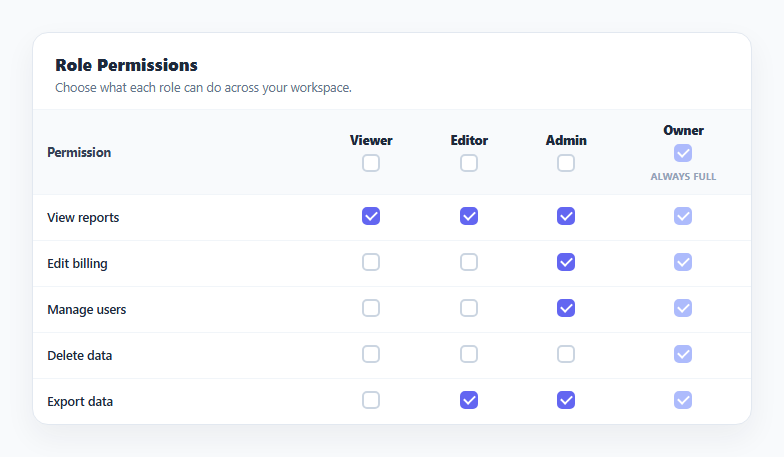
Permission matrices are the standard way admin panels let a team owner see and edit what each role in the system can do, at a glance, without navigating into five separate role-edit screens. This snippet renders permissions as rows and roles as columns, with a checkbox at every intersection, so scanning either a row or a column immediately answers "who can do this?" or "what can this role do?"
A plain JS state object drives the whole grid
A single state object keyed by role, then by permission key, holds every checkbox's boolean value. renderBody() reads from it to build every <tr> and <td>, and clicking any checkbox mutates state directly before the per-column select-all indicator is recalculated — there's no hidden duplicate copy of the grid's truth.
Per-column "select all" checkboxes
Each role's header cell carries its own checkbox that, when toggled, sets every permission for that role at once via a loop over PERMISSIONS. refreshSelectAll() keeps that same checkbox's checked state in sync afterward by checking whether every permission for the role is now true — so it accurately reflects "all granted" without ever getting stuck showing stale state after an individual cell changes.
A locked, always-true Owner column
The Owner role is treated specially: isLockedCell() returns true only for the owner key, and every checkbox rendered for that column — including its select-all header checkbox — gets the disabled attribute plus a small "Always full" badge. The change handler also short-circuits and ignores any event on a locked role, so Owner's permissions can never be edited even if a disabled checkbox were somehow triggered programmatically.
Step by step
How to Use
- 1Load the snippetClick "Account Permission Matrix Table" in the sidebar to load its HTML, CSS, and JS into the editor panels. The preview updates instantly.
- 2Edit the codeModify any panel — HTML, CSS, or JS. The preview refreshes as you type. Use Reset in each panel header to restore the original.
- 3Preview on devicesClick the Mobile (375px), Tablet (768px), or Desktop buttons in the preview header to check responsiveness.
- 4Export in your formatClick "HTML" to download a standalone file, "JSX" for a React component, "Tailwind" for a React + Tailwind CSS component, "Tailwind HTML" for a standalone HTML file with Tailwind CDN, "Vue" for a Vue 3 SFC with <template>/<script setup>/<style scoped>, or "Angular" for a standalone Angular .component.ts file. "Copy all" copies the full code to clipboard.
- 5Save your versionClick "Save as", type a name, and press Enter. Your snippet saves to IndexedDB and appears in the Saved tab.
Real-world uses
Common Use Cases
Got questions?
Frequently Asked Questions
Every checkbox rendered for the owner role — including its column select-all checkbox — gets the disabled attribute, and the change handler explicitly ignores any event coming from a locked role, so its permissions can never be toggled off.
After any individual permission checkbox changes, refreshSelectAll() recomputes whether every permission for that role is currently true and sets the header checkbox accordingly, so it never shows a stale "all selected" state.
Yes — add entries to the ROLES and PERMISSIONS arrays and a matching key in the state object for any new role; renderHead() and renderBody() rebuild the whole grid from those arrays automatically.