Source Code
<div class="tc-wrap">
  <div class="tc-ring-wrap">
    <svg class="tc-ring" viewBox="0 0 140 140">
      <circle class="tc-track" cx="70" cy="70" r="60"></circle>
      <circle class="tc-fill" id="tcFill" cx="70" cy="70" r="60"></circle>
    </svg>
    <div class="tc-center">
      <span class="tc-pct" id="tcPct">0%</span>
      <span class="tc-count" id="tcCount">0 / 6 tasks</span>
    </div>
  </div>
  <ul class="tc-list" id="tcList"></ul>
  <button class="tc-run" id="tcRun" type="button">Run tasks again</button>
</div>*{box-sizing:border-box;margin:0;padding:0}
body{font-family:system-ui,-apple-system,sans-serif;background:#0b0f1a;min-height:100vh;display:flex;align-items:center;justify-content:center;padding:24px}
.tc-wrap{width:100%;max-width:340px;display:flex;flex-direction:column;align-items:center}
.tc-ring-wrap{position:relative;width:170px;height:170px}
.tc-ring{width:100%;height:100%;transform:rotate(-90deg)}
.tc-track{fill:none;stroke:#1b2135;stroke-width:10}
.tc-fill{fill:none;stroke:#818cf8;stroke-width:10;stroke-linecap:round;stroke-dasharray:377;stroke-dashoffset:377;transition:stroke-dashoffset .5s cubic-bezier(.4,0,.2,1),stroke .3s}
.tc-fill.tc-done{stroke:#4ade80}
.tc-center{position:absolute;inset:0;display:flex;flex-direction:column;align-items:center;justify-content:center}
.tc-pct{font-size:28px;font-weight:800;color:#e7e9f5}
.tc-count{font-size:11.5px;color:#7d8296;margin-top:2px}
.tc-list{width:100%;list-style:none;margin-top:18px;display:flex;flex-direction:column;gap:8px}
.tc-item{display:flex;align-items:center;gap:9px;font-size:12.5px;color:#7d8296;background:#12162350;padding:8px 10px;border-radius:8px;border:1px solid #1c2033}
.tc-item.tc-ok{color:#c8cbdb}
.tc-item .tc-icon{width:14px;height:14px;border-radius:50%;flex-shrink:0;border:2px solid #2b3044;border-top-color:#818cf8;animation:tcSpin .7s linear infinite}
.tc-item.tc-ok .tc-icon{border:none;background:#173829;position:relative;animation:none}
.tc-item.tc-ok .tc-icon::after{content:'';position:absolute;left:3px;top:1px;width:4px;height:7px;border:solid #4ade80;border-width:0 2px 2px 0;transform:rotate(45deg)}
@keyframes tcSpin{to{transform:rotate(360deg)}}
.tc-run{margin-top:16px;padding:9px 18px;background:#181c2b;color:#c8cbdb;border:1px solid #2b3044;border-radius:9px;font-size:12.5px;font-weight:700;cursor:pointer;font-family:inherit}
.tc-run:hover{background:#1e2333}
.tc-run:disabled{opacity:.5;cursor:not-allowed}// The ring's percentage is driven by real accumulating completion of
// concurrently-running async subtasks (simulated with randomized-delay
// Promises), not a fixed-duration CSS animation or a fake timer that just
// counts up to 100.
var TASKS = ['Connect to database', 'Fetch user profile', 'Load billing data', 'Warm cache', 'Sync preferences', 'Build dashboard'];
var CIRC = 2 * Math.PI * 60; // matches the r=60 circle
var fillEl = document.getElementById('tcFill');
var pctEl = document.getElementById('tcPct');
var countEl = document.getElementById('tcCount');
var listEl = document.getElementById('tcList');
var runBtn = document.getElementById('tcRun');
fillEl.style.strokeDasharray = String(CIRC);
function setProgress(completed, total) {
var pct = completed / total;
fillEl.style.strokeDashoffset = String(CIRC * (1 - pct));
pctEl.textContent = Math.round(pct * 100) + '%';
countEl.textContent = completed + ' / ' + total + ' tasks';
if (completed === total) fillEl.classList.add('tc-done');
}
function runSubtask(name, itemEl) {
var delay = 500 + Math.random() * 1800; // real randomized async work
return new Promise(function (resolve) {
setTimeout(function () {
itemEl.classList.add('tc-ok');
resolve();
}, delay);
});
}
function renderList() {
listEl.innerHTML = '';
return TASKS.map(function (name) {
var li = document.createElement('li');
li.className = 'tc-item';
li.innerHTML = '<span class="tc-icon"></span><span>' + name + '</span>';
listEl.appendChild(li);
return li;
});
}
function runAll() {
runBtn.disabled = true;
fillEl.classList.remove('tc-done');
var items = renderList();
var completed = 0;
setProgress(0, TASKS.length);
var promises = TASKS.map(function (name, i) {
return runSubtask(name, items[i]).then(function () {
// Each subtask resolves independently and asynchronously; the ring
// reflects the REAL running count of settled promises so far.
completed++;
setProgress(completed, TASKS.length);
});
});
Promise.all(promises).then(function () {
runBtn.disabled = false;
});
}
runBtn.addEventListener('click', runAll);
runAll();Learn Coding Visually
Learn to code with interactive, live-preview playgrounds — HTML, CSS, JavaScript, React & more.
 HTML Playground42 lessons · Click-based · Live preview
 CSS PlaygroundLearn CSS with a live editor
 JavaScript Playground60 lessons · DOM · Async · Canvas
 React PlaygroundLearn React with a live code editor
 GSAP PlaygroundLearn GSAP animation interactively
 SVG Playground44 lessons · shapes · paths · animation
 SCSS Playground45 lessons · Sass modules · tokens
 Tailwind PlaygroundLearn Tailwind CSS with a live editor
 Bootstrap 5 Playground50 lessons · live preview
Async Task Completion Ring — Real Progress SVG Circle in JS
Async Task Completion Ring · Loaders · Plain HTML, CSS & JS · Live preview
What's included
Features
About this UI Snippet
Async Task Completion Ring — An SVG Progress Circle Driven by Real Promise Completion
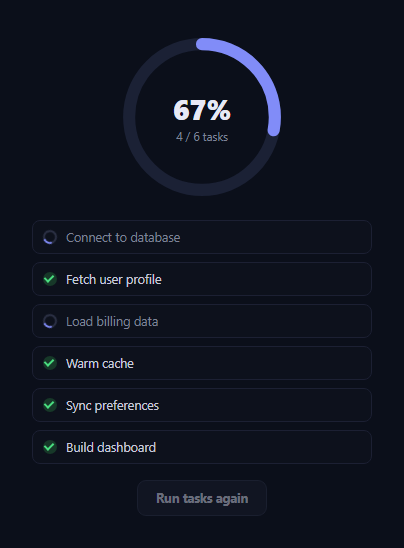
Most circular progress rings on the web animate to a hardcoded percentage over a fixed CSS duration — the ring has no idea whether the underlying work is actually 40% or 90% done. This snippet does something different: it kicks off six independently-timed async subtasks with Promise-based random delays, and the ring's fill, center percentage, and task-list checkmarks are all driven by counting how many of those promises have genuinely resolved so far.
Real accumulation, not a guessed duration
runSubtask() wraps a randomized setTimeout (between 500ms and roughly 2.3s) in a Promise, standing in for real asynchronous work like a network request. Each subtask's .then() increments a shared completed counter and calls setProgress(completed, TASKS.length) — so the ring only ever shows completed / total, a number that is true at every instant, not a percentage interpolated from an assumed total time. If a real task ran twice as long as expected, the ring would simply wait longer at whatever percentage was last true, rather than lying by finishing early.
The SVG stroke-dashoffset technique
The ring itself is two overlapping SVG <circle> elements: a static .tc-track and a .tc-fill with stroke-dasharray set to the circle's circumference (2 * Math.PI * r) and stroke-dashoffset set to the same value minus the completed fraction. Offsetting the dash pattern by exactly circumference * (1 - pct) reveals precisely that fraction of the ring, and a CSS transition on stroke-dashoffset smooths each jump into a short animated fill rather than a hard snap.
A task list that mirrors the ring
Below the ring, each task renders as a row with its own small spinner icon. As each subtask's promise resolves, that row's icon swaps from a spinning border to a checkmark built with a rotated CSS pseudo-element border — giving a second, itemized view of the exact same real completion state the ring is summarizing numerically.
Promise.all for the finishing state
Promise.all(promises) re-enables the "Run tasks again" button only once every subtask has genuinely settled, and the ring's stroke turns green via a .tc-done class at that same true completion moment — there's no separate "wait a bit longer, then pretend we're done" timer.
Customizing it
Replace runSubtask's setTimeout with real fetch() calls or other async work — the setProgress, checkmark, and Promise.all completion logic need no changes, since they only care about when each promise settles, not what it does. Adjust the TASKS array to match your app's real setup sequence, or reuse the setProgress(completed, total) function against any other async accumulation, like a batch upload or a multi-file import. Pair it with a multi-file upload queue for a related real-progress pattern.
Build with AI
Build, Understand, Optimize, and Extend It With AI
Instead of assuming the ring is just a timed CSS animation, paste this snippet's HTML, CSS, and JS into an AI coding assistant like Claude and ask it to explain exactly how stroke-dasharray and stroke-dashoffset combine to reveal a precise fraction of the circle, and how the completed counter inside each subtask's .then() callback keeps that fraction mathematically tied to real Promise settlement rather than elapsed time. The same assistant can help optimize it — for instance asking whether tracking progress via a single shared mutable counter could race under truly concurrent updates, and whether an atomic increment pattern or a reduce over settled results would be safer. It's also useful for extending it: ask it to add per-task error states using Promise.allSettled instead of Promise.all, show individual task timing, or expose the whole thing as a reusable function that takes an arbitrary array of promises. Treat the code less like a finished artifact and more like a starting point for a conversation.
Prompt to recreate it
Copy this into your AI assistant of choice to build the effect from scratch, or as a jumping-off point for your own variant:
Build a circular "async task completion" progress ring in plain HTML, CSS, and JavaScript — no libraries — where the percentage shown is driven by REAL accumulating completion of concurrently-running async work, not a fixed-duration CSS animation or a fake incrementing timer.

Requirements:
- An SVG ring made of two overlapping circles (a static track and a colored fill) using the stroke-dasharray / stroke-dashoffset technique, where stroke-dasharray equals the circle's circumference and stroke-dashoffset is set from JavaScript to circumference times (1 minus the completed fraction).
- A center label showing both a percentage and a "completed / total" fraction, both computed from a real running count of resolved promises.
- Simulate several (five or six) independent async subtasks, each returning a Promise that resolves after its own randomized delay (standing in for real network calls of varying duration) — not all resolving at the same fixed time.
- As each subtask's promise resolves, increment a shared completed counter and recompute the ring's fill and the center label from that counter divided by the total — the displayed percentage at any moment must reflect genuinely settled promises, never an assumed elapsed-time percentage.
- Render a list below the ring with one row per subtask, each showing its own spinning icon that changes to a checkmark exactly when that specific subtask's promise resolves.
- Use Promise.all over all the subtask promises to detect true full completion (turning the ring a completion color and re-enabling a "run again" button), not a fixed delay guessed to be long enough.
- Include a button to re-run the whole simulation with fresh random delays.
Want to tighten it up first? Run this prompt through the AI Prompt Studio to score it across 8 quality dimensions, catch anti-patterns, and tune the wording for Claude, ChatGPT, or Gemini before you paste it in.
Step by step
How to Use
- 1Paste HTML, CSS, and JSSix simulated subtasks start immediately and the ring begins filling as they complete.
- 2Watch the ring and list togetherThe center percentage, task count, and per-task checkmarks all update from the same real completion count.
- 3Reach 100%The ring turns green and the button re-enables once every subtask has actually settled.
- 4Click "Run tasks again"A fresh run starts with new randomized delays, so completion order and timing vary each time.
- 5Swap in real async workReplace the setTimeout inside runSubtask with a real fetch() call or other Promise-returning work.
- 6Reuse the progress functionCall setProgress(completed, total) from any other async accumulation you need to visualize.
Real-world uses
Common Use Cases
Got questions?
Frequently Asked Questions
It is genuinely accurate. Each of the six subtasks is a Promise wrapping a randomized-delay setTimeout standing in for real async work. As each promise resolves, a shared completed counter increments and setProgress(completed, total) recomputes the true fraction — the ring never assumes a fixed total duration.
Two circles overlap: a static track and a fill circle with stroke-dasharray set to its circumference (2 * Math.PI * r) and stroke-dashoffset set to circumference * (1 - percentComplete). Offsetting the dash pattern by that amount visually reveals exactly that fraction of the ring\u2019s stroke.
Replace the body of runSubtask so it returns a real Promise from your own work (a fetch call, a database query, etc.) instead of the setTimeout. Everything downstream — the completed counter, setProgress, checkmarks, and Promise.all completion state — works unchanged because it only depends on when the promise settles.
Each subtask\u2019s delay is 500ms plus a random amount up to about 1.8 seconds, generated fresh on every runAll() call. This deliberately avoids uniform, robotic-looking completion and better mirrors how real concurrent network calls actually finish at different times.
Promise.all(promises) would never fulfill, so the ring would remain at its last true percentage and the "Run tasks again" button would stay disabled — which is the correct, honest behavior, unlike a fixed-duration animation that would incorrectly show 100% regardless of whether the real work finished.
Yes. Keep a completed count and a total in state, run your real async calls (or Promise.all against several) inside a mount effect, and increment state in each one\u2019s .then(). Bind stroke-dashoffset to a computed value derived from that state; the SVG structure and CSS transition carry over directly.