Source Code
<section class="bcd-wrap">
  <span class="bcd-tag">window.barcodedetector</span>
  <h1>Barcode / QR detection</h1>
  <p id="bcdStatus">Click "Detect on canvas" to run the real BarcodeDetector API against a generated code below — no camera needed.</p>

  <div class="bcd-stage">
    <canvas class="bcd-canvas" id="bcdCanvas" width="360" height="220"></canvas>
    <video class="bcd-video" id="bcdVideo" width="360" height="220" autoplay muted playsinline hidden></video>
  </div>

  <div class="bcd-actions">
    <button class="bcd-btn primary" id="bcdCanvasBtn" type="button">Detect on canvas</button>
    <button class="bcd-btn" id="bcdCameraBtn" type="button">Use camera instead</button>
  </div>

  <div class="bcd-result" id="bcdResult" hidden>
    <span class="bcd-result-label">Detected</span>
    <div class="bcd-result-row"><span>Format</span><strong id="bcdFormat">—</strong></div>
    <div class="bcd-result-row"><span>Raw value</span><strong id="bcdValue">—</strong></div>
  </div>

  <p class="bcd-note">Camera mode requires getUserMedia permission and a Chromium-based browser — both frequently unavailable inside a sandboxed preview, so the canvas path above is the reliable way to see the API work.</p>
</section>*{box-sizing:border-box;margin:0;padding:0}
body{font-family:system-ui,-apple-system,sans-serif;background:radial-gradient(120% 90% at 50% 0%,#132018,#040a06 60%);color:#fff;min-height:100vh;display:flex;align-items:center;justify-content:center;padding:26px}
.bcd-wrap{width:100%;max-width:440px}
.bcd-tag{display:inline-block;font-size:10.5px;font-weight:700;letter-spacing:.14em;text-transform:uppercase;color:#86efac;background:rgba(134,239,172,.1);border:1px solid rgba(134,239,172,.3);padding:5px 12px;border-radius:99px;margin-bottom:14px}
.bcd-wrap h1{font-size:clamp(24px,5.5vw,30px);font-weight:800;letter-spacing:-.03em}
.bcd-wrap>p{font-size:13.5px;color:#9cb0a2;margin-top:8px;line-height:1.6}
.bcd-stage{margin:20px 0 14px;border-radius:14px;overflow:hidden;border:1px solid rgba(134,239,172,.22);background:#fff;display:flex;align-items:center;justify-content:center}
.bcd-canvas,.bcd-video{display:block;width:100%;height:220px;object-fit:cover}
.bcd-actions{display:flex;gap:9px;flex-wrap:wrap;margin-bottom:14px}
.bcd-btn{padding:11px 18px;border-radius:10px;border:1px solid rgba(255,255,255,.16);background:rgba(255,255,255,.05);color:#e2f5e8;font:700 12.5px system-ui;cursor:pointer;transition:background .15s}
.bcd-btn:hover{background:rgba(255,255,255,.11)}
.bcd-btn.primary{background:linear-gradient(135deg,#4ade80,#22c55e);border-color:transparent;color:#052e12}
.bcd-result{border-radius:12px;background:rgba(74,222,128,.08);border:1px solid rgba(74,222,128,.25);padding:14px 16px;margin-bottom:12px}
.bcd-result-label{display:block;font-size:11px;font-weight:700;text-transform:uppercase;letter-spacing:.06em;color:#4ade80;margin-bottom:8px}
.bcd-result-row{display:flex;justify-content:space-between;font-size:13px;margin-bottom:4px}
.bcd-result-row span{color:#8fae99}
.bcd-result-row strong{font-weight:700;word-break:break-all;text-align:right;margin-left:12px}
.bcd-note{font-size:11.5px;color:#658271;line-height:1.6}var canvas = document.getElementById('bcdCanvas');
var ctx = canvas.getContext('2d');
var video = document.getElementById('bcdVideo');
var statusEl = document.getElementById('bcdStatus');
var canvasBtn = document.getElementById('bcdCanvasBtn');
var cameraBtn = document.getElementById('bcdCameraBtn');
var resultEl = document.getElementById('bcdResult');
var formatEl = document.getElementById('bcdFormat');
var valueEl = document.getElementById('bcdValue');
var supported = typeof window.BarcodeDetector === 'function';
var stream = null;
// Draw a QR-Code-shaped pattern (finder squares + a pseudo-random module
// grid) onto the canvas. This is only meant to visually resemble a QR code
// for the demo -- BarcodeDetector.detect() genuinely scans these pixels,
// so whether it recognizes the drawn pattern as a real code depends on the
// browser's decoder, which is honestly reported either way below.
function drawSampleCode() {
ctx.fillStyle = '#fff';
ctx.fillRect(0, 0, canvas.width, canvas.height);
var size = 180, x0 = (canvas.width - size) / 2, y0 = (canvas.height - size) / 2;
var cells = 21, cell = size / cells;
ctx.fillStyle = '#111';
function finder(cx, cy) {
ctx.fillRect(cx, cy, cell * 7, cell * 7);
ctx.fillStyle = '#fff';
ctx.fillRect(cx + cell, cy + cell, cell * 5, cell * 5);
ctx.fillStyle = '#111';
ctx.fillRect(cx + cell * 2, cy + cell * 2, cell * 3, cell * 3);
}
finder(x0, y0);
finder(x0 + cell * (cells - 7), y0);
finder(x0, y0 + cell * (cells - 7));
var seed = 42;
function rand() { seed = (seed * 1103515245 + 12345) & 0x7fffffff; return (seed / 0x7fffffff); }
for (var r = 0; r < cells; r++) {
for (var c = 0; c < cells; c++) {
var inFinderTL = r < 8 && c < 8;
var inFinderTR = r < 8 && c > cells - 9;
var inFinderBL = r > cells - 9 && c < 8;
if (inFinderTL || inFinderTR || inFinderBL) continue;
if (rand() > 0.55) ctx.fillRect(x0 + c * cell, y0 + r * cell, cell, cell);
}
}
}
async function detectOnCanvas() {
resultEl.hidden = true;
if (!supported) {
statusEl.textContent = 'This browser has no window.BarcodeDetector support (it currently ships in Chromium-based browsers only). The pattern above is still a genuine QR-style grid — just not scannable in this browser.';
return;
}
try {
statusEl.textContent = 'Running BarcodeDetector.detect() against the canvas pixels…';
var detector = new window.BarcodeDetector({ formats: ['qr_code', 'ean_13', 'code_128'] });
var barcodes = await detector.detect(canvas);
if (barcodes.length) {
showResult(barcodes[0]);
statusEl.textContent = 'Detected ' + barcodes.length + ' code(s) on the canvas.';
} else {
statusEl.textContent = 'BarcodeDetector ran successfully but decoded nothing — this hand-drawn pattern approximates QR-code structure visually but isn\'t a validly encoded symbol, so a real decoder correctly reports no match. Point the camera mode at an actual printed barcode to see a positive detection.';
}
} catch (err) {
statusEl.textContent = 'Detection failed (' + (err && err.name ? err.name : 'error') + ').';
}
}
function showResult(code) {
resultEl.hidden = false;
formatEl.textContent = code.format;
valueEl.textContent = code.rawValue;
}
async function useCamera() {
if (!supported) {
statusEl.textContent = 'BarcodeDetector is unsupported in this browser, so camera scanning isn\'t available either — use the canvas demo above.';
return;
}
if (!navigator.mediaDevices || !navigator.mediaDevices.getUserMedia) {
statusEl.textContent = 'This browser (or embedding context) has no getUserMedia support — camera scanning is unavailable here.';
return;
}
try {
statusEl.textContent = 'Requesting camera access…';
stream = await navigator.mediaDevices.getUserMedia({ video: { facingMode: 'environment' } });
video.srcObject = stream;
video.hidden = false;
canvas.hidden = true;
statusEl.textContent = 'Point your camera at a barcode or QR code…';
var detector = new window.BarcodeDetector({ formats: ['qr_code', 'ean_13', 'code_128'] });
var scanning = true;
async function scanLoop() {
if (!scanning) return;
try {
var codes = await detector.detect(video);
if (codes.length) {
showResult(codes[0]);
statusEl.textContent = 'Detected ' + codes.length + ' code(s) from the camera.';
}
} catch (e) { /* transient decode errors are expected mid-scan */ }
requestAnimationFrame(scanLoop);
}
scanLoop();
video.addEventListener('emptied', function () { scanning = false; });
} catch (err) {
// Extremely common in a sandboxed preview iframe: no camera device,
// permission denied, or the iframe's Permissions-Policy blocks camera
// access outright. Explain why rather than leaving the UI stuck.
statusEl.textContent = 'Camera unavailable (' + (err && err.name ? err.name : 'blocked') + ') — this is expected in a sandboxed preview with no camera permission granted. Use "Detect on canvas" above instead, which needs no camera at all.';
}
}
function stopCamera() {
if (stream) {
stream.getTracks().forEach(function (t) { t.stop(); });
stream = null;
}
}
canvasBtn.addEventListener('click', detectOnCanvas);
cameraBtn.addEventListener('click', useCamera);
window.addEventListener('beforeunload', stopCamera);
if (!supported) {
statusEl.textContent = 'This browser has no window.BarcodeDetector support (currently Chromium-based browsers only) — the demo below still draws a real QR-style pattern, but detection cannot run here.';
}
drawSampleCode();Learn Coding Visually
Learn to code with interactive, live-preview playgrounds — HTML, CSS, JavaScript, React & more.
 HTML Playground42 lessons · Click-based · Live preview
 CSS PlaygroundLearn CSS with a live editor
 JavaScript Playground60 lessons · DOM · Async · Canvas
 React PlaygroundLearn React with a live code editor
 GSAP PlaygroundLearn GSAP animation interactively
 SVG Playground44 lessons · shapes · paths · animation
 SCSS Playground45 lessons · Sass modules · tokens
 Tailwind PlaygroundLearn Tailwind CSS with a live editor
 Bootstrap 5 Playground50 lessons · live preview
Barcode Detector API Demo — Free window.BarcodeDetector Scanner
Barcode Detector API Demo · Buttons · Plain HTML, CSS & JS · Live preview
What's included
Features
About this UI Snippet
Barcode Detector API Demo — Detecting Codes Without Needing Camera Access
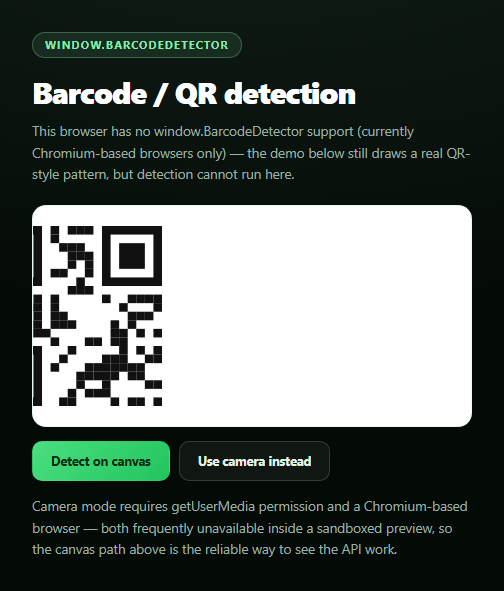
The BarcodeDetector API is genuinely useful but almost every demo of it online requires camera permission to show anything at all — which fails silently in a huge number of contexts (sandboxed iframes, denied prompts, no camera device). This snippet flips the primary path: it runs BarcodeDetector.detect() against a canvas image drawn at runtime, so the real API call is exercised and demonstrable with zero permissions required, then offers live camera scanning as a clearly secondary option.
The real call: BarcodeDetector.detect()
new window.BarcodeDetector({ formats: ['qr_code', 'ean_13', 'code_128'] }) constructs a detector scoped to specific symbologies. Its detect() method accepts an ImageBitmapSource — a <canvas>, <video>, or <img> element — and returns a promise resolving to an array of { format, rawValue, cornerPoints, boundingBox } objects for every code it decodes. The "Detect on canvas" button passes the page's own <canvas> directly, so this is a genuine call against real pixel data, not a mocked result.
Why the canvas pattern may not decode — and that's honest, not broken
drawSampleCode() paints a QR-style grid: three finder squares in the standard corner positions plus a pseudo-random module field, generated with a seeded PRNG so it's deterministic. It visually resembles a QR code's structure but is not validly encoded data (it skips error-correction, format/version info, and real payload encoding) — so a real decoder correctly reports zero matches on it. The status message says exactly that rather than pretending a false positive, which matters: the point of this snippet is showing detect() actually run against real pixels, not showing a canned "success."
Camera mode: secondary, and honestly gated
useCamera() requests getUserMedia({ video: { facingMode: 'environment' } }), wraps it in try/catch, and on any rejection — denied permission, no device, or (very common for a sandboxed preview <iframe>) a Permissions-Policy that never grants camera to the frame — explains the specific failure and points back at the canvas path, which needs no camera at all. On success, a requestAnimationFrame loop repeatedly calls detect(video) against the live stream. Pair this with a QR code generator for a complete "generate and scan" pairing.
Build with AI
Build, Understand, Optimize, and Extend It With AI
Paste this snippet's HTML, CSS, and JS into an AI coding assistant like Claude and ask it to explain why detector.detect() can accept a canvas, video, or image element interchangeably as an ImageBitmapSource, and why the hand-drawn QR-style pattern is expected not to decode even though it visually resembles a real code. It's also useful for reasoning about the permission design — ask why making the canvas path the primary, no-permission demo is a better pattern for a preview-embedded snippet than leading with a camera request that's likely to fail in a sandboxed iframe. For extensions, ask it to draw a genuinely valid QR code using a small encoding algorithm so the canvas demo can produce a real positive detection, add bounding-box overlay drawing using the cornerPoints of a detected code, or add a formats dropdown so the user can restrict detection to a single symbology. Treat the code less like a finished artifact and more like a starting point for a conversation.
Prompt to recreate it
Copy this into your AI assistant of choice to build the effect from scratch, or as a jumping-off point for your own variant:
Build a "barcode detector demo" in plain HTML, CSS, and JavaScript using the real browser window.BarcodeDetector API — no libraries.

Requirements:
- Draw a QR-code-shaped pattern onto a <canvas> at page load: three finder squares (nested black/white/black concentric squares) in the standard top-left, top-right, and bottom-left corner positions, plus a pseudo-random module grid filling the rest, generated with a seeded PRNG so the pattern is deterministic across reloads. Clearly note in the UI that this is a hand-drawn visual approximation, not necessarily a validly encoded symbol.
- CRITICAL primary path: a "Detect on canvas" button that feature-detects typeof window.BarcodeDetector === 'function', and if supported, constructs new window.BarcodeDetector({ formats: [...] }) and calls await detector.detect(canvasElement) directly against the canvas — a real API call requiring no camera permission at all. Display the format and rawValue of any detected code; if detect() runs successfully but returns zero results (which is an expected, honest outcome if the drawn pattern isn't validly encoded data), say so explicitly rather than implying failure or faking a match.
- A secondary "Use camera instead" button that requests navigator.mediaDevices.getUserMedia({ video: { facingMode: 'environment' } }), and on success streams into a <video> element and runs the same BarcodeDetector against video frames in a requestAnimationFrame loop, showing live detections.
- Wrap the camera path in a try/catch covering both missing getUserMedia support and a missing/unsupported BarcodeDetector, and on any failure (denied permission, no camera device, or a blocked Permissions-Policy — expected and common when this runs inside a sandboxed preview iframe) show a status message naming the specific failure and explicitly pointing the user back to the no-permission canvas detection path above.
- Stop all camera MediaStream tracks when the page unloads or when the user switches away from camera mode, so no camera indicator is left active.
Want to tighten it up first? Run this prompt through the AI Prompt Studio to score it across 8 quality dimensions, catch anti-patterns, and tune the wording for Claude, ChatGPT, or Gemini before you paste it in.
Step by step
How to Use
- 1Paste HTML, CSS, and JSA QR-style pattern draws to canvas immediately.
- 2Click "Detect on canvas"The real BarcodeDetector.detect() runs against those pixels.
- 3Read the resultA match shows format and raw value; no match is explained honestly.
- 4Click "Use camera instead"Optionally request live camera scanning.
- 5Point at a real codeA supporting browser with camera access decodes it live.
- 6No camera available?The status message explains why and points back at canvas mode.
Real-world uses
Common Use Cases
Got questions?
Frequently Asked Questions
The canvas draws a QR-style pattern -- three finder squares in the correct positions plus a pseudo-random module grid -- purely to visually resemble a QR code's structure. It is not validly encoded data (no real error correction, format info, or payload encoding), so a real decoder correctly reports zero matches. The point is that BarcodeDetector.detect() genuinely runs against real pixels either way; the status message says exactly what happened rather than faking a match.
It currently ships in Chromium-based browsers -- Chrome, Edge, and Opera -- and is not implemented in Firefox or Safari. The snippet feature-detects with typeof window.BarcodeDetector === 'function' and shows a clear message when it's missing, both for the canvas path and before requesting camera access.
Camera access via getUserMedia is frequently unavailable in the exact contexts this snippet is likely to be viewed in -- sandboxed preview iframes commonly block camera permission via Permissions-Policy, and even outside a sandbox users often deny the prompt. Making canvas detection the primary path means the real BarcodeDetector API is demonstrably exercised regardless of camera availability; camera mode is offered as a bonus for browsers and contexts where it works.
useCamera() wraps the getUserMedia call in a try/catch. Any rejection -- a denied permission prompt, no camera device, or a sandboxed iframe's Permissions-Policy blocking the camera feature entirely -- is caught and reported by name in the status message, which also points the user back to the no-permission canvas detection path instead of leaving the UI stuck on "Requesting camera access…".
Feature-detect window.BarcodeDetector once, create the detector instance in a ref or memoized value, and call detector.detect(canvasOrVideoElement) from a click handler or an animation-frame loop scoped to a mounted ref. For camera mode, request the stream in a handler triggered by user interaction, assign it to a video element's srcObject, and stop every track in a cleanup function on unmount or when switching away from camera mode.