Source Code
<div class="dyi-phone">
  <div class="dyi" id="dyi">
    <!-- Compact: camera dot only -->
    <div class="dyi-compact" id="dyiCompact">
      <span class="dyi-cam"></span>
    </div>

    <!-- Pill: now playing summary -->
    <div class="dyi-pill" id="dyiPill">
      <span class="dyi-art">♪</span>
      <span class="dyi-eq"><i></i><i></i><i></i></span>
    </div>

    <!-- Expanded: full player -->
    <div class="dyi-full" id="dyiFull">
      <div class="dyi-row">
        <span class="dyi-art dyi-art-lg">♪</span>
        <div class="dyi-meta">
          <strong>Midnight City</strong>
          <small>M83 — Hurry Up, We're Dreaming</small>
        </div>
        <span class="dyi-eq dyi-eq-lg"><i></i><i></i><i></i><i></i></span>
      </div>
      <div class="dyi-track"><i id="dyiProg"></i></div>
      <div class="dyi-controls">
        <button type="button" aria-label="Previous"><svg viewBox="0 0 24 24"><polygon points="19 20 9 12 19 4 19 20"/><line x1="5" y1="19" x2="5" y2="5"/></svg></button>
        <button type="button" id="dyiPlay" aria-label="Pause"><svg viewBox="0 0 24 24"><line x1="9" y1="5" x2="9" y2="19"/><line x1="15" y1="5" x2="15" y2="19"/></svg></button>
        <button type="button" aria-label="Next"><svg viewBox="0 0 24 24"><polygon points="5 4 15 12 5 20 5 4"/><line x1="19" y1="5" x2="19" y2="19"/></svg></button>
      </div>
    </div>
  </div>

  <div class="dyi-screen">
    <p class="dyi-hint">Tap the island to cycle its states</p>
    <div class="dyi-btns">
      <button class="dyi-demo" data-state="compact" type="button">Compact</button>
      <button class="dyi-demo" data-state="pill" type="button">Now playing</button>
      <button class="dyi-demo" data-state="full" type="button">Expanded</button>
    </div>
  </div>
</div>
* { box-sizing: border-box; margin: 0; padding: 0; }
body { font-family: system-ui, -apple-system, sans-serif; background: #1c1c1e; min-height: 100vh; display: flex; align-items: center; justify-content: center; padding: 24px; }
.dyi-phone {
position: relative; width: 300px; height: 480px;
background: linear-gradient(165deg, #3a3a5c, #17172b);
border: 6px solid #000; border-radius: 44px;
overflow: hidden; display: flex; flex-direction: column;
}
/* The island itself — width/height/radius transition between states */
.dyi {
position: absolute; top: 12px; left: 50%; transform: translateX(-50%);
background: #000; border-radius: 24px; cursor: pointer; z-index: 5;
width: 100px; height: 30px;
transition: width 0.5s cubic-bezier(0.32, 1.35, 0.45, 1), height 0.5s cubic-bezier(0.32, 1.35, 0.45, 1), border-radius 0.5s;
overflow: hidden;
display: flex; align-items: flex-start; justify-content: center;
}
.dyi.pill { width: 190px; height: 34px; }
.dyi.full { width: 272px; height: 128px; border-radius: 32px; }
/* Layers cross-fade; only the active one accepts interaction */
.dyi-compact, .dyi-pill, .dyi-full {
position: absolute; inset: 0; padding: 0 14px;
display: flex; align-items: center;
opacity: 0; pointer-events: none; transition: opacity 0.25s ease;
}
.dyi-compact { justify-content: center; }
.dyi.compact .dyi-compact, .dyi.pill .dyi-pill, .dyi.full .dyi-full { opacity: 1; pointer-events: auto; transition-delay: 0.18s; }
.dyi-cam { width: 12px; height: 12px; border-radius: 50%; background: #0a0a12; box-shadow: inset 0 0 3px 1.5px #1d1d3a; }
.dyi-pill { justify-content: space-between; }
.dyi-art {
width: 20px; height: 20px; border-radius: 6px; flex-shrink: 0;
background: linear-gradient(135deg, #f472b6, #8b5cf6);
color: #fff; font-size: 11px; display: flex; align-items: center; justify-content: center;
}
.dyi-art-lg { width: 38px; height: 38px; border-radius: 10px; font-size: 18px; }
.dyi-eq { display: flex; align-items: flex-end; gap: 2.5px; height: 14px; }
.dyi-eq i { width: 3px; border-radius: 2px; background: #34d399; animation: dyiEq 0.7s ease-in-out infinite alternate; }
.dyi-eq i:nth-child(1) { height: 40%; }
.dyi-eq i:nth-child(2) { height: 95%; animation-delay: 0.18s; }
.dyi-eq i:nth-child(3) { height: 60%; animation-delay: 0.34s; }
.dyi-eq i:nth-child(4) { height: 80%; animation-delay: 0.5s; }
.dyi-eq-lg { height: 18px; }
@keyframes dyiEq { from { transform: scaleY(0.35); } to { transform: scaleY(1); } }
.dyi.paused .dyi-eq i { animation-play-state: paused; transform: scaleY(0.35); }
.dyi-full { flex-direction: column; justify-content: center; gap: 10px; padding: 14px 16px; }
.dyi-row { display: flex; align-items: center; gap: 10px; width: 100%; }
.dyi-meta { flex: 1; min-width: 0; text-align: left; }
.dyi-meta strong { display: block; font-size: 13px; font-weight: 700; color: #fff; white-space: nowrap; overflow: hidden; text-overflow: ellipsis; }
.dyi-meta small { display: block; font-size: 10.5px; color: #8e8e93; white-space: nowrap; overflow: hidden; text-overflow: ellipsis; }
.dyi-track { width: 100%; height: 4px; border-radius: 2px; background: #2c2c3a; overflow: hidden; }
.dyi-track i { display: block; height: 100%; width: 0%; border-radius: 2px; background: #fff; transition: width 0.2s linear; }
.dyi-controls { display: flex; align-items: center; justify-content: center; gap: 22px; }
.dyi-controls button { border: none; background: none; cursor: pointer; padding: 2px; }
.dyi-controls svg { width: 17px; height: 17px; fill: #fff; stroke: #fff; stroke-width: 2; stroke-linecap: round; }
.dyi-screen { flex: 1; display: flex; flex-direction: column; align-items: center; justify-content: flex-end; gap: 12px; padding: 22px; }
.dyi-hint { font-size: 11.5px; color: #8e8e93; }
.dyi-btns { display: flex; gap: 7px; }
.dyi-demo {
padding: 7px 12px; border: 1px solid #3a3a4d; border-radius: 999px;
background: rgba(255, 255, 255, 0.06); color: #d1d1d6;
font-family: inherit; font-size: 11px; font-weight: 600; cursor: pointer; transition: all 0.2s;
}
.dyi-demo:hover { background: rgba(255, 255, 255, 0.12); }const island = document.getElementById('dyi');
const playBtn = document.getElementById('dyiPlay');
const prog = document.getElementById('dyiProg');
const STATES = ['compact', 'pill', 'full'];
let stateIndex = 0;
let playing = true;
let progress = 32; // percent
function setIsland(state) {
STATES.forEach(s => island.classList.remove(s));
island.classList.add(state);
stateIndex = STATES.indexOf(state);
}
// Tap the island to cycle compact -> pill -> full -> compact
island.addEventListener('click', (e) => {
// Don't cycle when pressing the player controls inside the expanded view
if (e.target.closest('.dyi-controls')) return;
setIsland(STATES[(stateIndex + 1) % STATES.length]);
});
// Demo buttons jump straight to a state
document.querySelectorAll('.dyi-demo').forEach(btn => {
btn.addEventListener('click', () => setIsland(btn.dataset.state));
});
// Play / pause toggles the equalizer and progress
const PAUSE_SVG = '<svg viewBox="0 0 24 24"><line x1="9" y1="5" x2="9" y2="19"/><line x1="15" y1="5" x2="15" y2="19"/></svg>';
const PLAY_SVG = '<svg viewBox="0 0 24 24"><polygon points="8 5 19 12 8 19 8 5"/></svg>';
playBtn.addEventListener('click', () => {
playing = !playing;
playBtn.innerHTML = playing ? PAUSE_SVG : PLAY_SVG;
playBtn.setAttribute('aria-label', playing ? 'Pause' : 'Play');
island.classList.toggle('paused', !playing);
});
// Simulated track progress
setInterval(() => {
if (!playing) return;
progress = (progress + 0.5) % 100;
prog.style.width = progress + '%';
}, 200);
setIsland('compact');
prog.style.width = progress + '%';Learn Coding Visually
Learn to code with interactive, live-preview playgrounds — HTML, CSS, JavaScript, React & more.
 HTML Playground42 lessons · Click-based · Live preview
 CSS PlaygroundLearn CSS with a live editor
 JavaScript Playground60 lessons · DOM · Async · Canvas
 React PlaygroundLearn React with a live code editor
 GSAP PlaygroundLearn GSAP animation interactively
 SVG Playground44 lessons · shapes · paths · animation
 SCSS Playground45 lessons · Sass modules · tokens
 Tailwind PlaygroundLearn Tailwind CSS with a live editor
 Bootstrap 5 Playground50 lessons · live preview
Dynamic Island — Free HTML CSS JS Snippet
Dynamic Island · Animations · Plain HTML, CSS & JS · Live preview
What's included
Features
About this UI Snippet
Dynamic Island — iPhone-Style Morphing Notification Pill in CSS and JavaScript
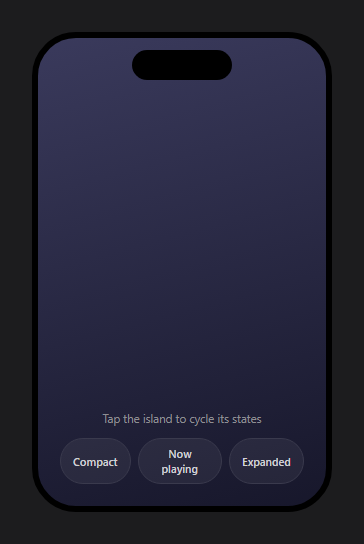
Apple's Dynamic Island turned dead sensor space into the most imitated UI element of the decade: a black pill that fluidly grows from a camera cutout into a live-activity capsule and then a full interactive card. This component recreates the pattern for the web in HTML, CSS, and vanilla JavaScript — three morphing states (compact cutout, now-playing pill, expanded music player), springy size transitions, cross-fading content layers, and a working play/pause with animated equalizer and progress bar, all framed in a phone mockup.
Morphing one element between three sizes
The island is a single black container whose width, height, and border-radius transition between per-state values: 100×30 compact, 190×34 pill, 272×128 expanded. The transition uses an overshooting cubic-bezier(0.32, 1.35, 0.45, 1), so the pill slightly overshoots its target size and settles back — the springy, alive quality that defines the real Island. Width and height animations do trigger layout, but the island is one absolutely positioned element layered above the screen, so nothing else reflows; this is the pragmatic exception to the transform-only rule, traded for the genuine size morph that scale transforms can't fake (scaling would distort the border-radius and text).
Cross-fading content layers
Each state's content — camera dot, artwork-plus-equalizer summary, full player — is an absolutely positioned layer filling the island, all present in the DOM at once. The active state's class fades exactly one layer to opacity: 1 with a 0.18s transition-delay, so the container starts morphing first and the new content fades in as the shape approaches its destination — matching iOS's choreography where the vessel leads and the content follows. Inactive layers keep pointer-events: none, so hidden buttons can never swallow taps, and overflow: hidden on the island clips the larger layouts during the shrink.
A state machine you can drive from anywhere
setIsland(state) swaps one class on the island; tapping the island cycles compact → pill → full, and the demo buttons jump straight to any state — showing the component is externally controllable, which is how you would drive it from real events (a timer starting, a call arriving, playback beginning). The tap handler ignores clicks inside the player controls via closest('.dyi-controls'), so pressing pause doesn't also collapse the island.
The live player
The expanded card is a functional mini player: play/pause swaps its SVG and toggles a paused class that freezes the equalizer bars mid-animation with animation-play-state: paused — pausing rather than removing the animation means the bars hold their exact heights instead of snapping flat. A setInterval advances the progress bar only while playing, and the equalizer reuses the staggered scaleY bounce from the audio waveform visualizer. Track metadata truncates with the min-width: 0 + ellipsis flexbox pattern so long titles never break the capsule.
Why this pattern matters beyond the gimmick
The Island is really a lesson in progressive disclosure for ongoing activities: minimal ambient presence, a glanceable summary, and full controls on demand — the same hierarchy behind picture-in-picture players, call banners, and upload indicators. The three-layer/one-vessel architecture here applies to all of them.
Customisation
Retheme the artwork gradient and equalizer green, adjust the three state sizes (content layers are independent, so resizing is safe), replace the player layer with your own activity — a timer, delivery tracker, or recording indicator — and drive setIsland() from your app's events. Pair it with the mobile status bar and phone mockup for full device scenes.
Build with AI
Build, Understand, Optimize, and Extend It With AI
Rather than reconstructing the choreography in your head, paste this snippet's HTML, CSS, and JS into an AI coding assistant like Claude and ask it to explain exactly why the content layers use a 0.18s transition-delay on fade-in while the island's own width/height/border-radius transition starts immediately, and why the overshooting cubic-bezier(0.32, 1.35, 0.45, 1) curve is what produces the springy settle rather than a normal ease. The same assistant can help optimize it, for instance checking whether animating width and height (which do trigger layout) is actually a performance concern here given the island is a single absolutely-positioned element that doesn't affect the rest of the page. It's also useful for extending the widget: ask it to add a fourth state for an incoming call banner with its own content layer, drive setIsland() from real Web Audio playback events instead of a fake timer, or make the equalizer bar heights react to actual audio frequency data. Treat the code less like a finished artifact and more like a starting point for a conversation.
Prompt to recreate it
Copy this into your AI assistant of choice to build the effect from scratch, or as a jumping-off point for your own variant:
Build an iPhone-style morphing "Dynamic Island" widget in plain HTML, CSS, and JavaScript with no animation library.

Requirements:
- A single absolutely-positioned black pill-shaped element whose width, height, and border-radius transition between three distinct sizes (a small compact camera-cutout size, a medium "now playing" pill size, and a large expanded player card size) using an overshooting cubic-bezier easing curve so the shape springs slightly past its target size before settling.
- Inside that one element, place all three states' content as separate absolutely-positioned layers stacked on top of each other simultaneously in the DOM (a compact camera dot, a now-playing summary with artwork and an equalizer, and a full player with track info, a progress bar, and playback controls), each starting at opacity 0 with pointer-events disabled.
- When a state becomes active, fade in only that one layer's opacity with a deliberate transition-delay (so the container's size morph begins immediately but the new content only becomes visible after the shape has had a moment to start growing), while every inactive layer stays at opacity 0 and pointer-events none so hidden buttons can never be accidentally clicked.
- Implement a single function that sets which of the three states is active by swapping one class on the container, and wire a click on the island itself to cycle through the three states in order, while making sure clicks on the playback control buttons inside the expanded state do not also trigger that cycling.
- Build a working play/pause toggle that swaps the button's icon, and when paused, freezes a staggered bar-style audio equalizer animation in place (using an animation-pause mechanism, not by removing or resetting the animation) so the bars hold their current heights rather than snapping back to a resting state, and gate a progress-bar-advancing timer on whether playback is active.
- Truncate long track title and artist text with ellipsis inside a flexible layout so the content never breaks the expanded card's fixed width, regardless of how the container is resized.
Want to tighten it up first? Run this prompt through the AI Prompt Studio to score it across 8 quality dimensions, catch anti-patterns, and tune the wording for Claude, ChatGPT, or Gemini before you paste it in.
Step by step
How to Use
- 1Paste the HTML, CSS, and JSA phone mockup renders with the black island in its compact camera-cutout state at the top of the screen.
- 2Tap the islandIt springs into the now-playing pill — artwork on the left, a bouncing green equalizer on the right — overshooting slightly before settling.
- 3Tap again to expandThe island grows into the full player card: title and artist, progress bar, and previous/play/next controls fading in as the shape lands.
- 4Use the playerPause freezes the equalizer bars mid-height and stops the progress bar; play resumes both. Controls don't collapse the island.
- 5Jump between statesThe three demo buttons call setIsland() directly — the same API your app events would use to summon each state.
- 6Swap in your activityReplace the player layer with a timer, call banner, or upload indicator; adjust the full-state dimensions to fit.
Real-world uses
Common Use Cases
Got questions?
Frequently Asked Questions
Scaling stretches everything inside — the border-radius distorts, text and icons squash, and the pill looks rubber-stamped rather than reshaped. Animating the real dimensions keeps corners perfectly round and lets each content layer lay itself out at the target size. The layout cost is confined to the island because it is absolutely positioned above the screen, so nothing else on the page reflows during the morph.
All three layers occupy the island simultaneously as absolutely positioned children at opacity 0. The state class fades in exactly one with transition-delay: 0.18s — so for the first 180ms only the black vessel is morphing, and the incoming content fades in as the shape nears its destination. The outgoing layer fades immediately with no delay, avoiding two layers being visible mid-flight. overflow: hidden clips the larger layouts while the vessel is still small.
The paused class sets animation-play-state: paused on the bars, halting each mid-keyframe so they hold their current heights — visually "the music stopped here". Removing or resetting the animation instead would snap all bars to their base transform, which reads as the widget breaking rather than pausing. Resuming just flips play-state back to running and the bounce continues from where it froze.
Call setIsland() from your event handlers: playback starting calls setIsland('pill'), the user tapping it calls setIsland('full'), an incoming call could swap the layer content and expand. For multiple activity types, keep one content layer per activity and add a class per type, or populate a single layer's DOM before expanding. The morph is entirely class-driven, so any code path that can toggle a class can drive the island.
Model state ('compact' | 'pill' | 'full') plus playing and progress in component state; setIsland dissolves into a class binding derived from the state value. The progress interval belongs in useEffect / onMounted / ngOnInit, gated on the playing flag and cleared in cleanup. Each content layer becomes conditional-opacity JSX/template markup. All the morph CSS — spring cubic-bezier, layer cross-fades, animation-play-state — ports unchanged.