Source Code
<div class="es-stage">
  <p class="es-hint">Click a switch — the thumb overshoots past its target and wobbles before settling, real spring physics</p>
  <label class="es-row">
    <span>Dark mode</span>
    <button class="es-toggle" id="esToggle1" role="switch" aria-checked="true" data-on="true">
      <span class="es-track"></span>
      <span class="es-thumb"></span>
    </button>
  </label>
  <label class="es-row">
    <span>Auto-updates</span>
    <button class="es-toggle" id="esToggle2" role="switch" aria-checked="false" data-on="false">
      <span class="es-track"></span>
      <span class="es-thumb"></span>
    </button>
  </label>
</div>
* { box-sizing: border-box; margin: 0; padding: 0; }
body { font-family: system-ui, sans-serif; background: #0b1120; display: flex; align-items: center; justify-content: center; min-height: 100vh; }
.es-stage { display: flex; flex-direction: column; gap: 22px; padding: 24px; }
.es-hint { font-size: 13px; color: #64748b; max-width: 360px; margin-bottom: 6px; }
.es-row { display: flex; align-items: center; justify-content: space-between; gap: 20px; width: 260px; color: #e2e8f0; font-size: 14px; font-weight: 600; }
.es-toggle {
position: relative;
width: 54px; height: 30px;
border: none; padding: 0;
background: none;
cursor: pointer;
}
.es-track {
position: absolute; inset: 0;
border-radius: 999px;
background: #263043;
transition: background 0.25s;
}
.es-toggle[data-on="true"] .es-track { background: #6366f1; }
.es-thumb {
position: absolute;
top: 3px; left: 3px;
width: 24px; height: 24px;
border-radius: 50%;
background: #fff;
box-shadow: 0 2px 6px rgba(0,0,0,0.3);
will-change: transform;
}// The thumb's horizontal position is driven by a hand-written spring rather
// than a CSS transition, so flipping the switch overshoots past the target
// side and wobbles briefly before settling — a real elastic snap instead of
// a flat ease. On/off state and the spring target are kept separate: state
// changes instantly (for correctness, a11y, and any bound data), while the
// spring animates the THUMB toward wherever the new state says it should be.
function attachElasticToggle(toggle) {
var thumb = toggle.querySelector('.es-thumb');
var TRAVEL = 24; // px the thumb moves from off (0) to on (TRAVEL)
var pos = 0, vel = 0, target = 0;
var stiffness = 0.32, damping = 0.58;
var running = false;
function isOn() { return toggle.dataset.on === 'true'; }
function frame() {
var force = (target - pos) * stiffness;
vel = (vel + force) * damping;
pos += vel;
thumb.style.transform = 'translateX(' + pos.toFixed(2) + 'px)';
var settled = Math.abs(vel) < 0.02 && Math.abs(target - pos) < 0.05;
if (settled) {
pos = target;
thumb.style.transform = 'translateX(' + pos + 'px)';
running = false;
return;
}
requestAnimationFrame(frame);
}
function wake() { if (!running) { running = true; requestAnimationFrame(frame); } }
// Initialize from the starting data-on state without animating.
pos = target = isOn() ? TRAVEL : 0;
thumb.style.transform = 'translateX(' + pos + 'px)';
toggle.addEventListener('click', function () {
var next = !isOn();
toggle.dataset.on = String(next);
toggle.setAttribute('aria-checked', String(next));
target = next ? TRAVEL : 0;
wake();
});
}
document.querySelectorAll('.es-toggle').forEach(attachElasticToggle);Learn Coding Visually
Learn to code with interactive, live-preview playgrounds — HTML, CSS, JavaScript, React & more.
 HTML Playground42 lessons · Click-based · Live preview
 CSS PlaygroundLearn CSS with a live editor
 JavaScript Playground60 lessons · DOM · Async · Canvas
 React PlaygroundLearn React with a live code editor
 GSAP PlaygroundLearn GSAP animation interactively
 SVG Playground44 lessons · shapes · paths · animation
 SCSS Playground45 lessons · Sass modules · tokens
 Tailwind PlaygroundLearn Tailwind CSS with a live editor
 Bootstrap 5 Playground50 lessons · live preview
Elastic Spring Toggle Switch — Bounce Animation Snippet
Elastic Spring Toggle Switch · Animations · Plain HTML, CSS & JS · Live preview
What's included
Features
About this UI Snippet
Elastic Spring Toggle Switch — Overshoot Thumb Motion via a Hand-Written Spring Loop
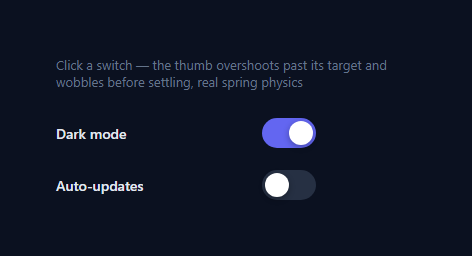
A standard toggle switch slides its thumb with a CSS transition: left 0.2s ease — smooth, but mechanically identical every single flip, and incapable of overshooting past its destination. This version replaces that transition with a real spring-damper simulation driving the thumb's transform: translateX, so flipping the switch sends the thumb slightly past the opposite edge before it wobbles back and settles — the same elastic quality as a jelly press button, applied to a binary on/off control instead of a momentary press.
Separating logical state from animated position
The switch's actual on/off state lives in toggle.dataset.on (and is mirrored to aria-checked for accessibility) and changes the instant the user clicks — this is important: any code reading the switch's state, or any screen reader announcing it, sees the correct value immediately, with no lag waiting for an animation to finish. Separately, a target variable tells the spring loop which pixel position the thumb is chasing. Clicking updates both at once, but they're conceptually independent — state is exact and instant, motion is physical and gradual.
The spring loop
Structurally the same integrator used in jelly press button and jelly icon dock hover, but here it drives a single scalar position (pos, in pixels) instead of a 2D scale. Each frame: force = (target - pos) * stiffness, vel = (vel + force) * damping, pos += vel. Because velocity persists and only decays gradually via damping, when the thumb is asked to travel the full 24px distance in one motion, it builds up enough velocity to sail slightly past 24px (or past 0, going the other way) before the restoring force pulls it back — that overshoot-and-correct is the entire elastic effect.
Initializing without animating
On setup, pos and target are both set directly from the switch's starting data-on value with no spring loop triggered — so a page that loads with several switches already in the on position shows them correctly placed instantly, rather than visibly animating in from off on load.
Click handling
Each click flips isOn(), writes the new state to both data-on and aria-checked, updates target to the new side's pixel position, and calls wake() to (re)start the requestAnimationFrame loop if it isn't already running. Clicking rapidly back and forth mid-animation simply changes target again — the spring's existing velocity carries into the new direction, so a fast double-click produces a natural, physically continuous redirect rather than an abrupt jump-cut.
Tuning
Raise stiffness for a faster, more urgent snap; raise damping toward 1 for more visible wobble before settling, or lower it for a quicker, more subdued motion.
Build with AI
Build, Understand, Optimize, and Extend It With AI
You don't have to derive the spring integration from scratch. Paste this snippet's HTML, CSS, and JS into an AI coding assistant like Claude and ask it to explain exactly why the logical on/off state and the animated thumb position are tracked as two separate variables (data-on/aria-checked versus pos/target) instead of deriving the thumb's position directly and instantly from the state. The same assistant can help optimize it — for instance asking whether the settle-detection thresholds (0.02 velocity, 0.05 position) are tight enough to avoid a visible final "snap" versus running a few extra unnecessary frames. It's also useful for extending the effect: ask it to add a subtle squash-and-stretch to the thumb's shape during the fastest part of its travel, make the track's background color transition use the same spring timing as the thumb instead of a separate CSS transition, or expose the toggle as a controlled component that accepts an external checked prop while still animating with the spring. Treat the code less like a finished artifact and more like a starting point for a conversation.
Prompt to recreate it
Copy this into your AI assistant of choice to build the effect from scratch, or as a jumping-off point for your own variant:
Build an "elastic spring toggle switch" in plain HTML, CSS, and JavaScript with no libraries and no CSS transition for the thumb's slide motion.

Requirements:
- One or more toggle switch elements (track + circular thumb), each with role="switch" and an aria-checked attribute reflecting the current boolean state, toggled by clicking the switch.
- The switch's logical on/off state must update instantly on click (including aria-checked), completely independent of how long the thumb's visual animation takes to finish.
- The thumb's horizontal position must be driven entirely by a hand-written spring-damper physics loop running on requestAnimationFrame — a target pixel position, a current pixel position, a velocity, a stiffness constant, and a damping constant, integrated each frame as: velocity += (target - current) * stiffness, then velocity *= damping, then current += velocity — not by a CSS transition on left or transform.
- When the switch is flipped, the thumb must visibly overshoot slightly past its destination edge before wobbling back and settling exactly at the correct position, which requires the velocity to be large enough at the point the target is reached that the restoring force cannot stop it in a single frame.
- If the switch is clicked again while the thumb is still mid-animation, the target must update immediately and the thumb must smoothly redirect using its existing velocity, without any jump-cut or animation restart.
- On page load, any switch that starts in the "on" position must render its thumb already in the correct final position with no animation playing — the spring should not run on initialization.
- The animation loop for a given switch must stop calling requestAnimationFrame once its thumb's velocity and distance-to-target both fall under a small threshold, snapping exactly to the target position at that point.
Want to tighten it up first? Run this prompt through the AI Prompt Studio to score it across 8 quality dimensions, catch anti-patterns, and tune the wording for Claude, ChatGPT, or Gemini before you paste it in.
Step by step
How to Use
- 1Click a switchToggle either switch and watch the thumb slide past the far edge slightly before wobbling back into its final resting position.
- 2Click rapidly back and forthDouble-click quickly — the thumb smoothly redirects mid-motion using its existing velocity, rather than jump-cutting.
- 3Change the travel distanceAdjust the TRAVEL constant in the JS panel to match a different track width if you resize the .es-toggle in CSS.
- 4Tune the spring feelChange stiffness (snappiness) and damping (how much it wobbles before settling) at the top of attachElasticToggle.
- 5Style the track and thumbEdit the .es-track, .es-toggle[data-on="true"] .es-track, and .es-thumb rules in the CSS panel for your own color scheme.
- 6Export in your formatClick "HTML" for a standalone file, "JSX" for a React component, or "Tailwind" for a React + Tailwind version.
Real-world uses
Common Use Cases
Got questions?
Frequently Asked Questions
The logical state (data-on, aria-checked) must be correct the instant the user clicks — for accessibility, for any code or data binding reading the switch, and for correctness if the user clicks again before the animation finishes. The spring only controls where the thumb visually is on its way to reflecting that state, so the two can update on different schedules without ever conflicting.
The spring loop tracks velocity across frames rather than just interpolating position. When the thumb is asked to travel the full track distance, it builds up enough velocity that the restoring force cannot stop it exactly at the target — it sails slightly past, and only the ongoing force-and-damping cycle pulls it back, producing the wobble-and-settle motion.
The click handler updates target to the new side's pixel position immediately. Because the spring loop always chases whatever target currently is, and because velocity persists across frames, the thumb smoothly redirects using its existing momentum rather than snapping or restarting from scratch.
On initialization, pos and target are both set directly to the starting position (computed from data-on) with no spring loop triggered — this avoids an unwanted animate-in effect on switches that should simply render already in their correct position when the page first loads.
Raise damping (closer to 1) for a longer, more visible wobble with more overshoot bounces before settling; lower it for a quicker, more subdued motion. Raising stiffness makes the whole motion, including the overshoot, happen faster.
Yes. Click "JSX" for a React component. Keep on/off in useState (for rendering and aria-checked) but keep the spring's pos/vel/target/running values in a ref, since they update every animation frame and should not trigger re-renders themselves — write the resulting transform directly to the thumb element via a ref.