Source Code
<div class="wrap">
  <h2>Product List</h2>
  <button class="filter-btn" id="filterBtn">
    <svg class="funnel-icon" id="funnelIcon" viewBox="0 0 64 64" width="20" height="20">
      <path id="funnelPath" d="" fill="none" stroke="currentColor" stroke-width="4.5" stroke-linejoin="round" stroke-linecap="round"></path>
    </svg>
    <span>Filters</span>
    <span class="badge" id="badge">0</span>
  </button>

  <div class="panel" id="panel">
    <label class="opt"><input type="checkbox" data-tag="in-stock"> In stock</label>
    <label class="opt"><input type="checkbox" data-tag="on-sale"> On sale</label>
    <label class="opt"><input type="checkbox" data-tag="new"> New arrivals</label>
  </div>
</div>
* { box-sizing: border-box; }
body { font-family: system-ui, sans-serif; background: #f8fafc; display: flex; justify-content: center; padding: 60px 20px; }
.wrap { width: 100%; max-width: 300px; }
h2 { font-size: 18px; font-weight: 800; color: #0f172a; margin: 0 0 16px; }
.filter-btn {
position: relative; display: inline-flex; align-items: center; gap: 8px;
padding: 10px 16px; border-radius: 9px; border: 1.5px solid #e2e8f0;
background: #fff; color: #334155; font-size: 13.5px; font-weight: 700;
font-family: inherit; cursor: pointer; transition: border-color 0.2s, color 0.2s;
}
.filter-btn.active { border-color: #6366f1; color: #6366f1; }
.filter-btn:hover { border-color: #cbd5e1; }
.filter-btn.active:hover { border-color: #4f46e5; }
.funnel-icon { flex-shrink: 0; }
.badge {
min-width: 18px; height: 18px; padding: 0 5px; border-radius: 999px;
background: #6366f1; color: #fff; font-size: 10.5px; font-weight: 800;
display: flex; align-items: center; justify-content: center;
transform: scale(0); transition: transform 0.25s cubic-bezier(0.34,1.56,0.64,1);
}
.badge.show { transform: scale(1); }
.panel {
margin-top: 12px; padding: 14px; border-radius: 10px;
background: #fff; border: 1px solid #e2e8f0;
display: flex; flex-direction: column; gap: 10px;
}
.opt { display: flex; align-items: center; gap: 8px; font-size: 13px; color: #475569; cursor: pointer; }
.opt input { accent-color: #6366f1; width: 15px; height: 15px; }/* Two 10-point closed outlines (matched vertex count) in a 0-64 viewBox.
restPts draws a relaxed, wide-mouthed funnel (no filters applied).
activePts draws the same funnel pinched narrower with a shorter stem,
reading as "actively filtering". Both are interpolated per-frame so the
funnel genuinely narrows rather than crossfading between two icons. */
const restPts = [
[8, 12], [56, 12], [56, 18], [38, 34],
[38, 50], [26, 50], [26, 34], [8, 18],
[8, 15], [8, 12],
];
const activePts = [
[14, 14], [50, 14], [50, 18], [36, 30],
[36, 52], [28, 52], [28, 30], [14, 18],
[14, 16], [14, 14],
];
function pointsToPath(pts) {
return pts.map((p, i) => (i === 0 ? 'M' : 'L') + p[0].toFixed(2) + ',' + p[1].toFixed(2)).join(' ');
}
function lerpPath(a, b, t) {
const pts = a.map((p, i) => [p[0] + (b[i][0] - p[0]) * t, p[1] + (b[i][1] - p[1]) * t]);
return pointsToPath(pts);
}
const pathEl = document.getElementById('funnelPath');
const btn = document.getElementById('filterBtn');
const badge = document.getElementById('badge');
const panel = document.getElementById('panel');
const checkboxes = panel.querySelectorAll('input[type="checkbox"]');
pathEl.setAttribute('d', pointsToPath(restPts));
let rafId = null;
function morphTo(target, duration) {
if (rafId) cancelAnimationFrame(rafId);
const start = performance.now();
// Always interpolate between the two canonical states so repeated
// toggles never drift from the intended shapes.
const startState = target === activePts ? restPts : activePts;
function frame(now) {
const t = Math.min(1, (now - start) / duration);
const eased = t * (2 - t); // ease-out quad
pathEl.setAttribute('d', lerpPath(startState, target, eased));
if (t < 1) rafId = requestAnimationFrame(frame);
}
rafId = requestAnimationFrame(frame);
}
function updateState() {
const count = Array.from(checkboxes).filter(c => c.checked).length;
const isActive = count > 0;
btn.classList.toggle('active', isActive);
badge.textContent = String(count);
badge.classList.toggle('show', isActive);
morphTo(isActive ? activePts : restPts, 320);
}
btn.addEventListener('click', () => {
panel.classList.toggle('open');
panel.style.display = panel.classList.contains('open') || panel.style.display === 'none' ? (panel.style.display === 'flex' ? 'none' : 'flex') : 'flex';
});
panel.style.display = 'flex';
checkboxes.forEach(cb => cb.addEventListener('change', updateState));Learn Coding Visually
Learn to code with interactive, live-preview playgrounds — HTML, CSS, JavaScript, React & more.
 HTML Playground42 lessons · Click-based · Live preview
 CSS PlaygroundLearn CSS with a live editor
 JavaScript Playground60 lessons · DOM · Async · Canvas
 React PlaygroundLearn React with a live code editor
 GSAP PlaygroundLearn GSAP animation interactively
 SVG Playground44 lessons · shapes · paths · animation
 SCSS Playground45 lessons · Sass modules · tokens
 Tailwind PlaygroundLearn Tailwind CSS with a live editor
 Bootstrap 5 Playground50 lessons · live preview
Filter Icon Shape Morph — Active State CSS JS
Filter Icon Active-State Morph · Animations · Plain HTML, CSS & JS · Live preview
What's included
Features
About this UI Snippet
Filter Icon Shape Morph — Funnel Path Interpolation Between Idle and Active States
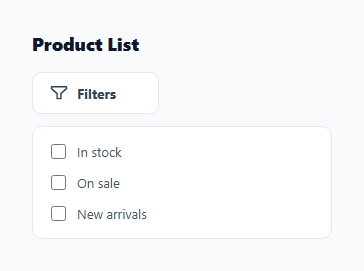
Most filter buttons only swap a background color when active. This snippet goes further: the funnel glyph itself morphs shape — narrowing and tightening — the instant a filter is applied, using genuine SVG path point interpolation rather than a static icon swap. A count badge scales in alongside the morph, giving a single control three layers of feedback: shape, color, and count.
Two point-matched funnel outlines
restPts and activePts are each a 10-point closed outline in a shared 0–64 SVG viewBox, describing the same funnel silhouette at two different states of "openness". Because both arrays have exactly 10 points in the same drawing order, each vertex in restPts has a direct partner in activePts to travel toward. pointsToPath() turns either array into an SVG path d string of M/L commands (the path is stroked, not filled, so it stays an outline rather than a solid funnel), and lerpPath(a, b, t) linearly blends every coordinate pair between the two arrays at progress t.
Driving the narrowing animation
morphTo(target, duration) runs a small requestAnimationFrame loop that always interpolates between the two canonical states — restPts and activePts — rather than from whatever the path currently happens to be. This matters: if you interpolated from the live, possibly mid-animation d attribute, rapid toggling could accumulate drift and the funnel would slowly lose its intended shape. Always sourcing from the two known-good endpoints keeps every toggle, however fast, visually consistent.
Wiring it to real filter state
updateState() counts the checked checkboxes inside .panel, decides whether any filter is active, and drives three things off that single boolean: the button gets an .active class (for the border and text color), the badge text updates to the live count, and morphTo() is called with whichever point set matches the new state. This means the icon shape is never manually toggled — it always reflects the real underlying filter state, so it cannot desync from what the user actually has selected.
The badge
The count badge uses a separate, simpler animation: transform: scale(0) at rest, transitioning to scale(1) with a bouncy cubic-bezier(0.34, 1.56, 0.64, 1) overshoot curve when .show is added. Keeping the badge's entrance on a CSS transition (rather than JS-driven interpolation like the funnel) shows that these two morphing techniques — CSS transform transitions for simple property changes, and JS point interpolation for actual path shape changes — compose well together in the same component without one blocking the other.
Designing your own state-dependent icon morph
The general recipe: pick a real, meaningful UI state (here, "any filter active"), design two versions of the same icon's silhouette with an identical, correspondingly-ordered vertex count, and drive the swap through a single state-derivation function rather than toggling classes from multiple click handlers. This keeps the icon morph, the badge, and the border color change all reachable from one source of truth, which avoids the classic bug where an icon and its underlying state get out of sync after a few interactions.
Where else this pattern helps
Any icon whose meaning depends on a data-driven boolean or count — a bell that "fills in" when there are unread notifications, a sort icon that flips orientation when direction changes, a bookmark that thickens when saved — benefits from the same rest/active point-pair-and-badge structure shown here.
Build with AI
Build, Understand, Optimize, and Extend It With AI
Paste this snippet into an AI coding assistant like Claude and ask it to explain why morphTo() always interpolates from the two canonical point arrays rather than the live SVG path — that design choice is what keeps rapid filter toggling from visually drifting. It is also a good jumping-off point for extension: ask the assistant to help you wire updateState() to a real state management store (Redux, Zustand, a URL query string) instead of local checkboxes, or to design a third "many filters active" funnel state and extend the interpolation to a 3-way morph.
Prompt to recreate it
Copy this into your AI assistant of choice to build the effect from scratch, or as a jumping-off point for your own variant:
Build a filter button in plain HTML, CSS, and JavaScript whose funnel icon morphs shape (not just color) between a relaxed "no filters" outline and a narrower "filters active" outline, with a count badge that scales in — no animation library.

Requirements:
- Represent the funnel icon in two states as arrays of [x, y] point pairs with the exact same length and order, in a shared SVG viewBox.
- Write a function that converts a point array into a stroked SVG path "d" string, and a lerp function that linearly interpolates every coordinate between two same-length arrays at a progress value t.
- Drive the shape morph with requestAnimationFrame, and make sure the interpolation always starts from one of the two canonical point arrays (never from whatever the path currently is) so rapid toggling never drifts the shape.
- Add a small filter panel with a few checkboxes. Whenever any checkbox is checked or unchecked, recompute the checked count, morph the funnel to the active or rest shape accordingly, update a badge with the live count, and scale the badge in or out with a bouncy CSS transition.
- All three visual changes (icon shape, button border color, badge) must derive from one function that reads the current checkbox state, so the icon can never fall out of sync with the real filter state.
Want to tighten it up first? Run this prompt through the AI Prompt Studio to score it across 8 quality dimensions, catch anti-patterns, and tune the wording for Claude, ChatGPT, or Gemini before you paste it in.
Step by step
How to Use
- 1Check a filter optionToggle any checkbox in the panel — the funnel icon narrows and the badge scales in with the live count.
- 2Uncheck all filtersWhen the count returns to zero, the funnel relaxes back to its wide rest shape and the badge scales out.
- 3Add more filter optionsAdd more <label class="opt"> checkboxes inside .panel — updateState() automatically counts every checkbox in the panel.
- 4Redesign the two funnel statesEdit restPts and activePts — keep both arrays at 10 points in the same order for a clean interpolation.
- 5Adjust the morph speedChange the 320 (ms) argument passed to morphTo() inside updateState().
- 6Export in your formatClick "HTML" for a standalone file, "JSX" for a React component, or "Tailwind" for a React + Tailwind version.
Real-world uses
Common Use Cases
Got questions?
Frequently Asked Questions
A color change alone is easy to miss at a glance, especially for colorblind users or on a busy toolbar. Narrowing the funnel shape itself adds a second, shape-based signal that active filtering is happening, independent of color.
If the interpolation source were the live d attribute, rapid repeated toggles mid-animation could compound small floating point drift and gradually distort the funnel. Always starting from one of the two known-good canonical arrays keeps every toggle visually identical no matter how fast the user clicks.
Yes — remove fill="none" and the stroke attributes, add a fill color, and design both point arrays as the outline of a solid shape rather than a single-width stroke path.
Store a third point array with the same 10-point count and call morphTo() with whichever pair of arrays represents the current transition — every array needs matching point counts for any-to-any interpolation to stay clean.
No — the badge uses a simple CSS transform: scale() transition with a bouncy cubic-bezier curve. Only the funnel outline itself needs JS-driven path interpolation because its shape, not just a transform property, is changing.
Replace the checkbox count logic inside updateState() with whatever boolean/count your app already tracks (URL query params, a filter store, etc.), and call updateState() whenever that state changes.