Source Code
<section class="scu-hero" id="scuHero">
  <div class="scu-copy">
    <span class="scu-eyebrow">Field notes, issue 12</span>
    <h1 class="scu-h1">A quieter way<br>to build software</h1>
    <p class="scu-sub">No dashboards shouting at you. No red badges. Just the tools you need, exactly when you need them.</p>
    <a href="#" class="scu-cta">Read the story</a>
  </div>

  <button class="scu-cue" id="scuCue" aria-label="Scroll down">
    <span class="scu-cue-arrow">
      <svg width="20" height="20" viewBox="0 0 24 24" fill="none" stroke="currentColor" stroke-width="2" stroke-linecap="round" stroke-linejoin="round"><polyline points="6 9 12 15 18 9"/></svg>
    </span>
    <span class="scu-cue-label">Scroll</span>
  </button>
</section>
<section class="scu-next">
  <p>You actually scrolled. The cue above already noticed and faded out.</p>
</section>*{box-sizing:border-box;margin:0;padding:0}
body{font-family:system-ui,-apple-system,sans-serif;background:#0b0d13;color:#f1f5f9}
.scu-hero{position:relative;min-height:100vh;display:flex;flex-direction:column;align-items:center;justify-content:center;padding:24px;overflow:hidden}
.scu-hero::before{content:'';position:absolute;inset:0;background:radial-gradient(circle at 50% 30%,rgba(94,234,212,.08),transparent 60%);pointer-events:none}
.scu-copy{position:relative;text-align:center;display:flex;flex-direction:column;align-items:center;gap:16px;max-width:600px}
.scu-eyebrow{font-size:12px;font-weight:700;letter-spacing:.1em;text-transform:uppercase;color:#5eead4}
.scu-h1{font-size:clamp(32px,5.6vw,58px);font-weight:800;line-height:1.1;letter-spacing:-.02em}
.scu-sub{font-size:15.5px;color:#94a3b8;line-height:1.7;max-width:460px}
.scu-cta{margin-top:4px;background:transparent;color:#5eead4;font-weight:700;font-size:15px;padding:12px 24px;border-radius:9px;text-decoration:none;border:1px solid rgba(94,234,212,.4);transition:background .15s,border-color .15s}
.scu-cta:hover{background:rgba(94,234,212,.08);border-color:rgba(94,234,212,.7)}
.scu-cue{position:absolute;left:50%;bottom:36px;transform:translateX(-50%);display:flex;flex-direction:column;align-items:center;gap:8px;background:none;border:none;color:#5eead4;cursor:pointer;padding:8px;transition:opacity .4s ease,visibility .4s ease}
.scu-cue-arrow{display:flex;align-items:center;justify-content:center;width:34px;height:34px;border-radius:50%;border:1px solid rgba(94,234,212,.35);animation:scuBounce 1.8s ease-in-out infinite}
.scu-cue-label{font-size:10px;letter-spacing:.16em;text-transform:uppercase;color:#5eead4;opacity:.75}
@keyframes scuBounce{0%,100%{transform:translateY(0)}50%{transform:translateY(7px)}}
.scu-cue.scu-hidden{opacity:0;visibility:hidden;pointer-events:none}
.scu-next{min-height:60vh;display:flex;align-items:center;justify-content:center;padding:40px 24px;background:#10131c}
.scu-next p{color:#64748b;font-size:15px;max-width:420px;text-align:center;line-height:1.7}// Real scroll-position detection: the cue fades out only once the user has actually scrolled.
const cue = document.getElementById('scuCue');
const hero = document.getElementById('scuHero');
const HIDE_THRESHOLD = 40; // px of real scroll before we consider the user "started scrolling"
function evaluateScroll() {
const scrolled = window.scrollY || document.documentElement.scrollTop;
cue.classList.toggle('scu-hidden', scrolled > HIDE_THRESHOLD);
}
// Passive listener — this only reads scroll position, never blocks the scroll itself.
window.addEventListener('scroll', evaluateScroll, { passive: true });
// Clicking the cue performs a real scroll rather than just a visual gesture.
cue.addEventListener('click', () => {
const next = hero.nextElementSibling;
if (next) next.scrollIntoView({ behavior: 'smooth' });
});
// Set correct initial state on load (e.g. if the page loads mid-scroll from a hash).
evaluateScroll();Learn Coding Visually
Learn to code with interactive, live-preview playgrounds — HTML, CSS, JavaScript, React & more.
 HTML Playground42 lessons · Click-based · Live preview
 CSS PlaygroundLearn CSS with a live editor
 JavaScript Playground60 lessons · DOM · Async · Canvas
 React PlaygroundLearn React with a live code editor
 GSAP PlaygroundLearn GSAP animation interactively
 SVG Playground44 lessons · shapes · paths · animation
 SCSS Playground45 lessons · Sass modules · tokens
 Tailwind PlaygroundLearn Tailwind CSS with a live editor
 Bootstrap 5 Playground50 lessons · live preview
Hero with Animated Scroll Cue — Free HTML CSS JS Snippet
Hero with Animated Scroll Cue · Heroes · Plain HTML, CSS & JS · Live preview
What's included
Features
About this UI Snippet
Hero with Animated Scroll Cue — Fades Out on Real Scroll, Not a Timer
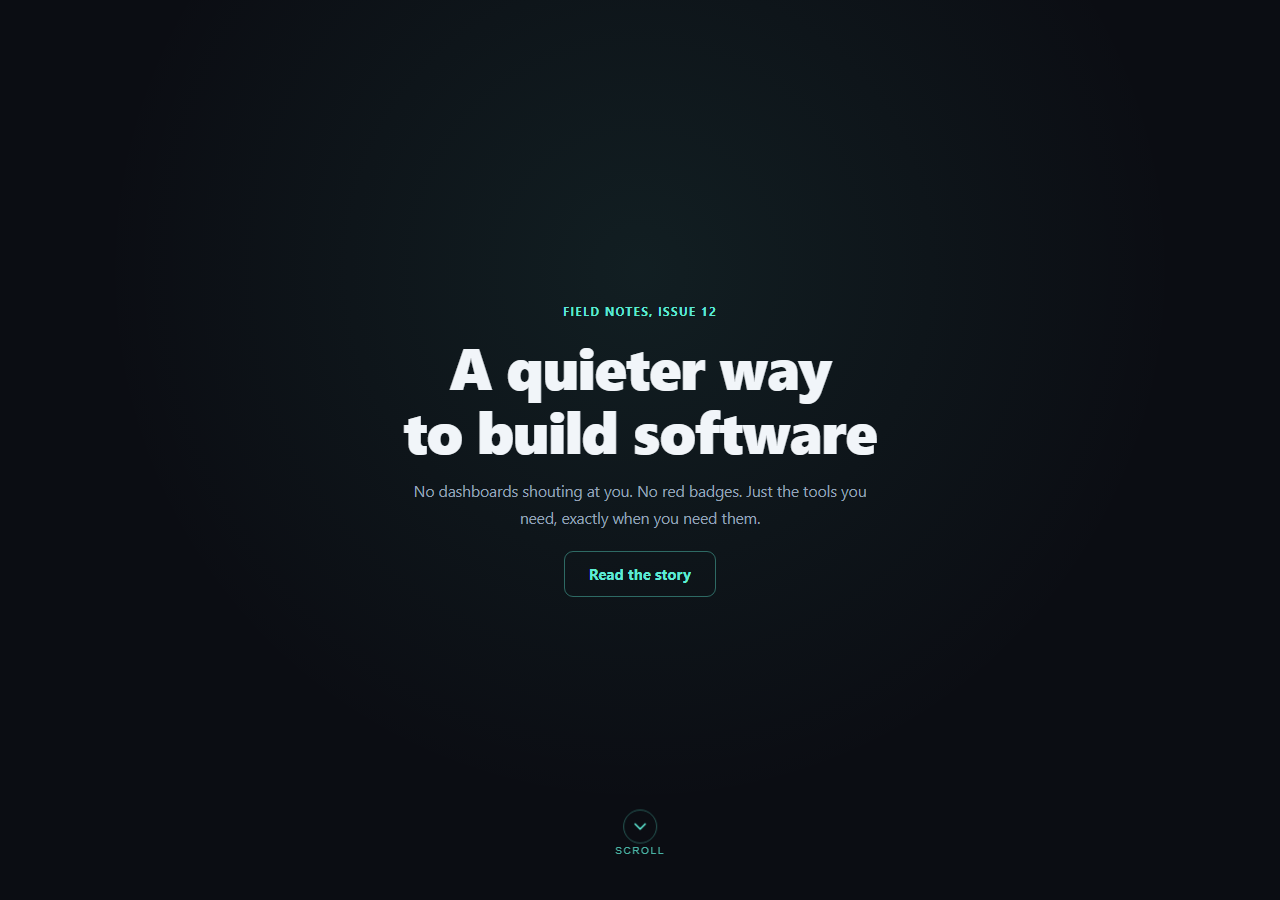
Most "scroll cue" implementations are pure CSS: a bouncing arrow that loops forever regardless of what the visitor does. This snippet's cue bounces via CSS, but its visibility is driven by an actual scroll event listener reading window.scrollY — so it disappears the moment the visitor has genuinely started scrolling, and stays put if they haven't.
Real scroll detection, not a setTimeout guess
The temptation with a scroll cue is to hide it after a fixed delay ("fade out after 4 seconds") — but that fades it out for a visitor who's still reading the headline, and leaves it visible for one who scrolled instantly. This snippet instead attaches a passive: true scroll listener that checks window.scrollY against a small HIDE_THRESHOLD (40px) on every scroll event, so the cue's visibility is a direct function of how far the page has actually moved — not a clock.
Why `{ passive: true }` matters
Scroll listeners can block the browser's scroll-performance optimizations unless marked passive, since the browser otherwise has to wait to confirm the listener won't call preventDefault(). Since this listener only reads scrollY and toggles a class — it never calls preventDefault() — marking it passive is both correct and free performance.
The bounce is CSS, the visibility is JS
The up-down bounce itself is a simple infinite @keyframes animation — that part genuinely can run forever with no downside, since it's purely decorative motion on an element that's either shown or hidden. The two concerns are cleanly separated: CSS owns "how it moves while visible," JavaScript owns "whether it's visible at all," which keeps the animation itself simple while the interactive logic stays testable.
A cue that also functions as a control
The scroll cue is a real <button>, not a decorative <div> — clicking it calls scrollIntoView({ behavior: 'smooth' }) on the hero's next sibling section, so it's an affordance you can act on directly rather than only a hint to scroll manually. It also has an aria-label for screen reader users.
Correct on load, not just after the first scroll
evaluateScroll() runs once immediately on script load (not just inside the listener), so a page that loads already scrolled — for example via a same-page anchor link — shows the cue in the correct hidden/visible state from the first paint instead of only updating on the next scroll event.
Customizing it
Adjust HIDE_THRESHOLD for a cue that disappears sooner or later, swap the arrow icon for a mouse-wheel glyph, or fade with an opacity transition instead of the visibility toggle. Pair it with scroll reveal grid or scroll zoom hero for more scroll-driven hero effects.
Build with AI
Build, Understand, Optimize, and Extend It With AI
Instead of guessing whether a scroll cue is doing real work, paste this snippet's HTML, CSS, and JS into an AI coding assistant like Claude and ask it to explain why the visibility check reads window.scrollY inside a passive scroll listener rather than hiding the cue after a fixed setTimeout, and what could go wrong for a visitor who loads the page already scrolled if evaluateScroll() weren't also called once immediately on load. The same assistant can help you refine the threshold and timing — ask whether 40px is the right hide threshold for a very tall hero versus a short one, or whether the fade should use an opacity transition instead of the current visibility toggle for a smoother disappearance. It's also useful for extending the pattern: ask it to add IntersectionObserver-based detection as an alternative to the scroll listener, throttle the scroll handler with requestAnimationFrame for very high-frequency scroll events, or swap the chevron icon for an animated mouse-wheel glyph. Treat the code less like a finished artifact and more like a starting point for a conversation.
Prompt to recreate it
Copy this into your AI assistant of choice to build the effect from scratch, or as a jumping-off point for your own variant:
Build a full-viewport hero section in plain HTML, CSS, and vanilla JavaScript with a bouncing scroll-down indicator that reacts to real scroll position (no library, no CDN, no setTimeout-based hiding).

Requirements:
- A full-height hero with a headline, subheading, and CTA link, and a scroll-cue control (a real <button>, not a plain div) fixed near the bottom center containing a bouncing chevron-down icon and a small "Scroll" label, with the bounce done via a simple infinite CSS keyframes animation.
- Attach a scroll event listener to the window with { passive: true } that reads the live window.scrollY (or document.documentElement.scrollTop) on every scroll event and toggles a "hidden" class on the cue once the scroll position exceeds a small threshold constant (e.g. 40px) — the cue's visibility must be a direct function of actual scroll position, not a fixed delay timer.
- The hidden state should use a CSS transition on opacity/visibility so the cue fades out smoothly rather than disappearing instantly, and the cue should reappear if the user scrolls back up above the threshold.
- Call the same scroll-check function once immediately when the script runs (not only inside the event listener) so the correct initial state is set even if the page loads already scrolled (e.g. via a hash link).
- Make the cue itself functional: clicking it should scroll smoothly to the next section below the hero using scrollIntoView({ behavior: "smooth" }), and give the button an appropriate aria-label since it's icon-only.
- Add a second section below the hero so there's something to scroll to and verify the cue's fade behavior against.
Want to tighten it up first? Run this prompt through the AI Prompt Studio to score it across 8 quality dimensions, catch anti-patterns, and tune the wording for Claude, ChatGPT, or Gemini before you paste it in.
Step by step
How to Use
- 1Paste HTML, CSS, and JSThe hero renders full-height with the cue bouncing at the bottom.
- 2Scroll down slightlyPast the 40px threshold, the cue fades out — this is a real scroll listener, not a timer.
- 3Scroll back to the topThe cue reappears since evaluateScroll() re-checks scrollY on every scroll event.
- 4Click the cue itselfIt performs a real smooth scroll to the next section.
- 5Tune the thresholdChange HIDE_THRESHOLD to control how much scroll hides the cue.
- 6Swap the iconReplace the chevron SVG with a mouse-wheel icon if preferred.
Real-world uses
Common Use Cases
Got questions?
Frequently Asked Questions
On real scrolling. A scroll event listener reads window.scrollY on every scroll event and toggles a hidden class once it exceeds a small threshold (40px by default). There is no setTimeout involved — a visitor who never scrolls keeps seeing the cue indefinitely, and one who scrolls immediately sees it disappear immediately.
Passive listeners tell the browser upfront that the handler will never call preventDefault(), so the browser doesn't have to wait for the handler to finish before proceeding with the scroll — improving scroll smoothness, especially on mobile. Since this listener only reads scrollY and toggles a CSS class, it never needs to block the default scroll behavior, so passive: true is free performance with no downside.
evaluateScroll() is called once immediately after the listener is attached, not just inside future scroll events. So if a visitor arrives via a same-page anchor link or the browser restores a scroll position, the cue is shown or hidden correctly on the very first paint rather than waiting for the next scroll event to correct it.
It's a real <button> with a click listener that calls scrollIntoView({ behavior: "smooth" }) on the hero's next sibling section — so it functions as an actual scroll control, not only a visual hint. It also carries an aria-label for screen reader users, since an unlabeled icon-only button would otherwise be meaningless to assistive tech.
Attach the scroll listener in a mount effect (useEffect with an empty dependency array in React) and remove it in the cleanup function to avoid leaking listeners across re-renders. Keep the visibility state in a piece of component state (or toggle a class via a ref) driven by the same scrollY-vs-threshold check, and call evaluateScroll() once synchronously after mount for the same reason as the vanilla version.