Source Code
<section class="vwi-hero">
<div class="vwi-copy">
<span class="vwi-eyebrow">Speak, and it's done</span>
<h1 class="vwi-h1">Your voice is<br>now your interface</h1>
<p class="vwi-sub">Tap the mic and talk — watch live audio levels and a real-time transcript appear, just like it works inside the app.</p>
</div>
<div class="vwi-demo">
<div class="vwi-bars" id="vwiBars"></div>
<button type="button" class="vwi-mic" id="vwiMic" aria-pressed="false" aria-label="Start voice demo">
<svg width="26" height="26" viewBox="0 0 24 24" fill="none" stroke="currentColor" stroke-width="2" stroke-linecap="round" stroke-linejoin="round">
<path d="M12 1a3 3 0 0 0-3 3v8a3 3 0 0 0 6 0V4a3 3 0 0 0-3-3z"/>
<path d="M19 10v2a7 7 0 0 1-14 0v-2"/>
<line x1="12" y1="19" x2="12" y2="23"/>
<line x1="8" y1="23" x2="16" y2="23"/>
</svg>
</button>
<p class="vwi-status" id="vwiStatus">Tap to start listening</p>
<p class="vwi-transcript" id="vwiTranscript"> </p>
</div>
</section>*{box-sizing:border-box;margin:0;padding:0}
body{font-family:system-ui,-apple-system,sans-serif;background:#0c0f1a;color:#f1f2f8}
.vwi-hero{min-height:100vh;display:flex;flex-direction:column;align-items:center;justify-content:center;gap:40px;padding:72px 20px}
.vwi-copy{text-align:center;max-width:560px;display:flex;flex-direction:column;align-items:center;gap:14px}
.vwi-eyebrow{font-size:12px;font-weight:700;letter-spacing:.08em;text-transform:uppercase;color:#34d399}
.vwi-h1{font-size:clamp(30px,5vw,50px);font-weight:800;line-height:1.12;letter-spacing:-.02em}
.vwi-sub{font-size:15.5px;color:#8d92ad;line-height:1.65;max-width:460px}
.vwi-demo{display:flex;flex-direction:column;align-items:center;gap:18px;width:min(420px,92vw);background:#12162340;border:1px solid rgba(255,255,255,.08);border-radius:20px;padding:34px 24px}
.vwi-bars{display:flex;align-items:center;justify-content:center;gap:4px;height:64px;width:100%}
.vwi-bar{width:5px;border-radius:99px;background:#34d399;height:6px;transition:height .09s ease-out;opacity:.35}
.vwi-bars.vwi-live .vwi-bar{opacity:1}
.vwi-mic{width:64px;height:64px;border-radius:50%;border:none;background:#1c2130;color:#8d92ad;display:flex;align-items:center;justify-content:center;cursor:pointer;transition:background .2s,color .2s,transform .15s;flex-shrink:0}
.vwi-mic:hover{transform:scale(1.05)}
.vwi-mic[aria-pressed="true"]{background:#34d399;color:#052e1c;box-shadow:0 0 0 8px rgba(52,211,153,.14)}
.vwi-status{font-size:13px;font-weight:600;color:#8d92ad;min-height:16px}
.vwi-transcript{font-size:14.5px;color:#e2e4f4;line-height:1.6;text-align:center;min-height:44px}
.vwi-transcript .vwi-cursor{display:inline-block;width:2px;height:15px;background:#34d399;vertical-align:middle;margin-left:2px;animation:vwiBlink 1s step-end infinite}
@keyframes vwiBlink{0%,100%{opacity:1}50%{opacity:0}}// Simulated voice input: no real microphone or Web Speech API access (which would
// require a permission prompt) — instead a randomized waveform driven by setInterval
// plus a typed-out transcript, giving a realistic live-listening demo on page load.
var micBtn = document.getElementById('vwiMic');
var barsWrap = document.getElementById('vwiBars');
var statusEl = document.getElementById('vwiStatus');
var transcriptEl = document.getElementById('vwiTranscript');
var BAR_COUNT = 28;
for (var i = 0; i < BAR_COUNT; i++) {
var bar = document.createElement('span');
bar.className = 'vwi-bar';
barsWrap.appendChild(bar);
}
var bars = document.querySelectorAll('.vwi-bar');
var listening = false;
var waveformTimer = null;
var typeTimer = null;
var phrases = [
'Schedule a call with the design team for tomorrow at 10am.',
'Show me revenue for the last thirty days, grouped by region.',
'Draft a follow-up email to everyone who missed the demo.',
];
var phraseIndex = 0;
function randomWaveform() {
bars.forEach(function (bar, idx) {
// Bars nearer the center bounce higher, mimicking a real amplitude envelope
// instead of pure uniform noise across the whole width.
var centerBias = 1 - Math.abs(idx - BAR_COUNT / 2) / (BAR_COUNT / 2);
var height = 6 + Math.random() * 52 * (0.35 + centerBias * 0.65);
bar.style.height = height + 'px';
});
}
function idleWaveform() {
bars.forEach(function (bar) { bar.style.height = '6px'; });
}
function typeTranscript(text, onDone) {
transcriptEl.innerHTML = '<span class="vwi-cursor"></span>';
var charIndex = 0;
function step() {
charIndex++;
transcriptEl.innerHTML = text.slice(0, charIndex) + '<span class="vwi-cursor"></span>';
if (charIndex < text.length) {
typeTimer = setTimeout(step, 26 + Math.random() * 35);
} else if (onDone) {
typeTimer = setTimeout(onDone, 1400);
}
}
typeTimer = setTimeout(step, 150);
}
function playNextPhrase() {
typeTranscript(phrases[phraseIndex], function () {
statusEl.textContent = 'Got it — processed.';
typeTimer = setTimeout(function () {
phraseIndex = (phraseIndex + 1) % phrases.length;
if (listening) {
statusEl.textContent = 'Listening…';
playNextPhrase();
}
}, 600);
});
}
function startListening() {
listening = true;
micBtn.setAttribute('aria-pressed', 'true');
micBtn.setAttribute('aria-label', 'Stop voice demo');
barsWrap.classList.add('vwi-live');
statusEl.textContent = 'Listening…';
waveformTimer = setInterval(randomWaveform, 90);
playNextPhrase();
}
function stopListening() {
listening = false;
micBtn.setAttribute('aria-pressed', 'false');
micBtn.setAttribute('aria-label', 'Start voice demo');
barsWrap.classList.remove('vwi-live');
statusEl.textContent = 'Tap to start listening';
clearInterval(waveformTimer);
clearTimeout(typeTimer);
idleWaveform();
transcriptEl.innerHTML = ' ';
}
micBtn.addEventListener('click', function () {
if (listening) {
stopListening();
} else {
startListening();
}
});
idleWaveform();Learn Coding Visually
Learn to code with interactive, live-preview playgrounds — HTML, CSS, JavaScript, React & more.
 HTML Playground42 lessons · Click-based · Live preview
 CSS PlaygroundLearn CSS with a live editor
 JavaScript Playground60 lessons · DOM · Async · Canvas
 React PlaygroundLearn React with a live code editor
 GSAP PlaygroundLearn GSAP animation interactively
 SVG Playground44 lessons · shapes · paths · animation
 SCSS Playground45 lessons · Sass modules · tokens
 Tailwind PlaygroundLearn Tailwind CSS with a live editor
 Bootstrap 5 Playground50 lessons · live preview
Hero with Voice Input Waveform Demo — Free HTML CSS JS Snippet
Hero with Voice Input Waveform Demo · Heroes · Plain HTML, CSS & JS · Live preview
What's included
Features
About this UI Snippet
Voice Input Hero with Live Waveform and Transcript — No Microphone Permission Needed
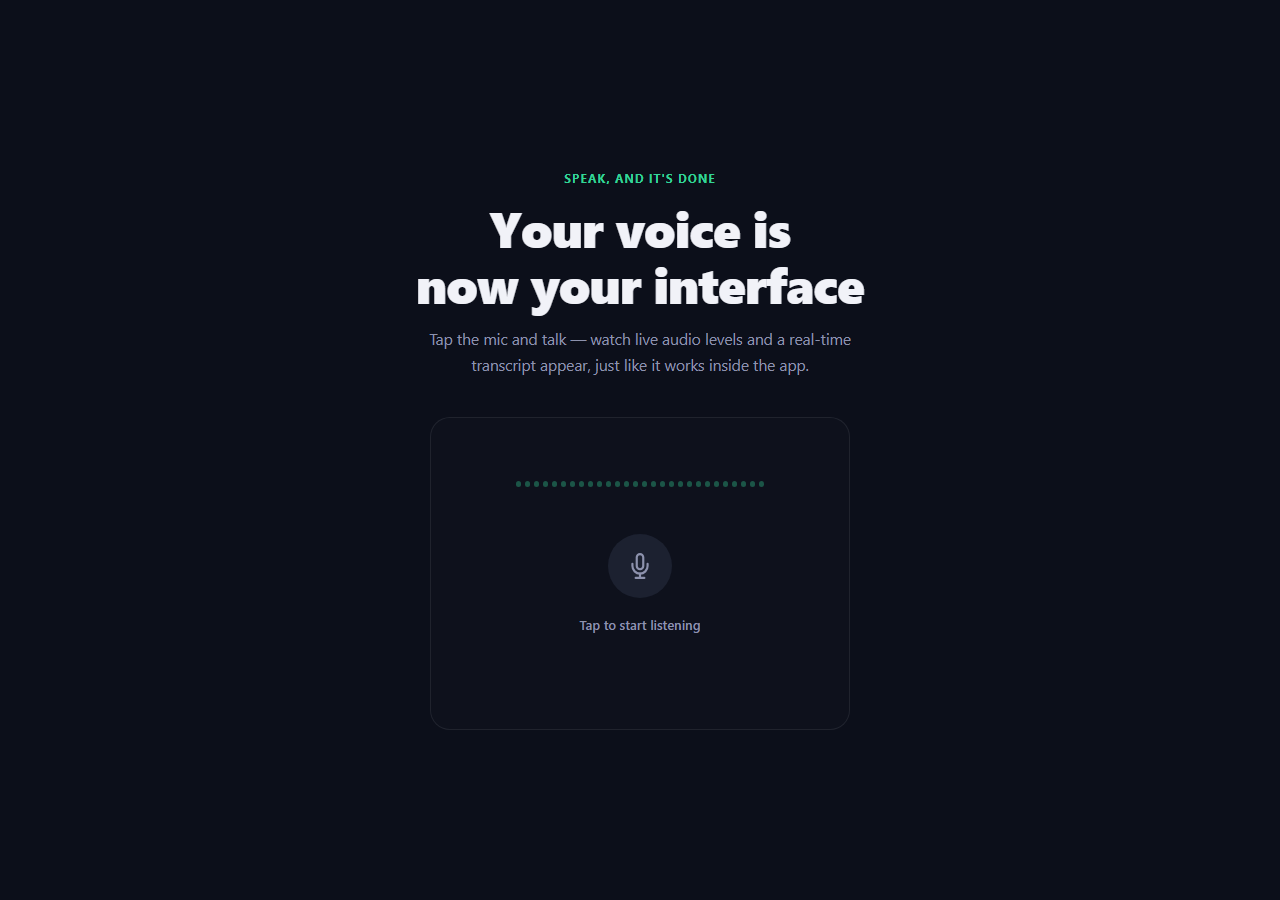
Voice-first products (dictation tools, voice assistants, meeting transcription) need their hero section to *feel* like listening is happening — but requesting real microphone access on page load is a non-starter: it triggers a permission prompt before a visitor has decided whether they trust the site, and it does nothing for anyone previewing the page without a mic. This snippet fakes it convincingly instead — a randomized waveform loop plus a character-typed transcript — so the demo works instantly for every visitor with zero permissions.
Why the waveform isn't just uniform random noise
randomWaveform() computes a centerBias for each bar based on its distance from the middle of the row: 1 - abs(idx - BAR_COUNT/2) / (BAR_COUNT/2). Bars near the center get a bias close to 1, bars at the edges get a bias close to 0, and each bar's random height is scaled by 0.35 + centerBias * 0.65 — meaning even edge bars still move a little, but center bars have a much higher ceiling. Real audio-level meters tend to show a rough bell-curve envelope rather than perfectly flat random bars, and this cheap bias term is what makes the fake waveform read as "audio" rather than as generic random noise.
A real typed-out transcript, not a pre-baked GIF
typeTranscript() uses the same tag-free character-by-character setTimeout pattern common to typewriter effects: it slices the target phrase to an increasing charIndex on every step, with a randomized 26–61ms delay per character so the pace doesn't feel mechanically uniform. A blinking <span class="vwi-cursor"> is appended after the revealed text on every render, so it always sits immediately after the last typed character.
A believable listen → transcribe → next-phrase loop
Once a phrase finishes typing, the status label switches to "Got it — processed," pauses briefly, then advances phraseIndex (wrapping via modulo) and types the next phrase — cycling through a small array of realistic voice-command examples for as long as the mic stays toggled on. This models a real multi-utterance listening session rather than a single one-shot animation.
Toggle state fully cleans up on stop
stopListening() clears both the waveform setInterval and any in-flight typing setTimeout, resets every bar to its idle height, and blanks the transcript — so re-tapping the mic always starts from a clean, consistent state rather than an animation continuing to run invisibly in the background or two overlapping typing loops fighting over the same transcript element.
Accessible toggle semantics
The mic button is a real <button> with aria-pressed toggling between "false"/"true" and an aria-label that updates to describe the *next* action ("Start voice demo" vs. "Stop voice demo"), so assistive technology announces both the current state and what activating the control will do next.
Wiring it to a real microphone
To make this a genuine voice input instead of a demo, replace startListening()'s waveform interval with the Web Audio API's AnalyserNode reading live getFloatFrequencyData, and swap the scripted phrases array for the Web Speech API's SpeechRecognition interim/final results — both are drop-in replacements for the fake data sources this snippet demonstrates the animation and UI feedback loop with.
Build with AI
Build, Understand, Optimize, and Extend It With AI
Instead of guessing why the waveform bars near the center jump higher than the ones at the edges, paste this snippet's HTML, CSS, and JS into an AI coding assistant like Claude and ask it to explain exactly how centerBias shapes the random heights into something that reads as an audio-level meter rather than uniform noise, and how the type -> pause -> next-phrase loop keeps its own timers cleanly separated from the waveform's setInterval so stopping and restarting the demo never leaves a stray animation running. The same assistant is genuinely useful for turning this into a real feature: ask it to wire startListening() up to the actual Web Speech API's SpeechRecognition interface for real transcription, or to the Web Audio API's AnalyserNode for a waveform driven by a real microphone's frequency data, gated behind an explicit user gesture so the permission prompt only appears after the visitor taps the mic themselves. It can also help you handle the edge cases a production voice feature needs — what to show if getUserMedia is denied, how to detect silence and auto-stop listening, or how to debounce rapid mic taps. Treat the code less like a finished artifact and more like a starting point for a conversation.
Prompt to recreate it
Copy this into your AI assistant of choice to build the effect from scratch, or as a jumping-off point for your own variant:
Build a hero section in plain HTML, CSS, and vanilla JavaScript featuring a simulated voice-input demo — no microphone access, no Web Speech API, no library — just a convincing fake using timers.

Requirements:
- A hero headline and subheading above a demo panel containing: a row of vertical bars representing an audio waveform, a circular mic toggle button, a status text label, and a transcript text area.
- Clicking the mic button must toggle a "listening" state. While listening, animate the waveform bars with randomized heights on a fast interval, but bias the randomization so bars near the horizontal center of the row can reach noticeably taller heights than bars near the edges, so it reads as a rough audio-level envelope rather than flat uniform noise.
- While listening, also type out a realistic example voice-command phrase into the transcript area character by character using a recursive setTimeout chain with a small randomized per-character delay (not a fixed interval), with a separate blinking cursor element that always appears immediately after the last revealed character.
- After a phrase finishes typing, briefly show a "processed" status message, then automatically move on to the next phrase in a small array (looping back to the first after the last) and keep listening — a real multi-phrase cycle, not a single one-shot animation.
- Tapping the mic again while listening must fully stop everything: clear any running interval and any in-progress typing timeout, reset the waveform bars to their idle resting height, clear the transcript text, and reset the status label — so toggling the mic on and off repeatedly never leaves two overlapping animations running at once.
- The mic button must be a real <button> element with an aria-pressed attribute reflecting its state and an aria-label that updates to describe what activating it will do next.
Want to tighten it up first? Run this prompt through the AI Prompt Studio to score it across 8 quality dimensions, catch anti-patterns, and tune the wording for Claude, ChatGPT, or Gemini before you paste it in.
Step by step
How to Use
- 1Tap the mic buttonThe waveform bars start animating and the status label switches to "Listening…".
- 2Watch the transcript type itselfA realistic voice-command phrase types out character by character with a blinking cursor.
- 3See it cycleAfter a short pause, the demo automatically moves on to the next phrase and keeps listening.
- 4Tap the mic again to stopThe waveform, status, and transcript all reset cleanly to their idle state.
- 5Swap in your own phrasesEdit the phrases array in the JS panel with commands relevant to your product.
- 6Export in your formatClick "HTML" for a standalone file, "JSX" for a React component, or "Tailwind" for a React + Tailwind version.
Real-world uses
Common Use Cases
Got questions?
Frequently Asked Questions
No. It deliberately avoids requesting real microphone access, since that would trigger a browser permission prompt before a visitor has any context for why the page wants it. The waveform and transcript are both simulated with setInterval/setTimeout so the demo works instantly and identically for every visitor.
Each bar's random height is scaled by a centerBias value based on its distance from the middle of the row — center bars can reach a much higher ceiling than edge bars. This mimics the rough bell-curve shape real audio-level meters tend to show, rather than looking like flat, uniform random noise.
typeTranscript() increments a charIndex on a recursive setTimeout chain, slicing the target phrase up to that index on each step and appending a blinking cursor span after it. Each character's delay is randomized within a small range so the typing rhythm feels more natural than a fixed-speed animation.
stopListening() clears both the waveform setInterval and any in-progress typing setTimeout, resets every bar to its idle height, and blanks the transcript text. This guarantees no animation keeps running invisibly in the background and prevents two overlapping typing loops from fighting over the same transcript element if you rapidly tap the mic on and off.
Replace the scripted phrases array and typeTranscript() calls with the Web Speech API's SpeechRecognition interface, feeding its interim and final results into the same transcript element. For the waveform, swap the setInterval-driven randomWaveform() for a Web Audio API AnalyserNode reading live getFloatFrequencyData from an actual microphone MediaStream — both are close to drop-in replacements for the fake data sources used here.
Yes. It is a real <button> element (not a styled div) with aria-pressed toggling between "false" and "true", and its aria-label updates dynamically between "Start voice demo" and "Stop voice demo" so assistive technology announces both the current state and the effect of activating it next.