Source Code
<div class="wip-phone">
<div class="wip-screen">
<div class="wip-status"><span>9:41</span><span class="wip-batt"><i></i></span></div>
<header class="wip-head">
<button class="wip-close" id="wipClose" aria-label="End workout">×</button>
<div class="wip-head-mid">
<b>Upper Body Strength</b>
<span id="wipExerciseCount">Exercise 1 of 5</span>
</div>
<span class="wip-spacer"></span>
</header>
<div class="wip-progress-track"><div class="wip-progress-fill" id="wipProgressFill"></div></div>
<div class="wip-body">
<p class="wip-exercise-name" id="wipExerciseName">Barbell Bench Press</p>
<div class="wip-set-ring">
<svg viewBox="0 0 120 120" width="150" height="150">
<circle cx="60" cy="60" r="52" fill="none" stroke="#1e293b" stroke-width="10"/>
<circle cx="60" cy="60" r="52" fill="none" stroke="#22c55e" stroke-width="10" stroke-linecap="round"
id="wipRingProgress" stroke-dasharray="326.7" stroke-dashoffset="326.7" transform="rotate(-90 60 60)"/>
</svg>
<div class="wip-set-ring-label">
<b id="wipSetNum">1</b>
<span>of <span id="wipSetTotal">4</span> sets</span>
</div>
</div>
<div class="wip-set-input">
<div class="wip-field">
<label>Reps</label>
<div class="wip-stepper">
<button id="wipRepsMinus" aria-label="Decrease reps">−</button>
<span id="wipRepsVal">8</span>
<button id="wipRepsPlus" aria-label="Increase reps">+</button>
</div>
</div>
<div class="wip-field">
<label>Weight (lb)</label>
<div class="wip-stepper">
<button id="wipWeightMinus" aria-label="Decrease weight">−</button>
<span id="wipWeightVal">135</span>
<button id="wipWeightPlus" aria-label="Increase weight">+</button>
</div>
</div>
</div>
<button class="wip-log-btn" id="wipLogBtn">Log Set</button>
<div class="wip-rest" id="wipRest" hidden>
<p class="wip-rest-label">Rest</p>
<b class="wip-rest-timer" id="wipRestTimer">1:30</b>
<div class="wip-rest-actions">
<button id="wipRestMinus15">−15s</button>
<button id="wipRestSkip">Skip rest</button>
<button id="wipRestPlus15">+15s</button>
</div>
</div>
<div class="wip-log-list" id="wipLogList"></div>
</div>
</div>
</div>*{box-sizing:border-box;margin:0;padding:0}
html{scrollbar-width:none;-ms-overflow-style:none}
html::-webkit-scrollbar{display:none}
body{font-family:system-ui,-apple-system,sans-serif;background:#1e293b;display:flex;justify-content:center;align-items:center;min-height:100vh;padding:24px;scrollbar-width:none;-ms-overflow-style:none}
body::-webkit-scrollbar{display:none}
.wip-phone{width:288px;height:600px;background:#0b1220;border-radius:46px;padding:12px;box-shadow:0 30px 60px -20px rgba(0,0,0,.6),inset 0 0 0 2px #1e293b}
.wip-screen{width:100%;height:100%;border-radius:34px;overflow:hidden;background:#0f172a;color:#f1f5f9;display:flex;flex-direction:column}
.wip-status{display:flex;justify-content:space-between;align-items:center;padding:13px 24px 0;font-size:13px;font-weight:700}
.wip-batt{width:22px;height:11px;border:1.4px solid currentColor;border-radius:3px;position:relative;display:inline-block}
.wip-batt::after{content:'';position:absolute;right:-3px;top:3px;width:2px;height:5px;background:currentColor;border-radius:0 1px 1px 0}
.wip-batt i{position:absolute;left:1.4px;top:1.4px;bottom:1.4px;width:82%;background:currentColor;border-radius:1px}
.wip-head{display:flex;align-items:center;gap:8px;padding:10px 16px 8px}
.wip-close{background:rgba(255,255,255,.1);border:none;width:28px;height:28px;border-radius:50%;font-size:16px;color:#fff;cursor:pointer;line-height:1;flex-shrink:0}
.wip-head-mid{flex:1;text-align:center}
.wip-head-mid b{display:block;font-size:13px}
.wip-head-mid span{font-size:10.5px;color:#94a3b8}
.wip-spacer{width:28px;flex-shrink:0}
.wip-progress-track{height:3px;background:#1e293b;margin:0 16px 4px}
.wip-progress-fill{height:100%;background:#22c55e;width:10%;transition:width .35s ease}
.wip-body{flex:1;overflow-y:auto;padding:14px 20px 20px;display:flex;flex-direction:column;align-items:center;scrollbar-width:none;-ms-overflow-style:none}
.wip-body::-webkit-scrollbar{display:none}
.wip-exercise-name{font-size:16px;font-weight:800;margin-bottom:14px;text-align:center}
.wip-set-ring{position:relative;display:flex;align-items:center;justify-content:center;margin-bottom:18px}
.wip-set-ring svg{transition:transform .2s}
#wipRingProgress{transition:stroke-dashoffset .3s ease}
.wip-set-ring-label{position:absolute;display:flex;flex-direction:column;align-items:center}
.wip-set-ring-label b{font-size:26px;font-weight:800}
.wip-set-ring-label span{font-size:11px;color:#94a3b8}
.wip-set-input{display:flex;gap:10px;width:100%;margin-bottom:14px}
.wip-field{flex:1;background:#1e293b;border-radius:14px;padding:10px 12px;text-align:center}
.wip-field label{font-size:10.5px;color:#94a3b8;text-transform:uppercase;letter-spacing:.4px}
.wip-stepper{display:flex;align-items:center;justify-content:space-between;margin-top:6px}
.wip-stepper button{width:28px;height:28px;border-radius:50%;background:#334155;border:none;color:#fff;font-size:16px;cursor:pointer;flex-shrink:0}
.wip-stepper button:active{background:#475569}
.wip-stepper span{font-size:16px;font-weight:800;flex:1}
.wip-log-btn{width:100%;background:#22c55e;color:#052e12;border:none;border-radius:14px;padding:13px;font-size:14px;font-weight:800;cursor:pointer;font-family:inherit;margin-bottom:12px}
.wip-log-btn:active{transform:scale(.98)}
.wip-rest{width:100%;background:#1e293b;border-radius:16px;padding:14px;text-align:center;margin-bottom:12px}
.wip-rest-label{font-size:11px;color:#94a3b8;text-transform:uppercase;letter-spacing:.5px}
.wip-rest-timer{display:block;font-size:28px;font-weight:800;font-variant-numeric:tabular-nums;margin:4px 0 10px;color:#facc15}
.wip-rest-actions{display:flex;gap:6px}
.wip-rest-actions button{flex:1;background:#334155;border:none;color:#fff;font-size:11.5px;font-weight:700;padding:8px 4px;border-radius:9px;cursor:pointer;font-family:inherit}
.wip-rest-actions button:hover{background:#475569}
.wip-log-list{width:100%;display:flex;flex-direction:column;gap:6px}
.wip-log-row{display:flex;align-items:center;gap:8px;font-size:12px;color:#cbd5e1;background:#1e293b;padding:8px 12px;border-radius:10px}
.wip-log-row b{color:#22c55e}var totalSets = 4;
var currentSet = 1;
var reps = 8;
var weight = 135;
var circumference = 326.7;
var restSeconds = 90;
var restTimerId = null;
var progressFill = document.getElementById('wipProgressFill');
var ring = document.getElementById('wipRingProgress');
var setNum = document.getElementById('wipSetNum');
var repsVal = document.getElementById('wipRepsVal');
var weightVal = document.getElementById('wipWeightVal');
var logBtn = document.getElementById('wipLogBtn');
var restBox = document.getElementById('wipRest');
var restTimerEl = document.getElementById('wipRestTimer');
var logList = document.getElementById('wipLogList');
function fmtTime(s) {
var m = Math.floor(s / 60);
var r = s % 60;
return m + ':' + (r < 10 ? '0' : '') + r;
}
function updateRing() {
var fraction = (currentSet - 1) / totalSets;
ring.setAttribute('stroke-dashoffset', String(circumference * (1 - fraction)));
setNum.textContent = Math.min(currentSet, totalSets);
progressFill.style.width = (10 + fraction * 18) + '%';
}
function adjust(varName, delta, min, max) {
if (varName === 'reps') {
reps = Math.max(min, Math.min(max, reps + delta));
repsVal.textContent = reps;
} else {
weight = Math.max(min, Math.min(max, weight + delta));
weightVal.textContent = weight;
}
}
document.getElementById('wipRepsMinus').addEventListener('click', function () { adjust('reps', -1, 1, 30); });
document.getElementById('wipRepsPlus').addEventListener('click', function () { adjust('reps', 1, 1, 30); });
document.getElementById('wipWeightMinus').addEventListener('click', function () { adjust('weight', -5, 0, 500); });
document.getElementById('wipWeightPlus').addEventListener('click', function () { adjust('weight', 5, 0, 500); });
function startRest() {
restSeconds = 90;
restBox.hidden = false;
restTimerEl.textContent = fmtTime(restSeconds);
clearInterval(restTimerId);
restTimerId = setInterval(function () {
restSeconds--;
if (restSeconds <= 0) {
clearInterval(restTimerId);
restBox.hidden = true;
return;
}
restTimerEl.textContent = fmtTime(restSeconds);
}, 1000);
}
function endRest() {
clearInterval(restTimerId);
restBox.hidden = true;
}
document.getElementById('wipRestMinus15').addEventListener('click', function () {
restSeconds = Math.max(0, restSeconds - 15);
restTimerEl.textContent = fmtTime(restSeconds);
});
document.getElementById('wipRestPlus15').addEventListener('click', function () {
restSeconds += 15;
restTimerEl.textContent = fmtTime(restSeconds);
});
document.getElementById('wipRestSkip').addEventListener('click', endRest);
logBtn.addEventListener('click', function () {
var row = document.createElement('div');
row.className = 'wip-log-row';
row.innerHTML = '<b>Set ' + currentSet + '</b><span>' + reps + ' reps × ' + weight + ' lb</span>';
logList.prepend(row);
if (currentSet >= totalSets) {
logBtn.textContent = 'Exercise Complete';
logBtn.disabled = true;
progressFill.style.width = '28%';
return;
}
currentSet++;
updateRing();
startRest();
});
updateRing();Learn Coding Visually
Learn to code with interactive, live-preview playgrounds — HTML, CSS, JavaScript, React & more.
 HTML Playground42 lessons · Click-based · Live preview
 CSS PlaygroundLearn CSS with a live editor
 JavaScript Playground60 lessons · DOM · Async · Canvas
 React PlaygroundLearn React with a live code editor
 GSAP PlaygroundLearn GSAP animation interactively
 SVG Playground44 lessons · shapes · paths · animation
 SCSS Playground45 lessons · Sass modules · tokens
 Tailwind PlaygroundLearn Tailwind CSS with a live editor
 Bootstrap 5 Playground50 lessons · live preview
Mobile Workout In-Progress Screen — Free Snippet
Mobile Workout In-Progress Screen · Mobile · Plain HTML, CSS & JS · Live preview
What's included
Features
About this UI Snippet
Mobile Workout In-Progress Screen — Set Ring, Rest Timer & Live Log
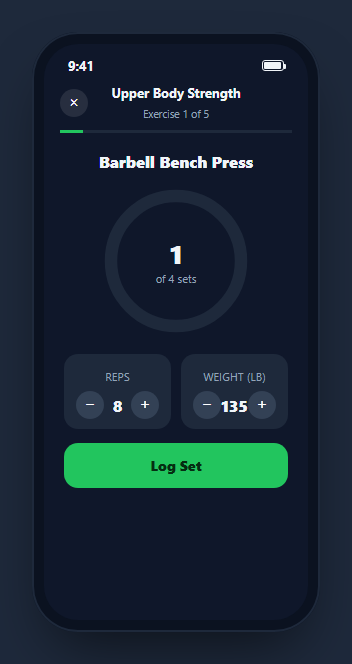
A workout screen used mid-set has one requirement above everything else: it has to be operable with sweaty thumbs between reps, not read like a static exercise database entry. This snippet builds the in-progress state of a strength workout — a current-set progress ring, quick +/- steppers for reps and weight, a Log Set button, and a real countdown rest timer — inside a phone-frame mockup, with every control doing something real rather than sitting there for decoration.
A ring that shows completed sets, not a generic loading spinner
updateRing() computes fraction = (currentSet - 1) / totalSets and sets the SVG circle's stroke-dashoffset from a precomputed circumference, so the ring visually fills in as sets are completed rather than representing time or a vague percentage. Reading currentSet and totalSets directly out of the same variables that drive the "of 4 sets" label underneath keeps the ring and the label from ever showing conflicting numbers.
Reps and weight as steppers, not a text input
adjust(varName, delta, min, max) handles both the reps and weight fields through one shared function, clamped to a sane range (1–30 reps, 0–500 lb) so a mis-tap can't produce a nonsensical logged value. Steppers were chosen deliberately over a free-text number input — during an actual set, tapping a large plus/minus button is far more reliable than typing on a small keyboard.
Logging a set drives three things at once
logBtn's click handler appends a row to #wipLogList with the exact reps and weight from state, then either advances currentSet and calls updateRing() plus startRest(), or — once currentSet reaches totalSets — disables the button and relabels it "Exercise Complete." This means logging is the single action that both records history and advances the workout state machine, rather than two separate steps a user could get out of sync.
A real rest countdown with quick adjustments
startRest() sets a 90-second countdown via setInterval, formatted with fmtTime(), and reveals a rest panel with ±15-second adjustment buttons and a "Skip rest" control that calls endRest() to clear the interval immediately. This matches how real training apps handle rest — a fixed default that respects a lifter's actual pace, adjustable in either direction without waiting for the whole timer to finish or restart.
A running log, most recent set first
Each completed set is prepended (not appended) to #wipLogList, so the most recently logged set is always the first one visible without needing to scroll down through the whole session — useful mid-workout when the only thing worth checking is "what did I just lift."
Wiring it to persistent workout data
Replace the in-memory reps/weight/currentSet variables with state synced to your workout-tracking backend (saving each logged set via an API call inside the log button's handler), and pull totalSets, starting reps, and starting weight from the user's programmed workout plan or their last session's data instead of the hardcoded defaults.
Build with AI
Build, Understand, Optimize, and Extend It With AI
Rather than tracing the set-progress and rest-timer state by hand, paste this snippet's HTML, CSS, and JS into an AI coding assistant like Claude and ask it to explain exactly how updateRing() derives the SVG stroke-dashoffset from currentSet and totalSets, and how logging a set advances three pieces of state (the log list, the set counter, and the rest timer) from one click handler. The same assistant can help you optimize it, for instance asking whether the fixed 90-second rest default should instead be configurable per exercise or per user profile. It is also useful for extending the screen: ask it to persist logged sets to a backend API, support supersets or drop sets that don't follow the simple sequential-set pattern, or add haptic-style visual feedback when the rest timer reaches its final few seconds. Treat the code less like a finished artifact and more like a starting point for a conversation.
Prompt to recreate it
Copy this into your AI assistant of choice to build the effect from scratch, or as a jumping-off point for your own variant:
Build a mobile "workout in progress" screen in plain HTML, CSS, and JavaScript, framed inside a CSS phone mockup, no library.

Requirements:
- A header showing the workout name and current exercise position (e.g. "Exercise 1 of 5"), plus a thin overall progress bar below it, and the current exercise name below that.
- A circular SVG progress ring showing the current set number out of a total set count for this exercise, where the ring's fill visually represents completed sets (using stroke-dasharray/stroke-dashoffset), not a generic percentage or time value.
- Two stepper controls (reps and weight) with plus/minus buttons that increment or decrement a numeric value, clamped to a sane minimum and maximum so repeated taps cannot produce a negative or absurd value.
- A "Log Set" button that, on each tap, adds the current reps/weight as a new entry to a visible log list (most recent entry first), advances the current set number and updates the progress ring, and automatically starts a 90-second rest countdown timer — except on the final set, where it must instead relabel itself to an exercise-complete state and disable further logging.
- The rest timer must count down live once per second in mm:ss format, with working "+15s" and "-15s" adjustment buttons and a "skip rest" button that ends the countdown immediately.
Want to tighten it up first? Run this prompt through the AI Prompt Studio to score it across 8 quality dimensions, catch anti-patterns, and tune the wording for Claude, ChatGPT, or Gemini before you paste it in.
Step by step
How to Use
- 1Paste HTML, CSS, and JSA workout screen renders with set 1 of 4, a green progress ring, and reps/weight steppers.
- 2Adjust reps and weightTap the +/- buttons on each stepper to set the values for the set you are about to log.
- 3Tap "Log Set"The set is added to the log list, the ring advances, and a 90-second rest timer starts automatically.
- 4Adjust or skip the rest timerUse +15s / -15s to adjust, or "Skip rest" to end it immediately and move on.
- 5Complete all setsAfter the final set is logged, the button relabels to "Exercise Complete" and disables itself.
- 6Wire it to real dataPersist each logged set to your workout-tracking backend and load totalSets/starting values from the user's program.
Real-world uses
Common Use Cases
Got questions?
Frequently Asked Questions
updateRing() computes fraction = (currentSet - 1) / totalSets and sets the SVG circle's stroke-dashoffset to circumference * (1 - fraction), so the ring visually represents completed sets out of the total rather than a generic or time-based percentage.
No — the shared adjust() function clamps both fields with Math.max/Math.min against a min and max passed in for each field (1 to 30 for reps, 0 to 500 for weight), so repeated taps cannot push either value outside a sane range.
The log button's click handler checks currentSet >= totalSets before advancing. On the final set, it relabels the button to "Exercise Complete", disables it, and skips starting another rest timer, instead of looping back or logging an extra set.
startRest() sets restSeconds to 90 and runs a setInterval that decrements it once per second, updating the displayed mm:ss text via fmtTime() and formatting it. The +15s/-15s buttons adjust restSeconds directly, and "Skip rest" calls endRest() to clear the interval and hide the panel immediately.
During an active workout, the most useful information is what was just lifted. Prepending keeps the newest entry at the top of the visible log without the user needing to scroll down past earlier sets to find it.
Yes. Track currentSet, reps, weight, and restSeconds in state, derive the ring's stroke-dashoffset from currentSet and totalSets in a computed value, and run the rest countdown inside a useEffect-managed interval that is cleared on skip, completion, or unmount.