Source Code
<section class="faq-section">
  <div class="faq-head">
    <div class="eyebrow">Pricing FAQ</div>
    <h2 class="faq-title">Everything about our pricing</h2>
    <p class="faq-sub">Can't find the answer? <a href="#" class="contact-link">Contact our team →</a></p>
  </div>

  <div class="faq-list" id="faq-list">

    <div class="faq-item open" data-id="1">
      <button class="faq-q" onclick="toggle(1)" aria-expanded="true">
        <span>Is there a free plan?</span>
        <span class="faq-icon">+</span>
      </button>
      <div class="faq-a">
        <p>Yes — our Starter plan is free forever. You get access to the core features with a 5 project limit and 1 GB storage. No credit card required to get started.</p>
      </div>
    </div>

    <div class="faq-item" data-id="2">
      <button class="faq-q" onclick="toggle(2)" aria-expanded="false">
        <span>Can I change my plan at any time?</span>
        <span class="faq-icon">+</span>
      </button>
      <div class="faq-a">
        <p>Absolutely. You can upgrade or downgrade your plan at any time from the billing settings page. Upgrades take effect immediately. Downgrades take effect at the end of your current billing cycle.</p>
      </div>
    </div>

    <div class="faq-item" data-id="3">
      <button class="faq-q" onclick="toggle(3)" aria-expanded="false">
        <span>What payment methods do you accept?</span>
        <span class="faq-icon">+</span>
      </button>
      <div class="faq-a">
        <p>We accept all major credit and debit cards (Visa, Mastercard, American Express), PayPal, and bank transfers for annual plans over $500. All payments are processed securely via Stripe.</p>
      </div>
    </div>

    <div class="faq-item" data-id="4">
      <button class="faq-q" onclick="toggle(4)" aria-expanded="false">
        <span>Do you offer discounts for annual billing?</span>
        <span class="faq-icon">+</span>
      </button>
      <div class="faq-a">
        <p>Yes — paying annually saves you 20% compared to monthly billing. The discount is applied automatically when you select the annual option on the pricing page. Annual plans are billed as a single upfront payment.</p>
      </div>
    </div>

    <div class="faq-item" data-id="5">
      <button class="faq-q" onclick="toggle(5)" aria-expanded="false">
        <span>What happens when I reach my plan limit?</span>
        <span class="faq-icon">+</span>
      </button>
      <div class="faq-a">
        <p>When you reach a plan limit (projects, storage, or team seats), you will receive an email notification. Existing functionality continues to work — you just cannot add more until you upgrade. We will never delete your data or lock you out without notice.</p>
      </div>
    </div>

    <div class="faq-item" data-id="6">
      <button class="faq-q" onclick="toggle(6)" aria-expanded="false">
        <span>Do you offer refunds?</span>
        <span class="faq-icon">+</span>
      </button>
      <div class="faq-a">
        <p>We offer a 14-day money-back guarantee on all paid plans. If you are not satisfied within 14 days of your first payment, contact us and we will issue a full refund, no questions asked. After 14 days, refunds are not available for the current billing period.</p>
      </div>
    </div>

    <div class="faq-item" data-id="7">
      <button class="faq-q" onclick="toggle(7)" aria-expanded="false">
        <span>Is there a discount for non-profits or students?</span>
        <span class="faq-icon">+</span>
      </button>
      <div class="faq-a">
        <p>Yes. We offer 50% off all paid plans for verified non-profit organisations and students. Email us at pricing@yourcompany.com with proof of status and we will apply the discount to your account within 24 hours.</p>
      </div>
    </div>

  </div>

  <div class="cta-block">
    <div class="cta-inner">
      <p class="cta-text">Still have questions? We reply within 2 hours on business days.</p>
      <a href="#" class="cta-btn">Talk to sales</a>
    </div>
  </div>
</section>
* { box-sizing: border-box; margin: 0; padding: 0; }
body { font-family: system-ui, sans-serif; background: #f8fafc; min-height: 100vh; padding: 60px 24px; }
.faq-section { max-width: 680px; margin: 0 auto; display: flex; flex-direction: column; gap: 40px; }
.faq-head { text-align: center; display: flex; flex-direction: column; align-items: center; gap: 10px; }
.eyebrow { font-size: 11px; font-weight: 700; letter-spacing: 1.5px; text-transform: uppercase; color: #6366f1; background: rgba(99,102,241,0.08); border: 1px solid rgba(99,102,241,0.15); padding: 4px 14px; border-radius: 20px; }
.faq-title { font-size: clamp(24px, 4vw, 36px); font-weight: 800; color: #0f172a; letter-spacing: -0.4px; }
.faq-sub { font-size: 14px; color: #64748b; }
.contact-link { color: #6366f1; text-decoration: none; font-weight: 600; }
.contact-link:hover { text-decoration: underline; }
.faq-list { display: flex; flex-direction: column; border: 1.5px solid #e2e8f0; border-radius: 16px; overflow: hidden; }
.faq-item { border-bottom: 1px solid #e2e8f0; }
.faq-item:last-child { border-bottom: none; }
.faq-q { width: 100%; display: flex; justify-content: space-between; align-items: center; gap: 16px; background: transparent; border: none; padding: 18px 22px; text-align: left; cursor: pointer; transition: background 0.15s; }
.faq-q:hover { background: #fafafa; }
.faq-q span:first-child { font-size: 15px; font-weight: 600; color: #0f172a; line-height: 1.45; }
.faq-icon { font-size: 20px; color: #94a3b8; transition: transform 0.25s, color 0.15s; flex-shrink: 0; font-weight: 300; line-height: 1; }
.faq-item.open .faq-icon { transform: rotate(45deg); color: #6366f1; }
.faq-item.open .faq-q { background: #fafafe; }
.faq-item.open .faq-q span:first-child { color: #6366f1; }
.faq-a { overflow: hidden; max-height: 0; transition: max-height 0.3s ease; }
.faq-item.open .faq-a { max-height: 300px; }
.faq-a p { font-size: 14px; color: #475569; line-height: 1.75; padding: 0 22px 18px; }
/* CTA block */
.cta-block { background: linear-gradient(135deg, rgba(99,102,241,0.06), rgba(236,72,153,0.04)); border: 1.5px solid rgba(99,102,241,0.12); border-radius: 16px; padding: 24px; }
.cta-inner { display: flex; align-items: center; justify-content: space-between; gap: 16px; flex-wrap: wrap; }
.cta-text { font-size: 14px; color: #475569; }
.cta-btn { background: #6366f1; color: #fff; font-size: 14px; font-weight: 700; padding: 10px 22px; border-radius: 10px; text-decoration: none; white-space: nowrap; transition: background 0.15s; }
.cta-btn:hover { background: #4f46e5; }function toggle(id) {
const item = document.querySelector('[data-id="'+id+'"]');
const btn = item.querySelector('.faq-q');
const isOpen = item.classList.contains('open');
// Close all
document.querySelectorAll('.faq-item').forEach(el => {
el.classList.remove('open');
el.querySelector('.faq-q').setAttribute('aria-expanded','false');
});
// Open clicked if it was closed
if (!isOpen) {
item.classList.add('open');
btn.setAttribute('aria-expanded','true');
}
}Learn Coding Visually
Learn to code with interactive, live-preview playgrounds — HTML, CSS, JavaScript, React & more.
 HTML Playground42 lessons · Click-based · Live preview
 CSS PlaygroundLearn CSS with a live editor
 JavaScript Playground60 lessons · DOM · Async · Canvas
 React PlaygroundLearn React with a live code editor
 GSAP PlaygroundLearn GSAP animation interactively
 SVG Playground44 lessons · shapes · paths · animation
 SCSS Playground45 lessons · Sass modules · tokens
 Tailwind PlaygroundLearn Tailwind CSS with a live editor
 Bootstrap 5 Playground50 lessons · live preview
Pricing FAQ — Free HTML CSS JS Accordion Snippet
Pricing FAQ · Pricing · Plain HTML, CSS & JS · Live preview
What's included
Features
About this UI Snippet
Pricing FAQ Section — Accordion with CSS Transition, 7 Billing Questions & Talk-to-Sales CTA
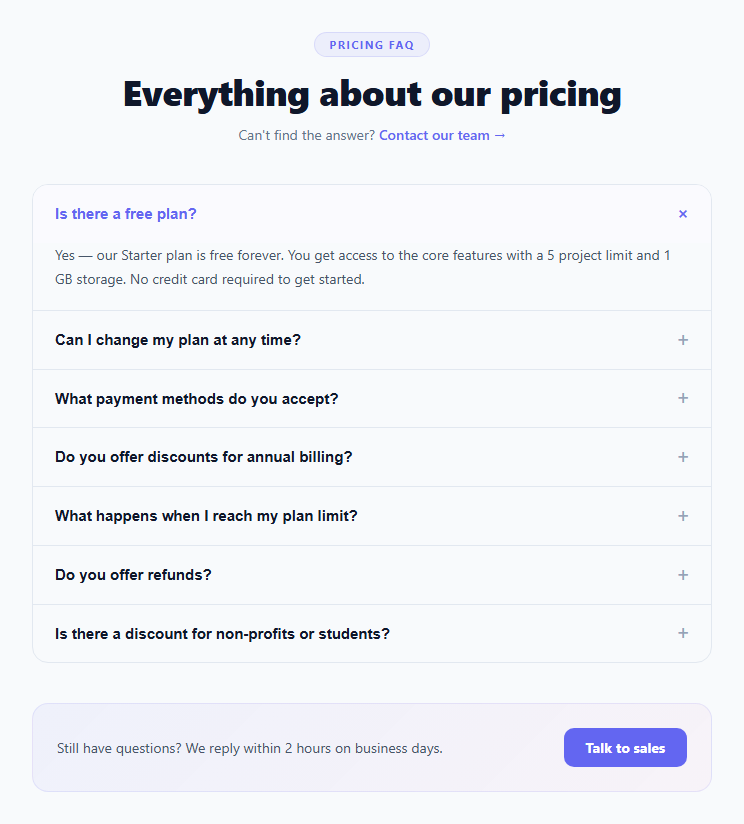
A pricing FAQ section answers the objections and uncertainties that prevent visitors from converting on your pricing page. Common blockers — "Is there a free plan?", "What happens if I exceed my limit?", "Do you offer refunds?" — prevent sign-ups when left unanswered. A well-placed FAQ section below the pricing tiers can lift conversion by 10–30% by removing uncertainty before the user decides to leave. This snippet provides a complete pricing FAQ accordion with 7 pre-filled billing questions, a max-height CSS transition, + icon rotation, aria-expanded accessibility, and a talk-to-sales CTA block.
How the accordion works
Each FAQ item has an .open class toggle. On the closed state, .faq-a has max-height: 0 and overflow: hidden. On .open, max-height: 300px. CSS transition: max-height 0.3s ease animates the expand and collapse. This is the standard CSS accordion technique — max-height must be set to a value larger than any possible content height (300px covers most FAQ answers).
The + icon rotation
The plus sign in .faq-icon rotates 45 degrees on .open via transform: rotate(45deg) — turning + into ×. The transition: transform 0.25s animates the rotation smoothly. No SVG or separate close icon is needed.
Accordion vs multi-open
The toggle() function closes all other items before opening the clicked one — accordion single-open behaviour. This is standard for FAQ sections because it prevents the page from becoming very tall when multiple items are open. To allow multiple items open simultaneously, remove the "Close all" querySelectorAll block.
Accessibility
Each question button has aria-expanded="false" in the closed state and "true" when open. Screen readers announce "expanded" or "collapsed" when the user toggles an item. The accordion uses button elements (keyboard-focusable) rather than div elements, ensuring keyboard users can Tab to each question and Enter to toggle.
The 7 pre-filled billing questions
The questions cover the most common pricing objections: free plan availability, plan changes, payment methods, annual discount, limit behaviour, refund policy, and non-profit/student discounts. Update the answers to match your actual terms. Add or remove questions by duplicating or removing .faq-item elements.
The talk-to-sales CTA block
The gradient CTA block at the bottom catches visitors whose question was not answered in the FAQ. "Talk to sales" is a lower-commitment CTA than "Buy now" — it works for enterprise and high-ACV products where prospects need human contact before converting.
Build with AI
Build, Understand, Optimize, and Extend It With AI
You don't have to trace the max-height accordion trick by hand. Paste this snippet's HTML, CSS, and JS into an AI coding assistant like Claude and ask it to explain exactly why the closed state needs both max-height 0 and overflow hidden together, and why the toggle function closes every other faq-item before opening the clicked one instead of allowing multiple items open at once. The same assistant can help optimize it, for example checking whether the fixed max-height of 300px used for the open state will ever clip a longer answer, and how you'd calculate that value dynamically from the content's real scrollHeight instead. It's also useful for extending the effect: ask it to add FAQPage JSON-LD schema markup so Google can show rich snippets for these questions, convert it to a multi-open accordion instead of single-open, or add a search box that filters the visible questions as the user types. Treat the code less like a finished artifact and more like a starting point for a conversation.
Prompt to recreate it
Copy this into your AI assistant of choice to build the effect from scratch, or as a jumping-off point for your own variant:
Build a single-open FAQ accordion section for a pricing page in plain HTML, CSS, and vanilla JavaScript, with no animation library.

Requirements:
- A list of FAQ items, each with a clickable button-element question row (showing the question text and a plus-sign icon) and a collapsible answer paragraph beneath it, plus a unique identifier on each item.
- The collapsed state of every answer must use max-height: 0 combined with overflow: hidden, and a CSS transition on max-height; the open state must set max-height to a fixed value large enough to fit realistic answer lengths, so opening and closing animates smoothly rather than snapping instantly.
- The plus-sign icon must visually rotate 45 degrees (turning it into an X shape) via a CSS transform transition whenever its item is open, with no separate close-icon asset needed.
- Clicking any question must enforce single-open accordion behavior: first close every other currently-open item, then open the clicked item only if it was not already open (so clicking an already-open item's question closes it without reopening anything).
- Every question button must carry an aria-expanded attribute that is kept in sync with true or false as items open and close, so assistive technology can announce the current state correctly.
- Include a header area with a short intro and a contact link, plus a distinctly styled call-to-action block at the bottom of the FAQ list (a gradient-tinted panel with a "talk to sales" style button) aimed at visitors whose question wasn't answered.
Want to tighten it up first? Run this prompt through the AI Prompt Studio to score it across 8 quality dimensions, catch anti-patterns, and tune the wording for Claude, ChatGPT, or Gemini before you paste it in.
Step by step
How to Use
- 1Click any question to expand or collapse itClicking a question expands the answer with a smooth max-height CSS transition. Clicking again or clicking another question closes it (accordion behaviour). The + icon rotates to × on open.
- 2Update the questions and answersIn the HTML, edit the span text inside each .faq-q button for the question, and the p text inside each .faq-a div for the answer. Update all 7 answers to match your actual pricing terms, refund policy, and plan limits.
- 3Add more FAQ itemsDuplicate any .faq-item div. Give it a unique data-id (8, 9, etc.) and update the onclick="toggle(N)" to match. Update the question and answer text. The accordion logic picks up the new item automatically.
- 4Update the CTA blockEdit the .cta-text paragraph and the .cta-btn link text. Set href="#" on .cta-btn to your contact, sales, or chat URL. Update the .contact-link href in the header to your support email or help page.
- 5Change the first item default open stateThe first .faq-item starts with the .open class applied. To start all closed, remove .open from the first item and set aria-expanded="false" on its button. To start multiple items open, this requires switching to multi-open mode (remove the close-all block in toggle()).
- 6Export in your formatClick "HTML" for a standalone file, "JSX" for a React component with useState for the open item id, or "Tailwind" for a React + Tailwind CSS version.
Real-world uses
Common Use Cases
Got questions?
Frequently Asked Questions
The .faq-a answer div has max-height: 0; overflow: hidden in its default state. CSS transition: max-height 0.3s ease is applied. When .open is added to the parent .faq-item, the CSS rule .faq-item.open .faq-a { max-height: 300px } applies, triggering the transition. The browser interpolates max-height from 0 to 300px over 0.3 seconds. On close, max-height transitions back to 0. The max-height value must be set higher than any possible content height — if content exceeds 300px, increase the open state max-height value.
Remove the "close all" block inside the toggle() function: delete the document.querySelectorAll(".faq-item").forEach(el => { el.classList.remove("open"); el.querySelector(".faq-q").setAttribute("aria-expanded","false"); }); lines. The remaining code only toggles the clicked item. This switches from accordion (single-open) to multi-open mode. For pricing FAQ sections, accordion is usually preferable as it keeps the page height controlled.
Add a script tag with type="application/ld+json" containing FAQPage schema: {"@context":"https://schema.org","@type":"FAQPage","mainEntity":[{"@type":"Question","name":"Is there a free plan?","acceptedAnswer":{"@type":"Answer","text":"Yes — our Starter plan is free forever..."}},...]}. One Question/Answer object per FAQ item. Google may display FAQ rich results in search snippets for pages that include this structured data — expanding the search result with the question and answer directly in the SERP.
Click "JSX" to download. Manage const [openId, setOpenId] = useState(1) for accordion mode (1 = first item open by default). The toggle function: const toggle = id => setOpenId(prev => prev === id ? null : id). Apply open class conditionally: className={"faq-item" + (openId === item.id ? " open" : "")}. For Next.js SEO, render the FAQ schema JSON-LD in a script tag inside the head using next/head, or use the metadata API for App Router pages.