Source Code
<div class="demo">
  <div class="app-shell" id="appShell">
    <aside class="sidebar" id="sidebar" style="width: 200px;">
      <div class="sidebar-brand">Workspace</div>
      <nav class="sidebar-nav">
        <a href="#" class="sidebar-link active">Dashboard</a>
        <a href="#" class="sidebar-link">Projects</a>
        <a href="#" class="sidebar-link">Team</a>
        <a href="#" class="sidebar-link">Settings</a>
      </nav>
    </aside>
    <div class="resize-handle" id="resizeHandle" role="separator" aria-orientation="vertical" aria-label="Resize sidebar" tabindex="0"></div>
    <main class="app-content">
      <h3>Main content</h3>
      <p>Drag the divider to resize the sidebar. Reload the preview and the width you set is restored from localStorage — try the keyboard too: focus the divider and press Arrow Left/Right.</p>
    </main>
  </div>
</div>
* { box-sizing: border-box; margin: 0; padding: 0; }
body { font-family: system-ui, sans-serif; background: #f8fafc; display: flex; align-items: center; justify-content: center; min-height: 100vh; padding: 24px; }
.demo { width: 520px; max-width: 100%; }
.app-shell { display: flex; height: 320px; border: 1px solid #e2e8f0; border-radius: 14px; overflow: hidden; background: #fff; }
.sidebar { flex-shrink: 0; background: #f8fafc; border-right: 1px solid #e2e8f0; display: flex; flex-direction: column; overflow: hidden; min-width: 140px; max-width: 340px; }
.sidebar-brand { padding: 16px 18px; font-size: 13px; font-weight: 800; color: #111827; border-bottom: 1px solid #e2e8f0; white-space: nowrap; }
.sidebar-nav { display: flex; flex-direction: column; padding: 10px; gap: 2px; }
.sidebar-link { padding: 8px 10px; border-radius: 8px; font-size: 12.5px; font-weight: 600; color: #64748b; text-decoration: none; white-space: nowrap; overflow: hidden; text-overflow: ellipsis; }
.sidebar-link:hover { background: #f1f5f9; color: #334155; }
.sidebar-link.active { background: #eef2ff; color: #4338ca; }
.resize-handle { flex-shrink: 0; width: 6px; cursor: col-resize; background: transparent; position: relative; }
.resize-handle::after { content: ''; position: absolute; top: 0; bottom: 0; left: 2px; width: 2px; border-radius: 2px; background: #e2e8f0; transition: background 0.15s; }
.resize-handle:hover::after, .resize-handle.active::after { background: #6366f1; }
.resize-handle:focus-visible { outline: none; }
.resize-handle:focus-visible::after { background: #6366f1; width: 3px; }
.app-content { flex: 1; padding: 22px; overflow: auto; }
.app-content h3 { font-size: 14.5px; font-weight: 800; color: #111827; margin-bottom: 8px; }
.app-content p { font-size: 12.5px; color: #64748b; line-height: 1.7; }const sidebar = document.getElementById('sidebar');
const handle = document.getElementById('resizeHandle');
const STORAGE_KEY = 'sidebar-width';
const MIN_WIDTH = 140;
const MAX_WIDTH = 340;
const KEYBOARD_STEP = 16;
function clamp(width) {
return Math.min(MAX_WIDTH, Math.max(MIN_WIDTH, width));
}
function setWidth(width) {
const clamped = clamp(width);
sidebar.style.width = clamped + 'px';
handle.setAttribute('aria-valuenow', String(Math.round(clamped)));
return clamped;
}
function persistWidth(width) {
try {
// Persisting on every pointerup (not on every pointermove) avoids
// hammering localStorage dozens of times during a single drag gesture —
// only the FINAL settled width after a resize actually needs saving.
localStorage.setItem(STORAGE_KEY, String(width));
} catch (err) {
/* storage unavailable — resizing still works for this session */
}
}
function loadPersistedWidth() {
try {
const stored = parseFloat(localStorage.getItem(STORAGE_KEY));
return isNaN(stored) ? null : stored;
} catch (err) {
return null;
}
}
handle.setAttribute('aria-valuemin', String(MIN_WIDTH));
handle.setAttribute('aria-valuemax', String(MAX_WIDTH));
// --- Pointer drag resizing ---
let dragStartX = null;
let dragStartWidth = null;
handle.addEventListener('pointerdown', (e) => {
dragStartX = e.clientX;
dragStartWidth = sidebar.getBoundingClientRect().width;
handle.classList.add('active');
handle.setPointerCapture(e.pointerId);
document.body.style.userSelect = 'none'; // prevent accidental text selection while dragging
});
handle.addEventListener('pointermove', (e) => {
if (dragStartX === null) return;
const delta = e.clientX - dragStartX;
setWidth(dragStartWidth + delta);
});
handle.addEventListener('pointerup', () => {
if (dragStartX === null) return;
dragStartX = null;
handle.classList.remove('active');
document.body.style.userSelect = '';
persistWidth(sidebar.getBoundingClientRect().width);
});
// --- Keyboard resizing, for users who can't (or don't want to) drag ---
handle.addEventListener('keydown', (e) => {
const current = sidebar.getBoundingClientRect().width;
if (e.key === 'ArrowRight') {
e.preventDefault();
persistWidth(setWidth(current + KEYBOARD_STEP));
} else if (e.key === 'ArrowLeft') {
e.preventDefault();
persistWidth(setWidth(current - KEYBOARD_STEP));
} else if (e.key === 'Home') {
e.preventDefault();
persistWidth(setWidth(MIN_WIDTH));
} else if (e.key === 'End') {
e.preventDefault();
persistWidth(setWidth(MAX_WIDTH));
}
});
// Restore a previously persisted width on load, falling back to the width
// already set inline in the markup if nothing (valid) was stored yet.
const persisted = loadPersistedWidth();
if (persisted !== null) setWidth(persisted);
else setWidth(sidebar.getBoundingClientRect().width);Learn Coding Visually
Learn to code with interactive, live-preview playgrounds — HTML, CSS, JavaScript, React & more.
 HTML Playground42 lessons · Click-based · Live preview
 CSS PlaygroundLearn CSS with a live editor
 JavaScript Playground60 lessons · DOM · Async · Canvas
 React PlaygroundLearn React with a live code editor
 GSAP PlaygroundLearn GSAP animation interactively
 SVG Playground44 lessons · shapes · paths · animation
 SCSS Playground45 lessons · Sass modules · tokens
 Tailwind PlaygroundLearn Tailwind CSS with a live editor
 Bootstrap 5 Playground50 lessons · live preview
Resizable Sidebar with Persisted Width — Drag or Keyboard, Remembered Across Reloads
Resizable Sidebar with Persisted Width · Layouts · Plain HTML, CSS & JS · Live preview
What's included
Features
About this UI Snippet
Resizable Sidebar — Drag, Keyboard, and Persistence Done Correctly
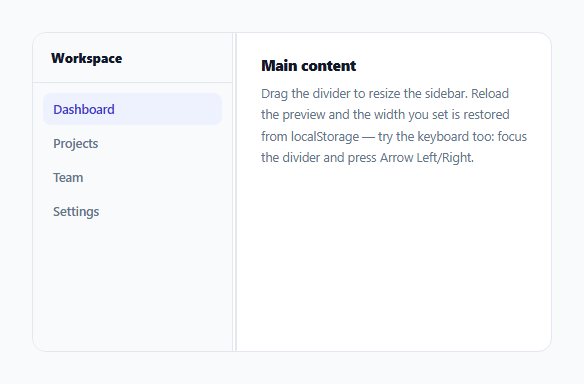
A fixed-width sidebar forces every user into the same layout tradeoff — too narrow for someone who wants to see full navigation labels, too wide for someone who wants more room for content. This snippet implements a genuinely resizable sidebar: drag the divider with a pointer, resize it with the keyboard, and have the chosen width remembered the next time the page loads — all built on the correct ARIA pattern for a resizable-panel divider.
The divider is a real ARIA separator, not a decorative div
The resize handle carries role="separator", aria-orientation="vertical", and live aria-valuemin/aria-valuemax/aria-valuenow attributes that update on every resize. This is the correct ARIA pattern for a draggable divider between two panels — it tells assistive technology this element represents an adjustable boundary with a real numeric value (the sidebar's width), not just an inert visual line, and gives a screen reader user the current width as part of the accessibility tree, kept in sync via setWidth() updating aria-valuenow every single time the width changes, from either drag or keyboard.
Persisting on release, not on every drag frame
persistWidth() is only called from pointerup and from each keyboard resize step — never from inside pointermove, which can fire dozens of times during a single drag gesture. Writing to localStorage on every one of those intermediate frames would be wasteful and could even introduce jank on lower-end devices; saving only the *final*, settled width once a resize gesture actually completes captures the meaningful state change without the unnecessary intermediate writes.
Keyboard resizing exists as a first-class interaction, not an afterthought
A user who can't use a pointer (or simply prefers the keyboard) can Tab to the divider and use Arrow Left/Right to resize in fixed steps, or Home/End to jump straight to the minimum/maximum allowed width — mirroring the same keyboard conventions native range sliders and other ARIA separator implementations use. This isn't a fallback bolted on after the fact; it calls the exact same setWidth()/persistWidth() functions the pointer-drag path uses, so both interaction methods produce identical, correctly-clamped, correctly-persisted results.
Clamping happens in exactly one function, used by every code path
Every width change — pointer drag, each keyboard step, and the width restored from localStorage on page load — is routed through setWidth(), which calls clamp() before applying anything. This guarantees the sidebar's width can never end up outside its valid MIN_WIDTH–MAX_WIDTH range through any interaction path, including a potentially corrupted or manually-edited stored value from a previous session.
Build with AI
Build, Understand, Optimize, and Extend It With AI
Ask an AI assistant to explain why role="separator" with live aria-value attributes is the correct accessibility pattern for this control, and to discuss what specific screen reader behavior it enables compared to a plain unstyled div. It's also worth asking for a version that supports double-clicking the divider to reset to a default width, or one that adds a collapse-to-icon-only mode once the sidebar is dragged below a certain width threshold, similar to how many real IDE sidebars behave.
Prompt to recreate it
Copy this into your AI assistant of choice to build the effect from scratch, or as a jumping-off point for your own variant:
Build a resizable sidebar with persisted width in HTML, CSS, and vanilla JavaScript using the Pointer Events API — no external library.

Requirements:
- A two-panel layout: a sidebar with navigation links, and a main content area, separated by a vertical divider element.
- The divider must be a proper ARIA separator: role="separator", aria-orientation="vertical", and aria-valuemin/aria-valuemax/aria-valuenow attributes that update live to reflect the sidebar's current width in pixels.
- Implement drag-to-resize using pointerdown/pointermove/pointerup with setPointerCapture, clamping the sidebar's width between a defined minimum and maximum on every single width change, regardless of which interaction method triggered it.
- Implement full keyboard resizing on the same divider element (once focused): Arrow Left/Right should adjust the width by a fixed step, and Home/End should jump directly to the minimum and maximum allowed width — using the exact same underlying width-setting and clamping logic as the pointer-drag path, not a separate implementation.
- Persist the sidebar's width to localStorage, but only once per completed resize action (on pointerup for dragging, immediately for each keyboard step) — not repeatedly during every intermediate pointermove event of an in-progress drag.
- On page load, read back any previously persisted width and restore it, falling back to a sensible default width if nothing valid has been stored yet. Wrap all localStorage access in try/catch so a storage failure never breaks the resizing functionality itself.
Want to tighten it up first? Run this prompt through the AI Prompt Studio to score it across 8 quality dimensions, catch anti-patterns, and tune the wording for Claude, ChatGPT, or Gemini before you paste it in.
Step by step
How to Use
- 1Drag the vertical dividerThe sidebar resizes live as you drag; width is clamped between a minimum and maximum so it can never collapse or grow unreasonably.
- 2Release the dragThe final width is saved to localStorage — only once per gesture, not on every intermediate frame while dragging.
- 3Reload the pageThe sidebar restores to whatever width you last set, read back from localStorage on load.
- 4Tab to the divider and use the keyboardArrow Left/Right resize in fixed steps; Home and End jump straight to the minimum and maximum allowed width.
- 5Adjust MIN_WIDTH, MAX_WIDTH, and KEYBOARD_STEPChange these constants in the JS to match your own layout's valid resize range and keyboard step size.
Real-world uses
Common Use Cases
Got questions?
Frequently Asked Questions
role="separator" with aria-orientation and live aria-value attributes is the correct ARIA pattern for a draggable divider that represents an adjustable numeric value (the sidebar's width) — it tells assistive technology this is a meaningful, interactive boundary control, not just a decorative visual line.
pointermove can fire many times per second during a drag. Writing to localStorage on every single one of those events would be wasteful and could introduce performance jank — only the final, settled width once the gesture completes is meaningful to actually persist.
Every width-setting code path (drag, keyboard, and the initial load from storage) routes through the same clamp() function, so the sidebar's width can never actually go below MIN_WIDTH or above MAX_WIDTH regardless of how far the pointer is dragged or how many times a keyboard step is pressed past the limit.
Yes — Tab to the divider (it has tabindex="0") and use Arrow Left/Right to resize in fixed steps, or Home/End to jump directly to the minimum or maximum width. This calls the exact same underlying functions as pointer dragging, so behavior is identical either way.
All localStorage access is wrapped in try/catch, so a failure never breaks resizing for the current session — it just won't persist. And a missing or non-numeric stored value causes the code to fall back to the sidebar's default inline width instead of applying an invalid or NaN width.
Mirror the delta calculation in the pointermove handler (subtract instead of add the pointer delta to the starting width) and move the resize handle to sit on the sidebar's left edge instead of its right edge in the markup order.