Source Code
<div class="demo">
  <nav class="spy-nav" aria-label="Page sections">
    <a href="#overview" class="spy-link active" data-target="overview">Overview</a>
    <a href="#pricing" class="spy-link" data-target="pricing">Pricing</a>
    <a href="#security" class="spy-link" data-target="security">Security</a>
    <a href="#faq" class="spy-link" data-target="faq">FAQ</a>
  </nav>

  <div class="spy-scroll" id="spyScroll">
    <section id="overview" class="spy-section">
      <h3>Overview</h3>
      <p>A quick summary of the product, what it does, and who it's for. This section is intentionally tall so scrolling clearly moves between sections.</p>
      <p>Scroll down inside this box — the nav link above updates to match whichever section is currently in view, not just whichever one you last clicked.</p>
    </section>
    <section id="pricing" class="spy-section">
      <h3>Pricing</h3>
      <p>Plans, tiers, and billing details live here. Scrollspy tracks this section becoming the dominant one in the viewport as you scroll past it.</p>
      <p>Notice the active link changes exactly when this heading crosses the tracking line, not before and not after.</p>
    </section>
    <section id="security" class="spy-section">
      <h3>Security</h3>
      <p>Compliance certifications, data handling practices, and encryption details for security-conscious teams evaluating the product.</p>
    </section>
    <section id="faq" class="spy-section">
      <h3>FAQ</h3>
      <p>Answers to the most common questions, including support and integration options.</p>
      <p>End of the scrollable content — the last section should stay active once you reach the bottom, even though it may not fill the whole viewport.</p>
    </section>
  </div>
</div>
* { box-sizing: border-box; margin: 0; padding: 0; }
body { font-family: system-ui, sans-serif; background: #f8fafc; display: flex; align-items: center; justify-content: center; min-height: 100vh; padding: 24px; }
.demo { width: 460px; max-width: 100%; display: flex; flex-direction: column; gap: 12px; }
.spy-nav { display: flex; gap: 4px; background: #f1f5f9; padding: 4px; border-radius: 10px; }
.spy-link { flex: 1; text-align: center; padding: 8px 6px; border-radius: 7px; font-size: 12px; font-weight: 700; color: #64748b; text-decoration: none; transition: background 0.15s, color 0.15s; }
.spy-link:hover { color: #334155; }
.spy-link.active { background: #fff; color: #4338ca; box-shadow: 0 1px 3px rgba(15,23,42,0.1); }
.spy-link:focus-visible { outline: 2px solid #6366f1; outline-offset: 1px; }
.spy-scroll { height: 320px; overflow-y: auto; border: 1px solid #e2e8f0; border-radius: 14px; background: #fff; scroll-behavior: smooth; }
.spy-section { padding: 22px 20px; min-height: 260px; border-bottom: 1px solid #f1f5f9; }
.spy-section:last-child { border-bottom: none; min-height: 200px; }
.spy-section h3 { font-size: 15px; font-weight: 800; color: #111827; margin-bottom: 10px; }
.spy-section p { font-size: 12.5px; color: #64748b; line-height: 1.7; margin-bottom: 8px; }const scrollContainer = document.getElementById('spyScroll');
const links = Array.from(document.querySelectorAll('.spy-link'));
const sections = links.map((link) => document.getElementById(link.dataset.target));
function setActive(id) {
links.forEach((link) => link.classList.toggle('active', link.dataset.target === id));
}
// IntersectionObserver, not a scroll listener doing manual getBoundingClientRect
// math, drives the tracking. rootMargin shrinks the "viewport" IntersectionObserver
// measures against to a thin horizontal band near the top of the scroll container —
// a section only counts as "in view" once it crosses that band, which is what
// makes the active link change at a predictable, consistent point rather than
// whenever any sliver of a section happens to be visible anywhere on screen.
const observer = new IntersectionObserver(
(entries) => {
entries.forEach((entry) => {
if (entry.isIntersecting) {
setActive(entry.target.id);
}
});
},
{
root: scrollContainer,
rootMargin: '-10% 0px -75% 0px', // a thin band starting 10% from the top of the scroll box
threshold: 0,
}
);
sections.forEach((section) => observer.observe(section));
// Clicking a link still scrolls smoothly to the target, but does not
// hardcode setActive() — the IntersectionObserver above is the single
// source of truth for "which link is active," triggered naturally once
// the smooth-scroll lands the target section inside the tracking band.
links.forEach((link) => {
link.addEventListener('click', (e) => {
e.preventDefault();
const target = document.getElementById(link.dataset.target);
target.scrollIntoView({ behavior: 'smooth', block: 'start' });
});
});Learn Coding Visually
Learn to code with interactive, live-preview playgrounds — HTML, CSS, JavaScript, React & more.
 HTML Playground42 lessons · Click-based · Live preview
 CSS PlaygroundLearn CSS with a live editor
 JavaScript Playground60 lessons · DOM · Async · Canvas
 React PlaygroundLearn React with a live code editor
 GSAP PlaygroundLearn GSAP animation interactively
 SVG Playground44 lessons · shapes · paths · animation
 SCSS Playground45 lessons · Sass modules · tokens
 Tailwind PlaygroundLearn Tailwind CSS with a live editor
 Bootstrap 5 Playground50 lessons · live preview
Scrollspy Navigation — IntersectionObserver-Driven Active Section Tracking
Scrollspy Navigation — Active Link Tracks the Section in View · Navigation · Plain HTML, CSS & JS · Live preview
What's included
Features
About this UI Snippet
Scrollspy Navigation — Tracking the Active Section with IntersectionObserver
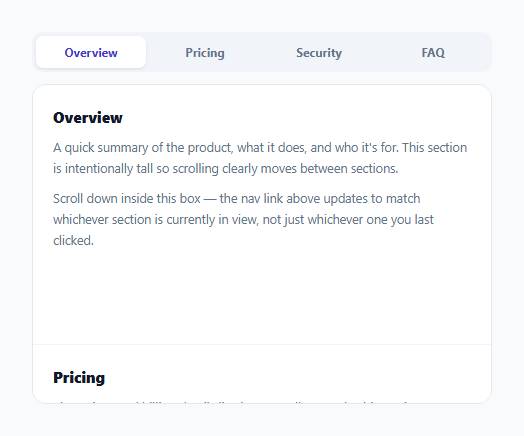
Scrollspy — highlighting the nav link for whichever section is currently in view — used to require a scroll event listener manually computing every section's getBoundingClientRect() on every scroll tick, an approach that's both a performance liability (scroll fires dozens of times a second) and a correctness headache (defining exactly when a section "counts" as active requires ad-hoc pixel-threshold math). This snippet uses IntersectionObserver instead, which is both faster and easier to reason about once you understand the one non-obvious trick that makes it work: rootMargin.
Why a plain "is any part of the section visible" check doesn't work
If a section counted as "active" the instant *any* pixel of it entered the viewport, two adjacent sections would frequently both be technically "visible" at once near their shared boundary, and picking one to highlight would feel arbitrary or flickery. What's actually wanted is: a section becomes active once it's crossed a specific, predictable line — typically somewhere near the top of the viewport, mimicking "the section currently at your eye line."
`rootMargin: '-10% 0px -75% 0px'` — shrinking the observed viewport into a thin band
IntersectionObserver's rootMargin shrinks (with negative values) or grows (with positive values) the area it treats as "the viewport" for intersection purposes, independent of the actual visible scroll container. A top margin of -10% and bottom margin of -75% together carve out a thin horizontal band starting 10% down from the top of the scroll container and ending at 25% down (100% − 75%) — a section only reports as isIntersecting: true once part of it crosses into that narrow band. This is what produces a single, predictable point at which the active link switches, rather than a fuzzy, multi-section-active zone.
`root: scrollContainer`, not the default browser viewport
By default, IntersectionObserver measures intersection against the browser's own viewport — but this demo scrolls inside an internal <div>, not the page itself. Passing root: scrollContainer tells the observer to measure against *that element's* visible bounds instead, which is what makes scrollspy work correctly for an internally-scrolling panel (a settings page with a scrollable content area, a modal with long content) rather than only for whole-page scrolling.
Clicking a link doesn't hardcode the active state — it lets the observer catch up naturally
The click handler only calls scrollIntoView({ behavior: 'smooth' }) — it deliberately does *not* also call setActive() directly. This keeps the observer as the single source of truth for which link is active: once the smooth scroll finishes landing the target section inside the tracking band, the observer's own callback fires and updates the active link exactly as if the user had scrolled there manually, avoiding any risk of the click-triggered state and the scroll-triggered state disagreeing with each other mid-animation.
Build with AI
Build, Understand, Optimize, and Extend It With AI
Ask an AI assistant to explain precisely what the rootMargin value '-10% 0px -75% 0px' computes to as an activation band, and to walk through why picking different percentages would move the point in the viewport where the active link switches. It's also worth asking for a version that also updates the URL hash as sections become active (without triggering a native jump-scroll), or one that adds a smooth animated underline that slides between nav links instead of an instant background swap.
Prompt to recreate it
Copy this into your AI assistant of choice to build the effect from scratch, or as a jumping-off point for your own variant:
Build a scrollspy navigation bar in HTML, CSS, and vanilla JavaScript using IntersectionObserver — no scroll event listener, no external library.

Requirements:
- A row of navigation links, each corresponding to a section inside an internally-scrolling content panel (a fixed-height div with overflow-y: auto), not the whole page.
- Use one IntersectionObserver, with its root option set to that internal scroll panel, to track which section is currently "active." Tune rootMargin so a section is only considered active once it crosses a specific narrow band near the top of the panel, rather than the instant any pixel of it becomes visible anywhere in the viewport — this should produce one clear, predictable point at which the active link switches, not a state where two adjacent sections both appear active near their shared boundary.
- Update the corresponding nav link's active styling whenever the observer reports a section crossing into that band.
- Clicking a nav link should smooth-scroll to its target section using scrollIntoView, but should not directly force that link into the active state — let the IntersectionObserver's own callback naturally mark it active once the scroll animation lands the section inside the tracking band, so there is exactly one source of truth for which link is active regardless of whether the user scrolled manually or clicked.
- Include at least four sections with enough content height that scrolling between them is clearly demonstrated.
Want to tighten it up first? Run this prompt through the AI Prompt Studio to score it across 8 quality dimensions, catch anti-patterns, and tune the wording for Claude, ChatGPT, or Gemini before you paste it in.
Step by step
How to Use
- 1Scroll the content panelThe nav link above highlights automatically as each section crosses a tracking band near the top of the panel — no clicking required.
- 2Click a nav linkSmooth-scrolls to that section; the link becomes active naturally once the section crosses the tracking band, not instantly on click.
- 3Adjust the rootMargin bandChange the percentages in the IntersectionObserver options to move where in the viewport a section is considered "active" — a smaller bottom-margin percentage widens the tracking band.
- 4Apply root: scrollContainer for internal scroll panelsPoint root at any internally-scrolling element instead of leaving it as the default page viewport, if your sections scroll inside a div rather than the whole page.
- 5Add more sectionsAdd a new link with a matching data-target and a new section with that id — the existing observer setup picks it up automatically since it observes every mapped section generically.
Real-world uses
Common Use Cases
Got questions?
Frequently Asked Questions
That approach fires on every scroll tick (dozens of times per second), forcing a layout read each time — a real performance cost on long pages. IntersectionObserver is purpose-built for exactly this "is this element in view" question and runs far more efficiently without manual per-tick math.
It shrinks or grows the area IntersectionObserver treats as "the viewport" for intersection checks. The specific values here carve out a thin horizontal band near the top of the scroll container — a section only becomes "active" once it crosses into that band, giving one predictable, consistent activation point rather than a fuzzy always-partially-true zone.
By default, IntersectionObserver measures against the browser's own viewport. Since this demo scrolls inside an internal div rather than the whole page, root must be set to that div so intersection is measured relative to its actual visible bounds.
To avoid two competing sources of truth for "which link is active." The click only triggers a smooth scroll; the observer's own callback naturally marks the link active once the target section crosses the tracking band, keeping behavior consistent regardless of whether the user scrolled manually or via a link click.
As long as any part of it crosses into the rootMargin-defined band, isIntersecting fires true for it just like any other section — its shorter height doesn't exempt it from the same tracking logic.
Yes — omit the root option entirely (or set it to null) to fall back to IntersectionObserver's default behavior of measuring against the actual browser viewport, which is the more common scrollspy setup for a full page rather than a scrollable div.