Source Code
<div class="shm-page">
  <button type="button" class="shm-open" id="shmOpen">
    <svg width="16" height="16" viewBox="0 0 24 24" fill="none" stroke="currentColor" stroke-width="2" stroke-linecap="round" stroke-linejoin="round"><circle cx="18" cy="5" r="3"/><circle cx="6" cy="12" r="3"/><circle cx="18" cy="19" r="3"/><line x1="8.6" y1="13.5" x2="15.4" y2="17.5"/><line x1="15.4" y1="6.5" x2="8.6" y2="10.5"/></svg>
    Share
  </button>
</div>

<div class="shm-backdrop" id="shmBackdrop"></div>
<div class="shm-modal" id="shmModal" role="dialog" aria-modal="true" aria-label="Share">
  <div class="shm-head">
    <h3>Share this article</h3>
    <button type="button" class="shm-close" id="shmClose" aria-label="Close">✕</button>
  </div>

  <div class="shm-targets" id="shmTargets"></div>

  <label class="shm-copy-label" for="shmLink">Or copy link</label>
  <div class="shm-copy">
    <input type="text" id="shmLink" readonly value="https://acme.io/blog/scaling-postgres">
    <button type="button" id="shmCopy">Copy</button>
  </div>

  <button type="button" class="shm-native" id="shmNative" hidden>
    <svg width="15" height="15" viewBox="0 0 24 24" fill="none" stroke="currentColor" stroke-width="2" stroke-linecap="round" stroke-linejoin="round"><path d="M4 12v8a2 2 0 0 0 2 2h12a2 2 0 0 0 2-2v-8"/><polyline points="16 6 12 2 8 6"/><line x1="12" y1="2" x2="12" y2="15"/></svg>
    More options…
  </button>
</div>*{box-sizing:border-box;margin:0;padding:0}
body{font-family:system-ui,-apple-system,sans-serif;background:#f1f5f9;min-height:100vh}
.shm-page{min-height:100vh;display:flex;align-items:center;justify-content:center}
.shm-open{display:inline-flex;align-items:center;gap:8px;background:#0f172a;color:#fff;border:none;border-radius:10px;padding:11px 20px;font-size:14px;font-weight:700;cursor:pointer}
.shm-backdrop{position:fixed;inset:0;background:rgba(15,23,42,.5);opacity:0;pointer-events:none;transition:opacity .25s;z-index:90}
.shm-backdrop.show{opacity:1;pointer-events:all}
.shm-modal{position:fixed;left:50%;bottom:50%;transform:translate(-50%,50%) scale(.96);opacity:0;pointer-events:none;
width:min(400px,92vw);background:#fff;border-radius:16px;padding:22px;z-index:91;
box-shadow:0 30px 70px rgba(15,23,42,.3);transition:opacity .26s,transform .26s}
.shm-modal.show{opacity:1;transform:translate(-50%,50%) scale(1);pointer-events:all}
.shm-head{display:flex;align-items:center;justify-content:space-between;margin-bottom:18px}
.shm-head h3{font-size:16px;font-weight:800;color:#0f172a}
.shm-close{width:28px;height:28px;border-radius:50%;border:none;background:#f1f5f9;color:#64748b;cursor:pointer;font-size:13px}
.shm-close:hover{background:#e2e8f0}
.shm-targets{display:grid;grid-template-columns:repeat(4,1fr);gap:10px;margin-bottom:20px}
.shm-target{display:flex;flex-direction:column;align-items:center;gap:7px;background:none;border:none;cursor:pointer;font-family:inherit}
.shm-target-ico{width:48px;height:48px;border-radius:50%;display:flex;align-items:center;justify-content:center;color:#fff;transition:transform .15s}
.shm-target:hover .shm-target-ico{transform:scale(1.08)}
.shm-target span{font-size:11px;font-weight:600;color:#64748b}
.shm-copy-label{display:block;font-size:11.5px;font-weight:700;color:#64748b;text-transform:uppercase;letter-spacing:.03em;margin-bottom:8px}
.shm-copy{display:flex;gap:8px;margin-bottom:4px}
.shm-copy input{flex:1;border:1.5px solid #e2e8f0;border-radius:9px;padding:10px 12px;font-size:12.5px;color:#475569;font-family:inherit;background:#f8fafc;min-width:0}
.shm-copy input:focus{outline:none;border-color:#6366f1}
.shm-copy button{background:#6366f1;color:#fff;border:none;border-radius:9px;padding:0 18px;font-size:13px;font-weight:700;cursor:pointer;min-width:74px;transition:background .15s}
.shm-copy button.copied{background:#16a34a}
.shm-native{display:flex;align-items:center;justify-content:center;gap:7px;width:100%;margin-top:14px;background:none;border:1.5px solid #e2e8f0;border-radius:9px;padding:10px;font-size:13px;font-weight:700;color:#475569;cursor:pointer;font-family:inherit}
.shm-native[hidden]{display:none}
.shm-native:hover{background:#f8fafc}var SHARE = {
url: 'https://acme.io/blog/scaling-postgres',
title: 'How we scaled Postgres to 10TB',
text: 'A practical guide to scaling Postgres.',
};
// Each ico is an inline SVG path (24x24 viewBox), filled white over the brand colour.
var TARGETS = [
{ id: 'x', name: 'X', bg: '#000000', ico: '<path d="M18.244 2.25h3.308l-7.227 8.26 8.502 11.24H16.17l-5.214-6.817L4.99 21.75H1.68l7.73-8.835L1.254 2.25H8.08l4.713 6.231zm-1.161 17.52h1.833L7.084 4.126H5.117z"/>' },
{ id: 'facebook', name: 'Facebook', bg: '#1877f2', ico: '<path d="M14 13.5h2.5l1-4H14v-2c0-1.03 0-2 2-2h1.5V2.14c-.326-.043-1.557-.14-2.857-.14C11.928 2 10 3.657 10 6.7v2.8H7v4h3V22h4z"/>' },
{ id: 'linkedin', name: 'LinkedIn', bg: '#0a66c2', ico: '<path d="M20.45 20.45h-3.56v-5.57c0-1.33-.02-3.04-1.85-3.04-1.85 0-2.14 1.45-2.14 2.94v5.67H9.35V9h3.41v1.56h.05c.48-.9 1.64-1.85 3.37-1.85 3.6 0 4.27 2.37 4.27 5.46zM5.34 7.43a2.06 2.06 0 1 1 0-4.13 2.06 2.06 0 0 1 0 4.13zM7.12 20.45H3.56V9h3.56zM22.22 0H1.77C.79 0 0 .77 0 1.73v20.54C0 23.23.79 24 1.77 24h20.45c.98 0 1.78-.77 1.78-1.73V1.73C24 .77 23.2 0 22.22 0z"/>' },
{ id: 'whatsapp', name: 'WhatsApp', bg: '#25d366', ico: '<path d="M17.47 14.38c-.3-.15-1.76-.87-2.03-.97-.27-.1-.47-.15-.67.15-.2.3-.77.96-.94 1.16-.17.2-.35.22-.64.07-.3-.15-1.26-.46-2.39-1.47-.88-.79-1.48-1.76-1.65-2.06-.17-.3-.02-.46.13-.6.13-.14.3-.35.45-.52.15-.17.2-.3.3-.5.1-.2.05-.37-.02-.52-.08-.15-.67-1.61-.92-2.21-.24-.58-.49-.5-.67-.51h-.57c-.2 0-.52.07-.79.37-.27.3-1.04 1.02-1.04 2.48 0 1.46 1.07 2.88 1.21 3.07.15.2 2.1 3.2 5.08 4.49.71.3 1.26.49 1.69.62.71.23 1.36.2 1.87.12.57-.09 1.76-.72 2.01-1.41.25-.7.25-1.29.17-1.41-.07-.12-.27-.2-.57-.35M12.05 21.79h-.01a9.87 9.87 0 0 1-5.03-1.38l-.36-.21-3.74.98 1-3.65-.24-.37a9.86 9.86 0 0 1-1.51-5.26c0-5.45 4.44-9.88 9.89-9.88 2.64 0 5.12 1.03 6.99 2.9a9.83 9.83 0 0 1 2.89 6.99c0 5.45-4.43 9.88-9.88 9.88m8.41-18.3A11.82 11.82 0 0 0 12.05 0C5.5 0 .16 5.34.16 11.89c0 2.1.55 4.14 1.59 5.95L.06 24l6.3-1.65a11.88 11.88 0 0 0 5.68 1.45h.01c6.55 0 11.89-5.34 11.89-11.89a11.82 11.82 0 0 0-3.48-8.42z"/>' },
{ id: 'reddit', name: 'Reddit', bg: '#ff4500', ico: '<path d="M24 11.78a2.34 2.34 0 0 0-2.34-2.33c-.62 0-1.18.24-1.6.63a11.5 11.5 0 0 0-6.28-1.99l1.07-5.03 3.5.74a1.67 1.67 0 1 0 .17-.82l-3.9-.83a.34.34 0 0 0-.41.27l-1.19 5.6a11.55 11.55 0 0 0-6.37 1.99 2.33 2.33 0 1 0-2.57 3.81 4.6 4.6 0 0 0-.05.7c0 3.55 4.13 6.44 9.23 6.44s9.23-2.89 9.23-6.44c0-.23-.02-.47-.05-.7A2.33 2.33 0 0 0 24 11.78m-18 1.67a1.67 1.67 0 1 1 3.33 0 1.67 1.67 0 0 1-3.33 0m9.31 4.4a6.07 6.07 0 0 1-3.3.79 6.07 6.07 0 0 1-3.3-.79.36.36 0 0 1 .51-.51c.5.5 1.55.67 2.79.67s2.29-.17 2.79-.67a.36.36 0 0 1 .51 0c.14.14.14.37 0 .51m-.31-2.73a1.67 1.67 0 1 1 0-3.34 1.67 1.67 0 0 1 0 3.34"/>' },
{ id: 'telegram', name: 'Telegram', bg: '#229ed9', ico: '<path d="M23.07 3.36 19.6 19.73c-.26 1.16-.95 1.44-1.92.9l-5.3-3.9-2.56 2.46c-.28.28-.52.52-1.07.52l.38-5.4L18.95 5.4c.43-.38-.09-.6-.66-.22L5.13 13.6l-5.23-1.64c-1.14-.36-1.16-1.14.24-1.69L21.6 1.7c.95-.35 1.78.22 1.47 1.66z"/>' },
{ id: 'email', name: 'Email', bg: '#64748b', ico: '<path d="M22 6c0-1.1-.9-2-2-2H4c-1.1 0-2 .9-2 2v12c0 1.1.9 2 2 2h16c1.1 0 2-.9 2-2zm-2 0-8 5-8-5zm0 12H4V8l8 5 8-5z"/>' },
{ id: 'messenger',name: 'Messenger',bg: '#a855f7', ico: '<path d="M12 0C5.37 0 0 4.97 0 11.11c0 3.5 1.74 6.61 4.47 8.65V24l4.09-2.24c1.09.3 2.25.46 3.44.46 6.63 0 12-4.97 12-11.11C24 4.97 18.63 0 12 0m1.19 14.96-3.05-3.26-5.96 3.26L10.73 8l3.13 3.26L19.75 8z"/>' },
];
var backdrop = document.getElementById('shmBackdrop');
var modal = document.getElementById('shmModal');
function shareUrl(id) {
var u = encodeURIComponent(SHARE.url), t = encodeURIComponent(SHARE.title), x = encodeURIComponent(SHARE.text);
return ({
x: 'https://twitter.com/intent/tweet?url=' + u + '&text=' + t,
facebook: 'https://www.facebook.com/sharer/sharer.php?u=' + u,
linkedin: 'https://www.linkedin.com/sharing/share-offsite/?url=' + u,
whatsapp: 'https://wa.me/?text=' + t + '%20' + u,
reddit: 'https://www.reddit.com/submit?url=' + u + '&title=' + t,
telegram: 'https://t.me/share/url?url=' + u + '&text=' + t,
email: 'mailto:?subject=' + t + '&body=' + x + '%0A%0A' + u,
messenger:'https://www.facebook.com/dialog/send?link=' + u + '&app_id=0&redirect_uri=' + u,
})[id];
}
document.getElementById('shmTargets').innerHTML = TARGETS.map(function (t) {
return '<button type="button" class="shm-target" data-id="' + t.id + '">' +
'<span class="shm-target-ico" style="background:' + t.bg + '"><svg viewBox="0 0 24 24" width="22" height="22" fill="#fff">' + t.ico + '</svg></span>' +
'<span>' + t.name + '</span></button>';
}).join('');
document.getElementById('shmTargets').addEventListener('click', function (e) {
var btn = e.target.closest('.shm-target');
if (btn) window.open(shareUrl(btn.dataset.id), '_blank', 'noopener,width=600,height=540');
});
document.getElementById('shmCopy').addEventListener('click', function () {
var input = document.getElementById('shmLink');
navigator.clipboard.writeText(input.value).catch(function () { input.select(); try { document.execCommand('copy'); } catch (e) {} });
var btn = this; btn.textContent = '✓ Copied'; btn.classList.add('copied');
setTimeout(function () { btn.textContent = 'Copy'; btn.classList.remove('copied'); }, 1800);
});
// If the device supports the native Web Share sheet, offer it too.
var nativeBtn = document.getElementById('shmNative');
if (navigator.share) {
nativeBtn.hidden = false;
nativeBtn.addEventListener('click', function () {
navigator.share({ title: SHARE.title, text: SHARE.text, url: SHARE.url }).catch(function () {});
});
}
function open() { backdrop.classList.add('show'); modal.classList.add('show'); }
function close() { backdrop.classList.remove('show'); modal.classList.remove('show'); }
document.getElementById('shmOpen').addEventListener('click', open);
document.getElementById('shmClose').addEventListener('click', close);
backdrop.addEventListener('click', close);
document.addEventListener('keydown', function (e) { if (e.key === 'Escape' && modal.classList.contains('show')) close(); });Learn Coding Visually
Learn to code with interactive, live-preview playgrounds — HTML, CSS, JavaScript, React & more.
 HTML Playground42 lessons · Click-based · Live preview
 CSS PlaygroundLearn CSS with a live editor
 JavaScript Playground60 lessons · DOM · Async · Canvas
 React PlaygroundLearn React with a live code editor
 GSAP PlaygroundLearn GSAP animation interactively
 SVG Playground44 lessons · shapes · paths · animation
 SCSS Playground45 lessons · Sass modules · tokens
 Tailwind PlaygroundLearn Tailwind CSS with a live editor
 Bootstrap 5 Playground50 lessons · live preview
Share Modal — Social Share Sheet HTML CSS JS
Share Modal · Modals · Plain HTML, CSS & JS · Live preview
What's included
Features
About this UI Snippet
Share Modal — Social Share Sheet with Copy Link & Native Share Fallback
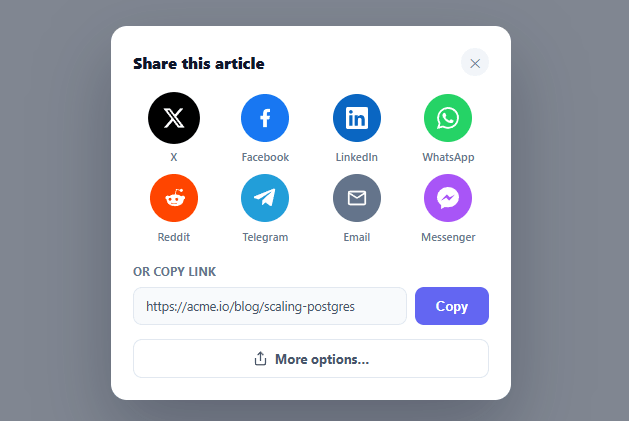
When a user wants to share your article, product, or page, a share modal gives them every option in one place — the social networks they actually use, a copy-link field, and on capable devices the native OS share sheet. This snippet builds that complete share dialog in plain HTML, CSS, and vanilla JavaScript: a grid of share targets with correct intent URLs, a one-click copy field, and progressive enhancement to the Web Share API.
Correct share URLs for every network
Each social target opens a pre-filled share intent — and every network has its own URL format with its own parameters. shareUrl() builds the right one for X, Facebook, LinkedIn, WhatsApp, Reddit, Telegram, email, and Messenger, properly URL-encoding the page URL, title, and text. Getting these formats exactly right (which parameter carries the URL vs the text, how each expects them encoded) is the tedious part that this snippet handles, so you don't have to look up eight different sharing endpoints. The links open in a sized popup window (width=600,height=540) with noopener for safety — the standard share-popup behavior.
A copy-link field for everything else
Not every share happens through a social button — people paste links into Slack, Notes, DMs, and a hundred other places. A read-only link field with a copy button covers all of that. The copy uses the modern navigator.clipboard API with a document.execCommand fallback for older or insecure-context browsers, and confirms with a green "✓ Copied" state so the user knows it worked. This is often the most-used option in a share modal, so it's given prominent placement rather than buried.
Native Web Share, progressively enhanced
On devices that support it (most mobile browsers and some desktop), the native OS share sheet is the best option — it offers the user's actual installed apps and contacts, which a fixed grid of web links can't. The snippet checks navigator.share and, only when present, reveals a "More options…" button that invokes the native sheet with the title, text, and URL. This is progressive enhancement done right: the web-link grid and copy field work everywhere, and the superior native option appears as a bonus exactly where it's available, never showing a broken button on browsers that lack it.
A polished, accessible modal
The dialog is role="dialog" with aria-modal="true", dims the page behind a backdrop, and closes via the ✕, a backdrop click, or Escape — all through one close(). It animates in with opacity and transform only, keeping it smooth across every framework export. The share targets are a responsive four-column grid of circular branded icons that scale slightly on hover, so the modal reads as a deliberate, app-quality share sheet rather than a row of plain links.
Data-driven targets
The share networks come from a TARGETS array (id, name, brand color, icon), so adding, removing, or reordering them — or matching the set to your audience — is a data edit. Pair that with the SHARE object (url, title, text) as the single source of what's being shared, and the whole modal is configured from two small pieces of data. Swap in your real page metadata and it's ready.
Build with AI
Build, Understand, Optimize, and Extend It With AI
You don't need to look up eight different social share intent formats yourself. Paste this snippet's HTML, CSS, and JS into an AI coding assistant like Claude and ask it to explain exactly why shareUrl builds a different query-parameter shape for each network, or how the navigator.share feature check hides the native share button entirely on devices that lack it rather than showing a broken control. The same assistant can help optimize it, for example checking whether the clipboard fallback path (execCommand) is still worth keeping given current browser support, or whether the eight-network TARGETS array should be trimmed for a specific audience. It's also useful for extending the feature: ask it to add a QR code target for sharing to a phone, track which network gets clicked most via an analytics event, or generate the SHARE object automatically from the page's own meta tags instead of a hardcoded object. Treat the code less like a finished artifact and more like a starting point for a conversation.
Prompt to recreate it
Copy this into your AI assistant of choice to build the effect from scratch, or as a jumping-off point for your own variant:
Build a share modal with social targets, a copy-link field, and native share fallback in plain HTML, CSS, and JavaScript, no framework, no libraries.

Requirements:
- A single SHARE object holding the url, title, and text being shared, used as the one source of truth for every share target and the copy field.
- A data-driven TARGETS array (id, display name, brand color, inline SVG icon) rendered into a grid of circular branded buttons via a single template-building function — adding a network must be a one-line data addition, not new markup.
- A function that builds the correct pre-filled share URL for at least six real networks (for example X/Twitter, Facebook, LinkedIn, WhatsApp, Reddit, email), with each network's URL and text parameters properly URL-encoded and assembled in that network's own specific query-string shape.
- Clicking a target must open its share URL in a new popup window sized roughly 600 by 540 pixels with the noopener flag set, not a full-tab navigation.
- A read-only text input showing the share URL plus a copy button that uses the Clipboard API (navigator.clipboard.writeText) with a document.execCommand fallback for browsers or contexts where the Clipboard API is unavailable, showing a temporary confirmation state on success.
- Feature-detect navigator.share and only reveal a native "more options" share button when it exists, wiring it to call navigator.share with the title, text, and url when present, and keeping it fully hidden (not just disabled) otherwise.
- The modal itself must be a real dialog: role="dialog", aria-modal="true", dismissible via a close button, a backdrop click, and the Escape key, animated only with opacity and transform so the transition works identically across every export target.
Want to tighten it up first? Run this prompt through the AI Prompt Studio to score it across 8 quality dimensions, catch anti-patterns, and tune the wording for Claude, ChatGPT, or Gemini before you paste it in.
Step by step
How to Use
- 1Paste HTML, CSS, and JSA "Share" button renders. Click it to open the share modal with social targets and a copy-link field.
- 2Share to a networkClick a social icon — a pre-filled share window opens for X, LinkedIn, WhatsApp, and the rest.
- 3Copy the linkClick Copy to copy the page URL; the button confirms with a green "✓ Copied" state.
- 4Try native shareOn a supporting device, a "More options…" button appears and opens the OS share sheet.
- 5Set what you're sharingEdit the SHARE object (url, title, text) and the link field value with your real page metadata.
- 6Customize the networksAdd, remove, or reorder entries in the TARGETS array to match your audience's platforms.
Real-world uses
Common Use Cases
Got questions?
Frequently Asked Questions
Edit the SHARE object — url is the page being shared, title is its headline, and text is an optional description. shareUrl() encodes these into each network's parameters, and the native Web Share call uses them directly. Also set the copy field's value to the same url. For dynamic pages, populate SHARE from your page metadata (og:title, canonical URL) when the modal opens.
navigator.share() opens the device's built-in share sheet — the same one native apps use — giving access to the user's installed apps and contacts. It's supported on most mobile browsers and some desktops. The snippet checks for it and only reveals the "More options…" button when present, so browsers without it never show a broken control. The web-link grid is the universal fallback.
Social share intents are designed to appear in a small popup window rather than a full tab — opening them with window.open(url, '_blank', 'width=600,height=540') matches each network's expected share dialog size and keeps the user's original page open behind it. Adding noopener prevents the opened page from accessing your window for security.
Use navigator.clipboard.writeText() (the modern async API) with a fallback that selects the input and calls document.execCommand('copy') for older browsers or insecure (non-HTTPS) contexts where the Clipboard API is unavailable. Always show a visual confirmation ("✓ Copied") so the user knows it succeeded regardless of which path ran.
In React, hold the open state in useState, render targets from the TARGETS array with .map(), and feature-detect navigator.share in a useEffect; in Vue, use ref() and v-for; in Angular, use a component field and *ngFor. The shareUrl() builder, clipboard logic, and Web Share detection are framework-agnostic — only the open/close state moves into the framework.