Source Code
<div class="ladder-app">
  <div class="ladder-header">
    <h2>Word Ladder</h2>
    <div class="stats">
      <div class="stat"><span class="stat-label">Moves</span><span class="stat-val" id="stat-moves">0</span></div>
      <div class="stat"><span class="stat-label">Best</span><span class="stat-val" id="stat-best">--</span></div>
    </div>
  </div>

  <p class="goal">Turn <strong id="start-word">COLD</strong> into <strong id="end-word">WARM</strong>, one letter at a time. Every step must be a real word.</p>

  <div class="trail" id="trail"></div>

  <form id="guess-form" class="guess-form" autocomplete="off">
    <input type="text" id="guess-input" maxlength="4" placeholder="Type the next word" spellcheck="false" />
    <button type="submit">Add step</button>
  </form>

  <p class="feedback" id="feedback">Change exactly one letter to start.</p>

  <div class="actions">
    <button class="ghost-btn" id="hint-btn">Reveal a hint</button>
    <button class="ghost-btn" id="new-btn">New puzzle</button>
  </div>
</div>
* { box-sizing: border-box; margin: 0; padding: 0; }
body { font-family: system-ui, sans-serif; background: #f8fafc; min-height: 100vh; }
.ladder-app { max-width: 440px; margin: 0 auto; padding: 32px 20px; display: flex; flex-direction: column; align-items: center; gap: 14px; }
.ladder-header { width: 100%; display: flex; align-items: center; justify-content: space-between; }
.ladder-header h2 { font-size: 19px; font-weight: 800; color: #1e293b; }
.stats { display: flex; gap: 10px; }
.stat { background: #fff; border: 1px solid #e2e8f0; border-radius: 12px; padding: 6px 14px; min-width: 60px; text-align: center; }
.stat-label { display: block; font-size: 9.5px; font-weight: 700; letter-spacing: 0.04em; text-transform: uppercase; color: #94a3b8; }
.stat-val { display: block; font-size: 15px; font-weight: 800; color: #6366f1; }
.goal { font-size: 13.5px; color: #475569; text-align: center; line-height: 1.6; }
.goal strong { color: #1e293b; letter-spacing: 0.06em; font-family: 'SFMono-Regular', Consolas, monospace; }
.trail { width: 100%; display: flex; flex-direction: column; gap: 6px; }
.trail-word {
display: flex; align-items: center; gap: 10px;
padding: 9px 14px; border-radius: 10px;
background: #fff; border: 1.5px solid #e2e8f0;
font-family: 'SFMono-Regular', Consolas, monospace;
font-size: 15px; font-weight: 700; letter-spacing: 0.08em; color: #1e293b;
}
.trail-word.start { border-color: #6366f1; background: #eef2ff; }
.trail-word.end { border-color: #16a34a; background: #f0fdf4; color: #15803d; }
.trail-word .idx { font-size: 10px; font-weight: 700; color: #94a3b8; min-width: 16px; }
.trail-word .diff-letter { color: #6366f1; }
.trail-word.end .diff-letter { color: #16a34a; }
.guess-form { width: 100%; display: flex; gap: 8px; }
#guess-input {
flex: 1; padding: 11px 14px; border-radius: 10px; border: 1.5px solid #e2e8f0;
font-family: 'SFMono-Regular', Consolas, monospace; font-size: 15px; letter-spacing: 0.08em;
text-transform: uppercase; color: #1e293b; outline: none;
}
#guess-input:focus { border-color: #6366f1; }
.guess-form button[type="submit"] {
background: #1e293b; color: #f1f5f9; border: none; border-radius: 10px;
padding: 0 18px; font-size: 13px; font-weight: 700; cursor: pointer; font-family: inherit;
}
.guess-form button[type="submit"]:hover { background: #334155; }
.feedback { font-size: 12.5px; font-weight: 600; color: #64748b; text-align: center; min-height: 16px; }
.feedback.good { color: #16a34a; }
.feedback.bad { color: #dc2626; }
.feedback.win { color: #6366f1; font-weight: 800; }
.actions { display: flex; gap: 10px; }
.ghost-btn {
background: none; border: 1.5px solid #e2e8f0; border-radius: 10px;
padding: 8px 16px; font-size: 12px; font-weight: 700; color: #475569;
cursor: pointer; font-family: inherit; transition: border-color 0.15s, color 0.15s;
}
.ghost-btn:hover { border-color: #6366f1; color: #6366f1; }// A small dictionary of connected four-letter word ladders.
// Each puzzle is a known solvable chain from start to end.
const PUZZLES = [
{ chain: ['COLD','CORD','WORD','WARD','WARM'], dict: ['COLD','CORD','WORD','WARD','WARM','CARD','BOLD','BORD','WARE','WORE','CORE','GOLD','FOLD','HOLD','BARD','YARD'] },
{ chain: ['CAT','COT','COG','DOG'], dict: ['CAT','COT','COG','DOG','CAR','CAP','CUT','COP','DOT','BOG','BAT','BAG','BOB'] },
{ chain: ['HEAD','HEAL','TEAL','TALL','TAIL'], dict: ['HEAD','HEAL','TEAL','TALL','TAIL','HEAT','HEAR','TEAR','TELL','TILL','TALE','HEAP'] },
{ chain: ['LEAD','LEAP','HEAP','HEAT','HEAR'], dict: ['LEAD','LEAP','HEAP','HEAT','HEAR','READ','REAP','LEAN','MEAN','MEAT'] },
{ chain: ['PORT','SORT','SORE','CORE','CARE'], dict: ['PORT','SORT','SORE','CORE','CARE','PART','PARK','SORE','SORT','CART','BORE','BARE'] },
];
let puzzleIndex = 0;
let chain = [];
let dict = new Set();
let trail = [];
let moves = 0;
let best = null;
let solved = false;
const trailEl = document.getElementById('trail');
const feedback = document.getElementById('feedback');
const input = document.getElementById('guess-input');
const form = document.getElementById('guess-form');
const movesEl = document.getElementById('stat-moves');
const bestEl = document.getElementById('stat-best');
const startWordEl = document.getElementById('start-word');
const endWordEl = document.getElementById('end-word');
function diffCount(a, b) {
if (a.length !== b.length) return Infinity;
let n = 0;
for (let i = 0; i < a.length; i++) if (a[i] !== b[i]) n++;
return n;
}
function renderTrail() {
trailEl.innerHTML = '';
trail.forEach((word, i) => {
const row = document.createElement('div');
row.className = 'trail-word';
if (i === 0) row.classList.add('start');
if (solved && i === trail.length - 1) row.classList.add('end');
const idx = document.createElement('span');
idx.className = 'idx';
idx.textContent = i + 1;
row.appendChild(idx);
const prev = i > 0 ? trail[i - 1] : null;
const letters = document.createElement('span');
word.split('').forEach((ch, ci) => {
const span = document.createElement('span');
if (prev && prev[ci] !== ch) span.className = 'diff-letter';
span.textContent = ch;
letters.appendChild(span);
});
row.appendChild(letters);
trailEl.appendChild(row);
});
}
function loadPuzzle(idx) {
const p = PUZZLES[idx % PUZZLES.length];
chain = p.chain;
dict = new Set(p.dict.map(w => w.toUpperCase()));
trail = [chain[0]];
moves = 0;
solved = false;
startWordEl.textContent = chain[0];
endWordEl.textContent = chain[chain.length - 1];
input.maxLength = chain[0].length;
input.value = '';
input.disabled = false;
feedback.textContent = 'Change exactly one letter to start.';
feedback.className = 'feedback';
movesEl.textContent = '0';
renderTrail();
}
function submitGuess(raw) {
if (solved) return;
const word = raw.trim().toUpperCase();
const current = trail[trail.length - 1];
const target = chain[chain.length - 1];
if (!word) return;
if (word.length !== current.length) {
feedback.textContent = `Must be ${current.length} letters long.`;
feedback.className = 'feedback bad';
return;
}
if (word === current) {
feedback.textContent = 'That is the same word — change one letter.';
feedback.className = 'feedback bad';
return;
}
const d = diffCount(current, word);
if (d !== 1) {
feedback.textContent = `Exactly one letter must change (you changed ${d}).`;
feedback.className = 'feedback bad';
return;
}
if (!dict.has(word)) {
feedback.textContent = `"${word}" is not in the accepted word list for this puzzle.`;
feedback.className = 'feedback bad';
return;
}
if (trail.includes(word)) {
feedback.textContent = 'You already used that word in this ladder.';
feedback.className = 'feedback bad';
return;
}
trail.push(word);
moves++;
movesEl.textContent = String(moves);
input.value = '';
if (word === target) {
solved = true;
input.disabled = true;
feedback.textContent = `Solved in ${moves} moves!`;
feedback.className = 'feedback win';
if (best === null || moves < best) {
best = moves;
bestEl.textContent = String(best);
}
} else {
feedback.textContent = 'Good step — keep going.';
feedback.className = 'feedback good';
}
renderTrail();
}
form.addEventListener('submit', e => {
e.preventDefault();
submitGuess(input.value);
});
document.getElementById('hint-btn').addEventListener('click', () => {
if (solved) return;
const stepIdx = trail.length;
if (stepIdx < chain.length) {
feedback.textContent = `Hint: one valid next word is "${chain[stepIdx]}".`;
feedback.className = 'feedback';
}
});
document.getElementById('new-btn').addEventListener('click', () => {
puzzleIndex = (puzzleIndex + 1) % PUZZLES.length;
loadPuzzle(puzzleIndex);
});
loadPuzzle(puzzleIndex);Learn Coding Visually
Learn to code with interactive, live-preview playgrounds — HTML, CSS, JavaScript, React & more.
 HTML Playground42 lessons · Click-based · Live preview
 CSS PlaygroundLearn CSS with a live editor
 JavaScript Playground60 lessons · DOM · Async · Canvas
 React PlaygroundLearn React with a live code editor
 GSAP PlaygroundLearn GSAP animation interactively
 SVG Playground44 lessons · shapes · paths · animation
 SCSS Playground45 lessons · Sass modules · tokens
 Tailwind PlaygroundLearn Tailwind CSS with a live editor
 Bootstrap 5 Playground50 lessons · live preview
Word Ladder Game — Free HTML CSS JS Snippet
Word Ladder Game · Games · Plain HTML, CSS & JS · Live preview
What's included
Features
About this UI Snippet
Word Ladder Game — One-Letter Transformation Puzzle with Diff Highlighting and Dictionary Validation
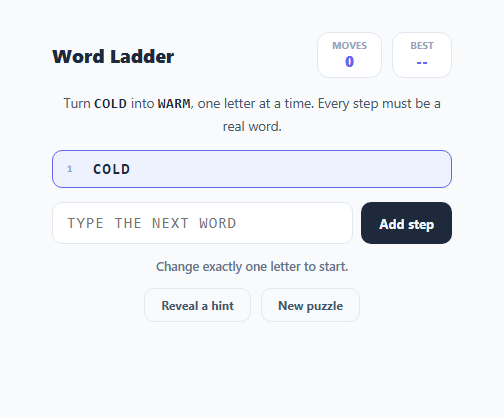
A word ladder (also called a doublet or word golf) is a classic word puzzle invented by Lewis Carroll: transform a start word into an end word by changing exactly one letter at a time, with every intermediate step required to be a real word of the same length. This snippet implements a fully playable version — an input form, a running trail of accepted steps, per-letter diff highlighting, move counting, and a small built-in dictionary used to validate every guess — without any backend or external word-list API.
Representing a puzzle as a chain plus an accepted dictionary
Each entry in the PUZZLES array bundles two things: a known-solvable chain from the start word to the end word (used only to know the target and to power the hint button), and a small dict array of every word the puzzle will accept as a valid intermediate step, including the chain words themselves. Keeping the dictionary intentionally small and puzzle-specific — rather than shipping a full English word list — keeps the snippet self-contained while still letting players find alternate valid ladders beyond the exact one baked into chain, since any accepted word from dict that satisfies the one-letter rule is a legal move.
Validating a guess: length, single-letter diff, dictionary membership, no repeats
submitGuess() runs a guess through four checks in order before accepting it. First, the guessed word's length must match the current word's length — a word ladder never changes word length mid-chain. Second, diffCount() compares the guess to the current word character-by-character and counts how many positions differ; the guess is rejected unless exactly one letter changed, which is the entire rule that makes the puzzle a "ladder" rather than free-form guessing. Third, the guess must appear in the puzzle's dict Set (uppercased for case-insensitive matching) — this stops nonsense strings that happen to differ by one letter from being accepted as real words. Fourth, a repeat check via trail.includes(word) prevents padding the ladder by bouncing back and forth between two words already used.
The diff-highlighting trail
renderTrail() rebuilds the visible list of accepted words after every successful move. For every word after the first, it compares each character position against the previous word in the trail and wraps any differing character in a .diff-letter span, which is styled in the accent color. This turns an otherwise flat list of words into a readable record of exactly which letter changed at each step, reinforcing the puzzle's core mechanic visually rather than just verbally.
Move counting and a persisted best score
A moves counter increments on every accepted step and is shown live in the stats header. When the current word matches the puzzle's final target word, solved is set to true, the input is disabled, and if this run's moves total is lower than any previous best for the session, best updates — giving returning players on the same puzzle set a concrete number to beat, purely from in-memory state (no localStorage is used, so best resets on page reload).
Hints without giving away the whole solution
The hint button does not reveal the full chain at once. It looks at trail.length — the number of words already accepted, including the start word — and reveals only chain[trail.length], i.e. the next single step in the reference solution. Because players can legally deviate from the reference chain (any dictionary word satisfying the one-letter rule is accepted), the hint is best read as "a valid next word," not "the only correct next word."
Build with AI
Build, Understand, Optimize, and Extend It With AI
Paste this snippet's HTML, CSS, and JS into an AI coding assistant like Claude and ask it to explain exactly how diffCount() and the trail.includes() repeat-guard work together to enforce a legal word ladder move, and why the dictionary is scoped per-puzzle rather than global. It is also a good candidate for extension — ask the assistant to load a real English word list via an API and validate arbitrary five-letter ladders instead of a fixed puzzle set, add a shortest-path solver using breadth-first search over the dictionary graph to show the true minimum move count, or persist the best score per puzzle in localStorage so it survives a page reload.
Prompt to recreate it
Copy this into your AI assistant of choice to build the effect from scratch, or as a jumping-off point for your own variant:
Build a word ladder puzzle game in plain HTML, CSS, and JavaScript — no libraries, no backend.

Requirements:
- Show a start word and an end word of the same length, and let the player type a new word into a text input to add a step to a growing "trail" list.
- A submitted word is only accepted as a valid next step if: it is the same length as the current last word in the trail, it differs from that word in exactly one letter position, it appears in a small built-in accepted-word list for the current puzzle, and it has not already been used earlier in the trail. Reject the guess with a specific, clear feedback message for whichever check failed.
- Render the trail as a list of accepted words, and for every word after the first, visually highlight (e.g. a different color span) the single letter that changed from the previous word in the trail.
- Track and display a live move counter, and once the player's word exactly matches the target end word, mark the puzzle solved, disable further input, and compare this run's move count against a best-score value held in memory, updating it if this run was better.
- Add a hint button that reveals only the single next word from a reference solution chain (based on how many steps have been accepted so far), never the entire remaining solution at once.
- Support multiple bundled puzzles that can be cycled with a "New puzzle" button, each resetting the trail, move counter, and input state.
Want to tighten it up first? Run this prompt through the AI Prompt Studio to score it across 8 quality dimensions, catch anti-patterns, and tune the wording for Claude, ChatGPT, or Gemini before you paste it in.
Step by step
How to Use
- 1Read the goal wordsThe header shows a start word and an end word, e.g. COLD to WARM. Every step in between must change exactly one letter and be a real word.
- 2Type your next wordType a word into the input and submit it. submitGuess() checks it changes exactly one letter from the current last word in the trail, via diffCount().
- 3Watch the diff highlightingEach accepted word in the trail highlights the letter that changed from the previous word, so you can trace exactly how the chain evolved.
- 4Reach the end word to winOnce your guess exactly matches the target end word, the puzzle is marked solved, the input disables, and your move count is compared against the best score for that puzzle.
- 5Ask for a hint if stuckClick "Reveal a hint" to see chain[trail.length] — one valid next word from the reference solution, without spoiling the rest of the ladder.
- 6Load a new puzzleClick "New puzzle" to cycle to the next entry in the PUZZLES array and reset moves, trail and best-score tracking for that puzzle.
Real-world uses
Common Use Cases
Got questions?
Frequently Asked Questions
The guessed word must be the same length as the current word, differ from it in exactly one letter position (checked by diffCount()), appear in the puzzle's built-in dict Set, and not already appear earlier in the trail. All four conditions must pass for the move to be accepted.
No. Any sequence of accepted dictionary words that satisfies the one-letter-change rule at every step and eventually reaches the exact end word counts as solved — the reference chain array is only used to determine the target word and to power the hint button, not to restrict your path.
Keeping dict scoped to each puzzle keeps the snippet fully self-contained with no external word-list API or large bundled file, while still allowing several valid alternate routes through the puzzle beyond the single baked-in chain.
The hint button looks up chain[trail.length] — using how many words you have accepted so far as an index — and reveals only that one next reference word, never the full remaining chain in one click.
Yes. Add an object to the PUZZLES array with a chain array (a known valid start-to-end sequence) and a dict array containing every word you want accepted as valid for that puzzle, including all words in chain.
No, best is held in a plain JavaScript variable for the current session only. To persist it across visits, read and write the value to localStorage inside loadPuzzle() and after a puzzle is solved.