Source Code
<div class="dl-phone">
<div class="dl-screen">
<div class="dl-display">
<div class="dl-num" id="dlNum"> </div>
<div class="dl-name" id="dlName"></div>
</div>
<div class="dl-pad" id="dlPad">
<button data-k="1"><b>1</b><small> </small></button>
<button data-k="2"><b>2</b><small>ABC</small></button>
<button data-k="3"><b>3</b><small>DEF</small></button>
<button data-k="4"><b>4</b><small>GHI</small></button>
<button data-k="5"><b>5</b><small>JKL</small></button>
<button data-k="6"><b>6</b><small>MNO</small></button>
<button data-k="7"><b>7</b><small>PQRS</small></button>
<button data-k="8"><b>8</b><small>TUV</small></button>
<button data-k="9"><b>9</b><small>WXYZ</small></button>
<button data-k="*"><b>∗</b><small> </small></button>
<button data-k="0"><b>0</b><small>+</small></button>
<button data-k="#"><b>#</b><small> </small></button>
</div>
<div class="dl-actions">
<span class="dl-spacer"></span>
<button class="dl-call" id="dlCall" aria-label="Call">
<svg viewBox="0 0 24 24" width="26" fill="#fff"><path d="M6.6 10.8a15.5 15.5 0 0 0 6.6 6.6l2.2-2.2a1 1 0 0 1 1-.24 11 11 0 0 0 3.5.56 1 1 0 0 1 1 1V20a1 1 0 0 1-1 1A17 17 0 0 1 3 4a1 1 0 0 1 1-1h3.5a1 1 0 0 1 1 1c0 1.2.2 2.4.56 3.5a1 1 0 0 1-.25 1z"/></svg>
</button>
<button class="dl-del" id="dlDel" aria-label="Delete">
<svg viewBox="0 0 24 24" width="24" fill="none" stroke="#94a3b8" stroke-width="2" stroke-linecap="round"><path d="M21 5H9L3 12l6 7h12z"/><path d="M14 9l-4 6M10 9l4 6"/></svg>
</button>
</div>
</div>
</div>*{box-sizing:border-box;margin:0;padding:0}
body{font-family:system-ui,-apple-system,sans-serif;background:#1e293b;display:flex;justify-content:center;align-items:center;min-height:100vh;padding:24px}
.dl-phone{width:280px;height:580px;background:#0b1220;border-radius:46px;padding:11px;box-shadow:0 30px 60px -20px rgba(0,0,0,.6),inset 0 0 0 2px #1e293b}
.dl-screen{width:100%;height:100%;border-radius:34px;overflow:hidden;background:#f8fafc;color:#0f172a;display:flex;flex-direction:column;padding:26px 26px 22px}
.dl-display{flex:1;display:flex;flex-direction:column;align-items:center;justify-content:center;min-height:80px}
.dl-num{font-size:34px;font-weight:600;letter-spacing:1px;font-variant-numeric:tabular-nums;min-height:42px;color:#0f172a;word-break:break-all;text-align:center;line-height:1.1}
.dl-name{font-size:13px;color:#22c55e;font-weight:700;margin-top:6px;min-height:18px}
.dl-pad{display:grid;grid-template-columns:repeat(3,1fr);gap:14px;margin-bottom:16px}
.dl-pad button{aspect-ratio:1;border:none;background:#fff;border-radius:50%;cursor:pointer;display:flex;flex-direction:column;align-items:center;justify-content:center;gap:1px;font-family:inherit;box-shadow:0 2px 6px -3px rgba(0,0,0,.25);transition:background .1s,transform .08s}
.dl-pad button:active{background:#e2e8f0;transform:scale(.93)}
.dl-pad b{font-size:25px;font-weight:600;line-height:1}
.dl-pad small{font-size:8.5px;font-weight:700;letter-spacing:1px;color:#94a3b8;height:9px}
.dl-actions{display:flex;align-items:center;justify-content:space-between}
.dl-spacer,.dl-del{width:52px}
.dl-call{width:60px;height:60px;border-radius:50%;background:#22c55e;border:none;cursor:pointer;display:flex;align-items:center;justify-content:center;box-shadow:0 8px 20px -6px rgba(34,197,94,.7);transition:transform .1s}
.dl-call:active{transform:scale(.92)}
.dl-call.calling{animation:dlPulse 1s ease infinite}
@keyframes dlPulse{50%{box-shadow:0 8px 30px 4px rgba(34,197,94,.9)}}
.dl-del{height:52px;background:none;border:none;cursor:pointer;display:flex;align-items:center;justify-content:center;opacity:0;pointer-events:none;transition:opacity .15s}
.dl-del.show{opacity:1;pointer-events:auto}var numEl = document.getElementById('dlNum');
var nameEl = document.getElementById('dlName');
var del = document.getElementById('dlDel');
var call = document.getElementById('dlCall');
var digits = '';
// A tiny fake contacts book for the green caller-ID line.
var CONTACTS = { '5550100': 'Sara Chen', '5550199': 'Pizza Palace', '911': 'Emergency' };
function format(d) {
// US-style grouping once enough digits are present.
if (d.length >= 7 && /^[0-9]+$/.test(d)) {
if (d.length <= 10) return d.replace(/(\d{0,3})(\d{0,3})(\d{0,4})/, function (_, a, b, c) {
return [a && '(' + a + ')', b, c].filter(Boolean).join(' ');
});
}
return d;
}
function render() {
numEl.innerHTML = digits ? format(digits) : ' ';
nameEl.textContent = CONTACTS[digits] || '';
del.classList.toggle('show', digits.length > 0);
}
document.getElementById('dlPad').addEventListener('click', function (e) {
var btn = e.target.closest('button');
if (!btn) return;
if (digits.length < 15) { digits += btn.getAttribute('data-k'); render(); }
});
del.addEventListener('click', function () { digits = digits.slice(0, -1); render(); });
del.addEventListener('dblclick', function () { digits = ''; render(); }); // press-hold equivalent
call.addEventListener('click', function () {
if (!digits) return;
call.classList.add('calling');
nameEl.textContent = 'Calling…';
setTimeout(function () { call.classList.remove('calling'); render(); }, 2200);
});
render();Learn Coding Visually
Learn to code with interactive, live-preview playgrounds — HTML, CSS, JavaScript, React & more.
 HTML Playground42 lessons · Click-based · Live preview
 CSS PlaygroundLearn CSS with a live editor
 JavaScript Playground60 lessons · DOM · Async · Canvas
 React PlaygroundLearn React with a live code editor
 GSAP PlaygroundLearn GSAP animation interactively
 SVG Playground44 lessons · shapes · paths · animation
 SCSS Playground45 lessons · Sass modules · tokens
 Tailwind PlaygroundLearn Tailwind CSS with a live editor
 Bootstrap 5 Playground50 lessons · live preview
Dialer Keypad — Free Phone Dialpad UI HTML CSS Snippet
Dialer Keypad · Mobile · Plain HTML, CSS & JS · Live preview
What's included
Features
About this UI Snippet
Dialer Keypad — Phone Dialpad with Number Formatting
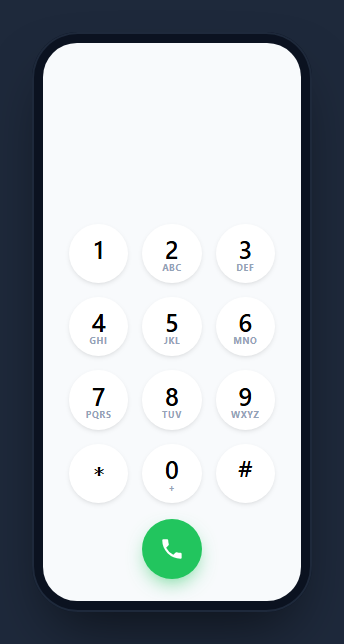
A dialer keypad is the phone app's number pad — a 3×4 grid of digits with letters beneath them, a growing number display, a green call button, and a delete key. This snippet builds a faithful, interactive one inside a CSS phone frame, with live number formatting, caller-ID lookup, and a calling animation, in HTML, CSS, and vanilla JavaScript with no dependency.
The classic 3×4 pad
The keypad is a CSS grid of circular buttons, each showing a large digit and the small letter group beneath it (ABC, DEF, …) exactly like a real phone, with 0 carrying a + for international dialing. Buttons are aspect-ratio: 1 circles that depress on :active (background and a slight scale) for tactile feedback. Taps are handled by one delegated listener on the pad that appends the pressed key, capped at 15 digits.
Live phone-number formatting
As you dial, format() groups the digits into a readable US-style number — (123) 456 7890 — using a single replace with a capture-group callback that wraps the area code in parentheses and spaces the rest, but only once enough digits are present and the input is purely numeric (so */# codes aren't mangled). The display updates on every keypress.
Caller-ID lookup
A small CONTACTS map simulates a phonebook: when the dialed string matches a known number, a green name line appears beneath the display — the caller-ID match you see when dialing a saved contact. It's a stand-in for a real contacts query, showing exactly where you'd plug one in.
Delete and call behavior
The delete key only appears once there's something to erase (it fades in via a .show class), removes the last digit on tap, and clears everything on double-tap (the press-and-hold equivalent). The call button pulses with a dlPulse keyframe and shows "Calling…" for a moment — the placeholder for initiating a real call.
Reusing it
Swap CONTACTS for your real address book, change format() to your locale's grouping, and wire the call button to a tel: link or your VoIP/WebRTC SDK. It works as the dialer in a softphone, a contact app, or any phone mockup demo.
Build with AI
Build, Understand, Optimize, and Extend It With AI
Rather than tracing the regex yourself, paste this snippet's HTML, CSS, and JS into an AI coding assistant like Claude and ask it to explain exactly what the capture groups in format()'s replace call are matching and why the function bails out for strings containing star or pound characters. The same assistant is useful for optimizing it too, for instance checking whether calling render() on every single keypress is wasteful for a 15-digit cap or whether that's already cheap enough to ignore. It is also a fast way to extend the dialer: ask it to wire the CONTACTS lookup to a real fetch-based address book, support international number formats beyond the US-style grouping, or add a long-press-to-clear gesture on touch devices instead of relying on double-tap. Treat the code less like a finished artifact and more like a starting point for a conversation.
Prompt to recreate it
Copy this into your AI assistant of choice to build the effect from scratch, or as a jumping-off point for your own variant:
Build a phone dialer keypad UI in plain HTML, CSS, and JavaScript with no library, inside a CSS-only phone frame.

Requirements:
- A 3x4 grid of circular buttons for 0-9, star, and pound, each button showing a large digit plus small letter groupings underneath it exactly like a real phone (ABC under 2, DEF under 3, and so on, with a plus sign under 0), built with a single delegated click listener on the grid container rather than one listener per button.
- A running dialed-digits string capped at a maximum length, appended to on each keypress and re-rendered into a display line above the pad.
- A live formatting function that groups digits into a readable phone number (e.g. area code in parentheses, then two more groups) only once enough digits are present and only when the string is purely numeric, so star/pound dial codes are left unformatted.
- A small in-memory contacts lookup object mapping known digit strings to names, checked on every render so a caller-ID-style name appears beneath the number display when the dialed digits match a known contact.
- A delete key that is visually hidden (not just disabled) until there is at least one digit dialed, removes the last digit on a single tap, and clears the entire number on a double-tap as a stand-in for a press-and-hold gesture.
- A call button that, on click, plays a pulsing CSS animation and shows a temporary "Calling..." status text for about two seconds before resetting, with the button disabled while the fake call is in progress.
Want to tighten it up first? Run this prompt through the AI Prompt Studio to score it across 8 quality dimensions, catch anti-patterns, and tune the wording for Claude, ChatGPT, or Gemini before you paste it in.
Step by step
How to Use
- 1Paste HTML, CSS, and JSA dialer keypad renders inside a phone frame.
- 2Tap the digitsThe number builds in the display above the pad.
- 3Watch the formattingOnce long enough it groups into (123) 456 7890.
- 4Dial a known numberA matching contact name appears in green.
- 5Delete or callThe delete key erases; double-tap clears; call pulses.
- 6Wire it upConnect CONTACTS and the call button to your stack.
Real-world uses
Common Use Cases
Got questions?
Frequently Asked Questions
As digits are entered, a format() function groups them into a US-style number like (123) 456 7890 using a single regex replace with a capture-group callback that wraps the area code in parentheses and spaces the rest. It only formats once there are enough digits and the input is all numbers, so star and pound codes aren't altered.
A small CONTACTS object maps numbers to names. On each keypress, the dialed string is looked up in that map, and if it matches, the contact's name is shown in green beneath the number — the caller-ID match for a saved contact. In a real app you'd replace the map with a query against your address book.
It only shows when there's something to delete. A show class fades it in once the dialed string is non-empty, mirroring real dialers where the backspace appears after you start typing. Tapping it removes the last digit, and double-tapping clears the whole number, standing in for press-and-hold to clear.
Wire its click handler to a tel: link (window.location.href = 'tel:' + digits) for the device dialer, or to your VoIP/WebRTC SDK to place an in-app call. The snippet shows a calling animation as a placeholder; replace the timeout with your call-initiation logic and update the status line from call events.
Hold the dialed digits in state, append on key press, and derive the formatted display and caller-ID name from it. The delete key visibility binds to whether the string is non-empty. Keep format() and the contacts lookup as pure helpers. In Tailwind, build the pad with a grid and aspect-square circular buttons.