Source Code
<div class="container py-5">
  <p class="text-muted small mb-3">Click "+ Add level" a few times to grow the trail past 4 segments and watch the middle ones collapse into a "…" dropdown.</p>
  <nav aria-label="breadcrumb">
    <ol class="breadcrumb bsbc-trail" id="bsbcTrail">
      <li class="breadcrumb-item"><a href="javascript:void(0)">Home</a></li>
      <li class="breadcrumb-item"><a href="javascript:void(0)">Docs</a></li>
      <li class="breadcrumb-item"><a href="javascript:void(0)">Guides</a></li>
      <li class="breadcrumb-item active" aria-current="page">Getting Started</li>
    </ol>
  </nav>
  <button class="btn btn-sm btn-outline-dark" id="bsbcAdd">+ Add level</button>
  <button class="btn btn-sm btn-outline-secondary" id="bsbcReset">Reset</button>
</div>
.bsbc-trail { background: #f6f7f9; border-radius: 8px; padding: 10px 16px; align-items: center; }
.bsbc-trail .breadcrumb-item + .breadcrumb-item::before { content: "›"; }
.bsbc-overflow .dropdown-toggle {
background: none; border: none; color: #6b7280; font-weight: 700; padding: 0 4px; cursor: pointer;
}
.bsbc-overflow .dropdown-menu { min-width: 160px; }const trail = document.getElementById('bsbcTrail');
const addBtn = document.getElementById('bsbcAdd');
const resetBtn = document.getElementById('bsbcReset');
let n = 0;
function segments() {
return Array.from(trail.children).filter(li => !li.classList.contains('bsbc-overflow'));
}
// Collapses every middle segment (all but the first "Home" and the last two)
// into one "…" dropdown once the trail has more than 4 real segments — the
// standard breadcrumb-overflow pattern, rebuilt from scratch on every change
// so it always reflects exactly what's currently in the trail.
function render() {
const segs = segments();
trail.querySelectorAll('.bsbc-overflow').forEach(el => el.remove());
if (segs.length <= 4) {
segs.forEach(li => li.style.display = '');
return;
}
const first = segs[0];
const lastTwo = segs.slice(-2);
const hidden = segs.slice(1, -2);
segs.forEach(li => li.style.display = 'none');
first.style.display = '';
lastTwo.forEach(li => li.style.display = '');
const overflowLi = document.createElement('li');
overflowLi.className = 'breadcrumb-item bsbc-overflow dropdown';
overflowLi.innerHTML =
'<a class="dropdown-toggle" href="javascript:void(0)" data-bs-toggle="dropdown">…</a>' +
'<ul class="dropdown-menu">' +
hidden.map(li => '<li><a class="dropdown-item" href="javascript:void(0)">' + li.textContent + '</a></li>').join('') +
'</ul>';
first.after(overflowLi);
}
addBtn.addEventListener('click', () => {
n++;
const active = trail.querySelector('.active');
active.classList.remove('active');
active.removeAttribute('aria-current');
const link = document.createElement('a');
link.href = 'javascript:void(0)';
const oldLi = active.cloneNode(false);
oldLi.appendChild(link.cloneNode());
link.textContent = active.textContent;
active.innerHTML = '';
active.appendChild(link);
const newLi = document.createElement('li');
newLi.className = 'breadcrumb-item active';
newLi.setAttribute('aria-current', 'page');
newLi.textContent = 'Level ' + n;
trail.appendChild(newLi);
render();
});
resetBtn.addEventListener('click', () => {
n = 0;
trail.innerHTML =
'<li class="breadcrumb-item"><a href="javascript:void(0)">Home</a></li>' +
'<li class="breadcrumb-item"><a href="javascript:void(0)">Docs</a></li>' +
'<li class="breadcrumb-item"><a href="javascript:void(0)">Guides</a></li>' +
'<li class="breadcrumb-item active" aria-current="page">Getting Started</li>';
render();
});Learn Coding Visually
Learn to code with interactive, live-preview playgrounds — HTML, CSS, JavaScript, React & more.
 HTML Playground42 lessons · Click-based · Live preview
 CSS PlaygroundLearn CSS with a live editor
 JavaScript Playground60 lessons · DOM · Async · Canvas
 React PlaygroundLearn React with a live code editor
 GSAP PlaygroundLearn GSAP animation interactively
 SVG Playground44 lessons · shapes · paths · animation
 SCSS Playground45 lessons · Sass modules · tokens
 Tailwind PlaygroundLearn Tailwind CSS with a live editor
 Bootstrap 5 Playground50 lessons · live preview
Bootstrap Breadcrumb Trail with Dropdown Overflow — Free Snippet
Bootstrap Breadcrumb Trail with Dropdown Overflow · Navigation · Plain HTML, CSS & JS · Live preview
What's included
Features
About this UI Snippet
Bootstrap Breadcrumb Trail with Dropdown Overflow — HTML, CSS & JavaScript
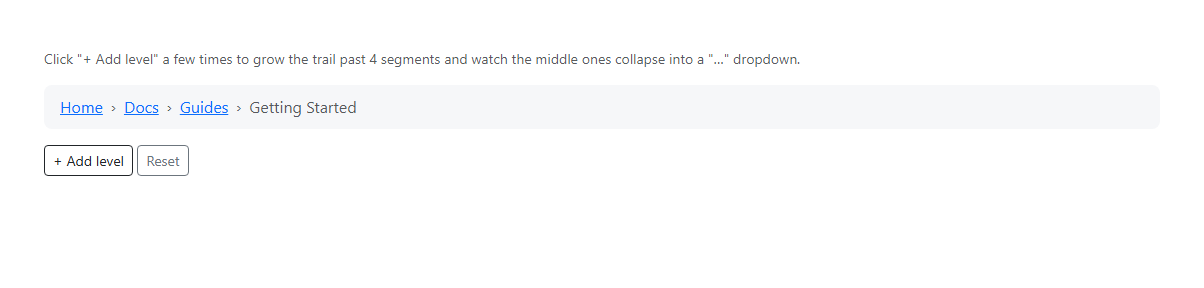
A breadcrumb trail five or six levels deep stops being useful — it wraps, it crowds the page, and the first and last segments (the ones a visitor actually cares about) get lost in the middle. This snippet uses real Bootstrap 5.3's .breadcrumb component and rebuilds it every time a segment is added: once there are more than four segments, everything except the first and the last two collapses into a single "…" item using Bootstrap's real Dropdown component, so the trail always stays exactly four visible items wide no matter how deep the real path goes.
The render function is intentionally non-incremental — it removes any existing overflow dropdown and rebuilds the visible/hidden split from scratch on every change, which is what guarantees the collapsed trail can never drift out of sync with the actual path as levels are added or removed.
Build with AI
Build, Understand, Optimize, and Extend It With AI
Hand this snippet's HTML, CSS, and JS to an AI coding assistant like Claude and ask it to make the overflow threshold responsive (collapsing at 3 segments on mobile, 5 on desktop), or to add breadcrumb structured data (BreadcrumbList JSON-LD) generated from the same trail array for SEO. It's also a good exercise to ask the assistant to drive the whole trail from a single array of {label, href} objects instead of manipulating li elements directly.
Prompt to recreate it
Copy this into your AI assistant of choice to build the effect from scratch, or as a jumping-off point for your own variant:
Build a Bootstrap 5.3 breadcrumb trail that collapses overflow into a dropdown, using the real Bootstrap CDN framework (bootstrap.min.css and bootstrap.bundle.min.js), not custom CSS made to resemble Bootstrap.

Requirements:
- A real Bootstrap breadcrumb component (ol.breadcrumb / li.breadcrumb-item) that can grow to any number of segments.
- Once the trail exceeds 4 segments, everything except the first segment and the last two must collapse into a single "…" item using Bootstrap's real Dropdown component (data-bs-toggle="dropdown"), listing the hidden segments as dropdown-item links.
- The collapse/expand logic must fully recompute which segments are visible vs. hidden every time the trail changes (add or remove a segment), rather than incrementally patching the DOM, so it can never drift out of sync with the actual path.
- Include working "add a level" and "reset" controls to demonstrate the collapsing behavior interactively.
Want to tighten it up first? Run this prompt through the AI Prompt Studio to score it across 8 quality dimensions, catch anti-patterns, and tune the wording for Claude, ChatGPT, or Gemini before you paste it in.
Step by step
How to Use
- 1Load the snippetClick the snippet in the sidebar Library tab. The preview loads a 4-segment breadcrumb.
- 2Add a levelClick "+ Add level" — a 5th segment appears, and the middle segments collapse into a "…" dropdown.
- 3Open the dropdownClick the "…" — Bootstrap's real Dropdown component shows the hidden middle segments as links.
- 4Add more levelsKeep clicking "+ Add level" — the dropdown's hidden list grows while the visible trail stays exactly four items.
- 5ResetClick "Reset" to return to the original 4-segment trail.
Real-world uses
Common Use Cases
Got questions?
Frequently Asked Questions
Real Bootstrap 5.3 — the "…" overflow item uses the actual Dropdown component via data-bs-toggle="dropdown", the same component used for any standard Bootstrap dropdown menu.
Once the trail has more than 4 segments. Change the "4" comparisons in the render() function to adjust that threshold.
No — render() recomputes which segments are hidden every time it runs, from whatever the current trail actually contains, so it's always accurate rather than a stale snapshot.
Yes — the breadcrumb-item and dropdown-item anchors already exist; set their href to real URLs (or wire click handlers to your router) instead of javascript:void(0).
Yes — the collapse logic has no hardcoded maximum; however many segments exist beyond the first and last two all get folded into the same overflow dropdown.