Source Code
<div class="container py-5">
<div class="card biv-card mx-auto">
<div class="card-body p-4 p-md-5">
<div class="d-flex justify-content-between align-items-start mb-4 biv-noprint-header">
<div>
<h4 class="fw-bold mb-0">INVOICE</h4>
<div class="text-muted small">#INV-2026-0142</div>
</div>
<button class="btn btn-dark btn-sm" id="bivPrintBtn">Print Invoice</button>
</div>
<div class="row mb-4">
<div class="col-6">
<div class="text-muted small text-uppercase mb-1">From</div>
<div class="fw-semibold">Northwind Studio LLC</div>
<div class="small text-muted">142 Harbor Ave, Suite 4<br>Seattle, WA 98101</div>
</div>
<div class="col-6 text-end">
<div class="text-muted small text-uppercase mb-1">Bill To</div>
<div class="fw-semibold">Acme Retail Co.</div>
<div class="small text-muted">88 Market St<br>Denver, CO 80202</div>
</div>
</div>
<table class="table align-middle" id="bivTable">
<thead class="table-light">
<tr>
<th>Description</th>
<th class="text-center" style="width:110px;">Qty</th>
<th class="text-end" style="width:120px;">Rate</th>
<th class="text-end" style="width:120px;">Amount</th>
</tr>
</thead>
<tbody>
<tr data-rate="450">
<td>Website redesign — homepage & product pages</td>
<td class="text-center"><input type="number" class="form-control form-control-sm biv-qty text-center" value="4" min="0"></td>
<td class="text-end">$450.00</td>
<td class="text-end biv-amount">$1,800.00</td>
</tr>
<tr data-rate="80">
<td>Custom icon set (12 icons)</td>
<td class="text-center"><input type="number" class="form-control form-control-sm biv-qty text-center" value="1" min="0"></td>
<td class="text-end">$80.00</td>
<td class="text-end biv-amount">$80.00</td>
</tr>
<tr data-rate="60">
<td>Support hours</td>
<td class="text-center"><input type="number" class="form-control form-control-sm biv-qty text-center" value="3" min="0"></td>
<td class="text-end">$60.00</td>
<td class="text-end biv-amount">$180.00</td>
</tr>
</tbody>
</table>
<div class="row justify-content-end">
<div class="col-md-5">
<div class="d-flex justify-content-between mb-1">
<span class="text-muted">Subtotal</span>
<span id="bivSubtotal">$0.00</span>
</div>
<div class="d-flex justify-content-between mb-1 align-items-center">
<span class="text-muted">Tax (<span id="bivTaxRateLabel">8</span>%)</span>
<span id="bivTax">$0.00</span>
</div>
<input type="range" class="form-range biv-noprint-header" id="bivTaxRate" min="0" max="20" value="8">
<hr>
<div class="d-flex justify-content-between fw-bold fs-5">
<span>Total</span>
<span id="bivTotal">$0.00</span>
</div>
</div>
</div>
</div>
</div>
</div>.biv-card { max-width: 760px; border: 1px solid #eceef1; border-radius: 14px; }
.biv-qty { width: 70px; margin: 0 auto; }
@media print {
.biv-noprint-header { display: none !important; }
body { background: #fff; }
.biv-card { border: none; box-shadow: none; }
}const rows = Array.from(document.querySelectorAll('#bivTable tbody tr'));
const subtotalEl = document.getElementById('bivSubtotal');
const taxEl = document.getElementById('bivTax');
const totalEl = document.getElementById('bivTotal');
const taxRateInput = document.getElementById('bivTaxRate');
const taxRateLabel = document.getElementById('bivTaxRateLabel');
const printBtn = document.getElementById('bivPrintBtn');
function money(n) {
return '$' + n.toFixed(2).replace(/\d(?=(\d{3})+\.)/g, '$&,');
}
function recalc() {
let subtotal = 0;
rows.forEach(row => {
const rate = parseFloat(row.getAttribute('data-rate'));
const qtyInput = row.querySelector('.biv-qty');
const qty = Math.max(0, parseFloat(qtyInput.value) || 0);
const amount = rate * qty;
row.querySelector('.biv-amount').textContent = money(amount);
subtotal += amount;
});
const rate = parseFloat(taxRateInput.value) || 0;
const tax = subtotal * (rate / 100);
taxRateLabel.textContent = rate;
subtotalEl.textContent = money(subtotal);
taxEl.textContent = money(tax);
totalEl.textContent = money(subtotal + tax);
}
rows.forEach(row => {
row.querySelector('.biv-qty').addEventListener('input', recalc);
});
taxRateInput.addEventListener('input', recalc);
printBtn.addEventListener('click', () => window.print());
recalc();Learn Coding Visually
Learn to code with interactive, live-preview playgrounds — HTML, CSS, JavaScript, React & more.
 HTML Playground42 lessons · Click-based · Live preview
 CSS PlaygroundLearn CSS with a live editor
 JavaScript Playground60 lessons · DOM · Async · Canvas
 React PlaygroundLearn React with a live code editor
 GSAP PlaygroundLearn GSAP animation interactively
 SVG Playground44 lessons · shapes · paths · animation
 SCSS Playground45 lessons · Sass modules · tokens
 Tailwind PlaygroundLearn Tailwind CSS with a live editor
 Bootstrap 5 Playground50 lessons · live preview
Bootstrap Invoice Template — Free HTML CSS JS Snippet
Bootstrap Invoice Template · Tables · Plain HTML, CSS & JS · Live preview
What's included
Features
About this UI Snippet
Bootstrap Invoice Template — HTML, CSS & JavaScript
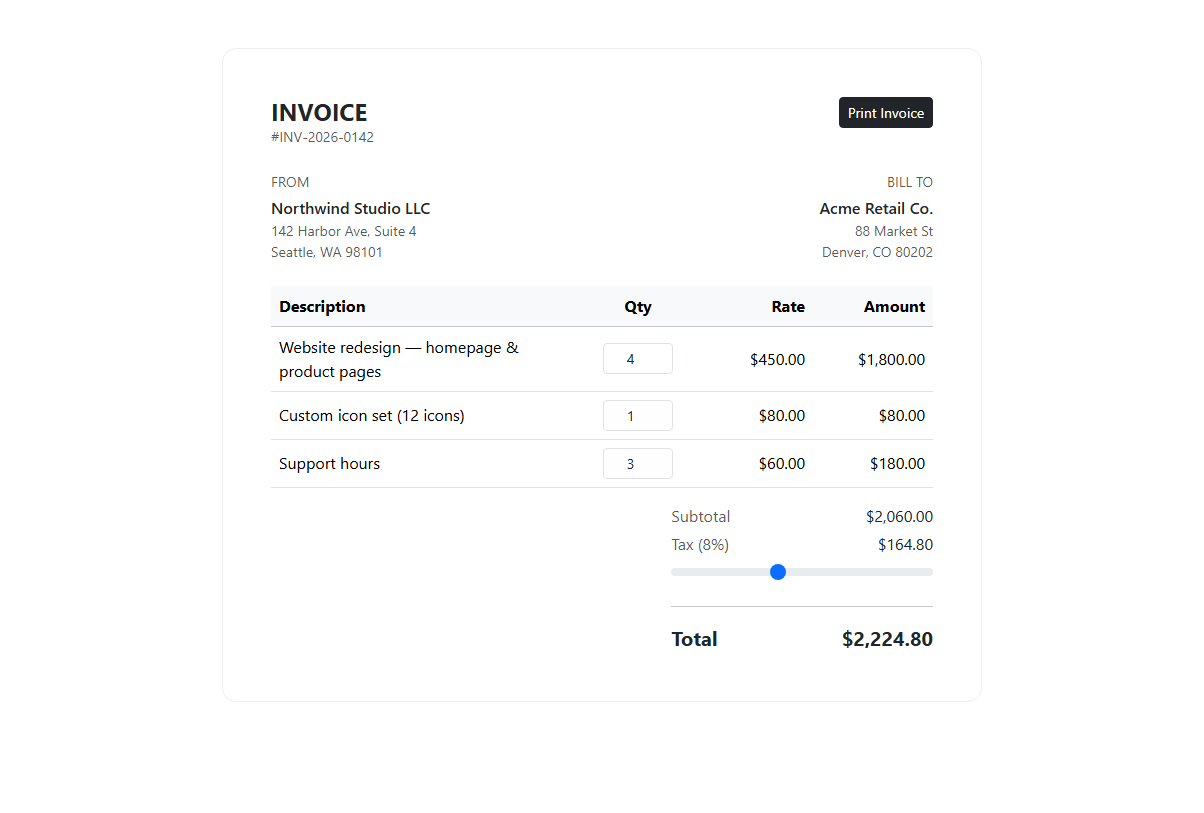
An invoice template only earns its keep if the numbers stay correct while someone edits it, so this snippet treats the totals as a derived, recalculated value rather than static text typed into the HTML. Line items live in a real Bootstrap table with a table-light head; each row carries its unit price in a data-rate attribute on the <tr> itself, and the quantity cell holds a small form-control-sm number input (.biv-qty) instead of plain text, so it can be edited in place.
The recalc() function is the whole engine. It loops over every row, reads data-rate with parseFloat, reads the quantity input's current value (guarded with Math.max(0, parseFloat(...) || 0) so an emptied or negative field never produces NaN or a negative amount), multiplies the two into that row's amount, and writes it back into the row's .biv-amount cell through a small money() formatter that adds thousands separators with a regex lookahead. Each row's amount is added into a running subtotal, which then feeds a tax calculation driven by a Bootstrap form-range slider (#bivTaxRate) — moving the slider updates bivTaxRateLabel's percentage text and recomputes tax and total immediately, since the slider's input event calls the same recalc() function the quantity fields call.
Because every quantity input and the tax slider are wired to the same recalc() on their input event, editing any single number — a quantity, or the tax rate — immediately ripples through the per-row amount, the subtotal, the tax line, and the bold total at the bottom, all in one synchronous pass with no debounce needed since the arithmetic is trivial.
Printing is handled two ways at once. The "Print Invoice" button calls window.print() directly rather than opening a new window, which keeps the browser's native print dialog and any print-specific CSS in play. That CSS lives in a @media print block that hides every element carrying the .biv-noprint-header class — the print button itself and the tax-rate slider — since neither belongs on a paper printout, and also strips the card's border and background so the printed page shows a clean, borderless invoice instead of a screen-styled card. The edge case worth calling out: without hiding the range input specifically, most browsers still render form controls in print output as flat, oddly-cropped widgets, so it is explicitly listed in the print media query even though it visually disappears rather than just becoming non-interactive.
Every selector is a plain id or class lookup made once at script start, so the same logic drops into a React useEffect, Vue onMounted, or Angular ngAfterViewInit with controlled inputs replacing the raw DOM reads if you prefer a fully reactive rewrite.
Build with AI
Build, Understand, Optimize, and Extend It With AI
Ask an AI coding assistant like Claude to add a "line item" add/remove button so the invoice supports a variable number of rows, or to generate a downloadable PDF via the browser's print-to-PDF flow with a custom paper size. It's also worth asking it to add currency selection that reformats every amount.
Prompt to recreate it
Copy this into your AI assistant of choice to build the effect from scratch, or as a jumping-off point for your own variant:
Build a printable Bootstrap 5.3 invoice using the real Bootstrap CDN (bootstrap.min.css and bootstrap.bundle.min.js), not custom CSS made to resemble Bootstrap.

Requirements:
- Business and client info blocks, and a line-items table with Description, Qty, Rate, and Amount columns.
- Each row stores its rate in a data attribute; the Qty cell is an editable number input. Amount must recalculate live as qty times rate whenever the quantity changes.
- A subtotal, a tax line controlled by a Bootstrap range slider (with a live percentage label), and a bold total, all recalculated together whenever any quantity or the tax rate changes.
- Format all dollar amounts with two decimals and thousand separators.
- A "Print Invoice" button that calls window.print() directly, plus a @media print CSS block that hides the print button and tax slider from the printed page so only the clean invoice content is printed.
Want to tighten it up first? Run this prompt through the AI Prompt Studio to score it across 8 quality dimensions, catch anti-patterns, and tune the wording for Claude, ChatGPT, or Gemini before you paste it in.
Step by step
How to Use
- 1Load the snippetA three-line invoice appears with business and client blocks, a line-items table, and computed Subtotal, Tax and Total already filled in.
- 2Edit a quantityChange the "4" in the first row to "6" — that row's Amount updates instantly, and so do the Subtotal, Tax and Total below the table.
- 3Drag the tax sliderMoving the range input changes the tax percentage label next to "Tax" and recalculates the Tax and Total lines live.
- 4Set a quantity to 0The row's amount drops to $0.00 and the totals adjust accordingly, without breaking the calculation for other rows.
- 5Click Print InvoiceThe browser print dialog opens showing a clean version of the invoice with the Print button and tax slider hidden from the printed output.
Real-world uses
Common Use Cases
Got questions?
Frequently Asked Questions
Yes — every .biv-qty input fires recalc() on its input event, which recomputes that row's amount from data-rate times the new quantity, then re-sums every row into the subtotal and re-derives tax and total from the current slider value.
parseFloat on an empty string returns NaN, so the code falls back to 0 via the "|| 0" guard and also clamps with Math.max(0, ...), meaning an emptied field is treated as zero quantity rather than breaking the total with NaN.
A Bootstrap form-range slider from 0 to 20 drives both the visible percentage label next to "Tax" and the actual tax calculation — dragging it fires the same recalc() function used by the quantity inputs.
Yes — move the row data into component state (an array of {description, rate, qty}), derive amounts/subtotal/tax/total with useMemo (React) or a computed property (Vue/Angular), and bind the quantity inputs and tax slider to that state instead of reading the DOM directly.
No — the .biv-noprint-header class is applied to both the header button row and the tax slider, and the @media print rule sets display:none on that class, so neither appears in the printed or PDF-saved output.
The table structure, data-rate attributes, and recalc() logic are independent of styling — replace the Bootstrap table and form-range classes with Tailwind utilities on the same markup and the JavaScript keeps working unchanged.