Source Code
<div class="container py-5">
  <div class="text-center mb-4">
    <div class="d-flex justify-content-center align-items-center gap-3">
      <span class="fw-semibold">Monthly</span>
      <div class="form-check form-switch fs-4 m-0">
        <input class="form-check-input" type="checkbox" role="switch" id="bspBillingToggle">
      </div>
      <span class="fw-semibold">Yearly</span>
    </div>
    <div class="small text-success fw-semibold mt-1" id="bspSaveNote" style="visibility:hidden;">Billed yearly, save 20%</div>
  </div>

  <div class="row g-4 justify-content-center">
    <div class="col-md-4">
      <div class="card h-100 bsp-card">
        <div class="card-body p-4 d-flex flex-column">
          <h5 class="fw-bold">Basic</h5>
          <p class="text-muted small">For individuals getting started.</p>
          <div class="mb-3">
            <span class="fs-2 fw-bold bsp-price" data-monthly="9" data-yearly="7.2">$9</span>
            <span class="text-muted">/mo</span>
          </div>
          <ul class="list-unstyled small flex-grow-1">
            <li class="mb-2">✓ 1 project</li>
            <li class="mb-2">✓ 5 GB storage</li>
            <li class="mb-2">✓ Community support</li>
          </ul>
          <button class="btn btn-outline-dark w-100">Choose Basic</button>
        </div>
      </div>
    </div>

    <div class="col-md-4">
      <div class="card h-100 bsp-card bsp-popular position-relative border-dark">
        <span class="badge text-bg-dark bsp-ribbon">Most Popular</span>
        <div class="card-body p-4 d-flex flex-column">
          <h5 class="fw-bold">Pro</h5>
          <p class="text-muted small">For growing teams that need more.</p>
          <div class="mb-3">
            <span class="fs-2 fw-bold bsp-price" data-monthly="29" data-yearly="23.2">$29</span>
            <span class="text-muted">/mo</span>
          </div>
          <ul class="list-unstyled small flex-grow-1">
            <li class="mb-2">✓ 10 projects</li>
            <li class="mb-2">✓ 100 GB storage</li>
            <li class="mb-2">✓ Priority email support</li>
            <li class="mb-2">✓ Team collaboration</li>
          </ul>
          <button class="btn btn-dark w-100">Choose Pro</button>
        </div>
      </div>
    </div>

    <div class="col-md-4">
      <div class="card h-100 bsp-card">
        <div class="card-body p-4 d-flex flex-column">
          <h5 class="fw-bold">Enterprise</h5>
          <p class="text-muted small">For organizations at scale.</p>
          <div class="mb-3">
            <span class="fs-2 fw-bold bsp-price" data-monthly="99" data-yearly="79.2">$99</span>
            <span class="text-muted">/mo</span>
          </div>
          <ul class="list-unstyled small flex-grow-1">
            <li class="mb-2">✓ Unlimited projects</li>
            <li class="mb-2">✓ 1 TB storage</li>
            <li class="mb-2">✓ Dedicated account manager</li>
          </ul>
          <button class="btn btn-outline-dark w-100">Choose Enterprise</button>
        </div>
      </div>
    </div>
  </div>
</div>
.bsp-card { border: 1px solid #eceef1; border-radius: 14px; transition: transform 0.15s ease; }
.bsp-card:hover { transform: translateY(-4px); }
.bsp-popular { box-shadow: 0 10px 30px rgba(0,0,0,0.08); }
.bsp-ribbon { position: absolute; top: -12px; left: 50%; transform: translateX(-50%); padding: 6px 14px; border-radius: 999px; }const toggle = document.getElementById('bspBillingToggle');
const saveNote = document.getElementById('bspSaveNote');
const prices = Array.from(document.querySelectorAll('.bsp-price'));
function formatPrice(value) {
const num = parseFloat(value);
return Number.isInteger(num) ? '$' + num : '$' + num.toFixed(1);
}
function updatePrices() {
const yearly = toggle.checked;
saveNote.style.visibility = yearly ? 'visible' : 'hidden';
prices.forEach(el => {
const value = yearly ? el.getAttribute('data-yearly') : el.getAttribute('data-monthly');
el.textContent = formatPrice(value);
});
}
toggle.addEventListener('change', updatePrices);
updatePrices();Learn Coding Visually
Learn to code with interactive, live-preview playgrounds — HTML, CSS, JavaScript, React & more.
 HTML Playground42 lessons · Click-based · Live preview
 CSS PlaygroundLearn CSS with a live editor
 JavaScript Playground60 lessons · DOM · Async · Canvas
 React PlaygroundLearn React with a live code editor
 GSAP PlaygroundLearn GSAP animation interactively
 SVG Playground44 lessons · shapes · paths · animation
 SCSS Playground45 lessons · Sass modules · tokens
 Tailwind PlaygroundLearn Tailwind CSS with a live editor
 Bootstrap 5 Playground50 lessons · live preview
Bootstrap Subscription Plans Cards — Free Snippet
Bootstrap Subscription Plans Cards · Pricing · Plain HTML, CSS & JS · Live preview
What's included
Features
About this UI Snippet
Bootstrap Subscription Plans Cards — HTML, CSS & JavaScript
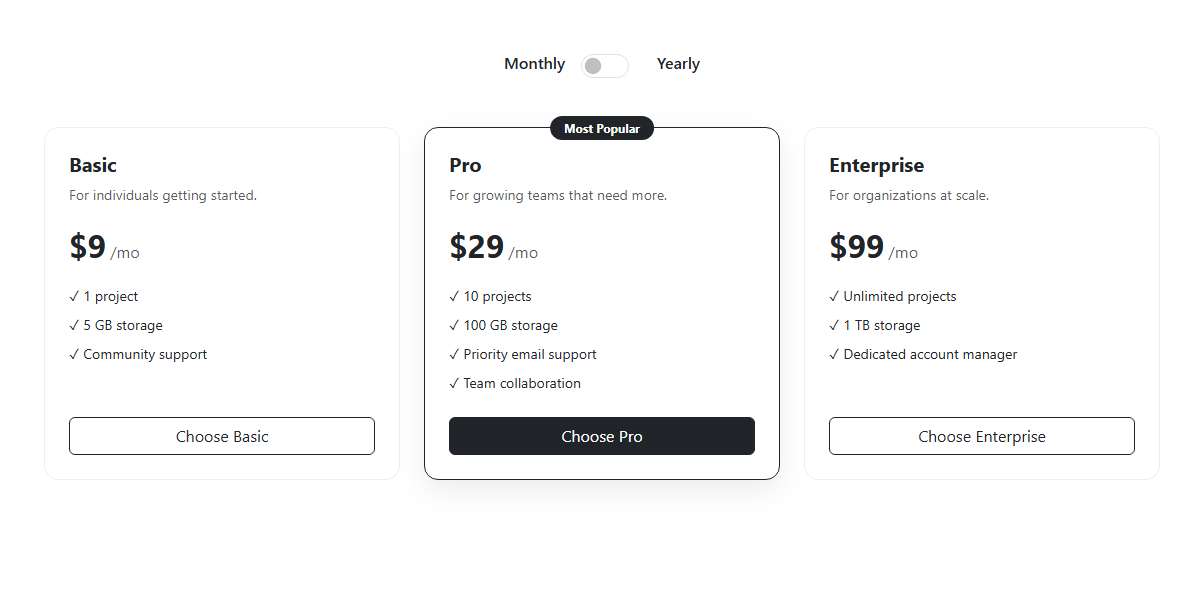
Pricing pages usually fake the monthly/yearly toggle by swapping two pre-written blocks of text; this snippet instead derives every displayed price from data attributes, so adding a fourth plan or changing a rate never requires touching the toggle logic at all. The billing switch itself is a real Bootstrap form-check form-switch checkbox with role="switch", not a custom-styled div pretending to be one, and the three plans are standard Bootstrap card components inside a responsive row g-4.
Each plan's price element (.bsp-price) carries two data attributes — data-monthly and data-yearly — holding the already-discounted yearly-equivalent monthly rate (for example Pro is 29 monthly and 23.2 yearly, the 20%-off monthly-equivalent when billed annually). The updatePrices() function reads the toggle's checked state, picks the matching attribute off every .bsp-price span in one querySelectorAll pass, and writes the formatted result back with textContent. A small formatPrice() helper checks Number.isInteger so whole-dollar monthly prices render as clean $29 while yearly-equivalent prices with a fractional cent render as $23.2 rather than an inconsistent mix of formats — that inconsistency is the non-obvious edge case a naive toFixed(2) on every value would otherwise introduce (turning $9 into $9.00 when nobody asked for cents on the monthly view).
The "Billed yearly, save 20%" note lives in the DOM at all times but is hidden with visibility: hidden rather than display: none — that choice keeps the note's height reserved in the layout, so toggling the switch does not cause the pricing cards below it to jump up and down by a line of text each time, a common polish detail that a naive display toggle would miss.
The Pro card is marked visually distinct using only real Bootstrap primitives: a border-dark class and a small absolutely-positioned badge text-bg-dark ribbon reading "Most Popular", plus a slightly heavier box-shadow in the additive .bsp-popular custom rule — no separate component or library was used to build the ribbon.
Because updatePrices() is called once immediately on load (so the monthly prices are correctly rendered from their own data attributes rather than relying on hardcoded HTML text matching them) and again on every change event, the same function can be lifted directly into a React useEffect plus a controlled checkbox, a Vue ref bound with v-model, or an Angular two-way-bound property — the underlying data-driven price model needs no change moving between frameworks. Swapping the Bootstrap card, form-switch, and badge classes for Tailwind utility classes on the same markup is equally painless, since updatePrices() only ever touches .bsp-price elements and the toggle's checked property, never a Bootstrap-specific selector or component API.
Build with AI
Build, Understand, Optimize, and Extend It With AI
Ask an AI coding assistant like Claude to add a subtle price-change animation (a brief fade or count transition) when the toggle switches, or to add a fourth "Team" tier with per-seat pricing. It's also a good exercise to have it wire the Choose buttons to a real checkout flow with the selected plan and billing cycle passed along.
Prompt to recreate it
Copy this into your AI assistant of choice to build the effect from scratch, or as a jumping-off point for your own variant:
Build three Bootstrap 5.3 subscription pricing cards using the real Bootstrap CDN (bootstrap.min.css and bootstrap.bundle.min.js), not custom CSS made to resemble Bootstrap.

Requirements:
- A Bootstrap form-switch checkbox above the cards labeled Monthly on one side and Yearly on the other.
- Three cards (Basic, Pro, Enterprise), each with a price element storing both its monthly rate and its yearly-equivalent monthly rate in data attributes.
- Toggling the switch must update all three displayed prices simultaneously by reading the correct data attribute, and must reveal a "billed yearly, save 20%" note without shifting the layout when hidden.
- The Pro card must be visually distinguished with a "Most Popular" ribbon badge and a different border/shadow, using real Bootstrap badge and border utility classes.
- Prices must render correctly immediately on page load, not only after the first toggle interaction.
Want to tighten it up first? Run this prompt through the AI Prompt Studio to score it across 8 quality dimensions, catch anti-patterns, and tune the wording for Claude, ChatGPT, or Gemini before you paste it in.
Step by step
How to Use
- 1Load the snippetThree pricing cards appear side by side, each showing its monthly price, with the Pro card visually raised and carrying a "Most Popular" ribbon.
- 2Toggle the switch to YearlyAll three prices update simultaneously to their lower yearly-equivalent monthly rate, and a green "Billed yearly, save 20%" note appears above the cards.
- 3Toggle back to MonthlyPrices revert to their original monthly figures and the save note disappears, without the cards shifting position.
- 4Hover a cardThe card lifts slightly via a CSS transform transition, giving tactile feedback that it is interactive.
- 5Compare the three tiersEach card lists distinct feature bullets and a differently styled button (outline for Basic/Enterprise, solid dark for Pro) making the recommended tier visually obvious.
Real-world uses
Common Use Cases
Got questions?
Frequently Asked Questions
It is not calculated at runtime — each price element stores its pre-computed yearly-equivalent monthly rate in a data-yearly attribute (for example 23.2 for a $29 plan at 20% off), and the toggle simply swaps which attribute is read, keeping the math transparent and easy to audit per plan.
It uses visibility:hidden rather than display:none, which keeps its box taking up space in the document flow — this stops the pricing cards from jumping upward by one line every time you toggle the switch off.
Yes — bind the switch to a boolean state (useState in React, a ref in Vue with onMounted for any DOM-dependent setup, a component property in Angular), and derive each displayed price from that boolean and the plan's stored monthly/yearly numbers in a computed value or render expression instead of manipulating textContent directly.
Yes — the card, form-switch, and badge classes are purely presentational; replace them with Tailwind utility classes on the same elements and the JavaScript, which only reads data attributes and toggles a checkbox state, keeps working unchanged.
Add a new .bsp-card with its own .bsp-price span carrying data-monthly and data-yearly attributes — no JavaScript changes are needed, since prices.forEach already picks up every .bsp-price element on the page automatically.
formatPrice() checks Number.isInteger on the numeric value: whole numbers render without decimals for a cleaner look, while the yearly-equivalent rates that come out to a fraction (like 23.2) render with one decimal place instead of being awkwardly rounded.