Source Code
<div class="flb-page">
<main class="flb-content"><p>↑ Page content above the footer</p></main>
<footer class="flb">
<div class="flb-inner">
<span class="flb-copy">© 2026 Cedarbrook Financial. All rights reserved.</span>
<nav class="flb-links" aria-label="Legal">
<a href="#">Privacy Policy</a>
<a href="#">Terms of Service</a>
<a href="#">Accessibility</a>
<button class="flb-link-btn" id="flbOpenCookies">Cookie Preferences</button>
</nav>
<select class="flb-region" id="flbRegion" title="Region">
<option>🇺🇸 United States</option>
<option>🇪🇺 European Union</option>
<option>🇬🇧 United Kingdom</option>
<option>🇨🇦 Canada</option>
</select>
</div>
</footer>
<div class="flb-overlay" id="flbOverlay" hidden>
<div class="flb-panel" role="dialog" aria-modal="true" aria-labelledby="flbPanelTitle">
<div class="flb-panel-head">
<h2 id="flbPanelTitle">Cookie Preferences</h2>
<button class="flb-close" id="flbClose" aria-label="Close">×</button>
</div>
<p class="flb-panel-sub">Choose which categories of cookies you allow. Necessary cookies keep the site working and cannot be turned off.</p>
<div class="flb-cat">
<div class="flb-cat-text"><b>Necessary</b><small>Required for core site functionality.</small></div>
<label class="flb-sw disabled"><input type="checkbox" checked disabled><i></i></label>
</div>
<div class="flb-cat">
<div class="flb-cat-text"><b>Analytics</b><small>Helps us understand how visitors use the site.</small></div>
<label class="flb-sw"><input type="checkbox" id="flbAnalytics" checked><i></i></label>
</div>
<div class="flb-cat">
<div class="flb-cat-text"><b>Marketing</b><small>Used to personalize ads across other sites.</small></div>
<label class="flb-sw"><input type="checkbox" id="flbMarketing"><i></i></label>
</div>
<div class="flb-panel-actions">
<button class="flb-btn-ghost" id="flbRejectAll">Reject All</button>
<button class="flb-btn-solid" id="flbSave">Save Preferences</button>
</div>
<p class="flb-saved" id="flbSaved" hidden>✓ Preferences saved</p>
</div>
</div>
</div>*{box-sizing:border-box;margin:0;padding:0}
body{font-family:system-ui,-apple-system,sans-serif;background:#f8fafc}
.flb-page{min-height:100vh;display:flex;flex-direction:column;position:relative}
.flb-content{flex:1;display:flex;align-items:center;justify-content:center;color:#94a3b8;font-size:13px;padding:50px 20px}
.flb{background:#fff;border-top:1px solid #e2e8f0}
.flb-inner{max-width:960px;margin:0 auto;padding:16px 24px;display:flex;align-items:center;justify-content:space-between;gap:16px;flex-wrap:wrap}
.flb-copy{color:#94a3b8;font-size:12.5px}
.flb-links{display:flex;align-items:center;gap:18px;flex-wrap:wrap}
.flb-links a{color:#64748b;font-size:12.5px;text-decoration:none}
.flb-links a:hover{color:#1e293b}
.flb-link-btn{background:none;border:none;color:#64748b;font-size:12.5px;text-decoration:underline;cursor:pointer;font-family:inherit;padding:0}
.flb-link-btn:hover{color:#1e293b}
.flb-region{background:#f8fafc;border:1px solid #e2e8f0;color:#64748b;font-size:12px;padding:5px 9px;border-radius:7px;cursor:pointer;font-family:inherit}
.flb-overlay{position:fixed;inset:0;background:rgba(15,23,42,.5);display:flex;align-items:center;justify-content:center;padding:20px;z-index:20}
.flb-panel{background:#fff;border-radius:16px;max-width:420px;width:100%;padding:24px;box-shadow:0 30px 60px -20px rgba(0,0,0,.4)}
.flb-panel-head{display:flex;align-items:center;justify-content:space-between;margin-bottom:10px}
.flb-panel-head h2{font-size:17px;font-weight:800;color:#0f172a}
.flb-close{background:none;border:none;font-size:22px;color:#94a3b8;cursor:pointer;line-height:1}
.flb-panel-sub{font-size:12.5px;color:#64748b;line-height:1.6;margin-bottom:18px}
.flb-cat{display:flex;align-items:center;justify-content:space-between;gap:14px;padding:12px 0;border-top:1px solid #f1f5f9}
.flb-cat-text b{display:block;font-size:13.5px;color:#0f172a;margin-bottom:2px}
.flb-cat-text small{font-size:11.5px;color:#94a3b8}
.flb-sw{position:relative;width:40px;height:23px;flex-shrink:0;cursor:pointer}
.flb-sw.disabled{cursor:not-allowed;opacity:.6}
.flb-sw input{opacity:0;width:0;height:0;position:absolute}
.flb-sw i{position:absolute;inset:0;background:#d5dbe4;border-radius:99px;transition:background .2s}
.flb-sw i::after{content:'';position:absolute;left:3px;top:3px;width:17px;height:17px;background:#fff;border-radius:50%;transition:transform .2s;box-shadow:0 1px 3px rgba(0,0,0,.3)}
.flb-sw input:checked + i{background:#16a34a}
.flb-sw input:checked + i::after{transform:translateX(17px)}
.flb-panel-actions{display:flex;gap:10px;margin-top:20px}
.flb-btn-ghost,.flb-btn-solid{flex:1;padding:10px;border-radius:9px;font-size:13px;font-weight:700;cursor:pointer;font-family:inherit;border:none}
.flb-btn-ghost{background:#f1f5f9;color:#475569}
.flb-btn-ghost:hover{background:#e2e8f0}
.flb-btn-solid{background:#0f172a;color:#fff}
.flb-btn-solid:hover{background:#1e293b}
.flb-saved{text-align:center;font-size:12.5px;color:#16a34a;font-weight:700;margin-top:12px}
@media (max-width:640px){ .flb-inner{flex-direction:column;align-items:flex-start} }var overlay = document.getElementById('flbOverlay');
var openBtn = document.getElementById('flbOpenCookies');
var closeBtn = document.getElementById('flbClose');
var saveBtn = document.getElementById('flbSave');
var rejectBtn = document.getElementById('flbRejectAll');
var savedMsg = document.getElementById('flbSaved');
var analytics = document.getElementById('flbAnalytics');
var marketing = document.getElementById('flbMarketing');
function openPanel() {
overlay.hidden = false;
savedMsg.hidden = true;
}
function closePanel() {
overlay.hidden = true;
}
openBtn.addEventListener('click', openPanel);
closeBtn.addEventListener('click', closePanel);
overlay.addEventListener('click', function (e) {
if (e.target === overlay) closePanel();
});
document.addEventListener('keydown', function (e) {
if (e.key === 'Escape' && !overlay.hidden) closePanel();
});
rejectBtn.addEventListener('click', function () {
analytics.checked = false;
marketing.checked = false;
});
saveBtn.addEventListener('click', function () {
var prefs = {
necessary: true,
analytics: analytics.checked,
marketing: marketing.checked,
};
console.log('Saved cookie preferences:', prefs);
savedMsg.hidden = false;
setTimeout(closePanel, 1100);
});Learn Coding Visually
Learn to code with interactive, live-preview playgrounds — HTML, CSS, JavaScript, React & more.
 HTML Playground42 lessons · Click-based · Live preview
 CSS PlaygroundLearn CSS with a live editor
 JavaScript Playground60 lessons · DOM · Async · Canvas
 React PlaygroundLearn React with a live code editor
 GSAP PlaygroundLearn GSAP animation interactively
 SVG Playground44 lessons · shapes · paths · animation
 SCSS Playground45 lessons · Sass modules · tokens
 Tailwind PlaygroundLearn Tailwind CSS with a live editor
 Bootstrap 5 Playground50 lessons · live preview
Legal & Compliance Bottom Bar — Free Snippet
Legal & Compliance Bottom Bar · Footers · Plain HTML, CSS & JS · Live preview
What's included
Features
About this UI Snippet
Legal & Compliance Bottom Bar — Cookie Preferences Panel and Region Selector
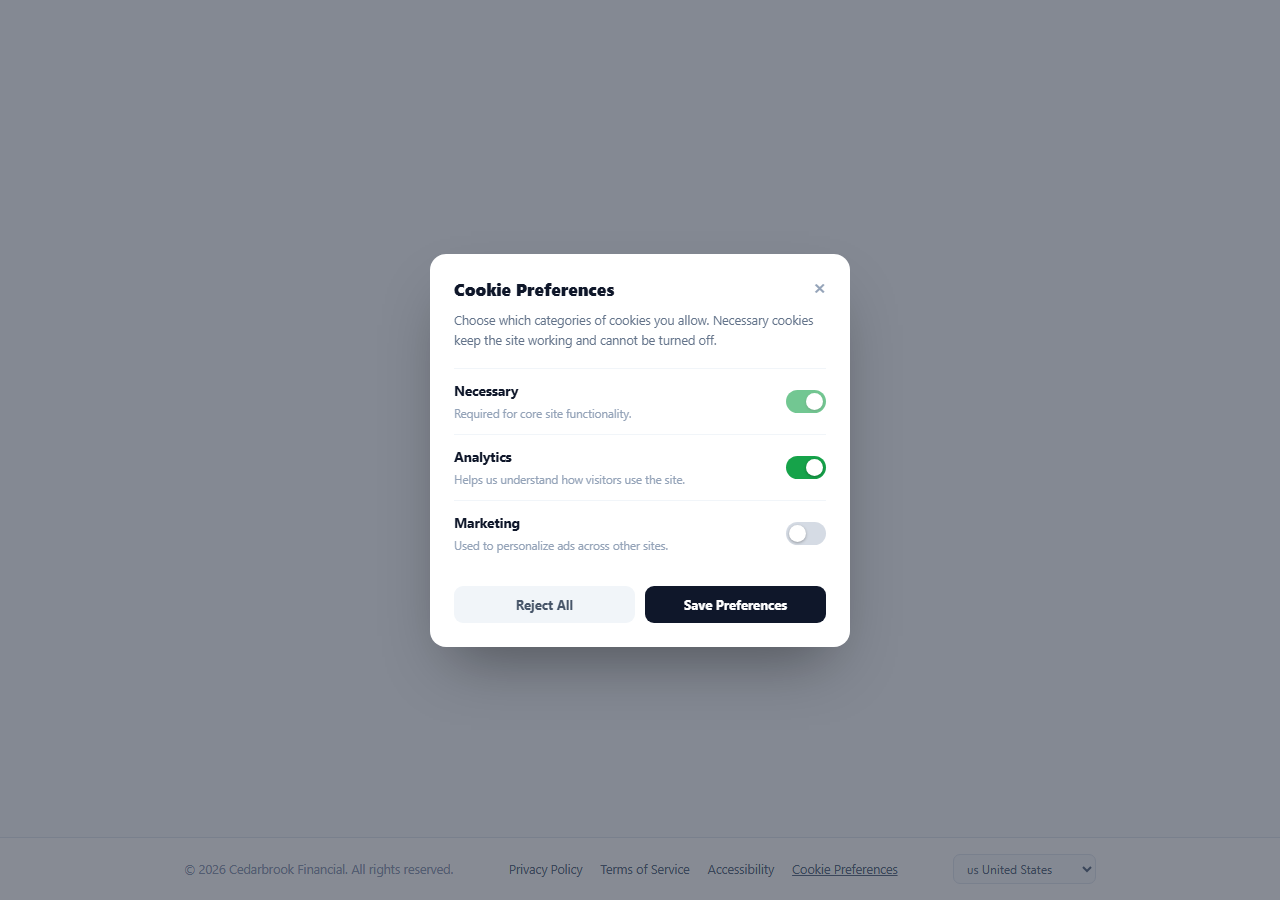
Beneath the marketing content of most footers, there is a quieter but legally necessary layer: a copyright line, a handful of policy links, and — for any site operating under GDPR, CCPA, or similar regimes — a real way for a visitor to review and change their cookie consent after the fact, not just accept or reject it once on first visit. This snippet builds that layer directly: a single-row legal bar with a "Cookie Preferences" trigger that opens a proper per-category consent panel, plus a region selector for jurisdictions with different disclosure requirements.
A deliberately quiet bar
Unlike the mega footer or a brand-forward footer, .flb-inner holds exactly three groups on one row — copyright text, a small link cluster, and a region dropdown — styled in muted grays with no accent color. This is intentional: a compliance bar's job is to be present and correct, not to compete visually with the page's actual content or calls-to-action above it.
Cookie Preferences as a button, not a link
The "Cookie Preferences" trigger is a real <button>, not an anchor with a # href, because it opens an in-page modal rather than navigating anywhere — using a link for a JavaScript-only action is a common accessibility antipattern this snippet avoids deliberately. Clicking it calls openPanel(), which un-hides the .flb-overlay and resets any previous "saved" confirmation state.
Per-category consent, honestly modeled
The panel lists three categories: Necessary (a checkbox that is checked, disabled, and cannot be turned off — because functionally required cookies are not something a user can opt out of and still use the site), Analytics, and Marketing, both independently toggleable. This mirrors the granular consent structure that regulations like GDPR actually require — a single "accept all cookies" banner without category-level control is a common but non-compliant pattern this component avoids.
Reject-all vs. save-preferences
Reject All sets both optional toggles to unchecked in one click without closing the panel, so a user can confirm the result before committing. Save Preferences reads the current checkbox states into a plain prefs object ({ necessary: true, analytics, marketing }), logs it (in production this is the point to POST to a consent-management endpoint or write to localStorage/a first-party cookie), shows a brief "Preferences saved" confirmation, and auto-closes the panel after a short delay so the interaction feels complete rather than requiring a second manual close.
Three ways to dismiss, one way to commit
The panel closes via its × button, a click on the overlay backdrop outside the panel itself (checked with e.target === overlay so clicks inside the panel don't bubble into an accidental close), or the Escape key — the same three dismissal paths users expect from any modal. Crucially, none of these three "just close it" paths silently changes what was previously saved; only clicking Save Preferences actually commits a new consent state, so a user idly opening and closing the panel never accidentally alters their prior choice.
The region selector
A simple <select> of jurisdictions (US, EU, UK, Canada) sits beside the legal links as a placeholder for region-specific consent requirements — in production this would typically drive which cookie categories are shown, whether consent defaults to opt-in or opt-out, and which specific policy documents are linked, since GDPR, CCPA, and other regimes impose materially different disclosure and default rules.
Build with AI
Build, Understand, Optimize, and Extend It With AI
Rather than tracing the modal dismissal logic by hand, paste this snippet's HTML, CSS, and JS into an AI coding assistant like Claude and ask it to explain exactly how the backdrop-click handler distinguishes a click on the overlay itself from a click bubbling up from inside the panel, and why the Necessary category's checkbox is both checked and disabled rather than simply omitted from the UI. The same assistant can help you optimize it, for instance asking whether the save confirmation's auto-close delay is appropriate or should instead wait for explicit user dismissal. It is also useful for extending the component: ask it to persist saved preferences to localStorage and read them back in on load to pre-populate the toggles, wire the region selector to change the default consent state per jurisdiction, or connect the save handler to a real consent-management platform API. Treat the code less like a finished artifact and more like a starting point for a conversation.
Prompt to recreate it
Copy this into your AI assistant of choice to build the effect from scratch, or as a jumping-off point for your own variant:
Build a minimal "legal and compliance" footer bar with an inline cookie-preferences modal, in plain HTML, CSS, and JavaScript, no libraries.

Requirements:
- A single-row footer bar with a copyright line, a few plain policy links, a "Cookie Preferences" trigger that must be a real button element (not a fake anchor link, since it does not navigate anywhere), and a region/jurisdiction select dropdown.
- Clicking the trigger opens a modal dialog listing exactly three consent categories: Necessary (a toggle that is checked and permanently disabled, since it cannot be turned off), Analytics, and Marketing (both independently toggleable checkboxes styled as switches).
- A "Reject All" button that unchecks both optional toggles without closing the panel, so the user can see the result before deciding to save.
- A "Save Preferences" button that is the only action which commits the current toggle states (log or store them as a plain object), then shows a brief confirmation message and automatically closes the panel after a short delay.
- The panel must be dismissible three ways without ever altering a previously saved consent state: a close button, a click on the backdrop outside the panel (but not a click inside the panel bubbling up), and the Escape key.
- Give the panel role="dialog" and aria-modal="true" for proper screen-reader announcement.
Want to tighten it up first? Run this prompt through the AI Prompt Studio to score it across 8 quality dimensions, catch anti-patterns, and tune the wording for Claude, ChatGPT, or Gemini before you paste it in.
Step by step
How to Use
- 1Paste HTML, CSS, and JSA quiet legal bar renders with copyright, links, a Cookie Preferences button, and a region dropdown.
- 2Open the panelClick "Cookie Preferences" — a modal opens with three category toggles.
- 3Toggle categoriesAnalytics and Marketing can be switched independently; Necessary is always on and disabled.
- 4Reject or saveClick "Reject All" to clear the optional toggles, or "Save Preferences" to commit and see a confirmation.
- 5Dismiss without savingClose with the × button, a backdrop click, or Escape — none of these alter a previously saved state.
- 6Wire it to real consent storageReplace the console.log in the save handler with a write to localStorage or your consent-management API.
Real-world uses
Common Use Cases
Got questions?
Frequently Asked Questions
It triggers an in-page modal rather than navigating to a new page, and using an anchor tag with a "#" href for a JavaScript-only action is a well-known accessibility antipattern — screen readers announce it as a link that goes nowhere. A real <button> correctly communicates its role as an interactive control.
No — its toggle is checked and carries the disabled attribute, both in the markup and visually (reduced opacity, not-allowed cursor). This matches how necessary/functional cookies are actually treated under most consent regimes: they are required for the site to work and are not something a user can opt out of while still using the site.
No. All three dismissal paths — the close button, clicking the backdrop, and pressing Escape — simply hide the panel. Only clicking "Save Preferences" reads the current toggle states and commits them; idly opening and closing the panel never alters a prior saved choice.
Replace the console.log(prefs) call inside the save handler with a write to localStorage, a first-party cookie, or a POST to your consent-management platform\u2019s API. Read that stored value on page load to initialize the toggle states and to decide whether to show a first-visit consent banner at all.
The overlay click handler checks e.target === overlay — since clicks on the panel itself have their target set to an element inside .flb-panel, not the .flb-overlay backdrop element, only genuine backdrop clicks satisfy the condition and trigger a close.
Listen for a change event on #flbRegion, and based on the selected region, adjust the default checked state of the Analytics/Marketing toggles (e.g. default them unchecked for EU under an opt-in model) and swap which policy documents the legal links point to.