Source Code
<div class="container py-5">
  <div class="d-flex justify-content-between align-items-center mb-2">
    <span class="small text-muted" id="bsselCount">0 selected</span>
    <button class="btn btn-sm btn-outline-danger d-none" id="bsselDelete">Delete selected</button>
  </div>
  <table class="table table-hover align-middle bssel-table">
    <thead>
      <tr>
        <th style="width:40px"><input type="checkbox" class="form-check-input" id="bsselAll"></th>
        <th>File</th><th>Size</th><th>Modified</th>
      </tr>
    </thead>
    <tbody id="bsselBody">
      <tr><td><input type="checkbox" class="form-check-input bssel-row"></td><td>proposal-final.pdf</td><td>2.1 MB</td><td>Sep 8</td></tr>
      <tr><td><input type="checkbox" class="form-check-input bssel-row"></td><td>brand-assets.zip</td><td>18.4 MB</td><td>Sep 5</td></tr>
      <tr><td><input type="checkbox" class="form-check-input bssel-row"></td><td>meeting-notes.docx</td><td>84 KB</td><td>Sep 2</td></tr>
      <tr><td><input type="checkbox" class="form-check-input bssel-row"></td><td>roadmap-2026.xlsx</td><td>412 KB</td><td>Aug 29</td></tr>
    </tbody>
  </table>
</div>
.bssel-table tr.bssel-selected { background: #eef0ff; }const selectAll = document.getElementById('bsselAll');
const rowChecks = document.querySelectorAll('.bssel-row');
const countEl = document.getElementById('bsselCount');
const deleteBtn = document.getElementById('bsselDelete');
const body = document.getElementById('bsselBody');
function updateSummary() {
const checked = document.querySelectorAll('.bssel-row:checked');
countEl.textContent = checked.length + ' selected';
deleteBtn.classList.toggle('d-none', checked.length === 0);
// The "select all" checkbox has a real third visual state — indeterminate
// — for exactly this case: some but not all rows are checked.
selectAll.indeterminate = checked.length > 0 && checked.length < rowChecks.length;
selectAll.checked = checked.length === rowChecks.length;
}
rowChecks.forEach(box => {
box.addEventListener('change', () => {
box.closest('tr').classList.toggle('bssel-selected', box.checked);
updateSummary();
});
});
selectAll.addEventListener('change', () => {
rowChecks.forEach(box => {
box.checked = selectAll.checked;
box.closest('tr').classList.toggle('bssel-selected', selectAll.checked);
});
updateSummary();
});
deleteBtn.addEventListener('click', () => {
document.querySelectorAll('.bssel-row:checked').forEach(box => box.closest('tr').remove());
updateSummary();
});Learn Coding Visually
Learn to code with interactive, live-preview playgrounds — HTML, CSS, JavaScript, React & more.
 HTML Playground42 lessons · Click-based · Live preview
 CSS PlaygroundLearn CSS with a live editor
 JavaScript Playground60 lessons · DOM · Async · Canvas
 React PlaygroundLearn React with a live code editor
 GSAP PlaygroundLearn GSAP animation interactively
 SVG Playground44 lessons · shapes · paths · animation
 SCSS Playground45 lessons · Sass modules · tokens
 Tailwind PlaygroundLearn Tailwind CSS with a live editor
 Bootstrap 5 Playground50 lessons · live preview
Bootstrap Data Table with Row Selection — Free Snippet
Bootstrap Data Table with Row Selection · Tables · Plain HTML, CSS & JS · Live preview
What's included
Features
About this UI Snippet
Bootstrap Data Table with Row Selection — HTML, CSS & JavaScript
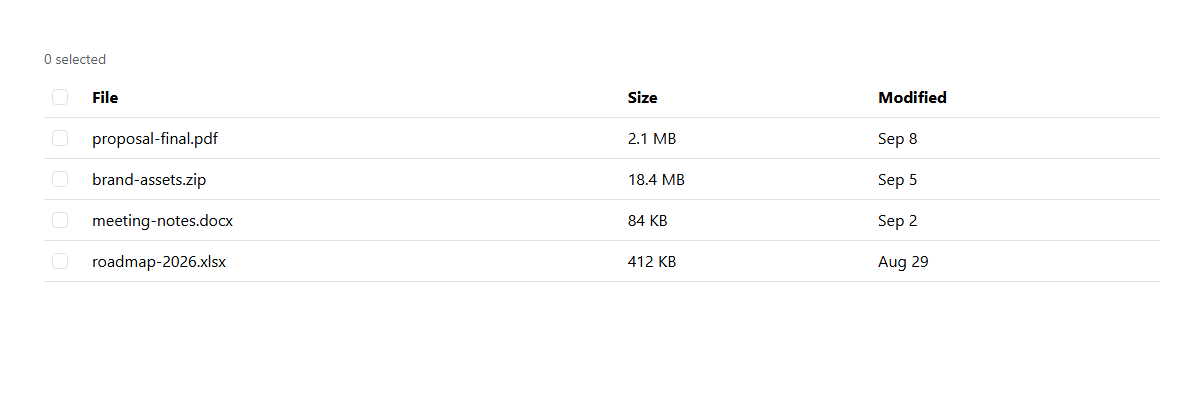
The header checkbox in this table isn't just a "select all" toggle — it also uses the native indeterminate property, the real third visual state (a dash instead of a check or empty box) browsers support specifically for "some, but not all, of a group is selected." updateSummary() recalculates all three states together on every change: the live "N selected" count, whether the bulk "Delete selected" button should even be visible, and whether the header checkbox should read as checked, unchecked, or indeterminate — so those three things can never contradict each other.
Built on real Bootstrap 5.3 form-check checkboxes and table styling, with a highlighted row background (.bssel-selected) applied the instant a row's own checkbox changes, giving immediate visual confirmation beyond the small checkbox itself.
Build with AI
Build, Understand, Optimize, and Extend It With AI
Hand this snippet's HTML, CSS, and JS to an AI coding assistant like Claude and ask it to add a confirmation step before bulk delete (reusing the pattern from the Bootstrap Type-to-Confirm Delete Modal snippet), or to add more bulk actions (Archive, Export) alongside Delete. It's also a good exercise to ask the assistant to persist the selection across a sort operation, matching selected rows by a stable ID rather than DOM position.
Prompt to recreate it
Copy this into your AI assistant of choice to build the effect from scratch, or as a jumping-off point for your own variant:
Build a Bootstrap 5.3 data table with row selection, using the real Bootstrap CDN framework (bootstrap.min.css and bootstrap.bundle.min.js), not custom CSS made to resemble Bootstrap.

Requirements:
- A real Bootstrap table with a checkbox column, including a "select all" checkbox in the header and an individual checkbox per row, for at least four rows.
- The header checkbox must correctly reflect three states: unchecked (no rows selected), checked (all rows selected), and the native indeterminate state (some but not all rows selected) — set via JavaScript, not just visual styling.
- A live "N selected" count and a bulk "Delete selected" button that only becomes visible once at least one row is checked.
- Checking a row must visually highlight it (not just show a checked checkbox), and clicking "Delete selected" must remove all currently-checked rows from the table and correctly update the count, the header checkbox state, and the delete button's visibility afterward.
Want to tighten it up first? Run this prompt through the AI Prompt Studio to score it across 8 quality dimensions, catch anti-patterns, and tune the wording for Claude, ChatGPT, or Gemini before you paste it in.
Step by step
How to Use
- 1Load the snippetClick the snippet in the sidebar Library tab. The preview loads a 4-row file table, "0 selected".
- 2Check one rowIt highlights, the count updates to "1 selected", and "Delete selected" appears. The header checkbox shows a dash (indeterminate).
- 3Check all remaining rowsThe header checkbox becomes fully checked once every row is selected.
- 4Click the header checkbox to uncheckEvery row deselects at once, the highlight clears, and the delete button hides again.
- 5Select a few rows and click "Delete selected"Those rows are removed from the table, and the summary updates to match what remains.
Real-world uses
Common Use Cases
Got questions?
Frequently Asked Questions
It's the native indeterminate visual state, set via JavaScript (checkbox.indeterminate = true) whenever some but not all rows are checked — distinct from both the checked and unchecked states, and it can only be set programmatically, not by a user click.
It removes them from this front-end demo's table. Wire the delete handler to a real API call before removing the rows for actual persistence.
A single updateSummary() function re-queries how many row checkboxes are currently checked every time any checkbox changes, and derives the count, the delete button's visibility, and the header checkbox's state all from that one query — so none of them can drift out of sync.
The header checkbox becomes fully checked automatically once the count of checked rows equals the total row count — it doesn't require actually clicking the header checkbox itself to reach that state.
Yes — if you add filtering (like the Bootstrap Filter Sidebar Offcanvas snippet), scope selectAll's change handler to only affect currently-visible rows, and have updateSummary() count only visible rows' checked state as well.