Source Code
<div class="container py-5">
  <div class="row g-3">
    <div class="col-md-4">
      <div class="bskanban-col" data-status="todo">
        <div class="bskanban-col-head">To Do <span class="badge bg-secondary bskanban-count">2</span></div>
        <div class="bskanban-drop" data-status="todo">
          <div class="card bskanban-card" draggable="true">Design onboarding email</div>
          <div class="card bskanban-card" draggable="true">Audit API rate limits</div>
        </div>
      </div>
    </div>
    <div class="col-md-4">
      <div class="bskanban-col" data-status="progress">
        <div class="bskanban-col-head">In Progress <span class="badge bg-primary bskanban-count">1</span></div>
        <div class="bskanban-drop" data-status="progress">
          <div class="card bskanban-card" draggable="true">Rebuild settings page</div>
        </div>
      </div>
    </div>
    <div class="col-md-4">
      <div class="bskanban-col" data-status="done">
        <div class="bskanban-col-head">Done <span class="badge bg-success bskanban-count">1</span></div>
        <div class="bskanban-drop" data-status="done">
          <div class="card bskanban-card" draggable="true">Fix login redirect bug</div>
        </div>
      </div>
    </div>
  </div>
</div>
.bskanban-col { background: #f6f7f9; border-radius: 10px; padding: 12px; height: 100%; }
.bskanban-col-head { display: flex; align-items: center; gap: 8px; font-size: 13px; font-weight: 700; color: #4b5563; margin-bottom: 10px; }
.bskanban-drop { min-height: 60px; display: flex; flex-direction: column; gap: 8px; }
.bskanban-drop.bskanban-over { background: #eef0ff; border-radius: 8px; outline: 2px dashed #6366f1; outline-offset: 2px; }
.bskanban-card { padding: 10px 12px; font-size: 13px; border: 1px solid #eceef1; cursor: grab; }
.bskanban-card.bskanban-dragging { opacity: .4; }const cards = document.querySelectorAll('.bskanban-card');
const drops = document.querySelectorAll('.bskanban-drop');
let dragged = null;
cards.forEach(card => {
card.addEventListener('dragstart', () => {
dragged = card;
card.classList.add('bskanban-dragging');
});
card.addEventListener('dragend', () => {
card.classList.remove('bskanban-dragging');
dragged = null;
updateCounts();
});
});
drops.forEach(zone => {
zone.addEventListener('dragover', e => {
e.preventDefault(); // required so 'drop' actually fires on this element
zone.classList.add('bskanban-over');
});
zone.addEventListener('dragleave', () => zone.classList.remove('bskanban-over'));
zone.addEventListener('drop', e => {
e.preventDefault();
zone.classList.remove('bskanban-over');
if (dragged) zone.appendChild(dragged);
});
});
function updateCounts() {
document.querySelectorAll('.bskanban-col').forEach(col => {
const count = col.querySelector('.bskanban-drop').children.length;
col.querySelector('.bskanban-count').textContent = count;
});
}Learn Coding Visually
Learn to code with interactive, live-preview playgrounds — HTML, CSS, JavaScript, React & more.
 HTML Playground42 lessons · Click-based · Live preview
 CSS PlaygroundLearn CSS with a live editor
 JavaScript Playground60 lessons · DOM · Async · Canvas
 React PlaygroundLearn React with a live code editor
 GSAP PlaygroundLearn GSAP animation interactively
 SVG Playground44 lessons · shapes · paths · animation
 SCSS Playground45 lessons · Sass modules · tokens
 Tailwind PlaygroundLearn Tailwind CSS with a live editor
 Bootstrap 5 Playground50 lessons · live preview
Bootstrap Kanban Board with Drag-and-Drop Cards — Free Snippet
Bootstrap Kanban Board with Drag-and-Drop Cards · Dashboards · Plain HTML, CSS & JS · Live preview
What's included
Features
About this UI Snippet
Bootstrap Kanban Board with Drag-and-Drop Cards — HTML, CSS & JavaScript
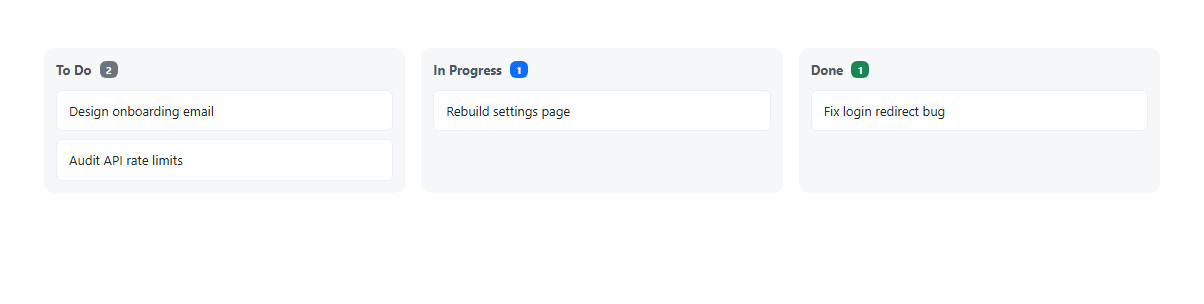
This kanban board uses the browser's native HTML5 Drag and Drop API — draggable="true" on every card, plus dragstart/dragend/dragover/drop event listeners — rather than a third-party drag library, built on real Bootstrap 5.3 cards and grid columns underneath. The one easy-to-miss requirement: a drop zone's dragover handler must call e.preventDefault(), since the browser's default behavior is to reject drops everywhere; without that one line, nothing would ever actually drop.
Dropping a card is genuinely simple once that's in place — zone.appendChild(dragged) moves the real dragged element into the target column, and a shared updateCounts() function re-reads how many cards each column actually contains and updates its badge, called after every drag ends so the counts can never go stale.
Build with AI
Build, Understand, Optimize, and Extend It With AI
Hand this snippet's HTML, CSS, and JS to an AI coding assistant like Claude and ask it to persist card positions to localStorage so the board state survives a page reload, or to add a "+ Add card" input at the bottom of each column. It's also a good exercise to ask the assistant to add pointer-event-based touch support for mobile drag-and-drop as a fallback.
Prompt to recreate it
Copy this into your AI assistant of choice to build the effect from scratch, or as a jumping-off point for your own variant:
Build a Bootstrap 5.3 kanban board with drag-and-drop cards, using the real Bootstrap CDN framework (bootstrap.min.css and bootstrap.bundle.min.js), not custom CSS made to resemble Bootstrap.

Requirements:
- Three columns (e.g. To Do, In Progress, Done) built with Bootstrap's grid, each containing a drop zone with a few real Bootstrap cards, and a live count badge showing how many cards are currently in that column.
- Implement dragging using the native HTML5 Drag and Drop API (draggable="true" on cards, with dragstart/dragend/dragover/drop event listeners) — do not use a third-party drag-and-drop library.
- Drop zones must visually highlight (e.g. a dashed outline) while a card is being dragged over them, and correctly call preventDefault() in the dragover handler so drops are actually accepted.
- Dropping a card on a different column's drop zone must genuinely move that card element there, and the per-column count badges must update to reflect the real card count in each column after every move.
Want to tighten it up first? Run this prompt through the AI Prompt Studio to score it across 8 quality dimensions, catch anti-patterns, and tune the wording for Claude, ChatGPT, or Gemini before you paste it in.
Step by step
How to Use
- 1Load the snippetClick the snippet in the sidebar Library tab. The preview loads three columns: To Do (2), In Progress (1), Done (1).
- 2Drag a cardClick and drag any card — the column you drag over highlights with a dashed outline.
- 3Drop it in a different columnThe card moves there for real, and both columns' counts update to reflect the new totals.
- 4Drag it backCards can move between any columns in any direction, any number of times.
Real-world uses
Common Use Cases
Got questions?
Frequently Asked Questions
No — it uses the browser's native HTML5 Drag and Drop API directly (draggable="true" plus dragstart/dragover/drop event listeners), no external library required.
Browsers reject drops on any element by default. Calling preventDefault() inside the dragover handler is what tells the browser this element is a valid drop target — without it, the drop event never fires at all, no matter how the card is released.
updateCounts() re-reads how many card elements each column's drop zone actually contains and updates its badge, called every time a drag ends — so it's always counting the real current DOM state, not tracking increments/decrements separately.
Native HTML5 drag and drop has inconsistent touch support across browsers. For reliable mobile drag-and-drop, consider adding pointer-event-based dragging as a fallback or replacement.
Yes — copy a .col-md-4 block with its own data-status and a fresh .bskanban-drop zone; the drag/drop event listeners are attached generically to every .bskanban-drop element, so a new one works immediately.