Source Code
<div class="fds-page">
<main class="fds-content"><p>↑ Page content above the footer</p></main>
<footer class="fds">
<div class="fds-inner">
<div class="fds-top">
<p class="fds-title">Full site directory</p>
<button class="fds-toggle-all" id="fdsToggleAll">Expand all</button>
</div>
<div class="fds-grid" id="fdsGrid">
<section class="fds-section" data-open="true">
<button class="fds-head" aria-expanded="true">
<span>Shop</span>
<svg class="fds-chev" width="13" height="13" viewBox="0 0 24 24" fill="none" stroke="currentColor" stroke-width="3"><polyline points="6 9 12 15 18 9"/></svg>
</button>
<ul class="fds-list"><li><a href="#">New Arrivals</a></li><li><a href="#">Best Sellers</a></li><li><a href="#">Women</a></li><li><a href="#">Men</a></li><li><a href="#">Kids</a></li><li><a href="#">Sale</a></li></ul>
</section>
<section class="fds-section" data-open="true">
<button class="fds-head" aria-expanded="true">
<span>Customer Care</span>
<svg class="fds-chev" width="13" height="13" viewBox="0 0 24 24" fill="none" stroke="currentColor" stroke-width="3"><polyline points="6 9 12 15 18 9"/></svg>
</button>
<ul class="fds-list"><li><a href="#">Track Order</a></li><li><a href="#">Returns & Exchanges</a></li><li><a href="#">Shipping Info</a></li><li><a href="#">Size Guide</a></li><li><a href="#">Contact Us</a></li></ul>
</section>
<section class="fds-section">
<button class="fds-head" aria-expanded="false">
<span>Company</span>
<svg class="fds-chev" width="13" height="13" viewBox="0 0 24 24" fill="none" stroke="currentColor" stroke-width="3"><polyline points="6 9 12 15 18 9"/></svg>
</button>
<ul class="fds-list"><li><a href="#">About Us</a></li><li><a href="#">Careers</a></li><li><a href="#">Press</a></li><li><a href="#">Sustainability</a></li><li><a href="#">Store Locator</a></li></ul>
</section>
<section class="fds-section">
<button class="fds-head" aria-expanded="false">
<span>Legal</span>
<svg class="fds-chev" width="13" height="13" viewBox="0 0 24 24" fill="none" stroke="currentColor" stroke-width="3"><polyline points="6 9 12 15 18 9"/></svg>
</button>
<ul class="fds-list"><li><a href="#">Privacy Policy</a></li><li><a href="#">Terms of Service</a></li><li><a href="#">Cookie Policy</a></li><li><a href="#">Accessibility Statement</a></li></ul>
</section>
<section class="fds-section">
<button class="fds-head" aria-expanded="false">
<span>Developers</span>
<svg class="fds-chev" width="13" height="13" viewBox="0 0 24 24" fill="none" stroke="currentColor" stroke-width="3"><polyline points="6 9 12 15 18 9"/></svg>
</button>
<ul class="fds-list"><li><a href="#">API Docs</a></li><li><a href="#">Status Page</a></li><li><a href="#">Changelog</a></li><li><a href="#">Affiliate Program</a></li></ul>
</section>
</div>
<div class="fds-bottom">
<span>© 2026 Marlowe & Finch</span>
<span class="fds-count" id="fdsCount"></span>
</div>
</div>
</footer>
</div>*{box-sizing:border-box;margin:0;padding:0}
body{font-family:system-ui,-apple-system,sans-serif;background:#fafaf9}
.fds-page{min-height:100vh;display:flex;flex-direction:column}
.fds-content{flex:1;display:flex;align-items:center;justify-content:center;color:#a8a29e;font-size:13px;padding:50px 20px}
.fds{background:#1c1917;color:#a8a29e}
.fds-inner{max-width:1080px;margin:0 auto;padding:36px 24px 22px}
.fds-top{display:flex;align-items:center;justify-content:space-between;margin-bottom:18px}
.fds-title{font-size:12px;font-weight:800;text-transform:uppercase;letter-spacing:.7px;color:#78716c}
.fds-toggle-all{background:none;border:1px solid #44403c;color:#d6d3d1;font-size:12px;font-weight:600;padding:6px 12px;border-radius:7px;cursor:pointer;font-family:inherit;transition:background .15s}
.fds-toggle-all:hover{background:#292524}
.fds-grid{display:grid;grid-template-columns:repeat(5,1fr);gap:0 20px;border-top:1px solid #292524}
.fds-section{border-bottom:1px solid #292524;padding:14px 0}
.fds-head{width:100%;display:flex;align-items:center;justify-content:space-between;background:none;border:none;color:#f5f5f4;font-size:13.5px;font-weight:700;cursor:pointer;font-family:inherit;padding:2px 0}
.fds-chev{color:#78716c;transition:transform .2s;flex-shrink:0}
.fds-section[data-open="true"] .fds-chev{transform:rotate(180deg)}
.fds-list{list-style:none;overflow:hidden;max-height:0;transition:max-height .25s ease}
.fds-section[data-open="true"] .fds-list{max-height:260px;margin-top:10px}
.fds-list li{margin-bottom:8px}
.fds-list a{color:#a8a29e;font-size:13px;text-decoration:none;transition:color .15s}
.fds-list a:hover{color:#fff}
.fds-bottom{border-top:1px solid #292524;margin-top:8px;padding-top:16px;display:flex;justify-content:space-between;align-items:center;flex-wrap:wrap;gap:8px;font-size:12px;color:#57534e}
@media (max-width:900px){ .fds-grid{grid-template-columns:repeat(2,1fr)} }
@media (max-width:520px){
.fds-grid{grid-template-columns:1fr}
.fds-head{padding:8px 0}
}var sections = document.querySelectorAll('.fds-section');
var toggleAllBtn = document.getElementById('fdsToggleAll');
var countEl = document.getElementById('fdsCount');
function totalLinks() {
return document.querySelectorAll('.fds-list a').length;
}
countEl.textContent = totalLinks() + ' pages in this directory';
function setSection(section, open) {
section.setAttribute('data-open', open ? 'true' : 'false');
section.querySelector('.fds-head').setAttribute('aria-expanded', open ? 'true' : 'false');
}
sections.forEach(function (section) {
var head = section.querySelector('.fds-head');
head.addEventListener('click', function () {
var isOpen = section.getAttribute('data-open') === 'true';
setSection(section, !isOpen);
syncToggleAllLabel();
});
});
function syncToggleAllLabel() {
var allOpen = Array.prototype.every.call(sections, function (s) {
return s.getAttribute('data-open') === 'true';
});
toggleAllBtn.textContent = allOpen ? 'Collapse all' : 'Expand all';
}
toggleAllBtn.addEventListener('click', function () {
var shouldOpen = toggleAllBtn.textContent === 'Expand all';
sections.forEach(function (s) { setSection(s, shouldOpen); });
syncToggleAllLabel();
});
syncToggleAllLabel();Learn Coding Visually
Learn to code with interactive, live-preview playgrounds — HTML, CSS, JavaScript, React & more.
 HTML Playground42 lessons · Click-based · Live preview
 CSS PlaygroundLearn CSS with a live editor
 JavaScript Playground60 lessons · DOM · Async · Canvas
 React PlaygroundLearn React with a live code editor
 GSAP PlaygroundLearn GSAP animation interactively
 SVG Playground44 lessons · shapes · paths · animation
 SCSS Playground45 lessons · Sass modules · tokens
 Tailwind PlaygroundLearn Tailwind CSS with a live editor
 Bootstrap 5 Playground50 lessons · live preview
Sitemap Directory Footer — Free HTML CSS JS Snippet
Sitemap Directory Footer · Footers · Plain HTML, CSS & JS · Live preview
What's included
Features
About this UI Snippet
Sitemap Directory Footer — Collapsible Site Directory with Expand-All
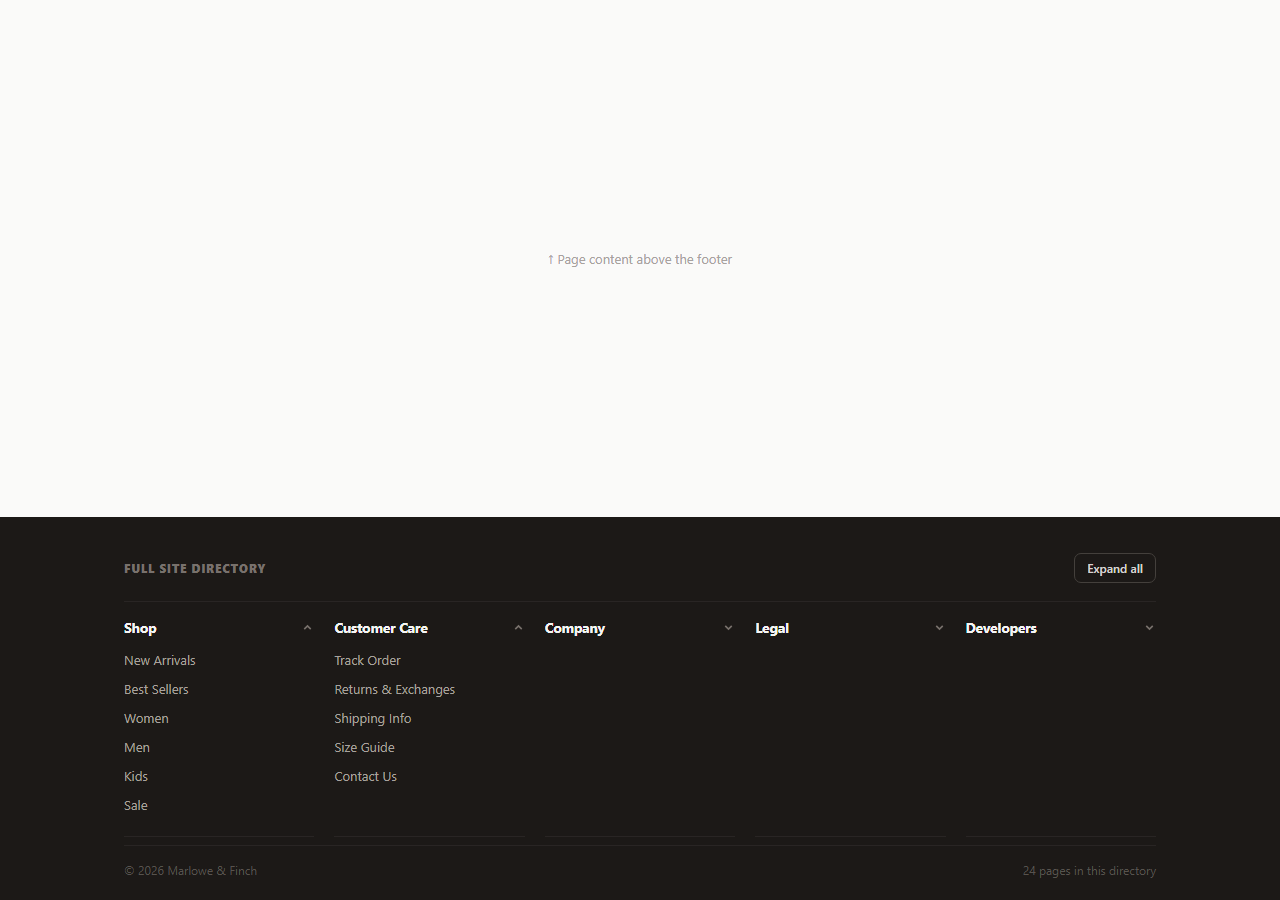
Large content sites — retailers, publishers, documentation hubs — often need a footer that behaves less like a marketing summary and more like an actual site directory: every top-level section, every page underneath it, all in one scannable place for both users and search engine crawlers. This snippet builds exactly that: five collapsible .fds-section groups laid out in a five-column grid, each independently expandable, plus a single "Expand all / Collapse all" control that operates every section at once and a live count of how many total pages the directory links to.
Independent per-section collapse, not an accordion
Unlike a single-open accordion FAQ, every section here can be open or closed independently — Shop and Customer Care start expanded, Company, Legal, and Developers start collapsed. Each .fds-section tracks its own state in a data-open attribute, and clicking its .fds-head button toggles only that section via setSection(section, !isOpen). This matches how a real sitemap-style footer is actually used: a visitor usually wants to expand one or two relevant categories, not cycle through all of them one at a time.
The max-height list-reveal animation
Each section's <ul class="fds-list"> sits at max-height: 0; overflow: hidden by default, transitioning to max-height: 260px when its parent's data-open attribute flips to "true". This is the same technique used in accordion components — height: auto cannot be transitioned by CSS, so a sufficiently large fixed max-height value stands in for it. The chevron icon rotates 180 degrees in sync via .fds-section[data-open="true"] .fds-chev, giving a consistent open/closed signal across all five sections.
A synchronized expand-all control
The syncToggleAllLabel() function checks whether every section is currently open with Array.prototype.every, and sets the toggle button's label to "Collapse all" only when that is true — otherwise it reads "Expand all," even if some sections are already open and others are not. This keeps the control's label always truthful: it never claims "expand all" when everything is already expanded, and it never claims "collapse all" when the directory is in a mixed state. The same syncToggleAllLabel() call runs after every individual section toggle, not just after the all-at-once button, so the label stays accurate no matter how a user reaches a given state.
A live page count as an SEO/UX signal
The totalLinks() function counts every anchor across every .fds-list, regardless of whether its section is currently collapsed, and writes that count into the footer's bottom bar on load ("32 pages in this directory"). Because the count is computed from the DOM rather than hardcoded, it stays correct automatically as sections are added or links are edited — a small detail, but the kind that prevents a footer from silently going stale.
Search engines and this pattern
Because every link exists in the DOM at all times — collapsed sections only hide their list visually via max-height, they are never removed or lazily rendered — crawlers see the full link graph regardless of the collapsed/expanded visual state. This is the correct approach for an SEO-sensitive sitemap footer: never gate real navigational links behind JavaScript that only renders them after a user interaction.
Build with AI
Build, Understand, Optimize, and Extend It With AI
Instead of tracing the expand-all label logic by hand, paste this snippet's HTML, CSS, and JS into an AI coding assistant like Claude and ask it to explain exactly how syncToggleAllLabel() decides between "Expand all" and "Collapse all" in a mixed state, and why every link stays present in the DOM even while its parent section is visually collapsed. The same assistant can help you optimize it, for instance asking whether a max-height value hardcoded at 260px could clip a longer link list and whether a ResizeObserver-based measurement would be more robust. It is also useful for extending the footer: ask it to persist which sections were left open across page loads via localStorage, generate the sections from a JSON sitemap config so the footer and an actual XML sitemap stay in sync, or add a search box that filters links across all sections at once. Treat the code less like a finished artifact and more like a starting point for a conversation.
Prompt to recreate it
Copy this into your AI assistant of choice to build the effect from scratch, or as a jumping-off point for your own variant:
Build a collapsible multi-section "site directory" footer in plain HTML, CSS, and JavaScript, no libraries.

Requirements:
- Five or more independently collapsible sections laid out in a responsive grid, each with a clickable header (a category name and a chevron icon) and a list of links beneath it. Unlike a single-open accordion, any number of sections must be able to stay open simultaneously — opening one must never close another.
- Each section's link list must be hidden with max-height: 0 and overflow: hidden by default, transitioning to a fixed max-height large enough to show its content when that section's open state becomes true, with the chevron icon rotating 180 degrees in sync.
- A single "Expand all / Collapse all" control above the grid that opens or closes every section at once, and whose own label must accurately reflect the current state: it should read "Collapse all" only when every section is open, and "Expand all" in every other case, including partially-open states, updating correctly no matter whether the user reached that state via the all-button or by toggling individual sections.
- A live count of the total number of links across every section, computed by counting anchor elements in the DOM (not hardcoded), displayed in a bottom bar alongside a copyright line — and this count must include links inside currently-collapsed sections, since every link must remain present in the DOM at all times regardless of its section's visual state (for crawlability).
- Keep each section header's aria-expanded attribute in sync with its actual open/closed state.
Want to tighten it up first? Run this prompt through the AI Prompt Studio to score it across 8 quality dimensions, catch anti-patterns, and tune the wording for Claude, ChatGPT, or Gemini before you paste it in.
Step by step
How to Use
- 1Paste HTML, CSS, and JSA five-column collapsible directory footer renders, with Shop and Customer Care open by default.
- 2Click a section headerIts link list expands or collapses independently of the other four sections.
- 3Click "Expand all"Every section opens at once and the button relabels itself to "Collapse all".
- 4Edit sections and linksDuplicate an .fds-section block and edit its heading and <ul> to add a new category.
- 5Check the page countThe bottom-bar count updates automatically from the number of anchors in the DOM.
- 6Export in your formatClick HTML, JSX, or Tailwind to download the version you need.
Real-world uses
Common Use Cases
Got questions?
Frequently Asked Questions
A single-open accordion (like an FAQ) closes every other item when one opens. Here, each of the five sections tracks its own independent data-open state — any combination can be open or closed at the same time, which better matches how users browse a multi-category site directory.
No — syncToggleAllLabel() runs after every toggle, whether from the all-button or an individual section header, and checks with Array.prototype.every whether literally every section is open before showing "Collapse all". Any mixed state shows "Expand all", which is always the truthful next action.
No. Every anchor tag exists in the DOM at all times — collapsing a section only sets its list\u2019s max-height to 0 via CSS, it never removes or conditionally renders the links. Search engine crawlers see the complete link graph regardless of any section\u2019s visual state.
Copy an .fds-section block (the button header plus its <ul> list), and adjust the grid-template-columns value on .fds-grid if you want six equal columns instead of five wrapping. The per-section JavaScript automatically picks up any element matching .fds-section, so no script changes are needed.
totalLinks() queries all .fds-list a elements regardless of their parent section\u2019s open/closed state, since the count is meant to represent the true size of the site directory, not just what is currently visible on screen.
Yes. Model each section as { title, links: [{label, href}], open } in an array or state object, render sections from a loop, and toggle each section\u2019s open boolean independently. Derive the "Expand all" button label from whether every item\u2019s open value is true, mirroring the syncToggleAllLabel() check.