Source Code
<div class="gm-wrap">
  <svg class="gm-goo" aria-hidden="true"><defs><filter id="gmGoo"><feGaussianBlur in="SourceGraphic" stdDeviation="7" result="blur"/><feColorMatrix in="blur" mode="matrix" values="1 0 0 0 0  0 1 0 0 0  0 0 1 0 0  0 0 0 20 -9" result="goo"/><feBlend in="SourceGraphic" in2="goo"/></filter></defs></svg>

  <nav class="gm-menu" id="gmMenu">
    <button type="button" class="gm-item gm-toggle" id="gmToggle" aria-label="Open actions" aria-expanded="false">+</button>
    <button type="button" class="gm-item" style="--i:1" aria-label="Edit">✎</button>
    <button type="button" class="gm-item" style="--i:2" aria-label="Share">↗</button>
    <button type="button" class="gm-item" style="--i:3" aria-label="Star">★</button>
    <button type="button" class="gm-item" style="--i:4" aria-label="Delete">🗑</button>
  </nav>
</div>*{box-sizing:border-box;margin:0;padding:0}
body{font-family:system-ui,-apple-system,sans-serif;background:#0f172a;min-height:100vh;display:flex;align-items:center;justify-content:center}
.gm-wrap{position:relative}
.gm-goo{position:absolute;width:0;height:0}
/* The filter on the container melds overlapping circles into a gooey blob. */
.gm-menu{position:relative;width:62px;height:62px;filter:url(#gmGoo)}
.gm-item{position:absolute;left:0;top:0;width:62px;height:62px;border-radius:50%;border:none;cursor:pointer;
background:#6366f1;color:#fff;font-size:22px;display:flex;align-items:center;justify-content:center;
transition:transform .4s cubic-bezier(.68,-0.55,.27,1.55);will-change:transform}
.gm-toggle{z-index:2;background:#4f46e5;transition:transform .3s}
.gm-menu.gm-open .gm-toggle{transform:rotate(135deg)}
/* Children stack on the toggle when closed, then fan upward when open. */
.gm-item:not(.gm-toggle){transform:translateY(0) scale(.5);opacity:.01}
.gm-menu.gm-open .gm-item:not(.gm-toggle){
opacity:1;transform:translateY(calc(var(--i) * -72px)) scale(1);
transition-delay:calc(var(--i) * .04s)}
/* Icons need to sit ABOVE the goo blur, so lift them with a pseudo-less trick:
keep glyphs crisp by not blurring them — applied via a sibling label layer. */
.gm-item span{position:relative;z-index:3}var menu = document.getElementById('gmMenu');
var toggle = document.getElementById('gmToggle');
function setOpen(open) {
menu.classList.toggle('gm-open', open);
toggle.setAttribute('aria-expanded', open ? 'true' : 'false');
toggle.textContent = open ? '+' : '+'; // rotation handles the visual change
}
toggle.addEventListener('click', function () {
setOpen(!menu.classList.contains('gm-open'));
});
// Close when clicking an action or outside the menu.
menu.addEventListener('click', function (e) {
var item = e.target.closest('.gm-item');
if (item && item !== toggle) setOpen(false);
});
document.addEventListener('click', function (e) {
if (!menu.contains(e.target)) setOpen(false);
});Learn Coding Visually
Learn to code with interactive, live-preview playgrounds — HTML, CSS, JavaScript, React & more.
 HTML Playground42 lessons · Click-based · Live preview
 CSS PlaygroundLearn CSS with a live editor
 JavaScript Playground60 lessons · DOM · Async · Canvas
 React PlaygroundLearn React with a live code editor
 GSAP PlaygroundLearn GSAP animation interactively
 SVG Playground44 lessons · shapes · paths · animation
 SCSS Playground45 lessons · Sass modules · tokens
 Tailwind PlaygroundLearn Tailwind CSS with a live editor
 Bootstrap 5 Playground50 lessons · live preview
Gooey Menu — SVG Goo Filter FAB Menu HTML CSS JS
Gooey Menu · Animations · Plain HTML, CSS & JS · Live preview
What's included
Features
About this UI Snippet
Gooey Menu — Items That Melt Out of a FAB with an SVG Goo Filter
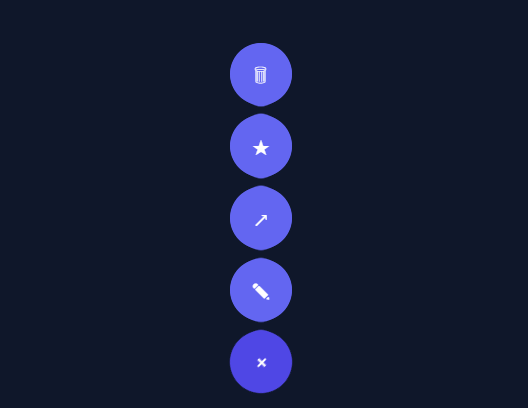
The gooey menu is a delightful floating-action-button effect where tapping the button makes the action items *ooze* out of it like drops of liquid, connected by stretchy "goo" before separating into distinct buttons. This snippet builds it in plain HTML, CSS, SVG, and a few lines of vanilla JavaScript — the gooey blending done entirely by an SVG filter, no library or images.
The goo is one SVG filter
The liquid-merge effect comes from a single SVG filter applied to the menu container. It works in two stages: feGaussianBlur blurs the overlapping circles into soft blobs, then feColorMatrix cranks up the alpha channel's contrast (the 0 0 0 20 -9 row) so the blurred edges snap back to sharp — but where two blobs overlap, their combined blur stays opaque, fusing them into one connected shape. The result is that circles near each other appear to *stick together with goo* and stretch apart as they move. This blur-then-sharpen-alpha trick is the entire gooey technique, and it's a classic SVG-filter effect.
Items fan out with a springy stagger
The action buttons start stacked exactly on the toggle (scaled down and invisible). Opening translates each one upward by --i × −72px — using a per-item index custom property — so they fan into a vertical column, with a transition-delay staggering each so they emerge one after another. The easing is an overshooting spring cubic-bezier, so items pop past their target and settle, which (combined with the goo filter melding them mid-motion) produces the signature liquid stretch-and-snap.
The toggle rotates into a close icon
The main button rotates 135° on open, turning the + into an × purely with a transform — a clean morph that signals the toggle state without swapping content. It sits above the items in stacking order so it stays the anchor the others flow from.
Closing on action or outside click
Choosing any action closes the menu, and a document-level click handler closes it when you click away — the expected behaviour for a popup action menu. Both route through one setOpen(false), and aria-expanded tracks the state for assistive tech.
Drop-in and adaptable
Add or remove action buttons (each with the next --i) and the fan adapts; change the −72px spacing, the colours, or the direction to fit your layout. Note the goo filter blurs its contents, so keep glyphs simple or layer crisp labels above it. It's a complete, dependency-free reference for SVG goo filters and staggered FAB menus — one of the most-loved CSS micro-interactions.
Build with AI
Build, Understand, Optimize, and Extend It With AI
Instead of reasoning about the filter math in your head, paste this snippet's HTML, CSS, and JS into an AI coding assistant like Claude and ask it to explain precisely how the feColorMatrix values (0 0 0 20 -9 on the alpha row) turn a soft feGaussianBlur back into hard edges everywhere except where two blurred circles overlap, which is what actually fuses the buttons into one liquid blob. It's also worth asking it to optimize the effect, for example whether applying the SVG filter to a larger menu with many more items would still be GPU-cheap, or whether the icon glyphs need to be lifted out of the filtered layer to stay crisp. For extending it, ask it to support a horizontal fan direction, add a long-press trigger for touch devices, or generalize the --i-based spacing so items can fan out in a circular arc instead of a straight line. Treat the code less like a finished artifact and more like a starting point for a conversation.
Prompt to recreate it
Copy this into your AI assistant of choice to build the effect from scratch, or as a jumping-off point for your own variant:
Build a gooey floating-action-button menu in plain HTML, CSS, SVG, and JavaScript, where secondary action buttons appear to melt out of a main toggle button, using a real SVG filter for the liquid-merge effect — no canvas, no images, no animation libraries.

Requirements:
- Define one inline SVG filter containing an feGaussianBlur (stdDeviation around 7) followed by an feColorMatrix whose alpha row sharply increases contrast (values like 0 0 0 20 -9) to threshold the blur back into solid shapes, then apply that filter via CSS filter: url(#id) to the entire menu container so overlapping circular buttons visually fuse together.
- A round toggle button plus several round action buttons stacked exactly on top of the toggle at rest, each scaled down and nearly invisible, each carrying its own index via a CSS custom property (for example --i).
- Clicking the toggle must add an "open" class to the menu that translates each action button upward by an amount proportional to its index (for example calc(var(--i) * -72px)) while scaling it up to full size and fading it in, using a per-item transition-delay derived from the same index so buttons emerge one after another rather than simultaneously.
- The transition on the fan-out must use an overshooting cubic-bezier easing curve so items pop slightly past their resting position and settle back, which combined with the goo filter should look like a liquid stretch-and-snap rather than a plain slide.
- The toggle button itself must rotate (for example 135 degrees) when open, morphing a plus glyph into an X purely via CSS transform, with no content swap.
- Clicking any action button, or clicking anywhere outside the menu, must close the menu; track and expose the open/closed state via aria-expanded on the toggle for accessibility.
- Note in a comment that content inside the filtered container gets blurred along with the shapes, so icon glyphs need to be layered so they stay crisp.
Want to tighten it up first? Run this prompt through the AI Prompt Studio to score it across 8 quality dimensions, catch anti-patterns, and tune the wording for Claude, ChatGPT, or Gemini before you paste it in.
Step by step
How to Use
- 1Paste HTML, CSS, and JSA round + button renders; the SVG goo filter is defined inline.
- 2Open the menuClick the button — action items ooze out and fan upward with a springy stagger, melding via the goo.
- 3Pick an actionClicking any item (or clicking outside) closes the menu; the + rotates back from ×.
- 4Add or remove itemsAdd a button with the next --i value; the fan spacing adapts automatically.
- 5Adjust spacing/directionChange the -72px translate (and sign) to space items more or fan them another way.
- 6Wire the actionsAttach handlers to each action button for edit, share, delete, etc.
Real-world uses
Common Use Cases
Got questions?
Frequently Asked Questions
A single SVG filter on the menu container does it in two steps. feGaussianBlur blurs the circles into soft blobs; then feColorMatrix multiplies the alpha channel by a large factor and subtracts an offset (the 0 0 0 20 -9 row), which forces blurred edges back to sharp — except where two blobs overlap, whose combined blur stays opaque and fuses them. So circles near each other stick together with "goo" and stretch as they separate. It's a classic blur-then-sharpen-alpha filter.
Each action button has a custom property --i (its index). Closed, they're stacked on the toggle, scaled down and transparent. Open, each translates upward by calc(var(--i) * -72px) with a transition-delay of calc(var(--i) * .04s), so they emerge in sequence. An overshooting cubic-bezier easing makes them pop slightly past their position and settle, which the goo filter renders as a liquid stretch.
The goo filter blurs everything it's applied to, including glyphs. For simple symbols it's usually fine, but to keep icons sharp you layer them above the filtered blobs — e.g. render the colored circles inside the filtered container and place the icons/labels in a sibling layer that isn't filtered, positioned over each blob. Keep filtered content to the shapes, and overlay crisp text/SVG icons.
SVG filters are GPU-accelerated in modern browsers and this one is lightweight (a small blur plus a color matrix over a few small circles), so it performs well for a menu of a handful of items. Avoid applying it to large areas or many elements. The transforms that move the items are also GPU-friendly. For very low-end devices you could feature-detect and fall back to a plain fan-out without the filter.
Render the SVG filter once and the menu buttons from an array (each with its --i). Hold an open boolean in state to toggle the gm-open class and aria-expanded, and add an outside-click listener in a useEffect (React), onMounted/onUnmounted (Vue), or HostListener (Angular). The goo filter and fan-out CSS are framework-agnostic — only the open state and outside-click move into the framework.