Source Code
<section class="hec-hero">
  <div class="hec-glow"></div>
  <div class="hec-inner">
    <span class="hec-badge"><span class="hec-dot"></span>Launching this spring</span>
    <h1 class="hec-title">Ship your ideas <span>before the coffee gets cold</span></h1>
    <p class="hec-sub">The fastest way to turn a sketch into a shipped feature. Join the early-access list and get the first invites.</p>

    <form class="hec-form" id="hecForm" novalidate>
      <div class="hec-inputwrap">
        <svg class="hec-mail" viewBox="0 0 24 24" aria-hidden="true"><rect x="3" y="5" width="18" height="14" rx="2"/><path d="m3 7 9 6 9-6"/></svg>
        <input class="hec-input" id="hecEmail" type="email" placeholder="you@company.com" aria-label="Email address" autocomplete="email">
      </div>
      <button class="hec-submit" id="hecSubmit" type="submit">
        <span class="hec-submit-label">Get early access</span>
        <svg class="hec-spinner" viewBox="0 0 24 24" aria-hidden="true"><path d="M21 12a9 9 0 1 1-6.2-8.5"/></svg>
      </button>
    </form>
    <p class="hec-msg" id="hecMsg"></p>

    <div class="hec-proof">
      <div class="hec-avatars"><span></span><span></span><span></span><span></span></div>
      <span class="hec-proof-text"><strong>2,400+</strong> builders already joined</span>
    </div>
  </div>
</section>
* { box-sizing: border-box; margin: 0; padding: 0; }
body { font-family: system-ui, -apple-system, sans-serif; }
.hec-hero {
position: relative;
min-height: 100vh;
display: flex; align-items: center; justify-content: center;
padding: 40px 24px;
background: #0b1020;
overflow: hidden;
}
.hec-glow {
position: absolute; top: -20%; left: 50%;
width: 700px; height: 700px;
transform: translateX(-50%);
background: radial-gradient(circle, rgba(99, 102, 241, 0.35), transparent 60%);
filter: blur(40px);
pointer-events: none;
}
.hec-inner { position: relative; max-width: 580px; text-align: center; }
.hec-badge {
display: inline-flex; align-items: center; gap: 7px;
padding: 6px 14px;
background: rgba(255, 255, 255, 0.06);
border: 1px solid rgba(255, 255, 255, 0.12);
border-radius: 999px;
color: #c7d2fe; font-size: 12.5px; font-weight: 600;
}
.hec-dot { width: 7px; height: 7px; border-radius: 50%; background: #22c55e; box-shadow: 0 0 0 0 rgba(34, 197, 94, 0.5); animation: hecPulse 2s infinite; }
@keyframes hecPulse { 70% { box-shadow: 0 0 0 6px rgba(34, 197, 94, 0); } 100% { box-shadow: 0 0 0 0 rgba(34, 197, 94, 0); } }
.hec-title { margin-top: 22px; font-size: 46px; font-weight: 800; line-height: 1.08; letter-spacing: -0.03em; color: #fff; }
.hec-title span { background: linear-gradient(135deg, #818cf8, #c084fc); -webkit-background-clip: text; background-clip: text; -webkit-text-fill-color: transparent; }
.hec-sub { margin: 18px auto 0; max-width: 460px; font-size: 16.5px; line-height: 1.6; color: #94a3b8; }
.hec-form { display: flex; gap: 10px; margin-top: 30px; }
.hec-inputwrap { position: relative; flex: 1; }
.hec-mail { position: absolute; left: 14px; top: 50%; transform: translateY(-50%); width: 18px; height: 18px; fill: none; stroke: #64748b; stroke-width: 2; stroke-linecap: round; stroke-linejoin: round; }
.hec-input {
width: 100%; padding: 14px 14px 14px 42px;
background: rgba(255, 255, 255, 0.05);
border: 1.5px solid rgba(255, 255, 255, 0.12);
border-radius: 12px;
color: #fff; font-family: inherit; font-size: 15px; outline: none;
transition: border-color 0.18s, box-shadow 0.18s;
}
.hec-input::placeholder { color: #64748b; }
.hec-input:focus { border-color: #818cf8; box-shadow: 0 0 0 3px rgba(129, 140, 248, 0.18); }
.hec-input.invalid { border-color: #ef4444; box-shadow: 0 0 0 3px rgba(239, 68, 68, 0.18); }
.hec-submit {
position: relative;
flex-shrink: 0;
padding: 14px 24px;
background: linear-gradient(135deg, #6366f1, #8b5cf6);
color: #fff; border: none; border-radius: 12px;
font-family: inherit; font-size: 15px; font-weight: 700; cursor: pointer;
transition: transform 0.1s, filter 0.18s;
}
.hec-submit:hover { filter: brightness(1.08); }
.hec-submit:active { transform: scale(0.98); }
.hec-spinner { width: 18px; height: 18px; fill: none; stroke: #fff; stroke-width: 2.4; stroke-linecap: round; display: none; animation: hecSpin 0.7s linear infinite; }
@keyframes hecSpin { to { transform: rotate(360deg); } }
.hec-submit.loading { pointer-events: none; }
.hec-submit.loading .hec-submit-label { display: none; }
.hec-submit.loading .hec-spinner { display: block; }
.hec-msg { min-height: 20px; margin-top: 12px; font-size: 13.5px; font-weight: 600; }
.hec-msg.error { color: #f87171; }
.hec-msg.success { color: #34d399; }
.hec-proof { display: flex; align-items: center; justify-content: center; gap: 12px; margin-top: 28px; }
.hec-avatars { display: flex; }
.hec-avatars span { width: 30px; height: 30px; border-radius: 50%; border: 2px solid #0b1020; margin-left: -8px; }
.hec-avatars span:first-child { margin-left: 0; }
.hec-avatars span:nth-child(1) { background: linear-gradient(135deg, #6366f1, #8b5cf6); }
.hec-avatars span:nth-child(2) { background: linear-gradient(135deg, #0ea5e9, #22d3ee); }
.hec-avatars span:nth-child(3) { background: linear-gradient(135deg, #f97316, #ec4899); }
.hec-avatars span:nth-child(4) { background: linear-gradient(135deg, #16a34a, #84cc16); }
.hec-proof-text { font-size: 13.5px; color: #94a3b8; }
.hec-proof-text strong { color: #e2e8f0; }
@media (max-width: 560px) {
.hec-title { font-size: 33px; }
.hec-form { flex-direction: column; }
}const form = document.getElementById('hecForm');
const email = document.getElementById('hecEmail');
const submit = document.getElementById('hecSubmit');
const msg = document.getElementById('hecMsg');
function setMsg(text, type) {
msg.textContent = text;
msg.className = 'hec-msg' + (type ? ' ' + type : '');
}
email.addEventListener('input', () => {
if (email.classList.contains('invalid')) { email.classList.remove('invalid'); setMsg('', ''); }
});
form.addEventListener('submit', (e) => {
e.preventDefault();
const value = email.value.trim();
// Validate with the input's own type=email rule
if (value === '' || !email.checkValidity()) {
email.classList.add('invalid');
email.focus();
setMsg('Please enter a valid email address.', 'error');
return;
}
submit.classList.add('loading');
setMsg('', '');
// Simulate the signup request
setTimeout(() => {
submit.classList.remove('loading');
form.style.display = 'none';
setMsg("You're on the list! Check your inbox to confirm.", 'success');
}, 1400);
});Learn Coding Visually
Learn to code with interactive, live-preview playgrounds — HTML, CSS, JavaScript, React & more.
 HTML Playground42 lessons · Click-based · Live preview
 CSS PlaygroundLearn CSS with a live editor
 JavaScript Playground60 lessons · DOM · Async · Canvas
 React PlaygroundLearn React with a live code editor
 GSAP PlaygroundLearn GSAP animation interactively
 SVG Playground44 lessons · shapes · paths · animation
 SCSS Playground45 lessons · Sass modules · tokens
 Tailwind PlaygroundLearn Tailwind CSS with a live editor
 Bootstrap 5 Playground50 lessons · live preview
Hero Email Capture — Free HTML CSS JS Landing Snippet
Hero Email Capture · Heroes · Plain HTML, CSS & JS · Live preview
What's included
Features
About this UI Snippet
Hero Email Capture — Waitlist Landing Hero with Inline Signup and Validation
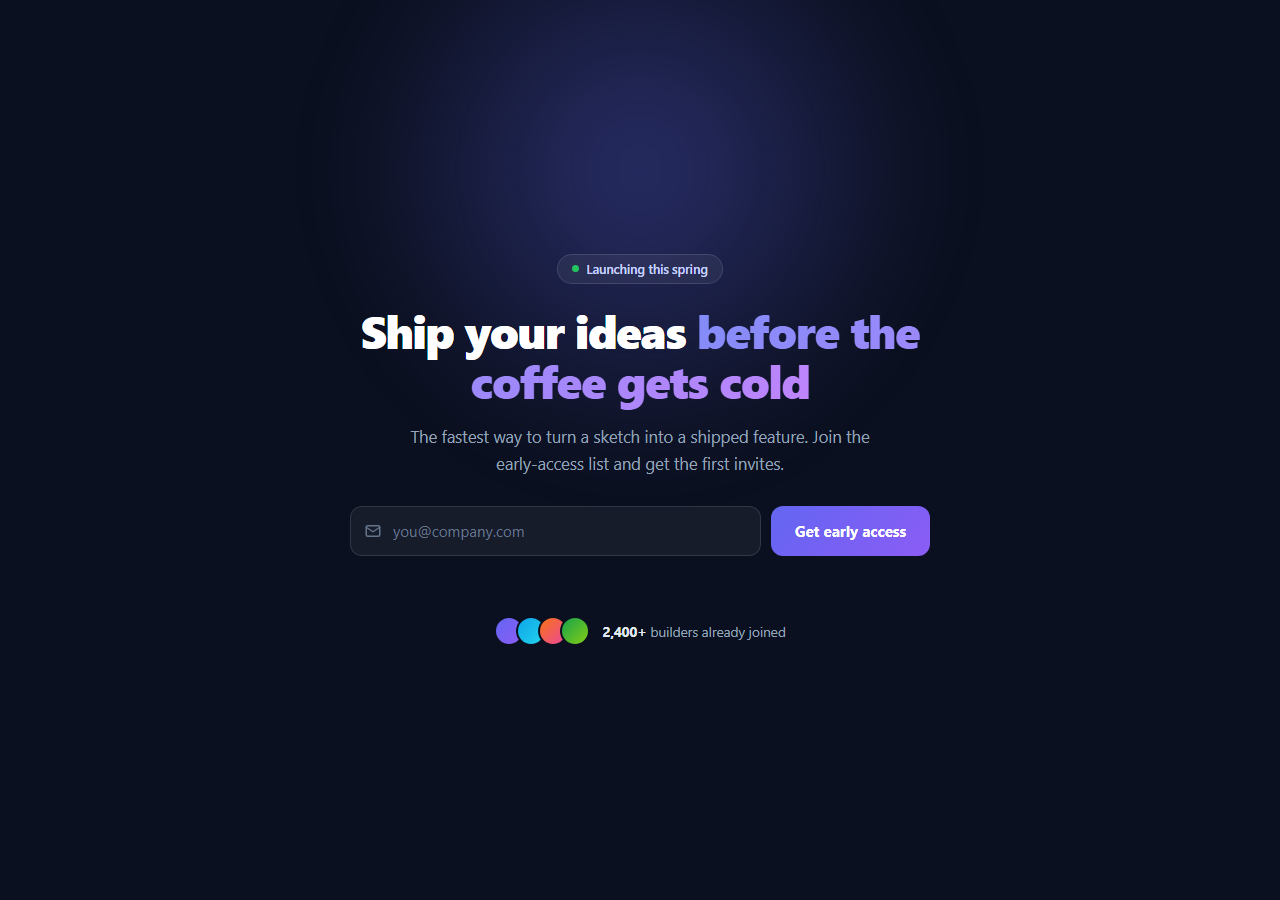
The single most valuable element on a pre-launch landing page is the email capture, and the best place for it is the hero — above the fold, the first thing a visitor sees. This component is a complete waitlist hero: a dark gradient-lit section with a status badge, a two-tone headline, a subheading, an inline email form with validation and a loading state, a success message, and social-proof avatars with a signup count. It is built in HTML, CSS, and vanilla JavaScript, and it is the conversion-focused front end you drop on top of a real email provider.
The lit-from-above hero treatment
The section has a near-black #0b1020 background with a large blurred radial glow positioned at the top centre — a radial-gradient in an absolutely positioned element with filter: blur(40px). This "spotlight from above" look is the signature of modern SaaS launch pages (Linear, Vercel, Raycast). The content sits in a relatively positioned inner wrapper above the glow, centred and capped at a readable max width. A pulsing green status dot in the badge uses an expanding box-shadow keyframe to signal "live / launching soon" without any image.
Gradient headline with background-clip
The headline splits into two tones: white for the first phrase and a purple-to-violet gradient for the emphasised phrase. The gradient text uses background-clip: text with -webkit-text-fill-color: transparent, which paints the gradient through the letterforms — the standard technique for gradient type. Tight negative letter-spacing and a compressed line-height give the large heading the dense, confident look that landing-page headlines need.
Inline email form with native validation
The form is an email input (with a leading mail icon) and a submit button side by side. On submit, preventDefault stops the page reload, and validation leans on the input's own type="email" rule via checkValidity() plus a non-empty check — no custom regex needed. An invalid entry adds an .invalid class (red border and ring), focuses the field, and shows an error message; the error clears the instant the user starts typing again, the forgiving pattern that feels better than persistent red borders.
The loading and success states
A valid submit adds a .loading class to the button that hides its label and reveals a spinning SVG via pure CSS, and disables pointer events so it cannot be double-submitted. A setTimeout simulates the network request to your email provider; on completion the form is hidden and a green success message ("You're on the list") replaces it. This idle → loading → success progression is exactly what a real async signup needs, so wiring it to a backend is a matter of swapping the timeout for a fetch.
Social proof that converts
Below the form, a row of overlapping gradient avatars (stacked with negative margins and ringed in the background colour to read as a cluster) sits beside a count — "2,400+ builders already joined." Social proof at the point of decision measurably lifts signup rates, and putting it immediately under the form means the visitor sees it exactly when they are deciding whether to enter their email.
Customisation and wiring
Replace the headline, subheading, badge text, and proof count with your own copy. To make it functional, swap the setTimeout in the submit handler for a fetch POST to your email service (Mailchimp, ConvertKit, Resend, Loops, or your own endpoint), keeping the same .loading and success/error message states around the request. Swap the #6366f1/#8b5cf6 gradient and the glow colour for your brand, and use real avatar images in place of the gradient circles. On mobile (under 560px) the form stacks vertically and the headline scales down automatically.
Build with AI
Build, Understand, Optimize, and Extend It With AI
You don't have to reverse-engineer the validation flow by hand. Paste this snippet's HTML, CSS, and JS into an AI coding assistant like Claude and ask it to explain exactly why checkValidity is enough for the email field instead of a custom regex, or how the radial-gradient glow combined with background-clip text creates the two-tone headline effect. The same assistant is useful for optimizing it — ask whether the blurred absolutely-positioned glow element could cause repaint cost on scroll, and whether the setTimeout standing in for the network request should be swapped for an AbortController-backed fetch with a real timeout. It's just as handy for extending the hero: ask it to add a double opt-in confirmation step after signup, persist submitted emails to localStorage to prevent resubmission, or animate the social-proof avatar count upward when it loads. Treat the code less like a finished artifact and more like a starting point for a conversation.
Prompt to recreate it
Copy this into your AI assistant of choice to build the effect from scratch, or as a jumping-off point for your own variant:
Build a dark waitlist landing-page hero with an inline email capture form in plain HTML, CSS, and JavaScript — no framework, no validation library.

Requirements:
- A full-height section with a near-black background and a large, absolutely-positioned, blurred radial-gradient glow behind the content to create a spotlight-from-above look.
- A status badge containing a small dot with a pulsing box-shadow keyframe animation to suggest a live launching-soon status.
- A headline where part of the text is plain white and another inline span uses a CSS gradient painted through the text via background-clip: text and a transparent text fill color.
- An inline form with an email input (leading icon, autocomplete="email") and a submit button side by side, which stacks vertically under a small-screen media query.
- On submit, call preventDefault, and validate using only the input's native type="email" constraint via checkValidity() plus a check that the trimmed value isn't empty — no manual regex. On failure, add a visible invalid style to the input, focus it, and show an inline error message that clears itself as soon as the user edits the field again.
- On success, add a loading class to the submit button that hides its label and shows a spinning SVG icon while disabling further clicks, simulate an async request with a delay, then hide the form and reveal a success message in its place.
- Below the form, show a cluster of overlapping circular avatars (stacked with negative margins) next to a bold signup count as social proof.
Want to tighten it up first? Run this prompt through the AI Prompt Studio to score it across 8 quality dimensions, catch anti-patterns, and tune the wording for Claude, ChatGPT, or Gemini before you paste it in.
Step by step
How to Use
- 1Paste the HTML, CSS, and JSA dark hero renders with a glowing backdrop, a status badge, a gradient headline, an inline email form, and social-proof avatars.
- 2Submit an invalid emailThe field gets a red ring and focus, and an inline error message asks for a valid address.
- 3Submit a valid emailThe button shows a spinner, then the form is replaced by a green "You're on the list" success message.
- 4Edit the copyChange the badge, headline (the gradient span is the emphasised phrase), subheading, and proof count to your launch.
- 5Connect your email providerReplace the setTimeout with a fetch POST to Mailchimp, ConvertKit, Resend, or your endpoint, keeping the loading and success states.
- 6Theme itSwap the indigo-violet gradient and the radial glow colour for your brand and use real avatar photos.
Real-world uses
Common Use Cases
Got questions?
Frequently Asked Questions
In the submit handler, replace the setTimeout block with an async fetch to your provider. Most (Mailchimp, ConvertKit, Resend, Loops, Buttondown) accept a POST with the email in JSON or form-encoded body. Set the button to loading before the call, await the response, then show the success message on a 2xx or an error message otherwise. Keep the validation in front of the request so you never send an empty or malformed address.
The input already has type="email", so the browser enforces a reasonable email format for free — checkValidity() returns false for malformed addresses with no code to maintain. Email regexes are notoriously hard to get right (the full RFC is enormous), so relying on the native check plus a non-empty test is more robust and far less code. Real verification still happens server-side via a confirmation email.
The gradient is on the <span> inside the H1. Move the span to wrap whichever words you want emphasised — the .hec-title span rule applies the background-clip gradient to exactly that span. You can also change the gradient stops (#818cf8 to #c084fc) to match your brand, and the rest of the headline stays solid white.
The handler sets form.style.display = 'none' to swap the form for the message. To keep the form and just show a confirmation below it, remove that line and only set the success message; optionally clear the input and disable the button so the same email is not submitted twice. Either pattern works — hiding the form gives a cleaner "done" state, keeping it allows multiple signups.
Hold email, loading, and message in state. The submit handler calls preventDefault, validates (a ref's checkValidity or your own check), sets loading, awaits the fetch, then sets the success/error message. Bind .loading to the button and .invalid to the input from state. Clear any pending timeout in a cleanup hook. The hero markup, the glow, the gradient headline, and all CSS states port unchanged — only the form state and submit logic move into the framework.