Source Code
<div class="feed-wrap">
  <div class="feed-header">
    <h2 class="feed-title">Latest Articles</h2>
    <span class="feed-count" id="feed-count">6 articles</span>
  </div>
  <div class="feed-list" id="feed-list"></div>
  <div class="sentinel" id="sentinel"></div>
  <div class="end-msg" id="end-msg">
    <svg width="32" height="32" viewBox="0 0 24 24" fill="none" stroke="currentColor" stroke-width="1.5" stroke-linecap="round" stroke-linejoin="round"><path d="M20 6L9 17l-5-5"/></svg>
    <span>You've reached the end</span>
  </div>
</div>
* { box-sizing: border-box; margin: 0; padding: 0; }
body { font-family: system-ui, -apple-system, sans-serif; background: #f1f5f9; }
.feed-wrap {
height: 100vh;
overflow-y: auto;
padding: 20px 16px 40px;
scroll-behavior: smooth;
}
.feed-header {
display: flex;
align-items: baseline;
justify-content: space-between;
margin-bottom: 16px;
max-width: 640px;
margin-left: auto;
margin-right: auto;
}
.feed-title {
font-size: 20px;
font-weight: 700;
color: #0f172a;
}
.feed-count {
font-size: 12px;
color: #94a3b8;
font-weight: 500;
}
/* Card */
.card {
background: #fff;
border-radius: 14px;
padding: 18px 20px;
margin-bottom: 12px;
max-width: 640px;
margin-left: auto;
margin-right: auto;
box-shadow: 0 1px 4px rgba(0,0,0,0.06);
opacity: 0;
transform: translateY(14px);
animation: cardIn 0.35s ease forwards;
}
@keyframes cardIn {
to { opacity: 1; transform: translateY(0); }
}
.card-top {
display: flex;
align-items: center;
gap: 8px;
margin-bottom: 10px;
}
.pill {
font-size: 10px;
font-weight: 700;
letter-spacing: 0.05em;
text-transform: uppercase;
padding: 3px 9px;
border-radius: 20px;
}
.pill-design { background: #ede9fe; color: #7c3aed; }
.pill-dev { background: #dbeafe; color: #1d4ed8; }
.pill-product { background: #dcfce7; color: #15803d; }
.pill-ux { background: #fce7f3; color: #9d174d; }
.pill-data { background: #fef3c7; color: #92400e; }
.pill-ai { background: #f0fdf4; color: #166534; }
.card-title {
font-size: 15px;
font-weight: 700;
color: #1e293b;
line-height: 1.4;
margin-bottom: 6px;
}
.card-excerpt {
font-size: 13px;
color: #64748b;
line-height: 1.55;
margin-bottom: 14px;
}
.card-footer {
display: flex;
align-items: center;
gap: 8px;
}
.avatar {
width: 28px;
height: 28px;
border-radius: 50%;
display: flex;
align-items: center;
justify-content: center;
font-size: 10px;
font-weight: 700;
color: #fff;
flex-shrink: 0;
}
.card-author { font-size: 12px; font-weight: 600; color: #475569; }
.card-dot { font-size: 12px; color: #cbd5e1; }
.card-time { font-size: 12px; color: #94a3b8; }
/* Skeleton */
.skeleton-card {
background: #fff;
border-radius: 14px;
padding: 18px 20px;
margin-bottom: 12px;
max-width: 640px;
margin-left: auto;
margin-right: auto;
box-shadow: 0 1px 4px rgba(0,0,0,0.06);
}
.sk {
background: linear-gradient(90deg, #f1f5f9 25%, #e2e8f0 50%, #f1f5f9 75%);
background-size: 200% 100%;
animation: shimmer 1.4s infinite;
border-radius: 6px;
}
@keyframes shimmer {
0% { background-position: 200% 0; }
100% { background-position: -200% 0; }
}
.sk-pill { width: 64px; height: 20px; border-radius: 20px; margin-bottom: 12px; }
.sk-title { height: 16px; width: 80%; margin-bottom: 8px; }
.sk-title-short { height: 16px; width: 50%; margin-bottom: 12px; }
.sk-line { height: 12px; width: 100%; margin-bottom: 6px; }
.sk-line-short { height: 12px; width: 70%; margin-bottom: 14px; }
.sk-footer { display: flex; align-items: center; gap: 8px; }
.sk-av { width: 28px; height: 28px; border-radius: 50%; flex-shrink: 0; }
.sk-name { height: 12px; width: 90px; }
/* Spinner */
.spinner-wrap {
display: flex;
justify-content: center;
padding: 16px 0;
max-width: 640px;
margin: 0 auto;
}
.spinner {
width: 24px;
height: 24px;
border: 3px solid #e2e8f0;
border-top-color: #6366f1;
border-radius: 50%;
animation: spin 0.7s linear infinite;
}
@keyframes spin { to { transform: rotate(360deg); } }
/* End message */
.end-msg {
display: none;
align-items: center;
justify-content: center;
gap: 8px;
max-width: 640px;
margin: 8px auto 0;
padding: 16px;
color: #10b981;
font-size: 14px;
font-weight: 600;
}
.end-msg svg { color: #10b981; }
.sentinel {
height: 1px;
}const BATCH_SIZE = 6;
const MAX_BATCHES = 5;
let batch = 0;
let loading = false;
const titles = [
'Why Intersection Observer Beats Scroll Events Every Time',
'Designing Feeds That Keep Users in Flow',
'CSS Grid vs Flexbox: Choosing the Right Layout Tool',
'The Psychology of Skeleton Loaders and Perceived Performance',
'Building Accessible Components Without a Framework',
'How to Structure a Design System That Scales',
'Understanding JavaScript Event Loop and Async Patterns',
'Dark Mode Done Right: CSS Custom Properties and Tokens',
'The Case for Vanilla JS in 2025',
'Responsive Typography Without a Single Media Query',
'Animating with CSS Instead of JavaScript Libraries',
'API Design Patterns for Frontend Developers',
'Micro-interactions That Make Products Feel Alive',
'Progressive Enhancement vs Graceful Degradation',
'State Management Without Redux: A Practical Guide',
'Web Performance Metrics That Actually Matter',
'Crafting Smooth Page Transitions in Next.js',
'Data Visualisation Best Practices for Product Teams',
'How AI is Changing the UX Research Process',
'Keyboard Navigation: The Most Ignored Accessibility Feature',
'The Art of Writing Reusable React Hooks',
'CSS Container Queries Finally Here — Should You Use Them?',
'Optimising Images for Core Web Vitals',
'Building Real-Time Features Without WebSockets',
'Token-Based Auth: JWTs, Sessions, and When to Use Each',
'When to Break the Grid: Art Direction in Web Design',
'Testing React Components the Right Way',
'Understanding CSS Specificity Once and For All',
'The Hidden Cost of Third-Party Scripts',
'Designing for Touch: Targets, Gestures, and Affordances',
];
const excerpts = [
'Scroll event listeners fire dozens of times per second. Intersection Observer fires only when elements cross the threshold — a fundamental shift in how browsers detect visibility.',
'Infinite scroll, pagination, and load-more buttons each serve different content types. Here\'s a framework for choosing the right pattern for your specific use case.',
'Both are powerful layout tools, but they solve different problems. Understanding the mental model behind each prevents hours of CSS debugging.',
'Research shows users tolerate loading states better when they can see the structure of incoming content. Skeleton screens reduce perceived wait time by up to 40%.',
'You don\'t need React, Vue, or Svelte to build accessible UI. The fundamentals — focus management, ARIA roles, keyboard events — work the same everywhere.',
'Most design systems collapse under their own weight. A token-based architecture with clear naming conventions is the foundation that keeps them maintainable.',
'Understanding how the event loop processes microtasks and macrotasks explains half the bugs that seem impossible to reproduce.',
'CSS custom properties propagate through the entire DOM instantly. Building a dark mode toggle becomes a single setProperty call instead of hundreds of class changes.',
'Frameworks solve real problems. But for component demos, small tools, and interactive snippets, vanilla JS stays readable indefinitely without version churn.',
'Fluid typography with clamp() gives you a smooth type scale between two breakpoints with zero JavaScript and no media queries required.',
'The Web Animations API and CSS keyframes cover 90% of UI animation needs. JavaScript animation libraries add weight that most projects don\'t need.',
'REST, GraphQL, and tRPC each make different tradeoffs. Choosing the wrong one for your team\'s needs costs months of rework.',
'The best micro-interactions are invisible — they confirm actions, communicate state, and delight users without drawing attention to themselves.',
'Progressive enhancement starts with working HTML, then adds CSS, then adds JavaScript. It\'s not a constraint — it\'s a quality guarantee.',
'Zustand, Jotai, and Context each shine in different scenarios. Here\'s a decision tree for picking the right tool without over-engineering.',
'LCP, CLS, and INP replaced FID in the Core Web Vitals spec. Understanding what triggers each metric is the first step to improving your scores.',
'The App Router in Next.js changes everything about page transitions. View Transitions API makes them feel native without client-side routing gymnastics.',
'Good charts tell stories. Bad charts confuse even the people who made them. These principles separate data visualisation from data decoration.',
'AI tools are best at synthesis and pattern recognition. Human researchers remain essential for the empathy and context that shaped what questions to ask.',
'Most accessibility audits catch contrast failures and missing alt text. Keyboard navigation issues are harder to spot but affect far more users.',
'A well-designed custom hook encapsulates logic, state, and side effects into a composable unit that makes complex components dramatically simpler.',
'Container queries let components respond to their parent\'s size instead of the viewport. They\'re already in all modern browsers — here\'s when they\'re worth using.',
'next/image handles lazy loading and format conversion automatically. But responsive srcset, AVIF format, and CDN configuration still need intentional setup.',
'Server-Sent Events, long polling, and the Broadcast Channel API cover most real-time needs without the complexity overhead of full WebSocket infrastructure.',
'JWTs are stateless but can\'t be invalidated. Sessions require server storage but give you instant revocation. The right answer depends on your threat model.',
'Grid constraints exist to create visual rhythm, not to cage creativity. Knowing when and how to break them intentionally is what separates design from layout.',
'Unit tests, integration tests, and end-to-end tests serve different roles. A testing strategy that\'s heavy on one and light on the others has blind spots.',
'Specificity isn\'t arbitrary — it follows a clear algorithm. Once you understand it, you can predict which styles win without resorting to !important.',
'A single third-party analytics script can block rendering, exfiltrate user data, and add 300ms to your Time to Interactive. The cost is rarely worth the benefit.',
'A 44px touch target is WCAG\'s minimum. But spacing between targets matters just as much. Dense mobile UIs cause mis-taps that erode trust over time.',
];
const categories = [
{ label: 'Design', cls: 'pill-design' },
{ label: 'Dev', cls: 'pill-dev' },
{ label: 'Product', cls: 'pill-product' },
{ label: 'UX', cls: 'pill-ux' },
{ label: 'Data', cls: 'pill-data' },
{ label: 'AI', cls: 'pill-ai' },
];
const authors = [
{ name: 'Alex Johnson', initials: 'AJ', color: '#6366f1' },
{ name: 'Sara Miller', initials: 'SM', color: '#ec4899' },
{ name: 'Raj Patel', initials: 'RP', color: '#10b981' },
{ name: 'Lucy Kim', initials: 'LK', color: '#f59e0b' },
{ name: 'Marco Bianchi', initials: 'MB', color: '#0ea5e9' },
{ name: 'Priya Sharma', initials: 'PS', color: '#8b5cf6' },
];
const times = [
'just now', '2 min ago', '15 min ago', '1 hr ago', '3 hrs ago',
'5 hrs ago', 'Yesterday', '2 days ago', '3 days ago', '1 week ago',
];
function pick(arr, idx) {
return arr[idx % arr.length];
}
function buildCard(globalIdx) {
const cat = pick(categories, globalIdx + 2);
const author = pick(authors, globalIdx + 1);
const time = pick(times, globalIdx + 3);
const title = pick(titles, globalIdx);
const excerpt = pick(excerpts, globalIdx);
const card = document.createElement('div');
card.className = 'card';
card.style.animationDelay = (globalIdx % BATCH_SIZE) * 0.06 + 's';
card.innerHTML = `
<div class="card-top">
<span class="pill ${cat.cls}">${cat.label}</span>
</div>
<div class="card-title">${title}</div>
<div class="card-excerpt">${excerpt}</div>
<div class="card-footer">
<div class="avatar" style="background:${author.color}">${author.initials}</div>
<span class="card-author">${author.name}</span>
<span class="card-dot">·</span>
<span class="card-time">${time}</span>
</div>
`;
return card;
}
function buildSkeleton() {
const sk = document.createElement('div');
sk.className = 'skeleton-card';
sk.innerHTML = `
<div class="sk sk-pill"></div>
<div class="sk sk-title"></div>
<div class="sk sk-title-short"></div>
<div class="sk sk-line"></div>
<div class="sk sk-line"></div>
<div class="sk sk-line-short"></div>
<div class="sk-footer">
<div class="sk sk-av"></div>
<div class="sk sk-name"></div>
</div>
`;
return sk;
}
const list = document.getElementById('feed-list');
const sentinel = document.getElementById('sentinel');
const endMsg = document.getElementById('end-msg');
const countEl = document.getElementById('feed-count');
// Render initial batch synchronously (no animation delay needed for first load)
function appendCards(startIdx) {
for (let i = 0; i < BATCH_SIZE; i++) {
list.appendChild(buildCard(startIdx + i));
}
}
function updateCount(total) {
countEl.textContent = total + ' article' + (total === 1 ? '' : 's');
}
function loadMore() {
if (loading || batch >= MAX_BATCHES) return;
loading = true;
observer.disconnect();
// Show skeletons + spinner
const skeletons = [];
for (let i = 0; i < 3; i++) {
const sk = buildSkeleton();
list.appendChild(sk);
skeletons.push(sk);
}
const spinner = document.createElement('div');
spinner.className = 'spinner-wrap';
spinner.innerHTML = '<div class="spinner"></div>';
list.appendChild(spinner);
setTimeout(() => {
// Remove skeletons and spinner
skeletons.forEach(sk => sk.remove());
spinner.remove();
const startIdx = batch * BATCH_SIZE;
appendCards(startIdx);
batch++;
updateCount(batch * BATCH_SIZE);
loading = false;
if (batch >= MAX_BATCHES) {
endMsg.style.display = 'flex';
sentinel.style.display = 'none';
} else {
observer.observe(sentinel);
}
}, 800);
}
const observer = new IntersectionObserver((entries) => {
if (entries[0].isIntersecting) {
loadMore();
}
}, { rootMargin: '120px' });
// Load first batch immediately, then start observing
appendCards(0);
batch = 1;
updateCount(BATCH_SIZE);
observer.observe(sentinel);Learn Coding Visually
Learn to code with interactive, live-preview playgrounds — HTML, CSS, JavaScript, React & more.
 HTML Playground42 lessons · Click-based · Live preview
 CSS PlaygroundLearn CSS with a live editor
 JavaScript Playground60 lessons · DOM · Async · Canvas
 React PlaygroundLearn React with a live code editor
 GSAP PlaygroundLearn GSAP animation interactively
 SVG Playground44 lessons · shapes · paths · animation
 SCSS Playground45 lessons · Sass modules · tokens
 Tailwind PlaygroundLearn Tailwind CSS with a live editor
 Bootstrap 5 Playground50 lessons · live preview
Infinite Scroll HTML CSS JS — IntersectionObserver Feed
Infinite Scroll · Layouts · Plain HTML, CSS & JS · Live preview
What's included
Features
About this UI Snippet
Infinite Scroll — How to Build an IntersectionObserver-Based Infinite Scroll Feed in JavaScript
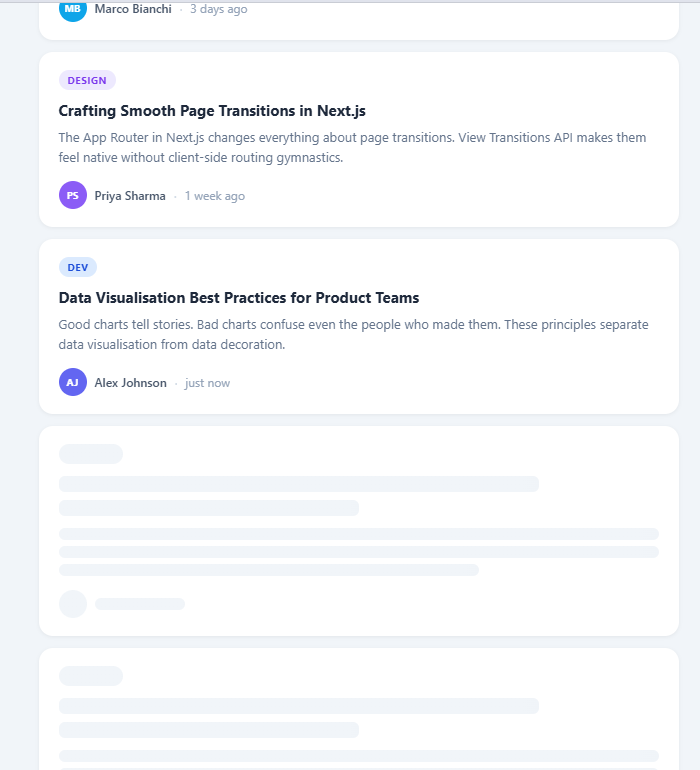
Infinite scroll is a feed loading pattern where content loads automatically as the user approaches the bottom of the page, removing the need for "Load More" buttons or pagination. Used by Twitter, Instagram, LinkedIn, and most modern content feeds, it creates an uninterrupted reading experience by fetching the next batch of content just before the user reaches the end of what has already loaded.
The naive implementation — listening to the scroll event and checking scrollTop + clientHeight >= scrollHeight — fires hundreds of times per second during scroll, runs on the main thread, and degrades performance. The modern approach uses IntersectionObserver, which fires asynchronously only when a target element enters or leaves the viewport.
This snippet builds a complete infinite scroll article feed using IntersectionObserver with a sentinel pattern, batch loading with skeleton placeholders, a configurable maximum batch count, and an end-of-feed message — all in plain JavaScript.
The Sentinel Pattern
A sentinel is an invisible element placed after the last rendered card. When the sentinel enters the viewport (becomes visible as the user scrolls down), the IntersectionObserver fires and loads the next batch. When loading is complete, the sentinel is still below the new cards, ready to trigger the next batch when reached again.
The sentinel element: <div class="sentinel" id="sentinel"></div>. It has zero visual size. The observer is created with rootMargin: '120px' — this means the observer fires 120px before the sentinel actually enters the viewport. This gives enough time to generate and inject the new cards so the user never sees a loading gap. The rootMargin acts as a pre-fetch buffer.
IntersectionObserver Setup
const observer = new IntersectionObserver(entries => { if (entries[0].isIntersecting && !loading && batch < MAX_BATCHES) { loadBatch(); } }, { rootMargin: '120px' }); observer.observe(sentinel);
The isIntersecting check fires only when the sentinel is visible (not on exit). The loading flag prevents concurrent batch loads. The batch < MAX_BATCHES check stops loading when all content is exhausted. The observer is disconnected when MAX_BATCHES is reached, since no further loading is needed.
Skeleton Placeholder Pattern
Before each batch of real cards loads, skeleton placeholder cards are injected into the feed. Each skeleton is a <div class="card skeleton"> with grey placeholder elements where the image, title, and meta text would appear. A CSS shimmer animation sweeps a lighter gradient across the placeholders — the same GPU-accelerated background-position technique used by Facebook and LinkedIn.
After a simulated 700ms delay (representing the API response time), the skeleton cards are removed with skeletons.forEach(s => s.remove()) and replaced with the real article cards. In production, the setTimeout would be replaced by an await fetch() call.
Batch Generation
The snippet includes a large titles array (30 entries) and a tags array. Each appendCards(batchIndex) call slices 6 entries from the titles array starting at batchIndex × BATCH_SIZE. Each card is created with document.createElement, populated with title, a formatted date, a reading time estimate, and a randomly selected tag. All 6 cards are appended to the feed via documentFragment for a single reflow rather than 6 individual DOM insertions.
DocumentFragment Batch Append
DOM insertions are expensive because each appendChild triggers a potential reflow. The snippet uses const frag = document.createDocumentFragment() — appending all 6 new cards to the fragment first, then calling feedList.appendChild(frag) once. This batches all 6 DOM insertions into a single reflow, reducing layout thrashing by 6×.
End of Feed
When batch >= MAX_BATCHES, the observer is disconnected with observer.disconnect() and an end-of-feed message is revealed: a checkmark icon with "You've reached the end." This prevents infinite loading when the content pool is exhausted and gives users clear closure. The end message uses endMsg.style.display = 'flex' to reveal the pre-rendered hidden element.
Article Count Label
The feed header shows "N articles" and updates after each batch load: feedCountEl.textContent = Math.min(batch * BATCH_SIZE, totalCards) + ' articles'. This gives users a sense of content volume without exposing implementation details like batch numbers.
Performance vs Scroll Listener
The IntersectionObserver approach fires at most once per batch and runs in a browser-managed background thread. A scroll listener equivalent would fire 60+ times per second during scroll, run synchronously on the main thread, and require throttle() or requestAnimationFrame() wrapping to not degrade scroll performance. IntersectionObserver is the correct tool for any "trigger action when element is visible" use case.
Build with AI
Build, Understand, Optimize, and Extend It With AI
You do not have to reconstruct the batching logic from scratch on your own. Paste this snippet's HTML, CSS, and JS into an AI coding assistant like Claude and ask it to explain exactly why loadMore disconnects the observer before showing skeletons and reconnects it only after appendCards runs, or how buildCard's use of the pick helper with different offsets keeps the category, author, and time values varied instead of always cycling in lockstep. The same assistant can help you optimize it — ask whether appending each card individually in the loop inside appendCards should instead batch into a single DocumentFragment before one appendChild call, especially once MAX_BATCHES grows much larger. It is just as useful for extending the feed: ask it to wire loadMore to a real paginated fetch call, add a scroll-position-preserving "jump to top" button once several batches have loaded, or introduce a lightweight virtualization layer so very long feeds do not keep every card in the DOM forever. Treat the code less like a finished artifact and more like a starting point for a conversation.
Prompt to recreate it
Copy this into your AI assistant of choice to build the effect from scratch, or as a jumping-off point for your own variant:
Build an infinite-scroll article feed in plain HTML, CSS, and JavaScript using only the IntersectionObserver API — no scroll event listeners, no libraries.

Requirements:
- A feed container holding an initial batch of article cards rendered synchronously on load, each card showing a category pill, title, excerpt, author avatar with initials, author name, and a relative timestamp.
- A single empty sentinel div placed after the last card, observed by an IntersectionObserver configured with a rootMargin of roughly 120px so loading starts slightly before the sentinel is actually scrolled into view.
- A loadMore function that: checks a loading boolean and a batch counter against a maximum batch count before doing anything; if allowed, disconnects the observer immediately to prevent duplicate triggers; inserts several skeleton placeholder cards plus a spinner, each skeleton using a CSS shimmer animation (a linear-gradient background whose background-position animates across the element); waits on a simulated network delay; then removes the skeletons and spinner, appends the next batch of real cards, updates a visible "N articles" counter, and either reconnects the observer or, if the batch limit is reached, permanently hides the sentinel and reveals a "You've reached the end" message with a checkmark icon.
- Each card must fade in and slide up slightly via a CSS keyframes animation when it is first appended, with a small per-card animation-delay stagger within its batch so cards do not all pop in at once.
- Card content must be generated from a set of arrays (titles, excerpts, categories, authors, timestamps) using a helper that picks an entry by index modulo the array length, so the feed can produce far more unique-looking cards than the arrays have entries.
Want to tighten it up first? Run this prompt through the AI Prompt Studio to score it across 8 quality dimensions, catch anti-patterns, and tune the wording for Claude, ChatGPT, or Gemini before you paste it in.
Step by step
How to Use
- 1See the initial feedSix article cards load immediately. The feed shows the article title, tag, date, and reading time. The IntersectionObserver is already watching the sentinel below the last card.
- 2Scroll to load moreScroll toward the bottom of the feed. When the sentinel comes within 120px of the viewport, the observer fires and loads the next batch of 6 cards.
- 3See skeleton placeholdersJust before new cards appear, grey shimmer skeleton placeholders flash briefly — simulating an API response delay. In production this matches the real network latency.
- 4Reach the endAfter 5 batches (30 articles), a "You've reached the end" message appears and the observer disconnects. No further scroll events fire.
- 5Connect to a real APIReplace the setTimeout simulation in loadBatch() with an await fetch() call to your API endpoint. Pass the batch number as a page parameter: /api/articles?page=2&limit=6.
- 6Customize batch sizeChange BATCH_SIZE (cards per batch) and MAX_BATCHES (total batches before end) at the top of the JS. Adjust rootMargin on the IntersectionObserver to pre-fetch earlier or later.
Real-world uses
Common Use Cases
Got questions?
Frequently Asked Questions
The sentinel is an invisible zero-height element placed after the last loaded card. An IntersectionObserver watches it — when it enters the viewport, the observer fires and triggers the next batch load. Unlike scroll event listeners (which fire 60+ times per second on the main thread and require throttling), IntersectionObserver fires asynchronously at most once per batch, runs off the main thread, and has no performance cost during scrolling. It is the browser-native solution for scroll-triggered content loading.
rootMargin expands the observation boundary beyond the actual viewport. With rootMargin: "120px", the observer fires when the sentinel is 120px below the visible viewport edge — before the user has actually reached it. This pre-fetch buffer gives the batch loading time to complete before the user reaches the current last card. Without rootMargin, users would see a brief empty gap at the bottom while cards loaded. Increase rootMargin for slower APIs (more buffer time) or decrease for very fast APIs.
Replace the setTimeout simulation in loadBatch() with: const res = await fetch(/api/posts?page=${batch + 1}&limit=${BATCH_SIZE}); const posts = await res.json(); if (!posts.length) { observer.disconnect(); endMsg.style.display = "flex"; return; } const frag = document.createDocumentFragment(); posts.forEach(post => { const card = createCard(post); frag.appendChild(card); }); feedList.appendChild(frag); batch++;. The API response length check replaces the MAX_BATCHES limit.
Each skeleton card uses background: linear-gradient(90deg, #e2e8f0 25%, #f1f5f9 50%, #e2e8f0 75%) with background-size: 200% on the placeholder elements (title bar, image area, meta row). A CSS @keyframes animates background-position from "200% 0" to "-200% 0" over 1.4 seconds. This sweeps a lighter highlight across the grey skeleton shape. Because background-position changes run on the GPU compositor, the animation runs at 60fps without affecting main thread performance.
Check the response length: if (posts.length === 0 || posts.length < BATCH_SIZE) { observer.disconnect(); endMsg.style.display = "flex"; return; }. If the API returns fewer items than BATCH_SIZE, it means you've reached the last partial page — show the end message. Also check for an explicit "hasMore: false" field in your API response if your backend provides pagination metadata. Always call observer.disconnect() when done to free browser memory.
Yes. The JSX, Vue, Angular, and Tailwind exports convert it automatically. In React, create the IntersectionObserver in useEffect, observe the sentinel div via a ref, and append items with setState; return observer.disconnect() as the cleanup so the observer does not leak between renders.