Source Code
<div class="span-app">
<div class="span-header">
<h2>Digit Span</h2>
<div class="stats">
<div class="stat"><span class="stat-label">Level</span><span class="stat-val" id="stat-level">1</span></div>
<div class="stat"><span class="stat-label">Lives</span><span class="stat-val" id="stat-lives">●●●</span></div>
<div class="stat"><span class="stat-label">Best</span><span class="stat-val" id="stat-best">--</span></div>
</div>
</div>
<div class="stage">
<div class="display" id="display">Watch</div>
</div>
<p class="status" id="status">Memorize the sequence as it appears, one digit at a time.</p>
<div class="entry" id="entry-wrap" hidden>
<div class="typed" id="typed"></div>
<div class="keypad" id="keypad"></div>
<div class="entry-actions">
<button id="clear-btn" class="ghost-btn">Clear</button>
<button id="submit-btn" class="primary-btn">Submit</button>
</div>
</div>
<button class="primary-btn" id="start-btn">Start game</button>
</div>* { box-sizing: border-box; margin: 0; padding: 0; }
body { font-family: system-ui, sans-serif; background: #0f172a; min-height: 100vh; }
.span-app { max-width: 420px; margin: 0 auto; padding: 32px 20px; display: flex; flex-direction: column; align-items: center; gap: 16px; }
.span-header { width: 100%; display: flex; align-items: center; justify-content: space-between; }
.span-header h2 { font-size: 19px; font-weight: 800; color: #f1f5f9; }
.stats { display: flex; gap: 8px; }
.stat { background: #1e293b; border: 1px solid #334155; border-radius: 10px; padding: 5px 11px; min-width: 52px; text-align: center; }
.stat-label { display: block; font-size: 9px; font-weight: 700; letter-spacing: 0.04em; text-transform: uppercase; color: #64748b; }
.stat-val { display: block; font-size: 14px; font-weight: 800; color: #a5b4fc; letter-spacing: 2px; }
.stage {
width: 100%; height: 130px;
background: #1e293b; border: 1px solid #334155; border-radius: 16px;
display: flex; align-items: center; justify-content: center;
}
.display {
font-family: 'SFMono-Regular', Consolas, monospace;
font-size: 56px; font-weight: 800; color: #a5b4fc;
transition: opacity 0.1s, transform 0.1s;
}
.display.flash { color: #f8fafc; transform: scale(1.15); }
.display.idle { font-size: 18px; color: #475569; font-weight: 600; font-family: system-ui, sans-serif; }
.status { font-size: 13px; color: #94a3b8; text-align: center; min-height: 18px; }
.status.bad { color: #f87171; }
.status.good { color: #4ade80; }
.entry { width: 100%; display: flex; flex-direction: column; align-items: center; gap: 12px; }
.typed {
min-height: 30px; font-family: 'SFMono-Regular', Consolas, monospace;
font-size: 22px; font-weight: 700; letter-spacing: 6px; color: #f1f5f9;
}
.keypad { display: grid; grid-template-columns: repeat(3, 1fr); gap: 8px; width: 100%; max-width: 260px; }
.key {
background: #1e293b; border: 1px solid #334155; border-radius: 10px;
padding: 14px 0; font-size: 18px; font-weight: 700; color: #e2e8f0;
cursor: pointer; font-family: inherit; transition: background 0.1s, transform 0.1s;
}
.key:hover { background: #334155; }
.key:active { transform: scale(0.95); }
.entry-actions { display: flex; gap: 10px; }
.ghost-btn {
background: none; border: 1.5px solid #334155; border-radius: 10px;
padding: 9px 18px; font-size: 12.5px; font-weight: 700; color: #cbd5e1;
cursor: pointer; font-family: inherit;
}
.ghost-btn:hover { border-color: #64748b; }
.primary-btn {
background: #6366f1; color: #fff; border: none; border-radius: 10px;
padding: 9px 22px; font-size: 13px; font-weight: 700; cursor: pointer; font-family: inherit;
transition: background 0.15s;
}
.primary-btn:hover { background: #4f46e5; }
.primary-btn:disabled { opacity: 0.5; cursor: default; }let level = 1;
let lives = 3;
let best = null;
let sequence = [];
let typed = '';
let playing = false;
let showing = false;
const displayEl = document.getElementById('display');
const statusEl = document.getElementById('status');
const entryWrap = document.getElementById('entry-wrap');
const typedEl = document.getElementById('typed');
const keypadEl = document.getElementById('keypad');
const levelEl = document.getElementById('stat-level');
const livesEl = document.getElementById('stat-lives');
const bestEl = document.getElementById('stat-best');
const startBtn = document.getElementById('start-btn');
const submitBtn = document.getElementById('submit-btn');
const clearBtn = document.getElementById('clear-btn');
function buildKeypad() {
keypadEl.innerHTML = '';
'1234567890'.split('').forEach(d => {
const btn = document.createElement('button');
btn.className = 'key';
btn.textContent = d;
btn.type = 'button';
btn.addEventListener('click', () => onDigit(d));
keypadEl.appendChild(btn);
});
}
function onDigit(d) {
if (!playing || showing) return;
if (typed.length >= sequence.length) return;
typed += d;
renderTyped();
}
function renderTyped() {
typedEl.textContent = typed.split('').join(' ') || '\u00b7';
}
function renderLives() {
livesEl.textContent = '\u25cf'.repeat(lives) + '\u25cb'.repeat(Math.max(0, 3 - lives));
}
function randomDigit() {
return String(Math.floor(Math.random() * 10));
}
async function sleep(ms) {
return new Promise(res => setTimeout(res, ms));
}
async function showSequence() {
showing = true;
entryWrap.hidden = true;
displayEl.classList.remove('idle');
statusEl.textContent = 'Watch closely...';
statusEl.className = 'status';
await sleep(500);
const speed = Math.max(430, 900 - level * 35);
for (let i = 0; i < sequence.length; i++) {
displayEl.textContent = sequence[i];
displayEl.classList.add('flash');
await sleep(speed * 0.55);
displayEl.classList.remove('flash');
await sleep(speed * 0.45);
displayEl.textContent = '';
await sleep(90);
}
displayEl.textContent = '?';
showing = false;
typed = '';
renderTyped();
entryWrap.hidden = false;
statusEl.textContent = `Enter all ${sequence.length} digits in order.`;
}
function nextRound() {
sequence = Array.from({ length: level + 2 }, randomDigit);
showSequence();
}
function onSubmit() {
if (!playing || showing) return;
if (typed.length !== sequence.length) {
statusEl.textContent = `Enter all ${sequence.length} digits before submitting.`;
statusEl.className = 'status bad';
return;
}
if (typed === sequence.join('')) {
statusEl.textContent = 'Correct! Level up.';
statusEl.className = 'status good';
level++;
levelEl.textContent = String(level);
if (best === null || level - 1 > best) {
best = level - 1;
bestEl.textContent = String(best);
}
entryWrap.hidden = true;
displayEl.textContent = String(level);
setTimeout(nextRound, 850);
} else {
lives--;
renderLives();
if (lives <= 0) {
endGame();
} else {
statusEl.textContent = `Not quite. The sequence was ${sequence.join('')}. ${lives} lives left.`;
statusEl.className = 'status bad';
entryWrap.hidden = true;
setTimeout(nextRound, 1600);
}
}
}
function endGame() {
playing = false;
entryWrap.hidden = true;
displayEl.classList.add('idle');
displayEl.textContent = 'Game over';
statusEl.textContent = `You reached level ${level} with a max span of ${level + 1} digits. Best cleared level: ${best || 0}.`;
statusEl.className = 'status bad';
startBtn.hidden = false;
startBtn.textContent = 'Play again';
}
function startGame() {
level = 1;
lives = 3;
playing = true;
renderLives();
levelEl.textContent = '1';
startBtn.hidden = true;
displayEl.classList.remove('idle');
nextRound();
}
buildKeypad();
renderLives();
submitBtn.addEventListener('click', onSubmit);
clearBtn.addEventListener('click', () => { typed = ''; renderTyped(); });
startBtn.addEventListener('click', startGame);
window.addEventListener('keydown', e => {
if (!playing || showing) return;
if (/^[0-9]$/.test(e.key)) onDigit(e.key);
else if (e.key === 'Enter') onSubmit();
else if (e.key === 'Backspace') { typed = typed.slice(0, -1); renderTyped(); }
});Learn Coding Visually
Learn to code with interactive, live-preview playgrounds — HTML, CSS, JavaScript, React & more.
 HTML Playground42 lessons · Click-based · Live preview
 CSS PlaygroundLearn CSS with a live editor
 JavaScript Playground60 lessons · DOM · Async · Canvas
 React PlaygroundLearn React with a live code editor
 GSAP PlaygroundLearn GSAP animation interactively
 SVG Playground44 lessons · shapes · paths · animation
 SCSS Playground45 lessons · Sass modules · tokens
 Tailwind PlaygroundLearn Tailwind CSS with a live editor
 Bootstrap 5 Playground50 lessons · live preview
Number Sequence Memory Game — Free JS Snippet
Number Sequence Memory Game · Games · Plain HTML, CSS & JS · Live preview
What's included
Features
About this UI Snippet
Number Sequence Memory Game — Digit-Span Recall with Adaptive Speed and Lives
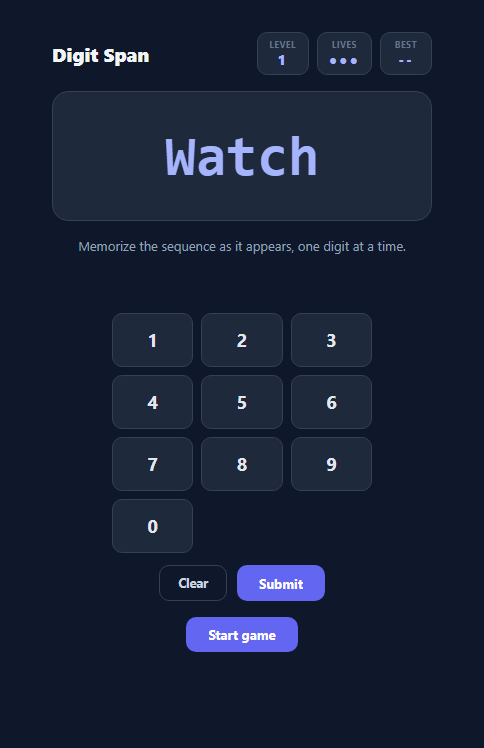
A digit span test measures short-term working memory by showing a sequence of digits and asking the subject to recall it in order — the length of sequence someone can reliably reproduce is a well-known memory benchmark. This snippet turns that test into a small game: digits flash one at a time in a display panel, the sequence grows by one digit every level, playback speeds up as levels rise, and the player has three lives before the run ends.
Why this is a distinct mechanic from a color-pattern game
A game like Simon shows a spatial or color-coded pattern that the player reproduces by clicking the same colored panels back — recall there is tied to spatial/visual position memory. This game instead shows abstract digits in a single fixed location, one after another, with no spatial cues to lean on at all — the only information available is the digit's identity and its position in the sequence, which is a purer test of sequential working memory (the same skill exercised by remembering a phone number or a one-time verification code).
Building and revealing a sequence
nextRound() generates a fresh sequence of level + 2 random digits via randomDigit(), so level 1 starts at three digits and each subsequent level adds one more, following the same escalating-difficulty structure classic digit-span tests use. showSequence() is an async function that reveals the sequence one character at a time: each digit is written into displayEl.textContent, briefly gets a .flash class (scaling and brightening it for a beat), then clears before the next digit appears, all paced by await sleep(ms) calls built on a small Promise-wrapped setTimeout. The pacing itself is adaptive: Math.max(430, 900 - level * 35) shortens the per-digit reveal time as level increases, so later levels are not only longer but genuinely faster, compounding the difficulty the way real digit-span protocols do.
Numeric keypad and keyboard input working together
Once the sequence finishes playing, an on-screen numeric keypad (buildKeypad() generates ten .key buttons) and physical keyboard digit keys both feed the same onDigit() handler, which appends to a typed string only while playing is true and showing is false — guarding against accidental input while the sequence is still animating. A window.addEventListener('keydown', ...) listener mirrors every keypad action for number keys, Enter (submit), and Backspace (delete last digit), so the game is equally playable by mouse/touch or keyboard alone.
Scoring: levels, a hard three-life limit, and a persisted best
Every correct submission increments level and immediately starts the next, longer round; an incorrect submission decrements lives, reveals the correct sequence briefly in the status text so the player learns what they missed, and continues if lives remain. When lives reaches zero, endGame() stops the loop, reports the level reached, and updates best — the highest fully-cleared level — only if this run beat the previous record, giving a simple, comparable score across sessions of the same page load.
Build with AI
Build, Understand, Optimize, and Extend It With AI
Paste this snippet's HTML, CSS, and JS into an AI coding assistant like Claude and ask it to explain exactly how the async showSequence() function paces the digit reveal using the sleep() helper, and why the playback speed formula caps at a minimum of 430ms per digit rather than continuing to accelerate indefinitely. It is also a good candidate for extension — ask the assistant to add a difficulty mode using letters or a mix of letters and digits instead of only 0-9, a visual-only "flash the digit's position on a grid" variant that also tests spatial memory, or persistent best-score tracking via localStorage so a returning player has a personal record to beat across sessions.
Prompt to recreate it
Copy this into your AI assistant of choice to build the effect from scratch, or as a jumping-off point for your own variant:
Build a digit-span memory recall game in plain HTML, CSS, and JavaScript — no libraries.

Requirements:
- On starting a level, generate a random sequence of digits whose length increases by one on every level (e.g. level 1 shows 3 digits, level 2 shows 4, and so on), and reveal it one digit at a time in a single display area using async/await-paced timing (not setInterval), with the reveal speed for each digit becoming faster at higher levels down to some reasonable minimum floor.
- After the sequence finishes revealing, present both an on-screen numeric keypad (0-9 buttons) and support physical keyboard digit key presses, both feeding into the same input-handling function, to let the player re-enter the digits in the exact order shown.
- Provide a Submit action (also triggerable with the Enter key) that compares the typed digits to the actual sequence: an exact match advances to a longer, faster next level; any mismatch consumes one of three lives and reveals what the correct sequence actually was.
- Add a Backspace/Clear way to correct mistyped digits before submitting, and disable all input while the sequence is actively being revealed so it cannot be typed over.
- Track and display the current level, remaining lives as a simple indicator, and the highest level fully cleared so far during the session. When lives reach zero, stop the game, show a game-over summary of the level reached, and offer a Play again control that resets state and starts a fresh run.
Want to tighten it up first? Run this prompt through the AI Prompt Studio to score it across 8 quality dimensions, catch anti-patterns, and tune the wording for Claude, ChatGPT, or Gemini before you paste it in.
Step by step
How to Use
- 1Click Start gamestartGame() resets level to 1, lives to 3, and immediately calls nextRound() to generate and reveal the first sequence.
- 2Watch the sequenceDigits flash one at a time in the display panel via showSequence(). No input is accepted while showing is true, so just watch until a "?" appears.
- 3Type the sequence backUse the on-screen keypad or your physical number keys to re-enter the digits in the exact order shown. Backspace or the Clear button lets you correct a mistake before submitting.
- 4Submit and check the resultPress Submit or hit Enter. A correct match advances you to a longer, faster sequence at the next level; a wrong answer costs one life and reveals the correct sequence.
- 5Track lives and best levelThe Lives stat shows filled/empty dots for your three lives. The Best stat records the highest level you have fully cleared this session.
- 6Tune the difficulty curveAdjust level + 2 in nextRound() to change the starting sequence length, or the 900 - level * 35 formula in showSequence() to change how quickly playback speeds up per level.
Real-world uses
Common Use Cases
Got questions?
Frequently Asked Questions
Simon-style games test spatial and color-pattern memory by having the player click the same colored panels back in order. This game shows abstract digits in a single fixed location with no spatial cues, testing pure sequential working memory instead — closer to a real digit-span cognitive test.
Two things scale together: the sequence itself grows by one digit every level (level + 2 digits), and the reveal speed accelerates via Math.max(430, 900 - level * 35), so higher levels are both longer to remember and shown to you more quickly.
endGame() is called once lives reaches zero. It stops accepting input, shows a game-over message reporting the level you reached and your best fully-cleared level for the session, and reveals the Play again button.
Yes. A window keydown listener accepts digit keys 0-9, Enter to submit, and Backspace to delete the last typed digit, mirroring every action available through the on-screen keypad.
No, best is stored in a plain JavaScript variable that resets on reload. To persist it across visits, read and write its value to localStorage inside startGame() and wherever best is updated in onSubmit().
Async/await with a Promise-wrapped setTimeout makes the multi-step reveal (show digit, flash, clear, pause, repeat) read as straightforward sequential code rather than a chain of nested callbacks or a manually tracked interval index, and makes it easy to change per-step timing based on the current level.