Source Code
<div class="wrap">
  <div class="toolbar">
    <div class="mode-tabs" id="mode-tabs">
      <button class="mode-tab active" data-algo="bfs">BFS</button>
      <button class="mode-tab" data-algo="astar">A*</button>
    </div>
    <div class="controls-row">
      <button class="btn btn-primary" id="btn-run">Run</button>
      <button class="btn" id="btn-clear-walls">Clear Walls</button>
      <button class="btn" id="btn-reset">New Grid</button>
    </div>
  </div>
  <div class="legend">
    <span><i class="dot dot-start"></i>Start (drag)</span>
    <span><i class="dot dot-end"></i>End (drag)</span>
    <span><i class="dot dot-wall"></i>Wall (click/drag)</span>
  </div>
  <div class="grid" id="grid"></div>
  <div class="status-row" id="status-row">Click and drag to draw walls, then hit Run.</div>
</div>
* { box-sizing: border-box; margin: 0; padding: 0; }
body { font-family: system-ui, -apple-system, sans-serif; background: #f8fafc; min-height: 100vh; display: flex; align-items: center; justify-content: center; padding: 24px; }
.wrap { width: 100%; max-width: 620px; background: #fff; border: 1px solid #e2e8f0; border-radius: 16px; padding: 20px; user-select: none; }
.toolbar { display: flex; justify-content: space-between; align-items: center; flex-wrap: wrap; gap: 10px; margin-bottom: 12px; }
.mode-tabs { display: flex; gap: 6px; }
.mode-tab { font-size: 12.5px; font-weight: 600; padding: 7px 14px; border-radius: 8px; border: 1.5px solid #e2e8f0; background: #f8fafc; color: #64748b; cursor: pointer; transition: all 0.15s; }
.mode-tab:hover { border-color: #a5b4fc; color: #4f46e5; }
.mode-tab.active { background: #6366f1; border-color: #6366f1; color: #fff; }
.controls-row { display: flex; gap: 8px; flex-wrap: wrap; }
.btn { font-size: 12.5px; font-weight: 600; padding: 8px 14px; border-radius: 8px; border: 1.5px solid #e2e8f0; background: #fff; color: #374151; cursor: pointer; transition: all 0.15s; }
.btn:hover { border-color: #cbd5e1; background: #f8fafc; }
.btn-primary { background: #6366f1; border-color: #6366f1; color: #fff; }
.btn-primary:hover { background: #4f46e5; border-color: #4f46e5; }
.btn:disabled { opacity: 0.5; cursor: not-allowed; }
.legend { display: flex; gap: 16px; flex-wrap: wrap; margin-bottom: 10px; font-size: 11.5px; color: #64748b; font-weight: 600; }
.legend span { display: flex; align-items: center; gap: 5px; }
.dot { width: 10px; height: 10px; border-radius: 3px; display: inline-block; }
.dot-start { background: #22c55e; }
.dot-end { background: #ef4444; }
.dot-wall { background: #334155; }
.grid { display: grid; grid-template-columns: repeat(24, 1fr); gap: 1px; background: #e2e8f0; border: 1px solid #e2e8f0; border-radius: 10px; overflow: hidden; aspect-ratio: 24 / 14; }
.cell { background: #fff; transition: background-color 0.18s ease, transform 0.15s ease; }
.cell.wall { background: #334155; }
.cell.start { background: #22c55e; }
.cell.end { background: #ef4444; }
.cell.visited { background: #c7d2fe; animation: pop 0.25s ease; }
.cell.frontier { background: #a5b4fc; }
.cell.path { background: #f59e0b; animation: pop 0.3s ease; }
@keyframes pop { from { transform: scale(0.5); opacity: 0.4; } to { transform: scale(1); opacity: 1; } }
.status-row { margin-top: 12px; font-size: 12.5px; color: #64748b; font-weight: 500; min-height: 18px; }const COLS = 24, ROWS = 14;
let cells = [];
let grid = [];
let start = { r: 3, c: 3 };
let end = { r: 10, c: 20 };
let dragging = null;
let running = false;
let algo = 'bfs';
function buildGrid() {
const el = document.getElementById('grid');
el.innerHTML = '';
grid = [];
cells = [];
for (let r = 0; r < ROWS; r++) {
const row = [];
const cellRow = [];
for (let c = 0; c < COLS; c++) {
const div = document.createElement('div');
div.className = 'cell';
div.dataset.r = r;
div.dataset.c = c;
el.appendChild(div);
row.push(0);
cellRow.push(div);
}
grid.push(row);
cells.push(cellRow);
}
paintEndpoints();
attachHandlers();
}
function paintEndpoints() {
for (let r = 0; r < ROWS; r++) {
for (let c = 0; c < COLS; c++) {
const cell = cells[r][c];
cell.classList.remove('start', 'end', 'wall', 'visited', 'frontier', 'path');
if (grid[r][c] === 1) cell.classList.add('wall');
}
}
cells[start.r][start.c].classList.add('start');
cells[end.r][end.c].classList.add('end');
}
function cellKey(r, c) { return r + ',' + c; }
function attachHandlers() {
let mouseDown = false;
document.getElementById('grid').addEventListener('mousedown', e => {
const t = e.target.closest('.cell');
if (!t || running) return;
mouseDown = true;
const r = Number(t.dataset.r), c = Number(t.dataset.c);
if (r === start.r && c === start.c) dragging = 'start';
else if (r === end.r && c === end.c) dragging = 'end';
else { dragging = 'wall'; toggleWall(r, c); }
});
document.getElementById('grid').addEventListener('mouseover', e => {
if (!mouseDown || !dragging || running) return;
const t = e.target.closest('.cell');
if (!t) return;
const r = Number(t.dataset.r), c = Number(t.dataset.c);
if (dragging === 'start' && !(r === end.r && c === end.c)) { start = { r, c }; paintEndpoints(); }
else if (dragging === 'end' && !(r === start.r && c === start.c)) { end = { r, c }; paintEndpoints(); }
else if (dragging === 'wall') setWall(r, c);
});
document.addEventListener('mouseup', () => { mouseDown = false; dragging = null; });
}
function toggleWall(r, c) {
if ((r === start.r && c === start.c) || (r === end.r && c === end.c)) return;
grid[r][c] = grid[r][c] === 1 ? 0 : 1;
paintEndpoints();
}
function setWall(r, c) {
if ((r === start.r && c === start.c) || (r === end.r && c === end.c)) return;
grid[r][c] = 1;
paintEndpoints();
}
function neighbors(r, c) {
const out = [];
if (r > 0) out.push([r - 1, c]);
if (r < ROWS - 1) out.push([r + 1, c]);
if (c > 0) out.push([r, c - 1]);
if (c < COLS - 1) out.push([r, c + 1]);
return out;
}
function buildSearchSteps() {
const steps = [];
const visited = new Set([cellKey(start.r, start.c)]);
const cameFrom = {};
if (algo === 'bfs') {
const queue = [[start.r, start.c]];
while (queue.length) {
const [r, c] = queue.shift();
if (r !== start.r || c !== start.c) steps.push({ type: 'visit', r, c });
if (r === end.r && c === end.c) break;
for (const [nr, nc] of neighbors(r, c)) {
const key = cellKey(nr, nc);
if (visited.has(key) || grid[nr][nc] === 1) continue;
visited.add(key);
cameFrom[key] = [r, c];
steps.push({ type: 'frontier', r: nr, c: nc });
queue.push([nr, nc]);
}
}
} else {
const h = (r, c) => Math.abs(r - end.r) + Math.abs(c - end.c);
const open = [{ r: start.r, c: start.c, g: 0, f: h(start.r, start.c) }];
const gScore = { [cellKey(start.r, start.c)]: 0 };
while (open.length) {
open.sort((a, b) => a.f - b.f);
const cur = open.shift();
const key = cellKey(cur.r, cur.c);
if (cur.r !== start.r || cur.c !== start.c) steps.push({ type: 'visit', r: cur.r, c: cur.c });
if (cur.r === end.r && cur.c === end.c) break;
for (const [nr, nc] of neighbors(cur.r, cur.c)) {
if (grid[nr][nc] === 1) continue;
const nKey = cellKey(nr, nc);
const tentative = cur.g + 1;
if (gScore[nKey] === undefined || tentative < gScore[nKey]) {
gScore[nKey] = tentative;
cameFrom[nKey] = [cur.r, cur.c];
const f = tentative + h(nr, nc);
if (!visited.has(nKey)) { steps.push({ type: 'frontier', r: nr, c: nc }); visited.add(nKey); }
open.push({ r: nr, c: nc, g: tentative, f });
}
}
}
}
let path = [];
const endKey = cellKey(end.r, end.c);
if (cameFrom[endKey] || (start.r === end.r && start.c === end.c)) {
let cur = [end.r, end.c];
while (cur) {
path.unshift(cur);
const key = cellKey(cur[0], cur[1]);
cur = cameFrom[key];
}
}
return { steps, path };
}
function run() {
if (running) return;
running = true;
document.getElementById('btn-run').disabled = true;
document.getElementById('status-row').textContent = algo === 'bfs' ? 'Running BFS — expanding cell by cell...' : 'Running A* — guided by Manhattan distance heuristic...';
paintEndpoints();
const { steps, path } = buildSearchSteps();
let i = 0;
function step() {
if (i >= steps.length) {
animatePath(path);
return;
}
const s = steps[i];
const cell = cells[s.r][s.c];
if (!(s.r === start.r && s.c === start.c) && !(s.r === end.r && s.c === end.c)) {
cell.classList.remove('frontier');
cell.classList.add(s.type === 'visit' ? 'visited' : 'frontier');
}
i++;
setTimeout(step, 12);
}
step();
}
function animatePath(path) {
if (!path.length) {
document.getElementById('status-row').textContent = 'No path found — the end cell is blocked off by walls.';
running = false;
document.getElementById('btn-run').disabled = false;
return;
}
let i = 0;
function step() {
if (i >= path.length) {
document.getElementById('status-row').textContent = 'Path found! Length: ' + path.length + ' cells.';
running = false;
document.getElementById('btn-run').disabled = false;
return;
}
const [r, c] = path[i];
if (!(r === start.r && c === start.c) && !(r === end.r && c === end.c)) {
cells[r][c].classList.add('path');
}
i++;
setTimeout(step, 22);
}
step();
}
document.querySelectorAll('.mode-tab').forEach(tab => {
tab.addEventListener('click', () => {
if (running) return;
document.querySelectorAll('.mode-tab').forEach(t => t.classList.remove('active'));
tab.classList.add('active');
algo = tab.dataset.algo;
document.getElementById('status-row').textContent = 'Switched to ' + (algo === 'bfs' ? 'BFS' : 'A*') + '. Click Run to search.';
});
});
document.getElementById('btn-run').addEventListener('click', run);
document.getElementById('btn-clear-walls').addEventListener('click', () => {
if (running) return;
for (let r = 0; r < ROWS; r++) for (let c = 0; c < COLS; c++) grid[r][c] = 0;
paintEndpoints();
document.getElementById('status-row').textContent = 'Walls cleared.';
});
document.getElementById('btn-reset').addEventListener('click', () => {
if (running) return;
start = { r: 3, c: 3 };
end = { r: 10, c: 20 };
buildGrid();
document.getElementById('status-row').textContent = 'New grid ready. Click and drag to draw walls.';
});
buildGrid();Learn Coding Visually
Learn to code with interactive, live-preview playgrounds — HTML, CSS, JavaScript, React & more.
 HTML Playground42 lessons · Click-based · Live preview
 CSS PlaygroundLearn CSS with a live editor
 JavaScript Playground60 lessons · DOM · Async · Canvas
 React PlaygroundLearn React with a live code editor
 GSAP PlaygroundLearn GSAP animation interactively
 SVG Playground44 lessons · shapes · paths · animation
 SCSS Playground45 lessons · Sass modules · tokens
 Tailwind PlaygroundLearn Tailwind CSS with a live editor
 Bootstrap 5 Playground50 lessons · live preview
Pathfinding Grid Visualizer — Free HTML CSS JS Snippet
Pathfinding Grid Visualizer · Animations · Plain HTML, CSS & JS · Live preview
What's included
Features
About this UI Snippet
Pathfinding Grid Visualizer — Animated BFS & A* Maze Search with Draggable Start/End and Wall Drawing in Vanilla JS
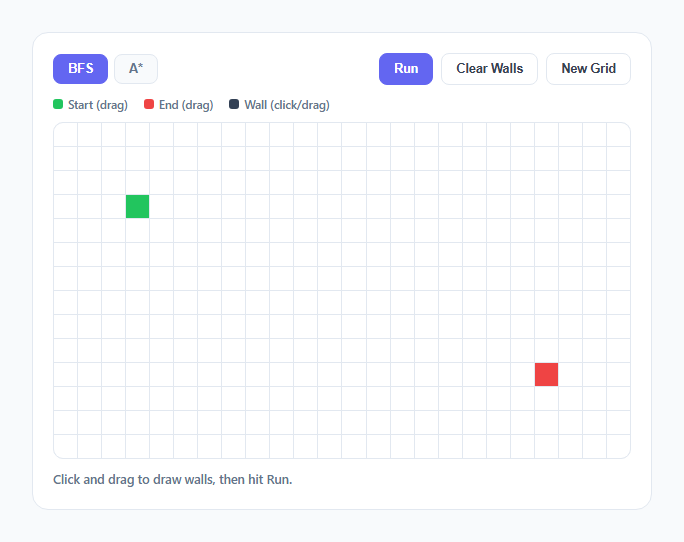
Pathfinding visualizers are one of the clearest ways to make graph search algorithms tangible, because the "graph" is just a grid you can see and the "edges" are simply up/down/left/right neighbor cells. This snippet implements two classic algorithms — Breadth-First Search and A* with a Manhattan-distance heuristic — over a 24×14 grid where the user draws walls, drags the start and end markers, and watches the search expand cell by cell before the shortest path traces itself back.
Step pre-computation, same pattern as the sorting visualizer
Just like the sorting algorithm visualizer in this library, the search itself and its animation are fully decoupled. buildSearchSteps() runs BFS or A* to completion synchronously, producing a flat array of {type:'visit', r, c} and {type:'frontier', r, c} records plus the reconstructed shortest path array — none of that computation touches the DOM. Only afterward does run() walk the step array with a setTimeout loop, coloring one cell every 12 milliseconds. This means the search algorithm's correctness is never entangled with animation timing, and the exact same expansion order the algorithm computed is guaranteed to be what gets drawn, frame for frame.
BFS: queue mechanics and why cells "ripple" outward
BFS is implemented with a plain array used as a FIFO queue: queue.shift() removes the oldest-enqueued cell and queue.push() adds newly discovered neighbors to the back. Because cells are always processed in the order they were first discovered, and every step moves exactly one cell away from its parent, BFS explores the grid in concentric rings — first everything one step from the start, then everything two steps away, and so on. This is why the animation looks like a ripple expanding outward from the start marker: it's a direct visual consequence of FIFO ordering, not a special effect. Critically, the first time BFS reaches the end cell is guaranteed to be via a shortest path, because no cell farther away can ever be dequeued before all closer cells have already been processed.
A*: why the heuristic reshapes the search
A* replaces the plain queue with a priority list sorted by f = g + h, where g is the confirmed number of steps from the start and h is Math.abs(r - end.r) + Math.abs(c - end.c) — the Manhattan distance to the goal, chosen because it's an admissible heuristic on a 4-directional grid (it never overestimates the true remaining distance, which is what guarantees A* still finds the optimal path). Sorting the open list by f before popping each iteration (open.sort((a,b) => a.f - b.f)) means cells that are both close to the start and pointing toward the goal get explored first. Run BFS and A* on the identical maze back to back and the difference is visible immediately: BFS's ripple fills a full circle around the start regardless of where the end is, while A*'s frontier visibly stretches and leans toward the end marker, exploring far fewer irrelevant cells in open areas.
Grid state, wall drawing, and drag handling
The grid is backed by a plain 2D array of 0s and 1s (grid[r][c]), completely separate from the DOM cells array (cells[r][c]) that holds the actual div references — a deliberate split so pathing logic never has to read CSS classes or query the DOM to know if a cell is a wall. Wall drawing uses a single mousedown/mouseover/mouseup trio on the grid container rather than a listener per cell: mousedown starts a drag mode ('start', 'end', or 'wall'), mouseover events during the drag call setWall, and mouseup on the document (not just the grid) ends the drag reliably even if the cursor leaves the grid bounds mid-drag. Both start and end markers are just coordinates that get repainted, protected from ever landing on top of each other or on a wall.
Path reconstruction via a cameFrom map
Both algorithms populate a shared cameFrom object that maps each discovered cell's key to the coordinates of the cell that discovered it — the standard technique for reconstructing a path after any graph search without storing full paths at every node. Once the end cell is reached, animatePath() walks backward from end through cameFrom links until it reaches start, unshifting each cell onto a path array, then animates that path forward in amber with its own separate, slightly slower setTimeout loop so the final route is legible even after a fast search.
Build with AI
Build, Understand, Optimize, and Extend It With AI
Give this snippet's JavaScript to an AI assistant like Claude and ask it to explain exactly why the Manhattan-distance heuristic is admissible on a 4-directional grid, or to trace how cameFrom reconstructs the path after A* terminates. Good extensions to ask for: Dijkstra's algorithm as a third tab (A* without the heuristic term), a "diagonal movement" toggle with the heuristic swapped to Chebyshev distance, or a step counter comparing how many cells BFS versus A* visited on the same maze.
Prompt to recreate it
Copy this into your AI assistant of choice to build the effect from scratch, or as a jumping-off point for your own variant:
Build an interactive pathfinding grid visualizer in plain HTML, CSS, and JavaScript, no libraries or frameworks.

Requirements:
- Render a grid of div cells (roughly 24 columns by 14 rows) with a draggable green start marker and red end marker that the user can reposition by clicking and dragging.
- Let the user draw walls by clicking or click-dragging across empty cells, using a single mousedown/mouseover/mouseup listener trio on the grid container rather than one listener per cell.
- Implement Breadth-First Search using a plain array as a FIFO queue, exploring 4-directional neighbors and guaranteeing the first path found is shortest.
- Implement A* as a second selectable mode using a Manhattan-distance heuristic (h = |dr| + |dc|) combined with the confirmed path cost (g) to prioritize which cell to expand next, and explain in a comment why this heuristic is admissible.
- Pre-compute the entire search as a flat array of visit/frontier step objects before animating anything, then play back that array on a timer so the search algorithm and the animation speed are fully decoupled.
- Reconstruct the shortest path after the search completes using a cameFrom map recording which cell discovered each other cell, then animate that path separately in a distinct highlight color.
- Include Clear Walls and New Grid buttons, and a status line reporting whether a path was found and its length, or that no path exists.
Want to tighten it up first? Run this prompt through the AI Prompt Studio to score it across 8 quality dimensions, catch anti-patterns, and tune the wording for Claude, ChatGPT, or Gemini before you paste it in.
Step by step
How to Use
- 1Drag the green start marker or red end markerClick and hold on either marker, then drag across the grid to reposition it. The grid repaints instantly and blocks you from dropping one marker on top of the other.
- 2Click or drag across empty cells to draw wallsEach cell you click toggles into a dark wall cell; dragging with the mouse held down paints a continuous wall, letting you build a maze in seconds.
- 3Choose BFS or A* from the tabsBFS explores in expanding rings from the start. A* uses a Manhattan-distance heuristic to lean its search toward the end, usually visiting far fewer cells.
- 4Click Run and watch the search expandFrontier cells light up light indigo as they are discovered, then darken to a visited shade as they are processed — the expansion animates one cell at a time.
- 5Watch the shortest path trace in amberOnce the end cell is reached, the reconstructed shortest path animates backward-to-forward in amber, tracing the exact route from start to end through the maze.
- 6Use Clear Walls or New Grid to resetClear Walls empties the maze while keeping your start/end positions; New Grid resets markers to their default corners and clears everything for a fresh run.
Real-world uses
Common Use Cases
Got questions?
Frequently Asked Questions
Yes. Move buildSearchSteps(), neighbors(), and the BFS/A* logic into a plain utils module — they take grid state as arguments and return data, so they need no framework changes. In React, run the animation loop inside a useEffect that stores its setTimeout id in a ref and clears it in the cleanup function when the component unmounts or Run is clicked again. In Vue, start the loop in a method and clear the pending timeout in onUnmounted or beforeUnmount. In Angular, manage the timer with a component field cleared in ngOnDestroy. The DOM/canvas cell painting is the only framework-specific part; the search algorithms stay pure functions.
BFS treats every direction as equally promising and expands in concentric rings regardless of where the end cell is. A* adds the Manhattan-distance heuristic to its priority score, so cells pointing toward the end are dequeued and explored before cells pointing away from it, even if both are the same number of steps from the start. In open mazes with few walls the difference is dramatic; in mazes with long forced corridors the two algorithms tend to converge because the heuristic offers less guidance when there is only one viable direction anyway.
No, not with this heuristic. Manhattan distance on a 4-directional grid where every move costs 1 is admissible — it never overestimates the true remaining distance to the goal — which mathematically guarantees A* still returns an optimal shortest path, it just typically explores fewer cells to get there. An inadmissible heuristic (one that can overestimate) could cause A* to return a suboptimal path, but that is not the case here.
Both algorithms exhaust their queue or open list without ever reaching the end cell, so cameFrom never gets an entry for the end coordinate. animatePath() detects the empty reconstructed path and shows "No path found" in the status line instead of attempting to animate a route, rather than throwing an error or looping indefinitely.
For diagonal movement, add the four diagonal offsets to neighbors() and switch the A* heuristic to Chebyshev or Euclidean distance, since Manhattan distance is not admissible once diagonal moves are allowed. For weighted terrain (e.g. slow "mud" cells), give each grid cell a cost value instead of just 0/1, and add that cost to g instead of always adding 1 when computing tentative — the rest of the priority-queue logic in the A* branch already supports variable edge weights without further changes.