Source Code
<div class="sab-page">
<div class="sab-banner" id="sabBanner">
<button class="sab-close" id="sabClose" aria-label="Dismiss">×</button>
<div class="sab-icon" aria-hidden="true">FT</div>
<div class="sab-info">
<p class="sab-name">FwdTools</p>
<p class="sab-meta">★★★★★ 4.9 · Free · On the App Store</p>
</div>
<button class="sab-open" id="sabOpen">Open</button>
</div>
<div class="sab-content">
<h1>Free UI Snippets</h1>
<p class="sab-lede">Copy-paste HTML, CSS & JS components for your next project.</p>
<div class="sab-cards">
<div class="sab-card"></div>
<div class="sab-card"></div>
<div class="sab-card"></div>
<div class="sab-card"></div>
</div>
<button class="sab-reopen" id="sabReopen" hidden>Show app banner</button>
</div>
</div>*{box-sizing:border-box;margin:0;padding:0}
body{font-family:system-ui,-apple-system,sans-serif;background:#f8fafc;min-height:100vh;display:flex;align-items:center;justify-content:center;padding:0}
.sab-page{width:100%;max-width:420px;background:#fff;min-height:100vh;box-shadow:0 0 40px rgba(0,0,0,.06)}
.sab-banner{display:flex;align-items:center;gap:10px;padding:12px 14px;background:#f8fafc;border-bottom:1px solid #e2e8f0;animation:sabSlideDown .2s ease}
.sab-banner[hidden]{display:none}
@keyframes sabSlideDown{from{transform:translateY(-100%);opacity:0}to{transform:translateY(0);opacity:1}}
.sab-close{width:22px;height:22px;flex-shrink:0;border:none;background:#e2e8f0;color:#64748b;border-radius:50%;font-size:15px;line-height:1;cursor:pointer;display:flex;align-items:center;justify-content:center}
.sab-close:hover{background:#cbd5e1}
.sab-icon{width:44px;height:44px;border-radius:11px;background:linear-gradient(135deg,#6366f1,#8b5cf6);color:#fff;font-weight:800;font-size:14px;display:flex;align-items:center;justify-content:center;flex-shrink:0}
.sab-info{flex:1;min-width:0}
.sab-name{font-size:13.5px;font-weight:800;color:#0f172a}
.sab-meta{font-size:11px;color:#f59e0b;margin-top:1px}
.sab-open{padding:8px 16px;background:#0ea5e9;color:#fff;border:none;border-radius:999px;font-size:12.5px;font-weight:700;cursor:pointer;flex-shrink:0}
.sab-open:hover{background:#0284c7}
.sab-content{padding:28px 22px}
.sab-content h1{font-size:22px;font-weight:800;color:#0f172a;margin-bottom:8px}
.sab-lede{font-size:13.5px;color:#64748b;line-height:1.6;margin-bottom:20px}
.sab-cards{display:grid;grid-template-columns:1fr 1fr;gap:10px;margin-bottom:20px}
.sab-card{height:90px;border-radius:12px;background:linear-gradient(135deg,#eef2ff,#f5f3ff);border:1px solid #e2e8f0}
.sab-reopen{padding:9px 16px;background:#eef2ff;color:#6366f1;border:none;border-radius:8px;font-size:12.5px;font-weight:700;cursor:pointer}
.sab-reopen[hidden]{display:none}(function(){
var STORAGE_KEY = 'sab-dismissed-until';
var DISMISS_DAYS = 7;
var banner = document.getElementById('sabBanner');
var closeBtn = document.getElementById('sabClose');
var openBtn = document.getElementById('sabOpen');
var reopenBtn = document.getElementById('sabReopen');
function safeGet(key) {
try { return window.localStorage.getItem(key); } catch (e) { return null; }
}
function safeSet(key, value) {
try { window.localStorage.setItem(key, value); } catch (e) { /* private mode / storage disabled: banner just won't persist dismissal */ }
}
function isDismissed() {
var until = safeGet(STORAGE_KEY);
if (!until) return false;
return Date.now() < Number(until);
}
function hideBanner() {
banner.hidden = true;
reopenBtn.hidden = false;
}
function showBanner() {
banner.hidden = false;
reopenBtn.hidden = true;
}
if (isDismissed()) hideBanner();
closeBtn.addEventListener('click', function () {
var until = Date.now() + DISMISS_DAYS * 24 * 60 * 60 * 1000;
safeSet(STORAGE_KEY, String(until));
hideBanner();
});
reopenBtn.addEventListener('click', function () {
safeSet(STORAGE_KEY, '0');
showBanner();
});
openBtn.addEventListener('click', function () {
// in production this deep-links into the native app (e.g. a custom URL scheme)
// and falls back to the store listing if the app isn't installed
openBtn.textContent = 'Opening…';
setTimeout(function () { openBtn.textContent = 'Open'; }, 900);
});
})();Learn Coding Visually
Learn to code with interactive, live-preview playgrounds — HTML, CSS, JavaScript, React & more.
 HTML Playground42 lessons · Click-based · Live preview
 CSS PlaygroundLearn CSS with a live editor
 JavaScript Playground60 lessons · DOM · Async · Canvas
 React PlaygroundLearn React with a live code editor
 GSAP PlaygroundLearn GSAP animation interactively
 SVG Playground44 lessons · shapes · paths · animation
 SCSS Playground45 lessons · Sass modules · tokens
 Tailwind PlaygroundLearn Tailwind CSS with a live editor
 Bootstrap 5 Playground50 lessons · live preview
Smart App Banner — Free HTML CSS JS Mobile Web Snippet
Smart App Banner · Mobile · Plain HTML, CSS & JS · Live preview
What's included
Features
About this UI Snippet
Smart App Banner — Dismissible Prompt with a Persisted Cooldown
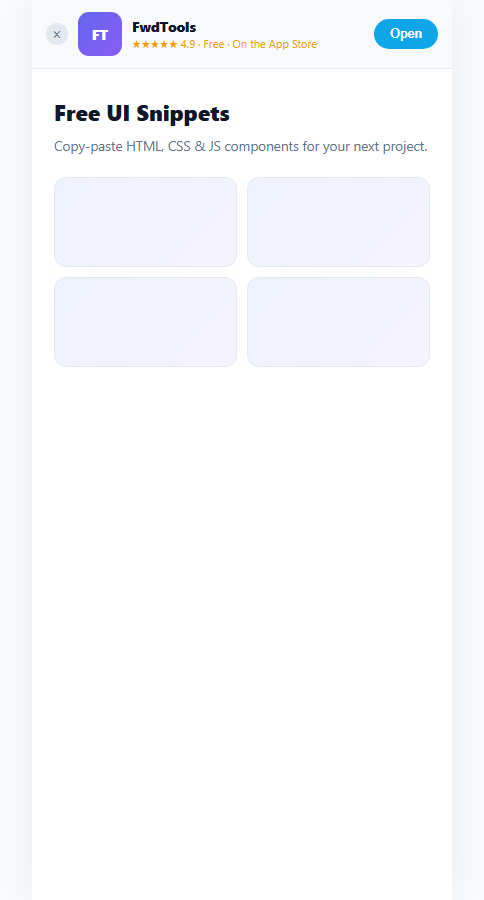
A smart app banner is the thin strip at the top of a mobile website nudging visitors toward a native app — Safari has a built-in version driven by a meta tag, and this snippet reproduces the same UX pattern as a fully custom, cross-browser component with its own dismissal memory.
A cooldown timestamp, not a boolean flag
Dismissing the banner doesn't just set a "dismissed: true" flag — it stores a future timestamp: Date.now() + DISMISS_DAYS * 24 * 60 * 60 * 1000. isDismissed() then simply checks Date.now() < Number(until). This means the banner reappears automatically after the cooldown window passes, rather than being permanently gone after one dismissal — a boolean can't expire on its own, but a stored timestamp compared against the current time can.
localStorage wrapped in try/catch, both directions
Both safeGet() and safeSet() wrap their localStorage calls in try/catch. Safari's private browsing mode and some locked-down environments throw on localStorage.setItem() even though the API exists, and third-party storage restrictions can block access entirely. Catching the error means the banner still functions perfectly as a same-session UI element — it just won't remember the dismissal across a reload in those environments, a reasonable and honest fallback rather than a broken page.
A visible way back in, not a silent disappearance
Once dismissed, a small "Show app banner" button appears in the page content (reopenBtn.hidden = false) so a visitor who changes their mind isn't stuck waiting out the cooldown — clicking it calls safeSet(STORAGE_KEY, '0'), a timestamp in the past, so isDismissed() evaluates false again immediately.
A slide-down entrance that respects layout
@keyframes sabSlideDown animates the banner in from translateY(-100%), and because the banner occupies real space at the top of the flow (not position: fixed overlapping content), the page content shifts down naturally rather than the banner floating over and obscuring the first thing a visitor sees.
Customizing it
Replace the Open button's placeholder with a real custom URL scheme deep link (e.g. fwdtools://open) that falls back to the store listing via a timed redirect if the app isn't installed, and adjust DISMISS_DAYS to match how aggressively you want to re-prompt.
Build with AI
Build, Understand, Optimize, and Extend It With AI
You don't have to work out the storage fallback logic by hand. Paste this snippet's HTML, CSS, and JS into an AI coding assistant like Claude and ask it to explain why the dismissal is stored as a future timestamp instead of a simple boolean, and why both the read and write paths to localStorage are wrapped in try/catch rather than just checking if the API exists. The same assistant can help optimize it too — ask whether the banner should check a User-Agent or platform detection API to only show on genuinely mobile devices. It's also useful for extending it: ask it to wire the Open button to a real custom URL scheme with a store-redirect fallback timer, add a PWA install-prompt variant, or animate the reopen button's appearance. Treat the code less like a finished artifact and more like a starting point for a conversation.
Prompt to recreate it
Copy this into your AI assistant of choice to build the effect from scratch, or as a jumping-off point for your own variant:
Build a "smart app banner" for a mobile web page in plain HTML, CSS, and JavaScript with no framework or library.

Requirements:
- A banner docked at the top of the page's normal content flow (not a fixed overlay) showing an app icon, app name, a star rating line, and an "Open" button, plus a small close button.
- Clicking close hides the banner and stores a dismissal timestamp set to a configurable number of days in the future, wrapping the storage write in a try/catch so it degrades gracefully if localStorage throws (as it can in Safari private browsing).
- On page load, check whether a stored dismissal timestamp exists and is still in the future (also wrapped in try/catch with a safe fallback); if so, keep the banner hidden without any animation.
- After dismissal, show a small persistent "Show app banner" button elsewhere in the page that, when clicked, clears the stored dismissal and brings the banner back immediately.
- The banner's appearance should use a CSS slide-down keyframe animation from above the viewport.
- The Open button should show a brief "Opening…" loading state before reverting, standing in for a real native app deep link with a store-page fallback in production.
Want to tighten it up first? Run this prompt through the AI Prompt Studio to score it across 8 quality dimensions, catch anti-patterns, and tune the wording for Claude, ChatGPT, or Gemini before you paste it in.
Step by step
How to Use
- 1Paste HTML, CSS, and JSA banner renders at the top of the mock page prompting the visitor to open the app.
- 2Click the close buttonThe banner hides and a "Show app banner" button appears in the page content below.
- 3Reload the previewIn a real deployment, the dismissal persists via localStorage — the banner stays hidden until the cooldown expires.
- 4Click "Show app banner"Immediately clears the stored dismissal and brings the banner back.
- 5Adjust the cooldownIn the JS, edit the DISMISS_DAYS constant to control how long a dismissal lasts before the banner reappears.
- 6Wire up the Open buttonReplace the placeholder timeout with a real custom URL scheme deep link and an App/Play Store fallback redirect.
Real-world uses
Common Use Cases
Got questions?
Frequently Asked Questions
A boolean flag has no way to expire — once set, the banner would stay hidden forever with no built-in mechanism to re-prompt later. Storing Date.now() plus a cooldown duration lets isDismissed() simply compare the current time against that stored value, so the banner naturally reappears once the cooldown window passes without any extra logic.
Both safeGet() and safeSet() wrap their localStorage calls in try/catch. If either throws, the function silently falls back — reads return null (treated as "not dismissed") and writes are simply skipped. The banner still displays and can be dismissed for the current page view; it just won't remember that dismissal on the next visit in that environment.
Without it, a visitor who dismissed the banner by accident, or who changes their mind, would have no way to bring it back except waiting out the full cooldown period. The reopen button calls safeSet() with a past timestamp, which makes isDismissed() immediately return false again.
Set window.location.href to your app's custom URL scheme (like fwdtools://open) or, for iOS, use a Universal Link. Since there's no reliable way to detect whether the app opened, the common pattern is to also start a timer that redirects to the App Store or Play Store listing if the page is still visible after roughly 1–2 seconds, implying the deep link failed.
Safari's native version is triggered by a apple-itunes-app meta tag and only renders in Safari on iOS — it can't be styled and doesn't work in other browsers. This snippet is a fully custom component that renders identically everywhere, can be styled to match your brand, and gives you full control over the dismissal and re-prompt behavior.