Source Code
<div class="demo">
  <div class="phone-frame">
    <div class="inbox-screen">
      <div class="inbox-header">Inbox</div>
      <ul class="swipe-list" id="swipeList">
        <li class="swipe-item" data-id="1">
          <div class="swipe-actions">
            <button class="swipe-action archive" data-action="archive">Archive</button>
            <button class="swipe-action delete" data-action="delete">Delete</button>
          </div>
          <div class="swipe-content">
            <span class="swipe-avatar">MC</span>
            <div class="swipe-text">
              <span class="swipe-title">Mia Chen</span>
              <span class="swipe-preview">Approved the design changes for the...</span>
            </div>
          </div>
        </li>
        <li class="swipe-item" data-id="2">
          <div class="swipe-actions">
            <button class="swipe-action archive" data-action="archive">Archive</button>
            <button class="swipe-action delete" data-action="delete">Delete</button>
          </div>
          <div class="swipe-content">
            <span class="swipe-avatar">SO</span>
            <div class="swipe-text">
              <span class="swipe-title">Sam Okoye</span>
              <span class="swipe-preview">Can we move Thursday's sync to...</span>
            </div>
          </div>
        </li>
        <li class="swipe-item" data-id="3">
          <div class="swipe-actions">
            <button class="swipe-action archive" data-action="archive">Archive</button>
            <button class="swipe-action delete" data-action="delete">Delete</button>
          </div>
          <div class="swipe-content">
            <span class="swipe-avatar">JP</span>
            <div class="swipe-text">
              <span class="swipe-title">Jules Park</span>
              <span class="swipe-preview">Here's the updated budget spreadsheet...</span>
            </div>
          </div>
        </li>
      </ul>
      <p class="swipe-hint">Drag a row left to reveal actions. Drag with a mouse too — the interaction works with both touch and pointer input.</p>
    </div>
  </div>
</div>
* { box-sizing: border-box; margin: 0; padding: 0; }
body { font-family: system-ui, sans-serif; background: #f8fafc; display: flex; align-items: center; justify-content: center; min-height: 100vh; padding: 24px; }
.demo { display: flex; }
.phone-frame { width: 300px; height: 480px; border-radius: 32px; border: 8px solid #0f172a; background: #0f172a; overflow: hidden; box-shadow: 0 30px 60px rgba(15,23,42,0.25); }
.inbox-screen { height: 100%; background: #fff; display: flex; flex-direction: column; }
.inbox-header { padding: 14px 16px; font-size: 14px; font-weight: 800; color: #111827; border-bottom: 1px solid #f1f5f9; flex-shrink: 0; }
.swipe-list { flex: 1; overflow-y: auto; list-style: none; }
.swipe-item { position: relative; overflow: hidden; border-bottom: 1px solid #f1f5f9; touch-action: pan-y; }
.swipe-actions { position: absolute; inset: 0; display: flex; justify-content: flex-end; }
.swipe-action { width: 76px; border: none; color: #fff; font-size: 11.5px; font-weight: 700; cursor: pointer; font-family: inherit; }
.swipe-action.archive { background: #f59e0b; }
.swipe-action.delete { background: #ef4444; }
.swipe-content {
position: relative;
display: flex; align-items: center; gap: 10px;
padding: 12px 16px;
background: #fff;
transform: translateX(0);
transition: transform 0.2s ease;
touch-action: pan-y;
}
.swipe-avatar { width: 34px; height: 34px; border-radius: 50%; background: #eef2ff; color: #4338ca; font-size: 11px; font-weight: 800; display: flex; align-items: center; justify-content: center; flex-shrink: 0; }
.swipe-text { display: flex; flex-direction: column; gap: 2px; min-width: 0; }
.swipe-title { font-size: 12.5px; font-weight: 700; color: #111827; }
.swipe-preview { font-size: 11.5px; color: #94a3b8; white-space: nowrap; overflow: hidden; text-overflow: ellipsis; }
.swipe-hint { padding: 10px 16px; font-size: 10.5px; color: #94a3b8; line-height: 1.5; flex-shrink: 0; }
.swipe-item.removing .swipe-content { transition: transform 0.22s ease, opacity 0.22s ease; opacity: 0; }
.swipe-item.removing { transition: max-height 0.22s ease 0.1s; max-height: 0 !important; }const ACTIONS_WIDTH = 152; // must match the combined width of the two action buttons
document.querySelectorAll('.swipe-item').forEach((item) => {
const content = item.querySelector('.swipe-content');
const actions = item.querySelectorAll('.swipe-action');
let startX = 0;
let currentX = 0;
let dragging = false;
let isOpen = false;
function setTranslate(x, animate) {
content.style.transition = animate ? 'transform 0.2s ease' : 'none';
content.style.transform = `translateX(${x}px)`;
}
content.addEventListener('pointerdown', (e) => {
dragging = true;
startX = e.clientX;
currentX = isOpen ? -ACTIONS_WIDTH : 0;
content.setPointerCapture(e.pointerId);
});
content.addEventListener('pointermove', (e) => {
if (!dragging) return;
const delta = e.clientX - startX;
// Clamp so the row can never be dragged past fully-open (revealing more
// than the actions' own width) or past fully-closed in the other
// direction — the drag always stays within the valid [-ACTIONS_WIDTH, 0]
// range no matter how far the pointer actually moves.
const next = Math.min(0, Math.max(-ACTIONS_WIDTH, currentX + delta));
setTranslate(next, false);
});
function endDrag(e) {
if (!dragging) return;
dragging = false;
const delta = e.clientX - startX;
const finalX = Math.min(0, Math.max(-ACTIONS_WIDTH, currentX + delta));
// Snap open or closed based on how far past the halfway point the drag
// ended — a genuine "flick" threshold, not requiring the user to drag
// the entire width before anything happens.
isOpen = finalX < -ACTIONS_WIDTH / 2;
setTranslate(isOpen ? -ACTIONS_WIDTH : 0, true);
}
content.addEventListener('pointerup', endDrag);
content.addEventListener('pointercancel', endDrag);
// Tapping an already-open row's content (rather than dragging) closes it —
// a natural way to dismiss revealed actions without needing to swipe back.
content.addEventListener('click', () => {
if (isOpen) {
isOpen = false;
setTranslate(0, true);
}
});
actions.forEach((btn) => {
btn.addEventListener('click', () => {
const action = btn.dataset.action;
if (action === 'delete') {
// Removing an item animates its height to zero after its content
// has already faded, rather than vanishing instantly — a smoother,
// more intentional-feeling removal than an abrupt DOM removal.
item.classList.add('removing');
setTimeout(() => item.remove(), 350);
} else {
content.style.background = '#fffbeb';
setTranslate(0, true);
isOpen = false;
setTimeout(() => { content.style.background = ''; }, 500);
}
});
});
});Learn Coding Visually
Learn to code with interactive, live-preview playgrounds — HTML, CSS, JavaScript, React & more.
 HTML Playground42 lessons · Click-based · Live preview
 CSS PlaygroundLearn CSS with a live editor
 JavaScript Playground60 lessons · DOM · Async · Canvas
 React PlaygroundLearn React with a live code editor
 GSAP PlaygroundLearn GSAP animation interactively
 SVG Playground44 lessons · shapes · paths · animation
 SCSS Playground45 lessons · Sass modules · tokens
 Tailwind PlaygroundLearn Tailwind CSS with a live editor
 Bootstrap 5 Playground50 lessons · live preview
Swipe-to-Reveal List Item Actions — Archive/Delete with Real Drag Physics
Swipe-to-Reveal List Item Actions (Archive / Delete) · Mobile · Plain HTML, CSS & JS · Live preview
What's included
Features
About this UI Snippet
Swipe-to-Reveal List Actions — Getting the Drag Physics Right
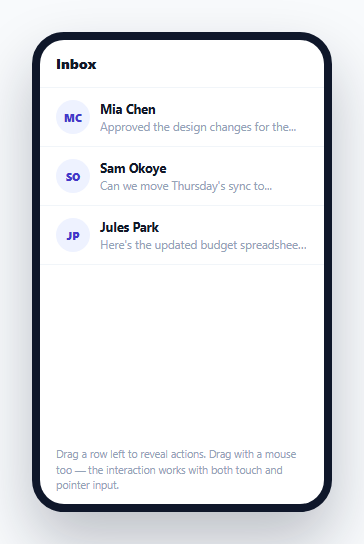
The swipe-left-to-reveal-actions pattern is familiar from every mobile mail and messaging app — but a convincing implementation depends on getting the *drag physics* right, not just sliding a panel a fixed distance on tap. This snippet tracks the actual pointer position throughout the gesture, clamps it to a valid range, and decides open-vs-closed based on how far the drag traveled relative to a real threshold — the same feel as a native swipe action.
The row's content follows the pointer exactly, not a preset animation
While dragging, setTranslate() is called on every pointermove with a position computed directly from the pointer's live delta — the row's content visually tracks the finger or cursor in real time, rather than snapping through a fixed pre-built animation the instant a swipe is detected. This is what makes the interaction feel physically connected to the gesture rather than merely triggered by it.
Clamping keeps the drag within a valid range, always
Math.min(0, Math.max(-ACTIONS_WIDTH, currentX + delta)) bounds every intermediate drag position between fully-closed (0) and fully-open (-ACTIONS_WIDTH, exactly the combined width of the two action buttons) — no matter how far past either edge the pointer actually travels. Without this clamp, a fast or long drag could push the content translateX far beyond the actions' actual width, either revealing empty space beyond the buttons or over-dragging in the closed direction into negative content overlap.
A genuine flick threshold, not "any drag opens it"
endDrag() decides whether to snap open or closed based on whether the final drag position passed the halfway point of ACTIONS_WIDTH — not whether *any* drag distance was registered at all. This matches how real native swipe interactions feel: a small, tentative drag that doesn't cross the threshold snaps back closed, while a more committed drag past the midpoint snaps fully open, giving the user forgiving, natural-feeling control rather than an all-or-nothing trigger.
Tapping open content closes it — a second, independent way back
Beyond dragging back to closed, a plain click on an already-open row's content also closes it. This matters because not every user will think to drag back; tapping the now-familiar visible content area to dismiss revealed actions is a common alternate expectation, and implementing it as a separate, simple click handler (checking isOpen first) covers that case without complicating the drag logic itself.
Delete animates height *after* the content fade completes, not simultaneously
The .removing class first fades the row's content opacity, and — via a CSS transition-delay on the outer <li>'s max-height — only *then* collapses the row's height to zero. Collapsing height and fading content at exactly the same time would look like the text is being physically squashed as it disappears; sequencing fade-then-collapse instead produces a cleaner, more intentional-feeling removal.
Build with AI
Build, Understand, Optimize, and Extend It With AI
Ask an AI assistant to explain why clamping the drag position on every pointermove (rather than only at the end of the gesture) is necessary for correct behavior, and to walk through what would visually happen without that clamp during a fast, long drag. It's also worth asking for a version that supports swiping right to reveal a different set of actions on the opposite side, or one that automatically closes any other currently-open row when a new row starts being dragged, matching how most real inbox apps only allow one swiped-open row at a time.
Prompt to recreate it
Copy this into your AI assistant of choice to build the effect from scratch, or as a jumping-off point for your own variant:
Build a swipe-to-reveal list item actions component in HTML, CSS, and vanilla JavaScript using the Pointer Events API — no external library.

Requirements:
- A vertical list of at least three items, each showing content (avatar, title, preview text) with two hidden action buttons (e.g. Archive and Delete) positioned underneath it, revealed by swiping the content left.
- Implement the drag using pointerdown/pointermove/pointerup/pointercancel with setPointerCapture, translating the row's content horizontally to directly track the pointer's live position throughout the gesture — not a preset fixed-distance animation triggered by a simple tap.
- Clamp the content's horizontal translation on every single pointermove to stay within a valid range between fully closed (0) and fully open (the exact combined width of the revealed action buttons), regardless of how far the pointer actually travels past either boundary.
- On release, decide whether to snap the row fully open or fully closed based on whether the drag passed the halfway point of the actions' width — a genuine threshold-based decision, not simply whether any drag occurred.
- Add a click handler on an already-open row's content that closes it, providing users a way to dismiss revealed actions without needing to reverse the drag gesture.
- Clicking the Delete action should animate the row's content fading out, and only after that fade completes, collapse the row's height to zero before removing it from the DOM — the two animations should be sequenced, not simultaneous.
- Clicking the Archive action should give a brief visual confirmation (like a background color flash) and then automatically close the revealed actions back to the closed position.
Want to tighten it up first? Run this prompt through the AI Prompt Studio to score it across 8 quality dimensions, catch anti-patterns, and tune the wording for Claude, ChatGPT, or Gemini before you paste it in.
Step by step
How to Use
- 1Drag a row left with a mouse or touchThe row's content visually tracks the drag in real time, revealing the archive/delete actions underneath it as it slides.
- 2Release partway through a short dragIf you didn't drag past the halfway point of the actions' width, the row snaps back closed automatically.
- 3Release after dragging past the halfway pointThe row snaps fully open, staying revealed until you interact with it again.
- 4Tap the open row's content, or drag it back rightBoth close the row — tapping is a quick way to dismiss without needing to reverse the drag gesture.
- 5Tap "Delete"The row's content fades first, then its height smoothly collapses to zero before it's removed from the DOM.
Real-world uses
Common Use Cases
Got questions?
Frequently Asked Questions
Tracking the pointer's live position on every move makes the interaction feel physically connected to the gesture — the same feel users expect from native swipe actions on their phone, rather than a UI element that merely reacts to a swipe being detected after the fact.
Whether the final drag position passed the halfway point between fully-closed and fully-open (ACTIONS_WIDTH / 2) — a real threshold-based decision, not simply whether any dragging happened at all. This gives forgiving, natural-feeling control matching real native swipe interactions.
Yes — tapping anywhere on the open row's visible content closes it via a separate click handler, giving users a second, simpler way to dismiss the revealed actions besides reversing the drag gesture.
Fading the content first and only then collapsing the row's height (via a CSS transition-delay) avoids the visually awkward effect of text appearing to be physically squashed as the row shrinks — sequencing the two produces a cleaner, more intentional-feeling removal animation.
The drag position is clamped with Math.min/Math.max on every movement to stay within the valid [-ACTIONS_WIDTH, 0] range, so no amount of extra drag distance can push the row translation beyond fully-open or fully-closed — it simply stops moving once it hits either boundary.
Both — the interaction is built entirely on Pointer Events (pointerdown/pointermove/pointerup/pointercancel) with setPointerCapture, which unifies mouse, touch, and pen input under one API, so dragging with a mouse produces identical behavior to a finger swipe.