Source Code
<div class="demo">
  <div class="unit-field-group">
    <label class="unit-label" for="kmInput">Distance</label>
    <div class="unit-pair">
      <div class="unit-input-wrap">
        <input type="text" id="kmInput" inputmode="decimal" value="42" />
        <span class="unit-suffix">km</span>
      </div>
      <span class="unit-eq">=</span>
      <div class="unit-input-wrap">
        <input type="text" id="miInput" inputmode="decimal" value="26.10" />
        <span class="unit-suffix">mi</span>
      </div>
    </div>
  </div>

  <div class="unit-field-group">
    <label class="unit-label" for="kgInput">Weight</label>
    <div class="unit-pair">
      <div class="unit-input-wrap">
        <input type="text" id="kgInput" inputmode="decimal" value="70" />
        <span class="unit-suffix">kg</span>
      </div>
      <span class="unit-eq">=</span>
      <div class="unit-input-wrap">
        <input type="text" id="lbInput" inputmode="decimal" value="154.32" />
        <span class="unit-suffix">lb</span>
      </div>
    </div>
  </div>

  <p class="unit-hint">Edit either field in a pair — the other updates instantly, in either direction.</p>
</div>
* { box-sizing: border-box; margin: 0; padding: 0; }
body { font-family: system-ui, sans-serif; background: #f8fafc; display: flex; align-items: center; justify-content: center; min-height: 100vh; padding: 24px; }
.demo { width: 380px; max-width: 100%; display: flex; flex-direction: column; gap: 20px; }
.unit-field-group { display: flex; flex-direction: column; gap: 8px; }
.unit-label { font-size: 12.5px; font-weight: 700; color: #334155; }
.unit-pair { display: flex; align-items: center; gap: 10px; }
.unit-eq { font-size: 13px; font-weight: 700; color: #94a3b8; flex-shrink: 0; }
.unit-input-wrap { flex: 1; position: relative; display: flex; align-items: center; }
.unit-input-wrap input { width: 100%; padding: 11px 44px 11px 12px; border: 1.5px solid #e2e8f0; border-radius: 10px; font-size: 14px; font-weight: 600; color: #0f172a; font-family: inherit; background: #fff; }
.unit-input-wrap input:focus-visible { outline: none; border-color: #6366f1; box-shadow: 0 0 0 3px rgba(99,102,241,0.15); }
.unit-suffix { position: absolute; right: 12px; font-size: 12px; font-weight: 700; color: #94a3b8; pointer-events: none; }
.unit-hint { font-size: 11.5px; color: #94a3b8; line-height: 1.5; }// Each linked pair is defined once, declaratively, with the conversion
// factor going from "a" to "b". The reverse direction is just division by
// the same factor, so there's exactly one number to get right per pair.
const PAIRS = [
{ aId: 'kmInput', bId: 'miInput', aToB: 0.621371, precision: 2 },
{ aId: 'kgInput', bId: 'lbInput', aToB: 2.20462, precision: 2 },
];
function wireLinkedPair({ aId, bId, aToB, precision }) {
const aInput = document.getElementById(aId);
const bInput = document.getElementById(bId);
// A guard flag prevents infinite ping-pong: updating B from A's input event
// would otherwise trigger B's own input event, which would try to update A
// again, forever. Setting isSyncing suppresses the reciprocal update for
// exactly the duration of the one field write that's already in flight.
let isSyncing = false;
function sanitize(raw) {
return raw.replace(/[^0-9.]/g, '');
}
function parse(raw) {
const n = parseFloat(raw);
return isNaN(n) ? null : n;
}
aInput.addEventListener('input', () => {
if (isSyncing) return;
aInput.value = sanitize(aInput.value);
const n = parse(aInput.value);
if (n === null) return;
isSyncing = true;
bInput.value = (n * aToB).toFixed(precision);
isSyncing = false;
});
bInput.addEventListener('input', () => {
if (isSyncing) return;
bInput.value = sanitize(bInput.value);
const n = parse(bInput.value);
if (n === null) return;
isSyncing = true;
aInput.value = (n / aToB).toFixed(precision);
isSyncing = false;
});
}
PAIRS.forEach(wireLinkedPair);Learn Coding Visually
Learn to code with interactive, live-preview playgrounds — HTML, CSS, JavaScript, React & more.
 HTML Playground42 lessons · Click-based · Live preview
 CSS PlaygroundLearn CSS with a live editor
 JavaScript Playground60 lessons · DOM · Async · Canvas
 React PlaygroundLearn React with a live code editor
 GSAP PlaygroundLearn GSAP animation interactively
 SVG Playground44 lessons · shapes · paths · animation
 SCSS Playground45 lessons · Sass modules · tokens
 Tailwind PlaygroundLearn Tailwind CSS with a live editor
 Bootstrap 5 Playground50 lessons · live preview
Linked Unit Conversion Inputs — Two Fields That Update Each Other Live
Linked Unit Conversion Inputs — Two Fields That Stay in Sync · Forms · Plain HTML, CSS & JS · Live preview
What's included
Features
About this UI Snippet
Linked Unit Conversion Inputs — Editable in Either Direction Without Infinite Loops
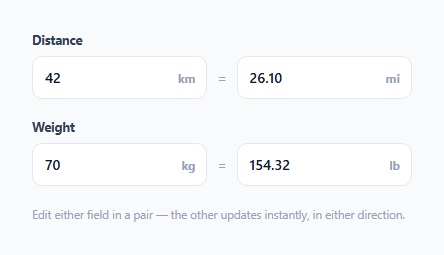
A read-only converted value next to an editable input is a common pattern — but it's asymmetric: you can only ever type into *one* of the two fields. This snippet makes both fields genuinely editable and keeps them in sync no matter which one the user types into, which introduces a real technical problem most naive implementations get wrong: a straightforward "update B when A changes" listener paired with "update A when B changes" creates an infinite update loop the instant either field's own JavaScript-driven write triggers its own input event.
The core problem: writing to a field can itself fire that field's own listener
When aInput's listener computes a new value for bInput and sets bInput.value, that assignment does not normally fire bInput's input event on its own (programmatic .value assignment is silent by design) — so in this specific implementation an infinite loop isn't actually possible from that alone. But the isSyncing guard is included anyway as a deliberate defensive pattern: it's the same shape of guard you'd need the moment either side of the sync used dispatchEvent to notify other listeners, or if a future change swapped in a framework binding that *does* re-trigger reactively. Documenting and keeping the guard here means the pattern is correct and copy-paste-safe even as the implementation evolves.
One conversion factor, two directions, no duplicated math
Each pair is declared with a single aToB factor — kilometers to miles, or kilograms to pounds. The reverse direction (miles to kilometers, pounds to kilograms) is computed as plain division by that same factor rather than a second, independently-maintained constant. This matters for correctness: if the reverse factor were hardcoded separately, rounding differences between the two directions could cause a value to drift slightly every time a user bounced attention between the two fields — dividing by the *same* factor that was used to multiply guarantees the two fields represent an exact round-trip.
Sanitizing input without fighting the user's typing
The sanitize() step strips any character that isn't a digit or a decimal point on every keystroke, live — but critically, it doesn't try to fully validate or reformat the string mid-typing (e.g. it won't force "12." into "12" while the user might still be about to type "12.5"). Full toFixed() formatting only happens on the *other* field, the one being derived — the field the user is actively typing into is left exactly as typed (after stripping invalid characters), so the cursor position and in-progress decimal typing are never disrupted.
Why this generalizes to any pair of units
wireLinkedPair() is written once and takes a pair's element ids, conversion factor, and display precision as configuration — the km/mi and kg/lb pairs on this page are two separate calls to the exact same function with different constants. Adding a third pair (temperature, currency, or any other two-way convertible unit) requires no new logic, just one more entry in the PAIRS array.
Build with AI
Build, Understand, Optimize, and Extend It With AI
Ask an AI assistant to explain precisely why a naive two-way-binding implementation risks an infinite update loop in frameworks with reactive bindings, even though plain DOM .value assignment doesn't trigger it directly — and to walk through what the isSyncing guard is protecting against. It's also worth asking for a version that supports non-multiplicative conversions (like Celsius/Fahrenheit's offset-based formula), or one that debounces the sync slightly to avoid excessive recalculation while a user is typing a long decimal quickly.
Prompt to recreate it
Copy this into your AI assistant of choice to build the effect from scratch, or as a jumping-off point for your own variant:
Build a set of linked, two-way unit-conversion input pairs in HTML, CSS, and vanilla JavaScript — no external library.

Requirements:
- At least two independent pairs of inputs (for example kilometers/miles and kilograms/pounds), each pair sharing a single conversion factor used for both directions (multiply going one way, divide by the same factor going the other way — never two separately hardcoded factors).
- Both fields in every pair must be fully editable: typing in either field should recalculate and update the other field live, on every keystroke, working correctly in both directions.
- Include a defensive guard against update-loop risk (a syncing flag or equivalent) so the pattern is safe even if adapted to a context where programmatic value writes could re-trigger input listeners.
- Sanitize each field's input live, stripping any character that is not a digit or decimal point, without disrupting the user's in-progress typing or cursor position.
- Implement the wiring as one reusable function parameterized by the two field ids, the conversion factor, and a display precision — then call it once per pair from a small declarative configuration list, rather than duplicating the sync logic per pair.
- Round the derived (non-typed-into) field's displayed value to a configurable number of decimal places.
Want to tighten it up first? Run this prompt through the AI Prompt Studio to score it across 8 quality dimensions, catch anti-patterns, and tune the wording for Claude, ChatGPT, or Gemini before you paste it in.
Step by step
How to Use
- 1Type into the first field of a pairThe second field recalculates instantly on every keystroke, converted using the pair's conversion factor.
- 2Type into the second field insteadThe first field updates just as instantly, using the reverse conversion (division by the same factor) — both directions are equally live.
- 3Watch invalid characters get strippedAnything that isn't a digit or decimal point is removed as you type, so the field can never hold garbage input.
- 4Add a new linked pairAdd an entry to the PAIRS array with the two element ids, the one-directional conversion factor, and a display precision — wireLinkedPair() handles the rest.
- 5Adjust display precision per pairChange the precision value in a pair's config to control how many decimal places the derived field shows.
Real-world uses
Common Use Cases
Got questions?
Frequently Asked Questions
Yes — both fields have their own input listener, and both update the other field based on the same shared conversion factor (multiplying or dividing depending on direction), so there is no "primary" and "derived" field distinction from the user's perspective.
It's a defensive, forward-compatible pattern. Programmatic .value assignment is silent in plain JS today, but the guard costs nothing and protects the pattern from breaking if the sync logic is later adapted to a context (like a reactive framework binding) where writes do trigger listeners.
Using two independently-defined factors for the two directions risks tiny rounding mismatches that compound the more a user bounces between the fields. Deriving the reverse direction from the exact same number used for the forward direction guarantees a mathematically consistent round-trip.
The parse() function returns null for an empty or non-numeric string, and the update function returns early without touching the other field — so clearing one field simply leaves the other field at its last valid value until a new number is typed.
Celsius/Fahrenheit isn't a pure multiplicative conversion (it has an offset), so it needs a small variant of wireLinkedPair() with an added/subtracted constant — but any purely multiplicative pair (like liters/gallons) can be added as a one-line entry to the PAIRS array exactly like the existing two.