Source Code
<div class="bhs-page">
<main class="bhs-content"><p>↑ Page content above the footer</p></main>
<footer class="bhs">
<div class="bhs-inner">
<div class="bhs-status-card">
<div class="bhs-status-row">
<span class="bhs-dot" id="bhsDot"></span>
<b id="bhsLabel">Checking hours...</b>
</div>
<p class="bhs-sub" id="bhsSub"> </p>
<p class="bhs-local" id="bhsLocal"> </p>
</div>
<table class="bhs-table" id="bhsTable">
<tbody>
<tr data-day="0"><td>Sunday</td><td>Closed</td></tr>
<tr data-day="1"><td>Monday</td><td>9:00 AM – 6:00 PM</td></tr>
<tr data-day="2"><td>Tuesday</td><td>9:00 AM – 6:00 PM</td></tr>
<tr data-day="3"><td>Wednesday</td><td>9:00 AM – 6:00 PM</td></tr>
<tr data-day="4"><td>Thursday</td><td>9:00 AM – 6:00 PM</td></tr>
<tr data-day="5"><td>Friday</td><td>9:00 AM – 8:00 PM</td></tr>
<tr data-day="6"><td>Saturday</td><td>10:00 AM – 4:00 PM</td></tr>
</tbody>
</table>
<div class="bhs-bottom">
<span>© 2026 Harlow & Co.</span>
<span>123 Market Street, Austin, TX</span>
</div>
</div>
</footer>
</div>*{box-sizing:border-box;margin:0;padding:0}
body{font-family:system-ui,-apple-system,sans-serif;background:#fafaf9}
.bhs-page{min-height:100vh;display:flex;flex-direction:column}
.bhs-content{flex:1;display:flex;align-items:center;justify-content:center;color:#a8a29e;font-size:13px;padding:50px 20px}
.bhs{background:#fff;border-top:1px solid #e7e5e4}
.bhs-inner{max-width:640px;margin:0 auto;padding:36px 24px 28px}
.bhs-status-card{background:#f5f5f4;border-radius:14px;padding:18px 20px;margin-bottom:18px}
.bhs-status-row{display:flex;align-items:center;gap:9px;margin-bottom:6px}
.bhs-dot{width:10px;height:10px;border-radius:50%;background:#a8a29e;flex-shrink:0;transition:background .2s}
.bhs-dot.open{background:#16a34a;box-shadow:0 0 0 0 rgba(22,163,74,.5);animation:bhsPulse 2s infinite}
.bhs-dot.closed{background:#dc2626}
@keyframes bhsPulse{0%{box-shadow:0 0 0 0 rgba(22,163,74,.45)}70%{box-shadow:0 0 0 7px rgba(22,163,74,0)}100%{box-shadow:0 0 0 0 rgba(22,163,74,0)}}
.bhs-status-row b{font-size:15px;color:#1c1917}
.bhs-sub{font-size:12.5px;color:#78716c;margin-left:19px}
.bhs-local{font-size:11px;color:#a8a29e;margin-left:19px;margin-top:4px}
.bhs-table{width:100%;border-collapse:collapse;font-size:12.5px;margin-bottom:20px}
.bhs-table td{padding:7px 4px;color:#57534e;border-bottom:1px solid #f5f5f4}
.bhs-table td:last-child{text-align:right;font-weight:600;color:#292524}
.bhs-table tr.bhs-today td{color:#059669;font-weight:800}
.bhs-table tr.bhs-today td:first-child::before{content:'\25CF';font-size:6px;margin-right:6px;vertical-align:middle}
.bhs-bottom{display:flex;justify-content:space-between;flex-wrap:wrap;gap:6px;font-size:11.5px;color:#a8a29e;padding-top:14px;border-top:1px solid #f5f5f4}
@media (max-width:480px){ .bhs-bottom{flex-direction:column} }var hours = {
0: null,
1: [9, 18],
2: [9, 18],
3: [9, 18],
4: [9, 18],
5: [9, 20],
6: [10, 16]
};
var dayNames = ['Sunday','Monday','Tuesday','Wednesday','Thursday','Friday','Saturday'];
var dot = document.getElementById('bhsDot');
var label = document.getElementById('bhsLabel');
var sub = document.getElementById('bhsSub');
var localEl = document.getElementById('bhsLocal');
function fmtHour(h) {
var period = h >= 12 ? 'PM' : 'AM';
var display = h % 12 === 0 ? 12 : h % 12;
return display + ':00 ' + period;
}
function update() {
var now = new Date();
var day = now.getDay();
var todayHours = hours[day];
var isOpen = false;
if (todayHours) {
var h = now.getHours() + now.getMinutes() / 60;
isOpen = h >= todayHours[0] && h < todayHours[1];
}
dot.className = 'bhs-dot ' + (isOpen ? 'open' : 'closed');
if (isOpen) {
label.textContent = 'Open now';
sub.textContent = 'Closes today at ' + fmtHour(todayHours[1]);
} else {
label.textContent = 'Closed now';
var nextDay = day;
var hop = 0;
var next = null;
while (hop < 8) {
nextDay = (nextDay + 1) % 7;
hop++;
if (hours[nextDay]) { next = { day: nextDay, open: hours[nextDay][0] }; break; }
}
if (next) {
var when = next.day === (day + 1) % 7 ? 'tomorrow' : dayNames[next.day];
sub.textContent = 'Opens ' + when + ' at ' + fmtHour(next.open);
} else {
sub.textContent = 'See hours below';
}
}
localEl.textContent = 'Local time: ' + now.toLocaleTimeString([], { hour: '2-digit', minute: '2-digit' });
document.querySelectorAll('.bhs-table tr').forEach(function (row) {
row.classList.toggle('bhs-today', Number(row.dataset.day) === day);
});
}
update();
setInterval(update, 30000);Learn Coding Visually
Learn to code with interactive, live-preview playgrounds — HTML, CSS, JavaScript, React & more.
 HTML Playground42 lessons · Click-based · Live preview
 CSS PlaygroundLearn CSS with a live editor
 JavaScript Playground60 lessons · DOM · Async · Canvas
 React PlaygroundLearn React with a live code editor
 GSAP PlaygroundLearn GSAP animation interactively
 SVG Playground44 lessons · shapes · paths · animation
 SCSS Playground45 lessons · Sass modules · tokens
 Tailwind PlaygroundLearn Tailwind CSS with a live editor
 Bootstrap 5 Playground50 lessons · live preview
Business Hours Status Footer — Free HTML CSS JS Snippet
Business Hours Status Footer · Footers · Plain HTML, CSS & JS · Live preview
What's included
Features
About this UI Snippet
Business Hours Footer — Live Open/Closed Status from Real Hours
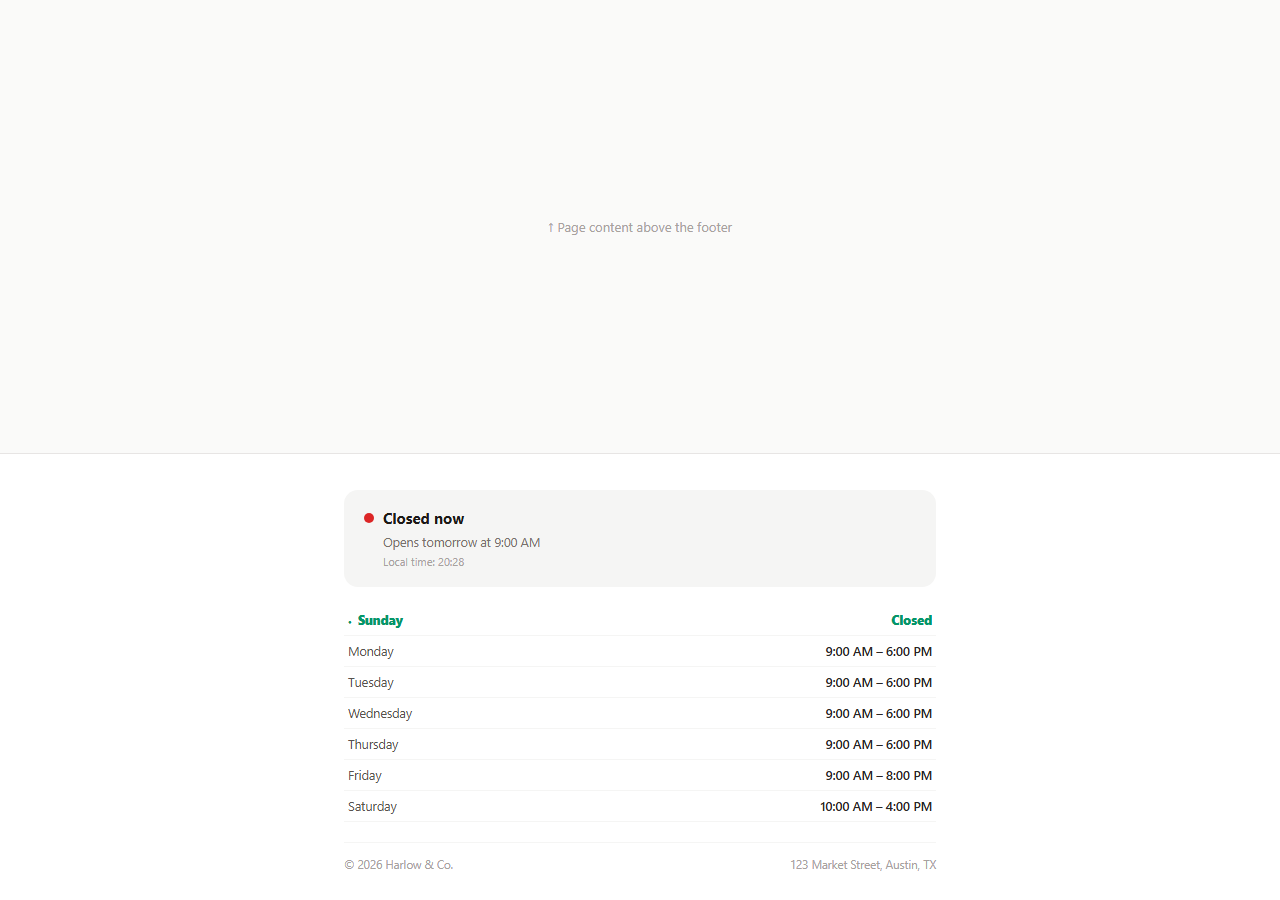
A hardcoded "Open Mon-Fri 9-6" line in a footer goes stale the moment a visitor lands outside those hours without any indication of whether the business is actually open right now. This snippet replaces that static text with a computed status: a pulsing dot that reads "Open now" or "Closed now" based on the visitor's real local clock, a sub-line telling them exactly when it closes or reopens, and a weekly hours table with the current day highlighted.
Hours as data, not prose
The hours object maps each day index (0 for Sunday through 6 for Saturday, matching Date.prototype.getDay()) to either null for a closed day or a [openHour, closeHour] pair in 24-hour time. update() reads new Date().getDay() and getHours()/getMinutes() to compute the visitor's current fractional hour, then checks whether it falls inside today's range. Because the status is derived from this one small data structure rather than a hand-written sentence, the same object also renders the table underneath it — the live status line and the printed weekly hours can never contradict each other.
A pulsing dot as an at-a-glance signal
.bhs-dot.open uses a box-shadow keyframe animation to pulse green, borrowing the same "live and active" visual language used by uptime-status indicators — see the Footer Live Status Indicator for a related pattern. A closed state simply turns the dot a static red with no animation, since a pulse implies something ongoing, and closed is not ongoing.
Finding the next opening time, not just today's
When the business is currently closed, the code does not just say "Closed" and stop — it walks forward day by day (nextDay = (nextDay + 1) % 7) until it finds the next day with a non-null hours entry, then reports either "Opens tomorrow at 9:00 AM" or the specific day name if the next open day is further out (for example, a visitor checking on a Saturday evening sees "Opens Monday at 9:00 AM" since Sunday is closed). This is meaningfully more useful than a bare closed label, since it answers the visitor's actual next question without them needing to scan the full table.
Recomputed on an interval, not just once
setInterval(update, 30000) re-runs the whole calculation every 30 seconds, so a visitor who leaves the tab open across a closing or opening boundary sees the status flip on its own without needing to refresh the page — a small detail, but one that prevents the footer from silently lying the moment real time crosses one of the configured boundaries.
Today's row highlighted in the table
Every table row carries a data-day attribute matching the same 0–6 index used in hours, and update() toggles a .bhs-today class onto whichever row matches the current day, adding a colored dot marker and bold text. This lets a visitor scanning the full weekly table immediately locate today's row without doing the day-of-week math themselves.
Extending it for multiple locations or timezones
For a business with several branches in different timezones, key the hours object per-location and pass the location's IANA timezone string into toLocaleTimeString and a timezone-aware Date construction (via Intl.DateTimeFormat with a timeZone option) rather than relying on the visitor's local browser clock, which reflects the visitor's timezone, not the store's.
Build with AI
Build, Understand, Optimize, and Extend It With AI
Rather than tracing the next-opening-day search by hand, paste this snippet's HTML, CSS, and JS into an AI coding assistant like Claude and ask it to explain exactly how the walk-forward loop finds the next open day while correctly skipping closed days and wrapping from Saturday back to Sunday. The same assistant can help you optimize it, for instance asking whether the calculation should account for the business’s own timezone rather than the visitor’s browser clock, and how to do that correctly with Intl.DateTimeFormat. It is also useful for extending the footer: ask it to support holiday closures and one-off exceptions layered on top of the regular weekly hours, add a countdown showing minutes until closing when nearly closed, or generate the hours object from a small admin-editable JSON file. Treat the code less like a finished artifact and more like a starting point for a conversation.
Prompt to recreate it
Copy this into your AI assistant of choice to build the effect from scratch, or as a jumping-off point for your own variant:
Build a footer "business hours status" widget in plain HTML, CSS, and JavaScript that computes a live open/closed indicator from real hours data, no library.

Requirements:
- A single JavaScript object mapping each day of the week (0 for Sunday through 6 for Saturday, matching Date.prototype.getDay()) to either null for a closed day or an [openHour, closeHour] pair in 24-hour time, used as the one source of truth for both the live status calculation and a printed weekly hours table below it.
- On load, and recalculated automatically every 30 seconds via setInterval, compute whether the current moment falls within today’s open range and show a status dot plus label: a pulsing green dot with "Open now" and the exact closing time when open, or a solid red dot with "Closed now" plus the next opening day and time when closed.
- When closed, the next-opening search must walk forward day by day from today (wrapping from Saturday back to Sunday), skip over any day whose hours entry is null, and report "tomorrow" specifically when the next open day is the very next calendar day, or the day name otherwise.
- The weekly hours table must be rendered from readable markup with a data-day attribute matching the same 0–6 index, and the current day’s row must be automatically highlighted (bold text plus a small marker) based on the real current day, recomputed on the same interval as the status.
- Display the visitor’s current local time somewhere in the widget so they can sanity-check the computed status against their own clock.
Want to tighten it up first? Run this prompt through the AI Prompt Studio to score it across 8 quality dimensions, catch anti-patterns, and tune the wording for Claude, ChatGPT, or Gemini before you paste it in.
Step by step
How to Use
- 1Paste HTML, CSS, and JSThe footer computes and displays the live open/closed status immediately on load.
- 2Check the status dotGreen and pulsing means open now; solid red means closed, with a sub-line explaining when it changes.
- 3Scroll to the hours tableToday’s row is highlighted so visitors can find it without counting days themselves.
- 4Edit the hours objectIn the JS panel, change any day’s [openHour, closeHour] pair, or set a day to null for closed.
- 5Watch it update automaticallyThe status recalculates every 30 seconds, so it flips on its own if you leave the tab open across a boundary.
- 6Export in your formatClick HTML, JSX, or Tailwind to download the version you need.
Real-world uses
Common Use Cases
Got questions?
Frequently Asked Questions
The visitor’s own browser/system clock, via new Date(). For a business that needs to show its own local hours regardless of where the visitor is browsing from, pass an explicit IANA timezone into a timezone-aware date calculation (for example using Intl.DateTimeFormat with a timeZone option) instead of the bare Date methods used here.
It starts from the current day index and walks forward one day at a time, wrapping from Saturday back to Sunday with modulo 7, until it finds a day whose hours entry in the data object is not null. It reports that day’s opening hour, using "tomorrow" specifically when the next open day is the very next calendar day.
A visitor may leave the tab open across an opening or closing boundary. Recomputing on an interval means the dot and label flip automatically to stay accurate, rather than showing a status that was only correct at the moment the page first loaded.
Set that day’s value in the hours object to null instead of an [openHour, closeHour] array. Both the live status logic and the walk-forward next-opening search already treat null as a closed day and skip it correctly.
Yes — key a hours-like object per location id, and re-run update() with the selected location’s object whenever the visitor picks a different branch, ideally alongside a location-specific timezone rather than the visitor’s own.
Yes. Keep the hours object as a constant or prop, run the same open/closed and next-opening calculation inside a useEffect/onMounted plus a setInterval (cleaned up on unmount), and store the derived status in state to drive the dot color and label text.