Source Code
<div class="slm-page">
<main class="slm-content"><p>↑ Page content above the footer</p></main>
<footer class="slm">
<div class="slm-inner">
<div class="slm-panel">
<h3>Find a store near you</h3>
<div class="slm-search-wrap">
<svg width="15" height="15" viewBox="0 0 24 24" fill="none" stroke="currentColor" stroke-width="2.5"><circle cx="11" cy="11" r="7"/><line x1="21" y1="21" x2="16.65" y2="16.65"/></svg>
<input class="slm-search" id="slmSearch" type="text" placeholder="Search by city or zip code...">
</div>
<ul class="slm-list" id="slmList"></ul>
<p class="slm-empty" id="slmEmpty" hidden>No stores match your search.</p>
</div>
<div class="slm-map" id="slmMap">
<div class="slm-map-grid"></div>
<div class="slm-pins" id="slmPins"></div>
<div class="slm-tooltip" id="slmTooltip" hidden></div>
</div>
</div>
<div class="slm-bottom">
<span>© 2026 Northline Outfitters</span>
<a href="#">View all 42 locations →</a>
</div>
</footer>
</div>*{box-sizing:border-box;margin:0;padding:0}
body{font-family:system-ui,-apple-system,sans-serif;background:#fafaf9}
.slm-page{min-height:100vh;display:flex;flex-direction:column}
.slm-content{flex:1;display:flex;align-items:center;justify-content:center;color:#a8a29e;font-size:13px;padding:50px 20px}
.slm{background:#fff;border-top:1px solid #e7e5e4}
.slm-inner{max-width:1040px;margin:0 auto;padding:36px 24px 0;display:grid;grid-template-columns:300px 1fr;gap:0;border:1px solid #e7e5e4;border-bottom:none;border-radius:16px 16px 0 0;overflow:hidden}
.slm-panel{padding:22px 20px;border-right:1px solid #e7e5e4}
.slm-panel h3{font-size:15px;font-weight:800;color:#1c1917;margin-bottom:14px}
.slm-search-wrap{display:flex;align-items:center;gap:8px;border:1.5px solid #e7e5e4;border-radius:10px;padding:9px 12px;color:#a8a29e;margin-bottom:14px;transition:border-color .15s}
.slm-search-wrap:focus-within{border-color:#059669;color:#059669}
.slm-search{border:none;outline:none;font-size:13px;font-family:inherit;flex:1;color:#1c1917}
.slm-list{list-style:none;max-height:260px;overflow-y:auto}
.slm-item-btn{width:100%;text-align:left;background:none;border:none;font-family:inherit;cursor:pointer;padding:10px 8px;border-radius:9px;display:flex;flex-direction:column;gap:2px;transition:background .15s}
.slm-item-btn:hover{background:#f5f5f4}
.slm-item.active .slm-item-btn{background:#ecfdf5}
.slm-name{font-size:13px;font-weight:700;color:#1c1917}
.slm-item.active .slm-name{color:#047857}
.slm-city{font-size:11.5px;color:#78716c}
.slm-dist{font-size:10.5px;color:#a8a29e;margin-top:2px}
.slm-empty{font-size:12.5px;color:#a8a29e;padding:10px 8px}
.slm-map{position:relative;background:#f0fdf4;overflow:hidden;min-height:300px}
.slm-map-grid{position:absolute;inset:0;background-image:linear-gradient(#dcfce7 1px,transparent 1px),linear-gradient(90deg,#dcfce7 1px,transparent 1px);background-size:32px 32px;opacity:.7}
.slm-pins{position:absolute;inset:0}
.slm-pin{position:absolute;transform:translate(-50%,-100%);background:#059669;border:2px solid #fff;color:#fff;width:26px;height:26px;border-radius:50% 50% 50% 0;display:flex;align-items:center;justify-content:center;font-size:11px;font-weight:800;cursor:pointer;box-shadow:0 3px 8px rgba(5,150,105,.35);transition:transform .18s,background .15s}
.slm-pin::after{content:'';transform:rotate(45deg)}
.slm-pin svg{transform:rotate(45deg)}
.slm-pin:hover{transform:translate(-50%,-100%) scale(1.12)}
.slm-pin.active{background:#dc2626;box-shadow:0 3px 10px rgba(220,38,38,.4);z-index:2}
.slm-tooltip{position:absolute;background:#1c1917;color:#fff;padding:10px 12px;border-radius:10px;font-size:12px;max-width:190px;pointer-events:none;transform:translate(-50%,calc(-100% - 14px));z-index:3;box-shadow:0 10px 24px rgba(0,0,0,.25)}
.slm-tooltip b{display:block;font-size:12.5px;margin-bottom:3px}
.slm-tooltip span{color:#a8a29e;font-size:11px}
.slm-bottom{max-width:1040px;margin:0 auto;padding:14px 24px 20px;display:flex;justify-content:space-between;align-items:center;flex-wrap:wrap;gap:8px;font-size:12px;color:#78716c;border:1px solid #e7e5e4;border-top:none;border-radius:0 0 16px 16px}
.slm-bottom a{color:#059669;font-weight:700;text-decoration:none}
@media (max-width:700px){
.slm-inner{grid-template-columns:1fr}
.slm-panel{border-right:none;border-bottom:1px solid #e7e5e4}
}var stores = [
{ name: 'Fifth Avenue', city: 'New York, NY', dist: '0.4 mi', x: 68, y: 34 },
{ name: 'Union Square', city: 'San Francisco, CA', dist: '1.2 mi', x: 12, y: 46 },
{ name: 'Michigan Ave', city: 'Chicago, IL', dist: '2.8 mi', x: 46, y: 30 },
{ name: 'South Beach', city: 'Miami, FL', dist: '3.1 mi', x: 62, y: 78 },
{ name: 'Pike Place', city: 'Seattle, WA', dist: '4.6 mi', x: 14, y: 14 },
{ name: 'Congress Ave', city: 'Austin, TX', dist: '5.0 mi', x: 38, y: 62 }
];
var listEl = document.getElementById('slmList');
var pinsEl = document.getElementById('slmPins');
var emptyEl = document.getElementById('slmEmpty');
var tooltipEl = document.getElementById('slmTooltip');
var searchEl = document.getElementById('slmSearch');
var activeIndex = 0;
function render(filter) {
var q = (filter || '').trim().toLowerCase();
listEl.innerHTML = '';
pinsEl.innerHTML = '';
var visibleCount = 0;
stores.forEach(function (store, i) {
var matches = !q || store.city.toLowerCase().indexOf(q) !== -1 || store.name.toLowerCase().indexOf(q) !== -1;
if (!matches) return;
visibleCount++;
var li = document.createElement('li');
li.className = 'slm-item' + (i === activeIndex ? ' active' : '');
li.innerHTML = '<button class="slm-item-btn" type="button">' +
'<span class="slm-name">' + store.name + '</span>' +
'<span class="slm-city">' + store.city + '</span>' +
'<span class="slm-dist">' + store.dist + ' away</span></button>';
li.querySelector('.slm-item-btn').addEventListener('click', function () { setActive(i); });
listEl.appendChild(li);
var pin = document.createElement('button');
pin.className = 'slm-pin' + (i === activeIndex ? ' active' : '');
pin.style.left = store.x + '%';
pin.style.top = store.y + '%';
pin.setAttribute('aria-label', store.name + ' store');
pin.innerHTML = '<svg width="12" height="12" viewBox="0 0 24 24" fill="currentColor"><circle cx="12" cy="12" r="5"/></svg>';
pin.addEventListener('click', function () { setActive(i); });
pin.addEventListener('mouseenter', function () { showTooltip(store); });
pin.addEventListener('mouseleave', hideTooltip);
pinsEl.appendChild(pin);
});
emptyEl.hidden = visibleCount !== 0;
}
function showTooltip(store) {
tooltipEl.style.left = store.x + '%';
tooltipEl.style.top = store.y + '%';
tooltipEl.innerHTML = '<b>' + store.name + '</b><span>' + store.city + '</span>';
tooltipEl.hidden = false;
}
function hideTooltip() { tooltipEl.hidden = true; }
function setActive(i) {
activeIndex = i;
render(searchEl.value);
showTooltip(stores[i]);
setTimeout(hideTooltip, 1800);
}
searchEl.addEventListener('input', function () { render(searchEl.value); });
render('');Learn Coding Visually
Learn to code with interactive, live-preview playgrounds — HTML, CSS, JavaScript, React & more.
 HTML Playground42 lessons · Click-based · Live preview
 CSS PlaygroundLearn CSS with a live editor
 JavaScript Playground60 lessons · DOM · Async · Canvas
 React PlaygroundLearn React with a live code editor
 GSAP PlaygroundLearn GSAP animation interactively
 SVG Playground44 lessons · shapes · paths · animation
 SCSS Playground45 lessons · Sass modules · tokens
 Tailwind PlaygroundLearn Tailwind CSS with a live editor
 Bootstrap 5 Playground50 lessons · live preview
Store Locator Footer with Map — Free Snippet
Store Locator Footer with Map · Footers · Plain HTML, CSS & JS · Live preview
What's included
Features
About this UI Snippet
Store Locator Footer — Searchable Branch List with Interactive Map Pins
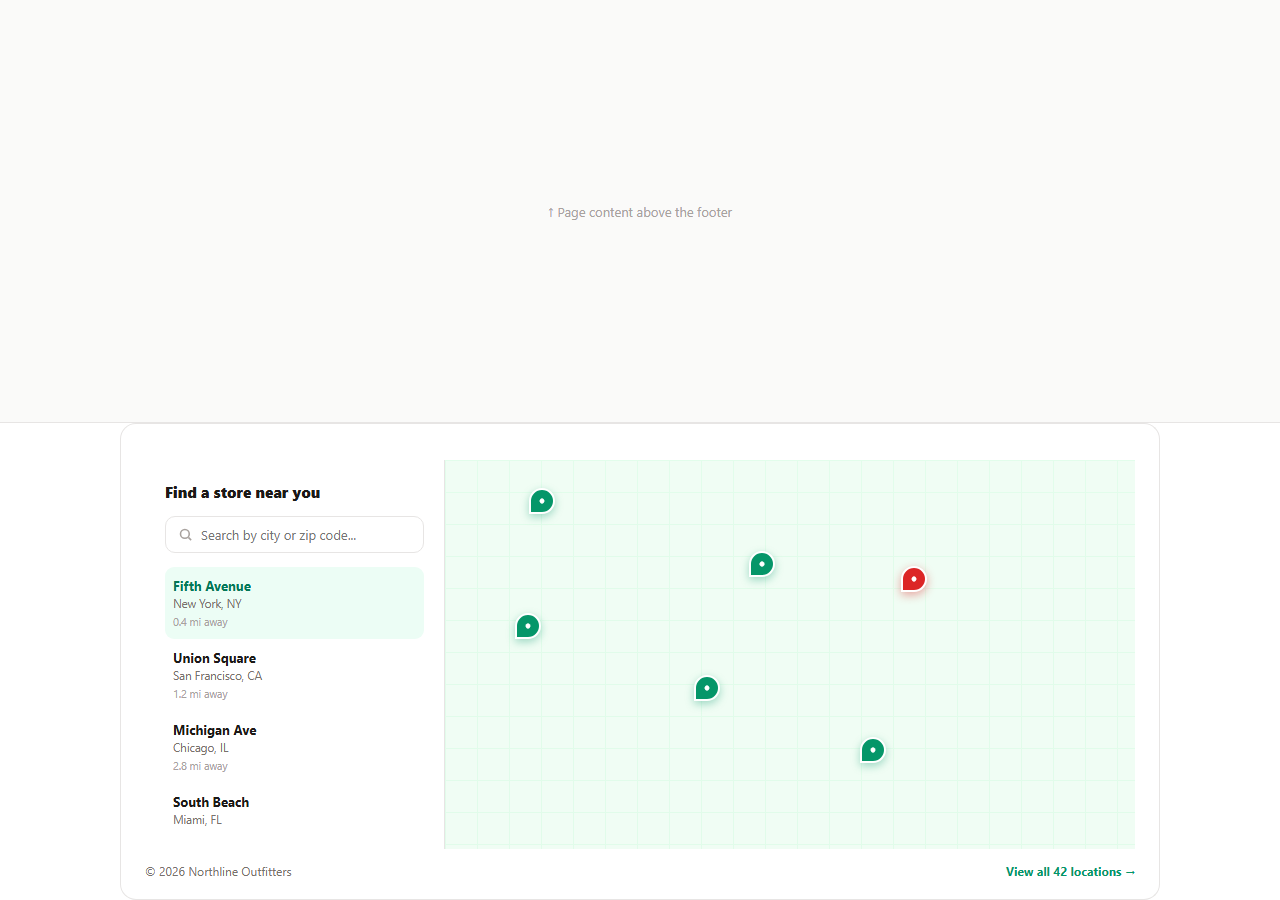
Retail and hospitality sites often need a footer that answers one specific question fast: where is the nearest location? This snippet builds a two-panel store locator footer — a searchable, scrollable list of branches on the left, and a lightweight stylized map on the right where every store renders as a clickable pin, all driven from a single stores array so the list and the pins can never drift out of sync.
One data array, two synchronized views
Rather than hand-writing the list items and the map pins as separate static HTML blocks, render() loops over the stores array once and builds both the <li> list entry and the absolutely-positioned .slm-pin button for every store in the same pass. Each store object carries an x/y percentage pair used directly as the pin's left/top CSS position, so adding a new location only means pushing one object into the array — the list, the pin, and the search index all update automatically.
A live text search that filters both panels at once
Typing into #slmSearch calls render(searchEl.value) on every input event. The filter checks whether the typed query is a substring of either the store's city or its name, case-insensitively, and skips any store that doesn't match — from both the list and the map in the same pass, so a search for "seattle" instantly narrows the pin field down to a single marker rather than leaving stale pins from a previous view.
No map API key or external tiles
The map surface is pure CSS: a repeating linear-gradient grid pattern stands in for map tiles, so this snippet works fully offline and needs zero external requests, API keys, or billing setup. Swap .slm-map-grid's background for an actual tile layer (Mapbox GL, Leaflet, Google Maps) in production and keep the same x/y-driven pin logic — only the coordinate system changes from arbitrary percentages to real latitude/longitude projected into pixel space.
Clicking either side highlights the other
Clicking a list item or a map pin calls setActive(i), which re-renders both panels with the .active class applied to the matching entry, and briefly shows a tooltip above the corresponding pin with the store name and city before auto-hiding after under two seconds. This two-way binding — click the list, see the pin light up; click the pin, see the list scroll into focus — is the core interaction that makes a store locator feel like a real map rather than two disconnected widgets glued together.
Hover tooltips without a library
showTooltip()/hideTooltip() toggle a single shared #slmTooltip element's position and content rather than creating one tooltip per pin, which keeps the DOM small even with dozens of locations. The tooltip is positioned with the same x/y percentages as the pin itself, offset upward with a CSS transform, so it always tracks its target correctly regardless of how many stores are currently rendered.
Extending it for production
Swap the six hardcoded stores for an API response, add a "use my location" button that computes real distances with the Geolocation API and re-sorts the list, and replace the CSS grid map with a real tile provider once you have API credentials — the render/search/active-state logic in this snippet needs no changes to support any of that.
Build with AI
Build, Understand, Optimize, and Extend It With AI
Instead of tracing the pin-and-list sync logic by hand, paste this snippet's HTML, CSS, and JS into an AI coding assistant like Claude and ask it to explain exactly how a single stores array and one render() call keep the list and the map pins from ever drifting apart, even as the search filter changes what is visible. The same assistant can help you optimize it, for instance asking whether the linear x/y percentage coordinates should instead be a proper geographic projection once you plug in a real map provider. It is also useful for extending the footer: ask it to add a real Geolocation-API-based "use my location" button that sorts stores by actual distance, wire the map background to Leaflet or Mapbox GL, or add store hours with a live open/closed indicator per pin. Treat the code less like a finished artifact and more like a starting point for a conversation.
Prompt to recreate it
Copy this into your AI assistant of choice to build the effect from scratch, or as a jumping-off point for your own variant:
Build a footer "store locator" section in plain HTML, CSS, and JavaScript, with a searchable list on one side and a lightweight map on the other, no map library or API key.

Requirements:
- A single JavaScript array of store objects, each with a name, city, distance label, and x/y percentage coordinates, used as the one source of truth to render both a scrollable list of stores and a set of absolutely-positioned pin buttons on a map panel — never hand-write the list and the pins as separate hardcoded HTML blocks.
- A text search input that filters both the list and the map pins together on every keystroke, matching case-insensitively against either the store name or city, and shows an empty-state message when nothing matches.
- Clicking a store in the list must highlight the corresponding pin on the map (a distinct active color) and briefly show a tooltip above it with the store name and city that auto-hides after a couple of seconds; clicking a pin directly must produce the same highlighted state from the other side.
- The map surface itself must be pure CSS (for example a repeating linear-gradient grid pattern) rather than any external map tiles or image, so the whole component works with zero network requests.
- A single shared tooltip element that repositions itself to whichever pin is active, rather than creating a separate tooltip node for every store.
Want to tighten it up first? Run this prompt through the AI Prompt Studio to score it across 8 quality dimensions, catch anti-patterns, and tune the wording for Claude, ChatGPT, or Gemini before you paste it in.
Step by step
How to Use
- 1Paste HTML, CSS, and JSA two-panel store locator footer renders with six sample stores in the list and matching pins on the map.
- 2Type in the search boxThe list and the map pins filter together to only the stores matching the city or name you typed.
- 3Click a store in the listThe matching pin turns red, a tooltip appears above it, and it auto-hides after under two seconds.
- 4Click a pin directlyThe same active state applies from the map side — list and map are two views of one data array.
- 5Edit the stores arrayIn the JS panel, add, remove, or reposition store objects — x and y are percentages of the map panel.
- 6Export in your formatClick HTML, JSX, or Tailwind to download the version you need.
Real-world uses
Common Use Cases
Got questions?
Frequently Asked Questions
No. The map surface is a pure CSS grid-pattern background so the snippet works offline with zero dependencies or API keys. Swap the .slm-map-grid background and the pin x/y coordinate system for a real tile provider such as Leaflet or Mapbox GL in production.
render(filter) is the single function that builds both panels. It loops the stores array once, checks each store city and name against the typed query, and only appends matching stores to both the list and the pins container — so both panels are always built from the same filtered set.
Push a new object into the stores array with name, city, dist, and x/y percentage coordinates for where its pin should sit on the map panel. No other code changes are needed — render() picks up any object in the array automatically.
They are plain percentages of the map panel width and height, used directly as the left and top CSS values on the absolutely positioned pin button. When swapping in a real map library, replace these with that library projecting real latitude/longitude into pixel coordinates.
showTooltip() and hideTooltip() reposition and rewrite a single shared #slmTooltip element rather than creating a tooltip node per store, which keeps the DOM lean even with a large number of locations.
Yes. Keep the stores array as component state or a prop, derive the filtered list with a computed/derived value from the search string, and render both the list and the pins from that same filtered array so they never fall out of sync.