Source Code
<section class="atk-hero">
  <div class="atk-ticker" aria-label="Announcements">
    <div class="atk-track">
      <span class="atk-item">🚀 v4.0 just shipped — real-time collaboration is here</span>
      <span class="atk-dot">•</span>
      <span class="atk-item">💸 Annual plans are 20% off through Friday</span>
      <span class="atk-dot">•</span>
      <span class="atk-item">📅 Join our live product walkthrough every Tuesday at 11am ET</span>
      <span class="atk-dot">•</span>
      <span class="atk-item">🚀 v4.0 just shipped — real-time collaboration is here</span>
      <span class="atk-dot">•</span>
      <span class="atk-item">💸 Annual plans are 20% off through Friday</span>
      <span class="atk-dot">•</span>
      <span class="atk-item">📅 Join our live product walkthrough every Tuesday at 11am ET</span>
      <span class="atk-dot">•</span>
    </div>
  </div>

  <div class="atk-inner">
    <span class="atk-badge">New: workspace automations</span>
    <h1 class="atk-title">Run your team on <span>one shared brain.</span></h1>
    <p class="atk-sub">Docs, tasks, and chat in a single workspace — so nothing important gets lost in five different tabs.</p>
    <div class="atk-cta-row">
      <a href="#" class="atk-btn-primary">Start for free</a>
      <a href="#" class="atk-btn-secondary">Watch demo</a>
    </div>
  </div>
</section>
* { box-sizing: border-box; margin: 0; padding: 0; }
body { font-family: system-ui, -apple-system, sans-serif; background: #0b0e14; }
.atk-hero { min-height: 100vh; display: flex; flex-direction: column; }
.atk-ticker { background: #171c28; border-bottom: 1px solid rgba(255,255,255,0.06); overflow: hidden; padding: 9px 0; }
.atk-track { display: flex; width: max-content; gap: 12px; animation: atkScroll 26s linear infinite; }
.atk-ticker:hover .atk-track { animation-play-state: paused; }
.atk-item { font-size: 12.5px; font-weight: 600; color: #cbd5e1; white-space: nowrap; padding: 0 4px; }
.atk-dot { color: #475569; font-size: 12px; }
@keyframes atkScroll { from { transform: translateX(0); } to { transform: translateX(-50%); } }
.atk-inner { flex: 1; display: flex; flex-direction: column; align-items: center; justify-content: center; text-align: center; padding: 56px 24px; }
.atk-badge { display: inline-block; padding: 6px 14px; background: rgba(34, 211, 238, 0.1); color: #67e8f9; border: 1px solid rgba(34, 211, 238, 0.25); border-radius: 999px; font-size: 12.5px; font-weight: 700; }
.atk-title { margin-top: 20px; font-size: 44px; font-weight: 800; line-height: 1.12; letter-spacing: -0.02em; color: #f8fafc; max-width: 620px; }
.atk-title span { color: #22d3ee; }
.atk-sub { margin: 16px auto 0; max-width: 460px; font-size: 15.5px; line-height: 1.65; color: #94a3b8; }
.atk-cta-row { display: flex; gap: 12px; margin-top: 30px; flex-wrap: wrap; justify-content: center; }
.atk-btn-primary { padding: 13px 24px; background: #22d3ee; color: #0b0e14; border-radius: 10px; text-decoration: none; font-size: 14.5px; font-weight: 800; transition: background .15s; }
.atk-btn-primary:hover { background: #67e8f9; }
.atk-btn-secondary { padding: 13px 24px; background: transparent; color: #cbd5e1; border: 1.5px solid rgba(255,255,255,0.14); border-radius: 10px; text-decoration: none; font-size: 14.5px; font-weight: 700; transition: border-color .15s; }
.atk-btn-secondary:hover { border-color: #22d3ee; color: #22d3ee; }
@media (max-width: 640px) {
.atk-title { font-size: 30px; }
}Learn Coding Visually
Learn to code with interactive, live-preview playgrounds — HTML, CSS, JavaScript, React & more.
 HTML Playground42 lessons · Click-based · Live preview
 CSS PlaygroundLearn CSS with a live editor
 JavaScript Playground60 lessons · DOM · Async · Canvas
 React PlaygroundLearn React with a live code editor
 GSAP PlaygroundLearn GSAP animation interactively
 SVG Playground44 lessons · shapes · paths · animation
 SCSS Playground45 lessons · Sass modules · tokens
 Tailwind PlaygroundLearn Tailwind CSS with a live editor
 Bootstrap 5 Playground50 lessons · live preview
Hero with Announcement Ticker Bar — Free HTML CSS Snippet
Hero with Announcement Ticker Bar · Heroes · Plain HTML & CSS · Live preview
What's included
Features
About this UI Snippet
Hero with Announcement Ticker Bar — A CSS Marquee That Pauses on Hover
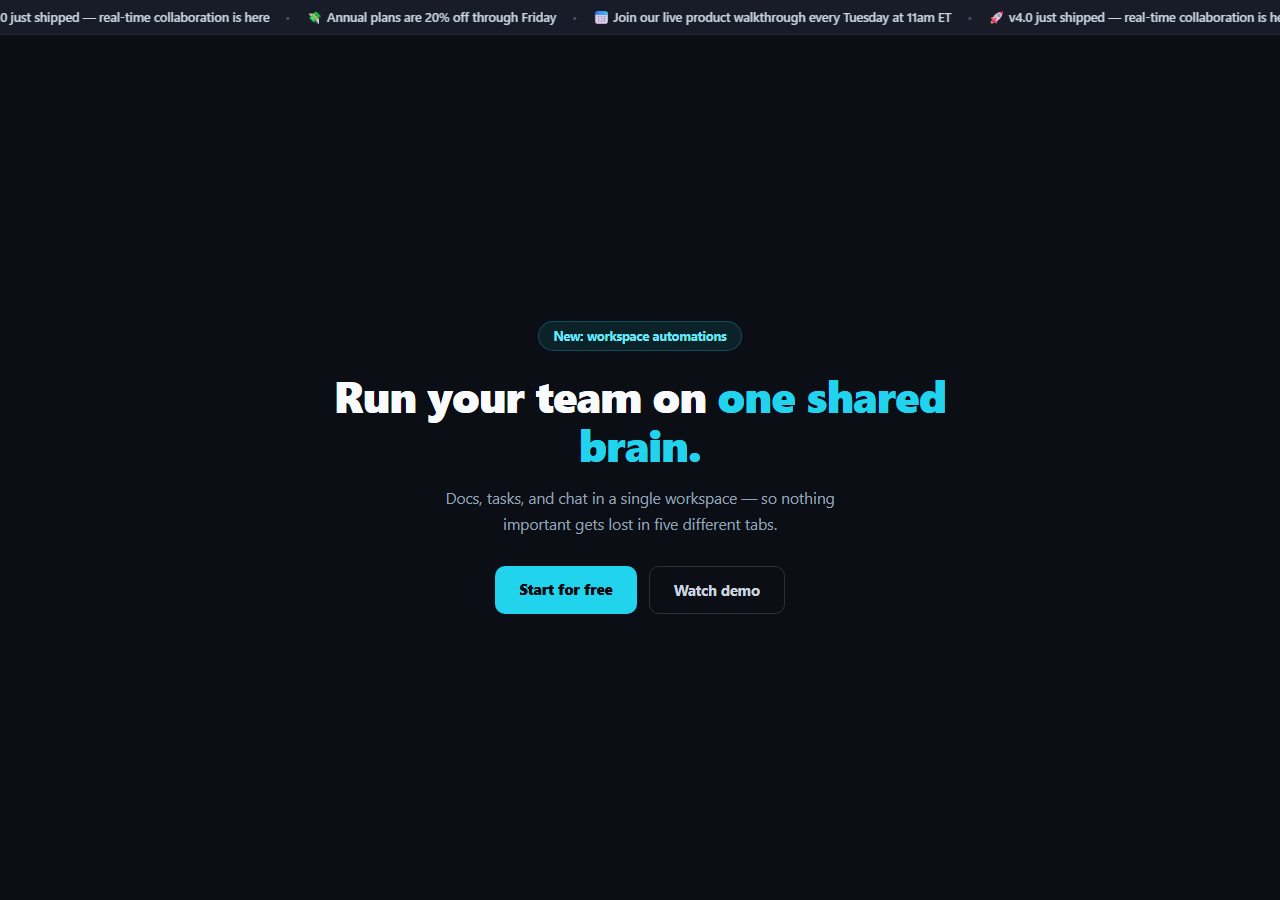
A single hero badge can only announce one thing at a time. This snippet adds a slim, continuously scrolling ticker bar above the main hero content — cycling through several short announcements (a release, a promotion, a recurring event) in the space a badge would normally take, built entirely in CSS with no JavaScript and no library.
A real CSS marquee, not a static row
.atk-track holds every announcement twice back to back, then a single translateX(-50%) keyframe animation shifts the whole track left by exactly half its total width over 26 seconds, linearly and infinitely. Because the content is duplicated, the moment the first copy has scrolled fully out of view, the second copy is in exactly the position the first started in — so the loop point is invisible and the scroll reads as endless rather than visibly resetting.
Pausing on hover is one line of CSS
.atk-ticker:hover .atk-track { animation-play-state: paused; } freezes the scroll the instant a visitor's cursor enters the bar, so they can actually read whichever announcement happens to be passing through — a real, functional pause, not a cosmetic hover style. Moving the cursor away resumes the animation from exactly where it paused, since animation-play-state preserves position rather than restarting.
Why duplicate the content instead of using `animation-iteration-count`
A naive marquee scrolls one copy of the content across and then jumps back to the start, producing a visible snap at the loop point. Duplicating the announcement list and animating exactly halfway through the doubled track means there's always more ticker content entering from the right before the visible content fully exits left — the seam is where the two copies meet, and since they're identical, it's imperceptible.
A slim, separate bar above the hero
The ticker sits in its own full-width strip with a distinct darker background and a bottom border, visually separated from the main hero content below it — so it reads as a persistent status bar rather than competing with the headline for attention. white-space: nowrap on each item keeps individual announcements from wrapping mid-sentence as they scroll.
Customizing it
Replace the three announcements (and their duplicated copies — keep both sets identical) with your own. Adjust the 26s duration to speed up or slow down the scroll — longer text needs a longer duration to stay readable at the same apparent speed. Swap the cyan accent for your brand color, and link individual .atk-item spans to relevant pages if you want the ticker to be clickable.
Build with AI
Build, Understand, Optimize, and Extend It With AI
You don't have to work out the seamless-loop math by hand. Paste this snippet's HTML and CSS into an AI coding assistant like Claude and ask it to explain why duplicating the announcement content and animating the track exactly halfway across its total width (translateX(-50%)) is what makes the marquee loop invisibly, instead of visibly snapping back to the start the way a naive single-copy scroll would. The same assistant can help you tune it — ask whether the animation duration should scale with the total text length so longer announcement lists don't scroll uncomfortably fast, or whether the ticker should respect prefers-reduced-motion for accessibility. It's also useful for extending the pattern: ask it to make individual announcements clickable links, add a small icon per announcement type, or pause the scroll automatically when the tab loses focus in addition to the hover pause. Treat the code less like a finished artifact and more like a starting point for a conversation.
Prompt to recreate it
Copy this into your AI assistant of choice to build the effect from scratch, or as a jumping-off point for your own variant:
Build a marketing hero topped with a continuously scrolling announcement ticker bar in plain HTML and CSS only — no JavaScript, no library.

Requirements:
- A slim, full-width ticker bar with a distinct background color and a bottom border, positioned above the main hero content, containing three short announcement strings separated by a bullet character.
- Implement the scroll as a seamless CSS marquee: duplicate the full set of announcements back-to-back within the same scrolling track element, then animate the track with a single linear, infinitely-repeating keyframe that translates it exactly 50% of its own total width to the left — this duplication is what makes the loop point invisible instead of visibly snapping back to the start.
- The ticker must genuinely pause when the mouse hovers over it (using animation-play-state: paused on hover) and resume from the exact paused position, not restart, when the cursor leaves.
- Prevent any announcement text from wrapping mid-line as it scrolls by keeping each item on a single line.
- Below the ticker, build a standard centered hero: a badge, a headline with one phrase in an accent color, a subheading, and two call-to-action buttons.
- Make it responsive: the headline font size should scale down on narrow screens while the ticker keeps scrolling continuously regardless of viewport width.
Want to tighten it up first? Run this prompt through the AI Prompt Studio to score it across 8 quality dimensions, catch anti-patterns, and tune the wording for Claude, ChatGPT, or Gemini before you paste it in.
Step by step
How to Use
- 1Paste the HTML and CSSA slim ticker bar renders above the hero, continuously scrolling three announcements.
- 2Hover over the tickerThe scroll pauses immediately so you can read the current announcement.
- 3Move the cursor awayThe scroll resumes from exactly where it paused, not from the start.
- 4Replace the announcementsEdit both duplicated sets of .atk-item spans identically — the loop depends on the duplication.
- 5Adjust the scroll speedChange the 26s duration in the atkScroll animation — longer text needs more time.
- 6Retheme the heroSwap the cyan accent and dark background for your brand's palette.
Real-world uses
Common Use Cases
Got questions?
Frequently Asked Questions
The track is animated exactly halfway across its total width (translateX(-50%)). Because the content is duplicated, by the time the first copy has scrolled fully out of view, the second identical copy is sitting exactly where the first one started — so the animation can loop (animation: ... infinite) without any visible jump or snap back to the start.
A single CSS rule, .atk-ticker:hover .atk-track { animation-play-state: paused; }, freezes the running keyframe animation the instant the cursor enters the ticker bar. Because animation-play-state preserves the animation's current position rather than resetting it, moving the cursor away resumes the scroll from exactly where it paused, not from the beginning.
Change the 26s duration on the animation: atkScroll 26s linear infinite; rule on .atk-track. A shorter duration scrolls faster; a longer one scrolls slower. If you add longer announcement text, increase the duration proportionally so the reading speed stays comfortable.
Yes — replace any .atk-item span with an <a> tag styled the same way (inherit the font-size, weight, and color, remove the default underline). The marquee animation applies to the parent .atk-track regardless of what element type the individual items are.
Since there's no JavaScript, this is a direct markup and CSS conversion. Click JSX, Vue, or Angular in the export panel. If your announcements come from a dynamic list, map over the array twice (rendering the full list two times in sequence) to preserve the duplication the seamless loop depends on.