Source Code
<section class="ght-intro"><h1>Scroll to fly the camera around a real glTF model</h1><p>Four camera checkpoints, interpolated live by scroll — grab and drag at any point to take over manually.</p></section>
<section class="ght-pin" id="ghtPin">
<canvas id="ghtCanvas"></canvas>
<div class="ght-stage" id="ghtStage">Front</div>
<div class="ght-hint" id="ghtHint">Drag to take over · release to resume · Ctrl/Cmd + scroll to zoom</div>
<div class="ght-zoom">
<span class="ght-zoom-label">+</span>
<input type="range" id="ghtZoom" class="ght-zoom-slider" min="0" max="100" step="1" />
<span class="ght-zoom-label">−</span>
</div>
</section>
<section class="ght-outro"><p>Reached the last checkpoint — scroll back up to reverse the flythrough.</p></section>*{box-sizing:border-box;margin:0;padding:0}
body{font-family:system-ui,-apple-system,sans-serif;color:#fff;background:#0a0b12}
.ght-intro,.ght-outro{min-height:70vh;display:flex;flex-direction:column;justify-content:center;align-items:center;text-align:center;gap:10px;padding:24px}
.ght-intro h1{font-size:clamp(28px,6vw,50px);letter-spacing:-.02em}
.ght-intro p,.ght-outro p{color:#9aa0b8;font-size:15px;max-width:460px}
.ght-pin{position:relative;height:100vh;overflow:hidden;background:radial-gradient(60% 60% at 50% 42%,#1a1420,#0a0b12)}
#ghtCanvas{display:block;width:100%;height:100%;cursor:grab}
#ghtCanvas:active{cursor:grabbing}
.ght-stage{position:absolute;top:24px;left:50%;transform:translateX(-50%);font-size:12.5px;font-weight:700;letter-spacing:.08em;text-transform:uppercase;color:#fca5a5;background:rgba(10,12,20,.55);padding:7px 18px;border-radius:999px;border:1px solid rgba(252,165,165,.3);backdrop-filter:blur(6px);transition:color .2s}
.ght-hint{position:absolute;left:50%;bottom:26px;transform:translateX(-50%);font-size:12px;font-weight:600;color:#b7c0da;background:rgba(10,12,20,.55);padding:8px 16px;border-radius:999px;backdrop-filter:blur(6px);border:1px solid rgba(255,255,255,.08)}
.ght-zoom{position:absolute;right:22px;top:74px;bottom:74px;width:34px;display:flex;flex-direction:column;align-items:center;gap:8px;background:rgba(10,12,20,.55);border:1px solid rgba(255,255,255,.1);border-radius:999px;padding:10px 0;backdrop-filter:blur(6px)}
.ght-zoom-label{font-size:13px;font-weight:700;color:#b7c0da;line-height:1;user-select:none}
.ght-zoom-slider{flex:1;width:6px;-webkit-appearance:slider-vertical;writing-mode:vertical-lr;direction:rtl;accent-color:#fca5a5;cursor:pointer}gsap.registerPlugin(ScrollTrigger);
const canvas = document.getElementById('ghtCanvas');
const stageLabel = document.getElementById('ghtStage');
const renderer = new THREE.WebGLRenderer({ canvas, antialias: true, alpha: true });
renderer.setPixelRatio(Math.min(window.devicePixelRatio, 2));
const scene = new THREE.Scene();
const camera = new THREE.PerspectiveCamera(42, 1, 0.1, 60);
// OrbitControls is always live so a visitor can grab the canvas at any
// moment, but here — unlike a simple object-spin demo — the camera's
// POSITION is also what the scroll path drives. Two systems both wanting
// to set camera.position genuinely would conflict, so a small isInteracting
// flag is the handoff: while the user is actively dragging, the scroll
// path's own camera writes are skipped; a short delay after release lets
// them resume smoothly instead of snapping.
const controls = new THREE.OrbitControls(camera, renderer.domElement);
controls.enableDamping = true;
controls.dampingFactor = 0.08;
controls.minDistance = 1.5;
controls.maxDistance = 12;
let isInteracting = false;
let resumeTimer = null;
controls.addEventListener('start', () => {
isInteracting = true;
if (resumeTimer) clearTimeout(resumeTimer);
});
controls.addEventListener('end', () => {
resumeTimer = setTimeout(() => { isInteracting = false; }, 900);
});
// OrbitControls' own wheel-zoom is turned off on purpose: left on, it calls
// preventDefault() on every wheel event over the canvas — including a plain
// scroll — which would silently swallow the page scroll this whole demo
// depends on. Zoom is reimplemented below as an explicit, opt-in gesture
// (a slider, and Ctrl/Cmd + scroll) instead of hijacking the default wheel.
controls.enableZoom = false;
// Zoom here is a relative MULTIPLIER on top of whatever distance the
// checkpoint path (or a manual drag) currently puts the camera at, rather
// than an absolute distance — the four checkpoints are different distances
// from the model, so "zoomed in 30%" needs to mean the same thing at every
// one of them, not just at the checkpoint it was set at.
const ZOOM_MIN = 0.5; // most zoomed in
const ZOOM_MAX = 2.2; // most zoomed out
let zoomFactor = 1;
let lastProgress = 0;
const zoomSlider = document.getElementById('ghtZoom');
zoomSlider.value = String(Math.round(((ZOOM_MAX - zoomFactor) / (ZOOM_MAX - ZOOM_MIN)) * 100));
function setZoomFactor(nextFactor) {
nextFactor = THREE.MathUtils.clamp(nextFactor, ZOOM_MIN, ZOOM_MAX);
if (isInteracting) {
// Mid-drag, the camera's current position came from OrbitControls'
// free orbit, not from the checkpoint path — so just rescale the
// existing offset from the target by how much the factor changed,
// rather than recomputing it from a checkpoint that may not apply.
const ratio = nextFactor / zoomFactor;
const offset = camera.position.clone().sub(controls.target).multiplyScalar(ratio);
camera.position.copy(controls.target).add(offset);
}
zoomFactor = nextFactor;
if (!isInteracting) applyFlythrough(lastProgress); // reapply at the same scroll position with the new zoom
zoomSlider.value = String(Math.round(((ZOOM_MAX - zoomFactor) / (ZOOM_MAX - ZOOM_MIN)) * 100));
}
zoomSlider.addEventListener('input', () => {
const t = Number(zoomSlider.value) / 100;
setZoomFactor(ZOOM_MAX - t * (ZOOM_MAX - ZOOM_MIN));
});
canvas.addEventListener('wheel', (e) => {
if (!e.ctrlKey && !e.metaKey) return; // plain scroll always passes through to the page
e.preventDefault();
setZoomFactor(zoomFactor + e.deltaY * 0.0015);
}, { passive: false });
scene.add(new THREE.AmbientLight(0x445066, 0.6));
const key = new THREE.DirectionalLight(0xffffff, 2.0);
key.position.set(3, 4, 5);
scene.add(key);
const fill = new THREE.DirectionalLight(0x93c5fd, 0.6);
fill.position.set(-4, 1, 3);
scene.add(fill);
const rim = new THREE.PointLight(0xfca5a5, 1.4, 20);
rim.position.set(-2, 2, -4);
scene.add(rim);
let helmet = null;
// Khronos' official sample-asset "Damaged Helmet" — a highly-detailed,
// freely-licensed .glb with real PBR textures, chosen here specifically
// because it has enough surface detail (visor, straps, battle damage) to
// make a multi-checkpoint camera tour actually worth taking.
const MODEL_URL = 'https://cdn.jsdelivr.net/gh/KhronosGroup/glTF-Sample-Assets@main/Models/DamagedHelmet/glTF-Binary/DamagedHelmet.glb';
const loader = new THREE.GLTFLoader();
loader.load(
MODEL_URL,
(gltf) => {
helmet = gltf.scene;
helmet.rotation.x = Math.PI / 10;
scene.add(helmet);
},
undefined,
(err) => {
console.error('GLB failed to load, showing a placeholder instead:', err);
const placeholder = new THREE.Mesh(
new THREE.IcosahedronGeometry(1, 1),
new THREE.MeshStandardMaterial({ color: 0xfca5a5, roughness: 0.4, metalness: 0.3 })
);
helmet = placeholder;
scene.add(placeholder);
}
);
// Four named camera checkpoints around the model — each a position + a
// lookAt target. Scroll progress selects which pair of adjacent
// checkpoints to interpolate between, and how far, turning four fixed
// shots into one continuous, scrubbable flythrough.
const CHECKPOINTS = [
{ name: 'Front', pos: [0, 0.1, 3.2], look: [0, 0, 0] },
{ name: 'Visor', pos: [0.4, -0.1, 1.6], look: [0, -0.1, 0] },
{ name: 'Side', pos: [3.0, 0.3, 0.2], look: [0, 0, 0] },
{ name: 'Back', pos: [-0.2, 0.4, -3.0], look: [0, 0, 0] },
];
const tmpPos = new THREE.Vector3();
const tmpLook = new THREE.Vector3();
function lerpVec3(a, b, t, out) {
out.set(
a[0] + (b[0] - a[0]) * t,
a[1] + (b[1] - a[1]) * t,
a[2] + (b[2] - a[2]) * t
);
return out;
}
function applyFlythrough(progress) {
const segments = CHECKPOINTS.length - 1;
const scaled = progress * segments;
const i = Math.min(segments - 1, Math.floor(scaled));
const t = scaled - i;
const a = CHECKPOINTS[i], b = CHECKPOINTS[i + 1];
lerpVec3(a.pos, b.pos, t, tmpPos);
lerpVec3(a.look, b.look, t, tmpLook);
controls.target.copy(tmpLook);
// Apply the zoom multiplier as a radial offset from the checkpoint-defined
// look-at target, so the current zoom level holds steady across every
// checkpoint rather than resetting to each checkpoint's authored distance.
const dir = tmpPos.clone().sub(tmpLook).multiplyScalar(zoomFactor);
camera.position.copy(tmpLook).add(dir);
stageLabel.textContent = t < 0.5 ? a.name : b.name;
}
ScrollTrigger.create({
trigger: '#ghtPin',
start: 'top top',
end: '+=3200',
pin: true,
scrub: 0.5,
onUpdate(self) {
lastProgress = self.progress;
if (isInteracting) return; // the visitor is dragging — let them drive
applyFlythrough(self.progress);
},
});
applyFlythrough(0);
function resize() {
const w = canvas.clientWidth, h = canvas.clientHeight;
renderer.setSize(w, h, false);
camera.aspect = w / h;
camera.updateProjectionMatrix();
}
function animate() {
requestAnimationFrame(animate);
controls.update();
renderer.render(scene, camera);
}
resize();
window.addEventListener('resize', resize);
animate();Learn Coding Visually
Learn to code with interactive, live-preview playgrounds — HTML, CSS, JavaScript, React & more.
 HTML Playground42 lessons · Click-based · Live preview
 CSS PlaygroundLearn CSS with a live editor
 JavaScript Playground60 lessons · DOM · Async · Canvas
 React PlaygroundLearn React with a live code editor
 GSAP PlaygroundLearn GSAP animation interactively
 SVG Playground44 lessons · shapes · paths · animation
 SCSS Playground45 lessons · Sass modules · tokens
 Tailwind PlaygroundLearn Tailwind CSS with a live editor
 Bootstrap 5 Playground50 lessons · live preview
Scroll GLB Camera Flythrough — Free GSAP ScrollTrigger + Three.js glTF Tour
Scroll GLB Camera Flythrough · Scroll · Plain HTML, CSS & JS · Live preview
What's included
Features
About this UI Snippet
Scroll GLB Camera Flythrough — A Scroll-Driven Tour With a Real Manual Override
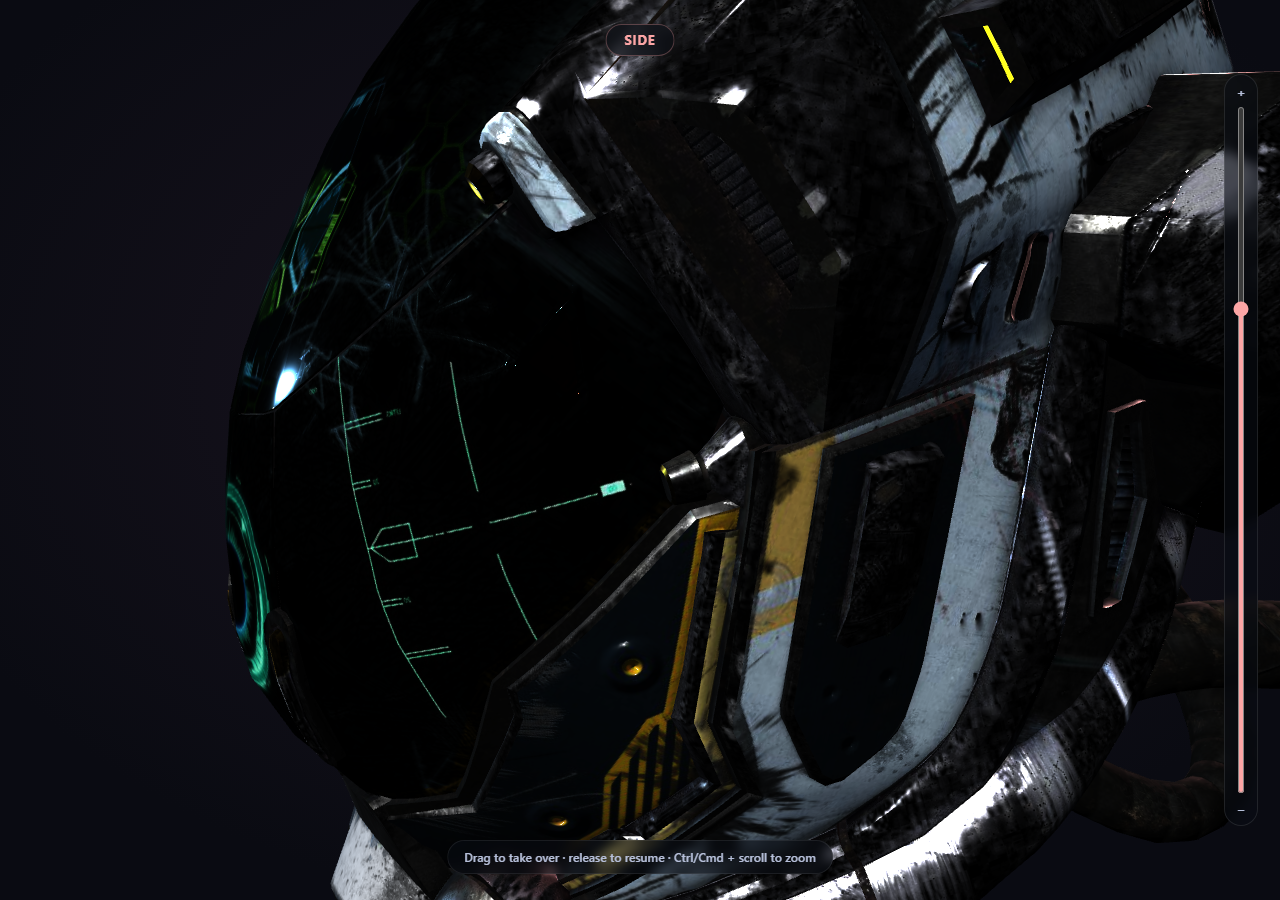
A single scroll-scrubbed rotation is one thing; touring a model past several distinct, named viewpoints — front, a close-up detail, the side, the back — is a genuinely different problem, because now the *camera's position itself* is what scroll drives, and a visitor dragging to look around wants to control that exact same property. This snippet builds both halves properly: a four-checkpoint camera path interpolated live from scroll progress, and a real, working handoff to manual OrbitControls dragging that doesn't fight the scroll path or snap awkwardly on release.
Checkpoints, not one continuous curve
CHECKPOINTS is a plain array of four { name, pos, look } objects — a camera position and look-at target for Front, Visor, Side, and Back. applyFlythrough(progress) maps the 0-1 scroll progress onto segments = 3 legs of the journey, works out which pair of adjacent checkpoints the current progress falls between, and linearly interpolates both the camera position and its look-at target between them with a small lerpVec3 helper. The result is one continuous camera move built from four fixed shots — you never have to hand-author every in-between frame.
Why dragging and the scroll path genuinely need a handoff
Unlike a demo where scroll spins the *model* and dragging orbits the *camera* (two different transforms that never conflict), here scroll is setting camera.position directly, and OrbitControls also sets camera.position when a visitor drags. Without coordination, both would fight for the same frame. The fix is a small isInteracting flag: controls' own 'start' and 'end' events flip it, and the ScrollTrigger's onUpdate simply returns early — skipping its own camera write — whenever isInteracting is true. A visitor's drag always wins immediately.
A deliberate delay before resuming, not an instant snap
The 'end' handler doesn't clear isInteracting immediately — it starts a 900ms setTimeout first. Release the drag and the scroll path doesn't yank the camera back to its "correct" scroll position the instant your mouse lifts; there's a brief pause that reads as intentional, then control returns to the scroll path smoothly on the next scroll-driven update.
A real, detailed glTF model, not a placeholder
THREE.GLTFLoader fetches Khronos' own "Damaged Helmet" sample asset — a genuinely PBR-textured .glb with visible surface detail (a visor, straps, battle damage) — specifically because a four-checkpoint tour is only worth taking if there's something to actually look at from each angle. If the model fails to load, a named error is logged and a placeholder icosahedron takes its place, so the scene is never silently empty.
Zoom as a multiplier, not an absolute distance
OrbitControls' built-in wheel-zoom is deliberately turned off (controls.enableZoom = false) so a plain scroll always advances the page instead of being hijacked. Zoom is reimplemented as a relative zoomFactor — a slider and Ctrl/Cmd + scroll both nudge it — applied as a radial scale on the checkpoint's own position-to-target offset inside applyFlythrough(), so "zoomed in 30%" means the same thing at every checkpoint despite their very different authored distances. While a visitor is mid-drag, setZoomFactor() instead rescales the camera's *current* offset directly, since the position at that moment came from free orbiting, not from a checkpoint.
Customizing it
Add more checkpoints for a longer tour, change CHECKPOINTS' pos/look values to frame different details, or shorten the 900ms resume delay for a snappier handoff. Pair it with scroll-scrubbed GLB turntable for the simpler object-rotation version of this same idea, or three product viewer for a non-scroll-driven OrbitControls baseline.
Build with AI
Build, Understand, Optimize, and Extend It With AI
Paste this snippet's HTML, CSS, and JS into an AI coding assistant like Claude and ask it to explain exactly why scroll-driven camera position and OrbitControls dragging genuinely conflict here in a way that a scroll-driven object rotation wouldn't, and how the isInteracting flag combined with the 900ms resume delay resolves that conflict without either system fighting the other or snapping abruptly. It's also useful for extending the demo — ask it to add a fifth checkpoint, ease the interpolation between checkpoints with a non-linear curve instead of a plain lerp, or add small text captions that fade in/out per checkpoint describing what the visitor is currently looking at. Use the conversation to build real intuition for coordinating two systems that want to control the same property before applying the same handoff pattern to your own scroll-driven camera work.
Prompt to recreate it
Copy this into your AI assistant of choice to build the effect from scratch, or as a jumping-off point for your own variant:
Build a "scroll-driven camera flythrough" around a real 3D model in plain HTML, CSS, and JavaScript using Three.js (core, GLTFLoader, and OrbitControls, all loaded from a CDN with no bundler) plus GSAP with its ScrollTrigger plugin.

Requirements:
- A pinned full-viewport Three.js scene (GSAP ScrollTrigger pin: true) with an intro section before it and an outro section after, studio-lit with key, fill, and rim lights.
- Load a real .glb model using THREE.GLTFLoader pointed at a genuine, freely-licensed, CDN-hosted glTF binary URL with enough surface detail to be worth touring (e.g. one of Khronos' official glTF-Sample-Assets models) — do not substitute a primitive geometry.
- Define at least four named camera checkpoints, each with a camera position and a look-at target, representing distinct views of the model (e.g. front, a close-up detail, side, back).
- Using ScrollTrigger's scrub option, map the 0-1 scroll progress onto which pair of adjacent checkpoints the camera currently sits between and how far, and linearly interpolate both the camera's position and its look-at target between that pair every scroll update — so scrolling produces one continuous camera move built from the fixed checkpoints, reversible by scrolling back up.
- Set up OrbitControls on the camera with damping enabled so a visitor can click-and-drag the canvas to manually orbit at any time. Because both the scroll path and OrbitControls want to control the camera's position, implement a real handoff: track whether the user is currently interacting (via OrbitControls' own start/end events) and skip the scroll-driven camera update entirely while they are, so a manual drag always takes immediate priority — then resume the scroll-driven camera path smoothly after a short delay (a few hundred milliseconds) once the drag ends, rather than snapping the camera back instantly.
- Display a small label showing which named checkpoint the camera is currently closest to, derived from the same scroll progress used for the camera interpolation.
- Handle the model still being asynchronously in-flight when scroll events first fire, and handle the GLTFLoader's error callback by logging the real error and substituting a simple placeholder mesh so the scene is never blank if the model fails to load.
Want to tighten it up first? Run this prompt through the AI Prompt Studio to score it across 8 quality dimensions, catch anti-patterns, and tune the wording for Claude, ChatGPT, or Gemini before you paste it in.
Step by step
How to Use
- 1Add all five CDN scriptsthree.min.js, GLTFLoader.js, OrbitControls.js, gsap, and ScrollTrigger.
- 2Paste HTML, CSS, and JSThe helmet loads at the "Front" checkpoint.
- 3Scroll into the pinned sectionThe camera tours Front → Visor → Side → Back, interpolated live.
- 4Drag on the canvas mid-tourYou take over immediately — the scroll path pauses while you orbit.
- 5Release the dragAfter a short pause, the scroll path resumes from the correct position.
- 6Use the slider or Ctrl/Cmd + scroll to zoomPlain scroll always advances the page; zoom is a separate, opt-in gesture.
- 7Scroll back upThe tour reverses exactly, since it's a pure function of progress.
Real-world uses
Common Use Cases
Got questions?
Frequently Asked Questions
Because here, scroll drives the CAMERA's position directly — the same property OrbitControls sets when a visitor drags. Two systems writing to camera.position on the same frame would genuinely fight. In the simpler turntable snippet, scroll instead drives the MODEL's own rotation while OrbitControls only ever moves the camera, so there's nothing to arbitrate there. Zoom follows the same discipline: OrbitControls' own wheel-zoom is turned off so a plain scroll never gets hijacked, and zoom is reimplemented as an explicit slider plus Ctrl/Cmd + scroll instead.
OrbitControls fires a 'start' event the instant a drag begins, which flips an isInteracting flag to true. The ScrollTrigger's onUpdate callback checks that flag first and returns immediately without touching the camera if it's true — so a visitor's drag always takes priority on the very next frame, with no delay.
Clearing isInteracting the instant the drag ends would let the scroll path immediately snap the camera back to wherever scroll position says it "should" be, which reads as jarring. Waiting 900ms after the 'end' event before resuming gives the moment room to feel intentional rather than like the visitor's input was overridden the second they let go.
applyFlythrough(progress) divides the 0-1 scroll progress into three equal segments (one per pair of adjacent checkpoints), determines which segment the current progress falls in and how far through it, then linearly interpolates both the camera position and look-at target between that pair's values. The camera path is built entirely from four fixed shots with no hand-authored in-between frames.
Set up the renderer, scene, GLTFLoader call, OrbitControls, and ScrollTrigger inside a mount effect, keeping the isInteracting flag, resumeTimer, and loaded model in refs so the onUpdate callback and controls event listeners can reach current values. Call controls.dispose(), renderer.dispose(), clearTimeout on any pending resume timer, and the ScrollTrigger instance's .kill() in the cleanup function.